SQL

SQL Interview Questions and Answers
SQL Interview Questions

The following are the most popular and useful SQL interview questions and answers for fresher and experienced candidates. These questions are created specifically to familiarise you with the types of questions you might encounter during your SQL interview. According to our experiences, good interviewers rarely plan to ask any specific topic during the interview. Instead, questioning usually begins with a basic understanding of the subject, and based on your responses, further discussion happened.

1) What is SQL?

SQL stands for the Structured Query Language. It is the standard language used to maintain the relational database and perform many different data manipulation operations on the data. SQL was initially invented in 1970. It is a database language used for database creation, deletion, fetching and modifying rows, etc. sometimes, it is pronounced as ‘sequel.’ We can also use it to handle organized data comprised of entities (variables) and relations between different entities of the data.


2) When SQL appeared?

SQL first appeared in 1974. It is one of the most used languages for maintaining the relational database. In 1986, SQL became the standard of the American National Standards Institute (ANSI) and ISO (International Organization for Standardization) in 1987.


3) What are the usages of SQL?

SQL is responsible for maintaining the relational data and the data structures present in the database. Some of the common usages are given below:PauseUnmute

  • To execute queries against a database
  • To retrieve data from a database
  • To inserts records in a database
  • To updates records in a database
  • To delete records from a database
  • To create new databases
  • To create new tables in a database
  • To create views in a database
  • To perform complex operations on the database.

4) Does SQL support programming language features?

SQL refers to the Standard Query Language. Therefore, it is true that SQL is a language but does not actually support the programming language. It is a common language that doesn’t have a loop, conditional statements, and logical operations. It cannot be used for anything other than data manipulation. It is a command language to perform database operations. The primary purpose of SQL is to retrieve, manipulate, update, delete, and perform complex operations like joins on the data present in the database.


5) What are the subsets of SQL?

The following are the four significant subsets of the SQL:

  • Data definition language (DDL): It defines the data structure that consists of commands like CREATE, ALTER, DROP, etc.
  • Data manipulation language (DML): It is used to manipulate existing data in the database. The commands in this category are SELECT, UPDATE, INSERT, etc.
  • Data control language (DCL): It controls access to the data stored in the database. The commands in this category include GRANT and REVOKE.
  • Transaction Control Language (TCL): It is used to deal with the transaction operations in the database. The commands in this category are COMMIT, ROLLBACK, SET TRANSACTION, SAVEPOINT, etc.

6) What is the purpose of DDL Language?

DDL stands for Data definition language. It is the subset of a database that defines the data structure of the database when the database is created. For example, we can use the DDL commands to add, remove, or modify tables. It consists of the following commands: CREATE, ALTER and DELETE database objects such as schema, tables, indexes, view, sequence, etc.

Example

  1. CREATE TABLE Students  
  2. (  
  3. Roll_no INT,  
  4. Name VARCHAR(45),  
  5. Branch VARCHAR(30),  
  6. );  

7) What is the purpose of DML Language?

Data manipulation language makes the user able to retrieve and manipulate data in a relational database. The DML commands can only perform read-only operations on data. We can perform the following operations using DDL language:

  • Insert data into the database through the INSERT command.
  • Retrieve data from the database through the SELECT command.
  • Update data in the database through the UPDATE command.
  • Delete data from the database through the DELETE command.

Example

  1. INSERT INTO Student VALUES (111, ‘George’, ‘Computer Science’)  

8) What is the purpose of DCL Language?

Data control language allows users to control access and permission management to the database. It is the subset of a database, which decides that what part of the database should be accessed by which user at what point of time. It includes two commands, GRANT and REVOKE.

GRANT: It enables system administrators to assign privileges and roles to the specific user accounts to perform specific tasks on the database.

REVOKE: It enables system administrators to revoke privileges and roles from the user accounts so that they cannot use the previously assigned permission on the database.

Example

  1. GRANT * ON mydb.Student TO javatpoint@localhsot;  

9) What are tables and fields in the database?

A table is a set of organized data in the form of rows and columns. It enables users to store and display records in the structure format. It is similar to worksheets in the spreadsheet application. Here rows refer to the tuples, representing the simple data item, and columns are the attribute of the data items present in a particular row. Columns can categorize as vertical, and Rows are horizontal.

Fields are the components to provide the structure for the table. It stores the same category of data in the same data type. A table contains a fixed number of columns but can have any number of rows known as the record. It is also called a column in the table of the database. It represents the attribute or characteristics of the entity in the record.

Example

Table: Student

Field: Stud_rollno, Stud_name, Date of Birth, Branch, etc.


10) What is a primary key?

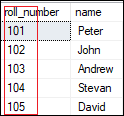
A primary key is a field or the combination of fields that uniquely identify each record in the table. It is one of a special kind of unique key. If the column contains a primary key, it cannot be null or empty. A table can have duplicate columns, but it cannot have more than one primary key. It always stores unique values into a column. For example, the ROLL Number can be treated as the primary key for a student in the university or college.
SQL Interview Questions and Answers

We can define a primary key into a student table as follows:

  1. CREATE TABLE Student (    
  2.     roll_number INT PRIMARY KEY,    
  3.     name VARCHAR(45),     
  4. );    


11) What is a foreign key?

The foreign key is used to link one or more tables together. It is also known as the referencing key. A foreign key is specified as a key that is related to the primary key of another table. It means a foreign key field in one table refers to the primary key field of the other table. It identifies each row of another table uniquely that maintains the referential integrity. The primary key-foreign key relationship is a very crucial relationship as it maintains the ACID properties of the database sometimes. It also prevents actions that would destroy links between the child and parent tables.

We can define a foreign key into a table as follows:

  1. CONSTRAINT constraint_name]    
  2.     FOREIGN KEY [foreign_key_name] (col_name, …)    
  3.     REFERENCES parent_tbl_name (col_name,…)    


12) What is a unique key?

A unique key is a single or combination of fields that ensure all values stores in the column will be unique. It means a column cannot stores duplicate values. This key provides uniqueness for the column or set of columns. For example, the email addresses and roll numbers of student’s tables should be unique. It can accept a null value but only one null value per column. It ensures the integrity of the column or group of columns to store different values into a table.

We can define a foreign key into a table as follows:

  1. CREATE TABLE table_name(    
  2.     col1 datatype,    
  3.     col2 datatype UNIQUE,    
  4.     …    
  5. );  


13) What is the difference between a primary key and a unique key?

The primary key and unique key both are essential constraints of the SQL. The main difference among them is that the primary key identifies each record in the table. In contrast, the unique key prevents duplicate entries in a column except for a NULL value. The following comparison chart explains it more clearly:

Primary KeyUnique Key
The primary key act as a unique identifier for each record in the table.The unique key is also a unique identifier for records when the primary key is not present in the table.
We cannot store NULL values in the primary key column.We can store NULL value in the unique key column, but only one NULL is allowed.
We cannot change or delete the primary key column values.We can modify the unique key column values.


14) What is a Database?

A database is an organized collection of data that is structured into tables, rows, columns, and indexes. It helps the user to find the relevant information frequently. It is an electronic system that makes data access, data manipulation, data retrieval, data storing, and data management very easy. Almost every organization uses the database for storing the data due to its easily accessible and high operational ease. The database provides perfect access to data and lets us perform required tasks.

The following are the common features of a database:

  • Manages large amounts of data
  • Accurate
  • Easy to update
  • Security
  • Data integrity
  • Easy to research data

15) What is meant by DBMS?

DBMS stands for Database Management System. It is a software program that primarily functions as an interface between the database and the end-user. It provides us the power such as managing the data, the database engine, and the database schema to facilitate the organization and manipulation of data using a simple query in almost no time. It is like a File Manager that manages data in a database rather than saving it in file systems. Without the database management system, it would be far more difficult for the user to access the database’s data.

The following are the components of a DBMS:

  • Software
  • Data
  • Procedures
  • Database Languages
  • Query Processor
  • Database Manager
  • Database Engine
  • Reporting

16) What are the different types of database management systems?

The database management systems can be categorized into several types. Some of the important lists are given below:

  • Hierarchical databases (DBMS)
  • Network databases (IDMS)
  • Relational databases (RDBMS
  • Object-oriented databases
  • Document databases (Document DB)
  • Graph databases
  • ER model databases
  • NoSQL databases

17) What is RDBMS?

RDBMS stands for Relational Database Management System. It is a database management system based on a relational model. It facilitates you to manipulate the data stored in the tables by using relational operators. RDBMS stores the data into the collection of tables and links those tables using the relational operators easily whenever required. Examples of relational database management systems are Microsoft Access, MySQL, SQL Server, Oracle database, etc.


18) What is Normalization in a Database?

Normalization is used to minimize redundancy and dependency by organizing fields and table of a database.

There are some rules of database normalization, which is commonly known as Normal From, and they are:

  • First normal form(1NF)
  • Second normal form(2NF)
  • Third normal form(3NF)
  • Boyce-Codd normal form(BCNF)

Using these steps, the redundancy, anomalies, inconsistency of the data in the database can be removed.


19) What is the primary use of Normalization?

Normalization is mainly used to add, delete or modify a field that can be made in a single table. The primary use of Normalization is to remove redundancy and remove the insert, delete and update distractions. Normalization breaks the table into small partitions and then links them using different relationships to avoid the chances of redundancy.


20) What are the disadvantages of not performing database Normalization?

The major disadvantages are:

The occurrence of redundant terms in the database causes the waste of space in the disk.

Due to redundant terms, inconsistency may also occur. If any change is made in the data of one table but not made in the same data of another table, then inconsistency will occur. This inconsistency will lead to the maintenance problem and effects the ACID properties as well.


21) What is an inconsistent dependency?

An Inconsistent dependency refers to the difficulty of getting relevant data due to a missing or broken path to the data. It leads users to search the data in the wrong table, resulting in an error as an output.


22) What is Denormalization in a Database?

Denormalization is a technique used by database administrators to optimize the efficiency of their database infrastructure. The denormalization concept is based on Normalization, which is defined as arranging a database into tables correctly for a particular purpose. This method allows us to add redundant data into a normalized database to alleviate issues with database queries that merge data from several tables into a single table. It adds redundant terms into the tables to avoid complex joins and many other complex operations.

Denormalization doesn’t mean that normalization will not be done. It is an optimization strategy that takes place after the normalization process.


23) What are the different types of SQL operators?

Operators are the special keywords or special characters reserved for performing particular operations. They are also used in SQL queries. We can primarily use these operators within the WHERE clause of SQL commands. It’s a part of the command to filters data based on the specified condition. The SQL operators can be categorized into the following types:

  • Arithmetic operators: These operators are used to perform mathematical operations on numerical data. The categories of this operators are addition (+), subtraction (-), multiplication (*), division (/), remainder/modulus (%), etc.
  • Logical operators: These operators evaluate the expressions and return their results in True or False. This operator includes ALL, AND, ANY, ISNULL, EXISTS, BETWEEN, IN, LIKE, NOT, OR, UNIQUE.
  • Comparison operators: These operators are used to perform comparisons of two values and check whether they are the same or not. It includes equal to (=), not equal to (!= or <>), less than (<), greater than (>), less than or equal to (<=), greater than or equal to (>=), not less than (!<), not greater than (!>), etc.
  • Bitwise operators: It is used to do bit manipulations between two expressions of integer type. It first performs conversion of integers into binary bits and then applied operators such as AND (& symbol), OR (|, ^), NOT (~), etc.
  • Compound operators: These operators perform operations on a variable before setting the variable’s result to the operation’s result. It includes Add equals (+=), subtract equals (-=), multiply equals (*=), divide equals (/=), modulo equals (%=), etc.
  • String operators: These operators are primarily used to perform concatenation and pattern matching of strings. It includes + (String concatenation), += (String concatenation assignment), % (Wildcard), [] (Character(s) matches), [^] (Character(s) not to match), _ (Wildcard match one character), etc.

24) What is a view in SQL?

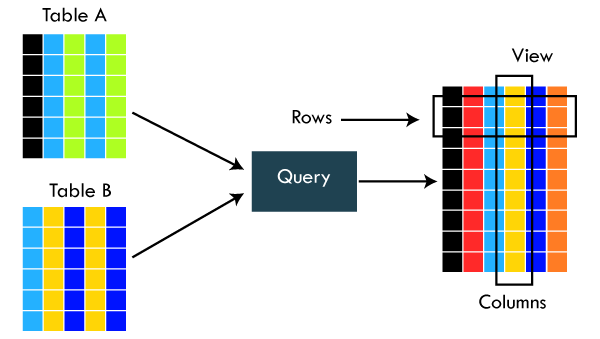
A view is a database object that has no values. It is a virtual table that contains a subset of data within a table. It looks like an actual table containing rows and columns, but it takes less space because it is not present physically. It is operated similarly to the base table but does not contain any data of its own. Its name is always unique. A view can have data from one or more tables. If any changes occur in the underlying table, the same changes reflected in the views also.
SQL Interview Questions and Answers

The primary use of a view is to implement the security mechanism. It is the searchable object where we can use a query to search the view as we use for the table. It only shows the data returned by the query that was declared when the view was created.

We can create a view by using the following syntax:

  1. CREATE VIEW view_name AS  
  2. SELECT column_lists FROM table_name  
  3. WHERE condition;  

25) What is an Index in SQL?

An index is a disc structure associated with a table or view that speeds up row retrieval. It reduces the cost of the query because the query’s high cost will lead to a fall in its performance. It is used to increase the performance and allow faster retrieval of records from the table. Indexing reduces the number of data pages we need to visit to find a particular data page. It also has a unique value meaning that the index cannot be duplicated. An index creates an entry for each value which makes it faster to retrieve data.

For example: Suppose we have a book which carries the details of the countries. If you want to find out information about India, why will you go through every page of that book? You could directly go to the index. Then from the index, you can go to that particular page where all the information about India is given.


26) What are the different types of indexes in SQL?

SQL indexes are nothing more than a technique of minimizing the query’s cost. The higher the query’s cost, the worse the query’s performance. The following are the different types of Indexes supported in SQL:

  • Unique Index
  • Clustered Index
  • Non-Clustered Index
  • Bit-Map Index
  • Normal Index
  • Composite Index
  • B-Tree Index
  • Function-Based Index

27) What is the unique index?

UNIQUE INDEX is used to enforce the uniqueness of values in single or multiple columns. We can create more than one unique index in a single table. For creating a unique index, the user has to check the data in the column because the unique indexes are used when any column of the table has unique values. This indexing does not allow the field to have duplicate values if the column is unique indexed. A unique index can be applied automatically when a primary key is defined.

We can create it by using the following syntax:

  1. CREATE UNIQUE INDEX index_name    
  2. ON table_name (index_column1, index_column2,…);  

Example

  1. CREATE TABLE Employee(      
  2.     ID int AUTO_INCREMENT PRIMARY KEY,       
  3.     Name varchar(45),     
  4.     Phone varchar(15),    
  5.     City varchar(25),   
  6. );  

Suppose we want to make a Phone column as a unique index. We can do this like below:

  1. CREATE UNIQUE INDEX index_name_phone ON Employee (Phone);    


28) What is clustered index in SQL?

A clustered index is actually a table where the data for the rows are stored. It determines the order of the table data based on the key values that can sort in only one direction. Each table can have only one clustered index. It is the only index, which has been automatically created when the primary key is generated. If many data modifications needed to be done in the table, then clustered indexes are preferred.


29) What is the non-clustered index in SQL?

The indexes other than PRIMARY indexes (clustered indexes) are called non-clustered indexes. We know that clustered indexes are created automatically when primary keys are generated, and non-clustered indexes are created when multiple joins conditions and various filters are used in the query. The non-clustered index and table data are both stored in different places. It cannot be able to alter the physical order of the table and maintains the logical order of data.

The purpose of creating a non-clustered index is for searching the data. Its best example is a book where the content is written in one place, and the index is at a different place. We can create 0 to 249 non-clustered indexes in each table. The non-clustered indexing improves the performance of the queries which use keys without assigning the primary key.


30) What are the differences between SQL, MySQL, and SQL Server?

The following comparison chart explains their main differences:

SQLMySQLSQL Server
SQL or Structured Query Language is useful for managing our relational databases. It is used to query and operate the database.MySQL is the popular database management system used for managing the relational database. It is a fast, scalable, and easy-to-use database.SQL Server is an RDBMS database system mainly developed for the Windows system to store, retrieve, and access data requested by the developer.
SQL first appeared in 1974.MySQL first appeared on May 23, 1995.SQL Server first appeared on April 24, 1989.
SQL was developed by IBM Corporation.MySQL was developed by Oracle Corporation.SQL Server was developed by Microsoft Company.
SQL is a query language for managing databases.MySQL is database software that uses SQL language to conduct with the database.SQL Server is also a software that uses SQL language to conduct with the database.
SQL has no variables.MySQL can use variables constraints and data types.SQL Server can use variables constraints and data types.
SQL is a programming language, so that it does not get any updates. Its commands are always fixed and remain the same.MySQL is software, so it gets frequent updation.SQL Server is also software, so it gets frequent updation.

31) What is the difference between SQL and PL/SQL?

The following comparison chart explains their main differences:

SQLPL/SQL
SQL is a database structured query language used to communicate with relational databases. It was developed by IBM Corporations and first appeared in 1974.PL/SQL or Procedural Language/Structured Query Language is a dialect of SQL used to enhance the capabilities of SQL. Oracle Corporation developed it in the early 90’s. It uses SQL as its database language.
SQL is a declarative and data-oriented language.PL/SQL is a procedural and application-oriented language.
SQL has no variables.PL/SQL can use variables constraints and data types.
SQL can execute only a single query at a time.PL/SQL can execute a whole block of code at once.
SQL query can be embedded in PL/SQL.PL/SQL cannot be embedded in SQL as SQL does not support any programming language and keywords.
SQL can directly interact with the database server.PL/SQL cannot directly interact with the database server.
SQL is like the source of data that we need to display.PL/SQL provides a platform where SQL data will be shown.

32) Is it possible to sort a column using a column alias?

Yes. We can use the alias method in the ORDER BY instead of the WHERE clause for sorting a column.


33) What is the difference between clustered and non-clustered indexes in SQL?

Indexing is a method to get the requested data very fast. There are mainly two types of indexes in SQL, clustered index and non-clustered index. The differences between these two indexes are very important from an SQL performance perspective. The following comparison chart explains their main differences:

Clustered IndexNon-Clustered Index
A clustered index is a table or view where the data for the rows are stored. In a relational database, if the table column contains a primary key, MySQL automatically creates a clustered index named PRIMARY.The indexes other than PRIMARY indexes (clustered indexes) are called non-clustered indexes. It has a structure separate from the data row. The non-clustered indexes are also known as secondary indexes.
Clustered indexes store the data information and the data itself.Non-clustered indexes stores only the information, and then it will refer you to the data stored in clustered data.
There can only be one clustered index per table.There can be one or more non-clustered indexes in a table.
A clustered index determines how data is stored physically in the table. Therefore, reading from a clustered index is faster.It creates a logical ordering of data rows and uses pointers for accessing the physical data files. Therefore, reading from a clustered index is slower.
A clustered index always contains an index id of 0.A non-clustered index always contains an index id>0.

To read more information, click here.


34) What is the SQL query to display the current date?

There is a built-in function in SQL called GetDate(), which is used to return the current timestamp.


35) Which are joins in SQL? Name the most commonly used SQL joins?

SQL joins are used to retrieve data from multiple tables into a meaningful result set. It is performed whenever you need to fetch records from two or more tables. They are used with SELECT statement and join conditions.

The following are the most commonly used joins in SQL:

  • INNER JOIN
  • LEFT OUTER JOIN
  • RIGHT OUTER JOIN

36) What are the different types of joins in SQL?

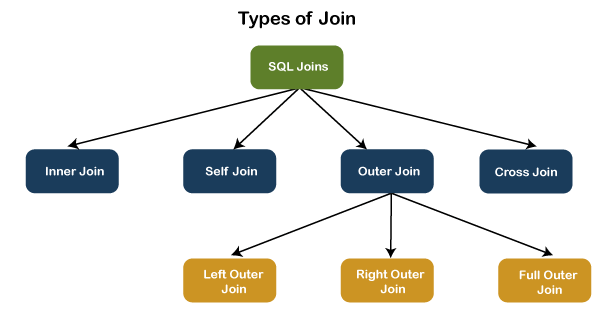
Joins are used to merge two tables or retrieve data from tables. It depends on the relationship between tables. According to the ANSI standard, the following are the different types of joins used in SQL:

  • INNER JOIN
  • SELF JOIN
  • LEFT OUTER JOIN
  • RIGHT OUTER JOIN
  • FULL OUTER JOIN
  • CROSS JOIN
SQL Interview Questions and Answers


37) What is INNER JOIN in SQL?

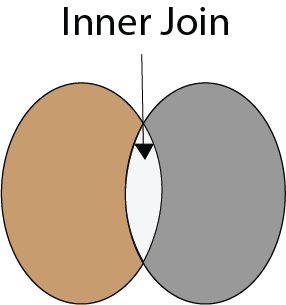
Inner join returns only those records from the tables that match the specified condition and hides other rows and columns. In simple words, it fetches rows when there is at least one match of rows between the tables is found. INNER JOIN keyword joins the matching records from two tables. It is assumed as a default join, so it is optional to use the INNER keyword with the query.

The below visual representation explain this join more clearly:
SQL Interview Questions and Answers

The following syntax illustrates the INNER JOIN:

  1. SELECT column_lists  
  2. FROM table1    
  3. INNER JOIN table2 ON join_condition1    
  4. INNER JOIN table3 ON join_condition2    
  5. …;    


38) What is the Right JOIN in SQL?

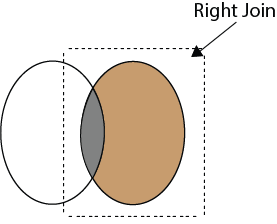
The Right join is used to retrieve all rows from the right-hand table and only those rows from the other table that fulfilled the join condition. It returns all the rows from the right-hand side table even though there are no matches in the left-hand side table. If it finds unmatched records from the left side table, it returns a Null value. This join is also known as Right Outer Join.

The below visual representation explain this join more clearly:
SQL Interview Questions and Answers

The following syntax illustrates the RIGHT JOIN:

  1. SELECT colum_lists    
  2. FROM table1     
  3. RIGHT JOIN table2    
  4. ON join_condition;  


39) What is Left Join in SQL?

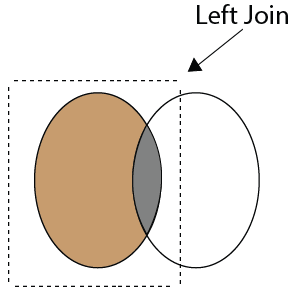
The Left Join is used to fetch all rows from the left-hand table and common records between the specified tables. It returns all the rows from the left-hand side table even though there are no matches on the right-hand side table. If it will not find any matching record from the right side table, then it returns null. This join can also be called a Left Outer Join.

The following visual representation explains it more clearly:
SQL Interview Questions and Answers

The following syntax illustrates the RIGHT JOIN:

  1. SELECT colum_lists    
  2. FROM table1     
  3. LEFT JOIN table2    
  4. ON join_condition;  


40) What is Full Join in SQL?

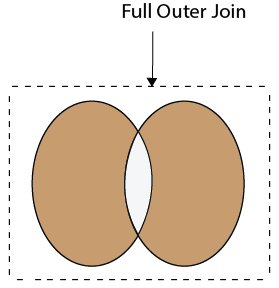
The Full Join results from a combination of both left and right join that contains all the records from both tables. It fetches rows when there are matching rows in any one of the tables. This means it returns all the rows from the left-hand side table and all the rows from the right-hand side tables. If a match is not found, it puts NULL value. It is also known as FULL OUTER JOIN.

The following visual representation explains it more clearly:
SQL Interview Questions and Answers

The following syntax illustrates the FULL JOIN:

  1. SELECT * FROM table1     
  2. FULL OUTER JOIN table2    
  3. ON join_condition;  


41) What is a “TRIGGER” in SQL?

A trigger is a set of SQL statements that reside in a system catalog. It is a special type of stored procedure that is invoked automatically in response to an event. It allows us to execute a batch of code when an insert, update or delete command is run against a specific table because the trigger is the set of activated actions whenever DML commands are given to the system.

SQL triggers have two main components one is action, and another is an event. When certain actions are taken, an event occurs as a result of those actions.

We use the CREATE TRIGGER statement for creating a trigger in SQL. Here is the syntax:

  1. CREATE TRIGGER trigger_name      
  2.     (AFTER | BEFORE) (INSERT | UPDATE | DELETE)    
  3.          ON table_name FOR EACH ROW      
  4.          BEGIN      
  5.         –variable declarations      
  6.         –trigger code      
  7.         END; 

42) What is self-join and what is the requirement of self-join?

A SELF JOIN is used to join a table with itself. This join can be performed using table aliases, which allow us to avoid repeating the same table name in a single sentence. It will throw an error if we use the same table name more than once in a single query without using table aliases.

A SELF JOIN is required when we want to combine data with other data in the same table itself. It is often very useful to convert a hierarchical structure to a flat structure.

The following syntax illustrates the SELF JOIN:

  1. SELECT column_lists    
  2. FROM table1 AS T1, table1 AS T2    
  3. WHERE join_conditions;    

Example

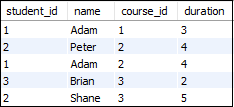
Suppose we have a table ‘Student’ having the following data:
SQL Interview Questions and Answers

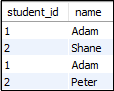
If we want to get retrieve the student_id and name from the table where student_id is equal, and course_id is not equal, it can be done by using the self-join:

  1. SELECT  s1.student_id, s1.name    
  2. FROM student AS s1, student s2    
  3. WHERE s1.student_id=s2.student_id    
  4. AND s1.course_id<>s2.course_id;    

Here is the result:
SQL Interview Questions and Answers


43) What are the set operators in SQL?

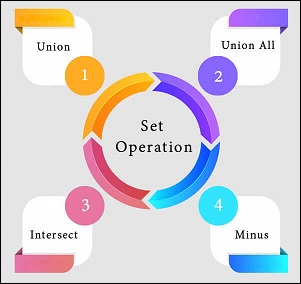
We use the set operators to merge data from one or more tables of the same kind. Although the set operators are like SQL joins, there is a significant distinction. SQL joins combine columns from separate tables, whereas SQL set operators combine rows from different queries. SQL queries that contain set operations are called compound queries. The set operators in SQL are categories into four different types:
SQL Interview Questions and Answers

A. UNION: It combines two or more results from multiple SELECT queries into a single result set. It has a default feature to remove the duplicate rows from the tables. The following syntax illustrates the Union operator:

  1. SELECT columns FROM table1    
  2. UNION    
  3. SELECT columns FROM table2;    

B. UNION ALL: This operator is similar to the Union operator, but it does not remove the duplicate rows from the output of the SELECT statements. The following syntax illustrates the UNION ALL operator:

  1. SELECT columns FROM table1    
  2. UNION  ALL  
  3. SELECT columns FROM table2;    

C. INTERSECT: This operator returns the common records from two or more SELECT statements. It always retrieves unique records and arranges them in ascending order by default. Here, the number of columns and data types should be the same. The following syntax illustrates the INTERSECT operator:

  1. SELECT columns FROM table1    
  2. INTERSECT  
  3. SELECT columns FROM table2;    

D. MINUS: This operator returns the records from the first query, which is not found in the second query. It does not return duplicate values. The following syntax illustrates the MINUS operator:

  1. SELECT columns FROM table1    
  2. MINUS  
  3. SELECT columns FROM table2;    


44) What is the difference between IN and BETWEEN operators?

The following comparison chart explains their main differences:

BETWEEN OperatorIN Operator
This operator is used to selects the range of data between two values. The values can be numbers, text, and dates as well.It is a logical operator to determine whether or not a specific value exists within a set of values. This operator reduces the use of multiple OR conditions with the query.
It returns records whose column value lies in between the defined range.It compares the specified column’s value and returns the records when the match exists in the set of values.
The following syntax illustrates this operator:
SELECT * FROM table_name
WHERE column_name BETWEEN ‘value1’ AND ‘value2’;
The following syntax illustrates this operator:
SELECT * FROM table_name
WHERE column_name IN (‘value1′,’value 2’);

45) What is a constraint? Tell me about its various levels.

The constraint is used to specify the rule and regulations that allows or restricts what values/data will be stored in the table. It ensures data accuracy and integrity inside the table. It enforces us to store valid data and prevents us from storing irrelevant data. If any interruption occurs between the constraint and data action, the action is failed. Some of the most commonly used constraints are NOT NULL, PRIMARY KEY, FOREIGN KEY, AUTO_INCREMENT, UNIQUE KEY, etc.

The following syntax illustrates us to create a constraint for a table:

  1. CREATE TABLE table_name (    
  2.     column1 datatype constraint,    
  3.     column2 datatype constraint,   
  4.     ………    
  5. );    

SQL categories the constraints into two levels:

Column Level Constraints: These constraints are only applied to a single column and limit the type of data that can be stored in that column.

Table Level Constraints: These constraints are applied to the entire table and limit the type of data that can be entered.


46) How to write an SQL query to find students’ names start with ‘A’?

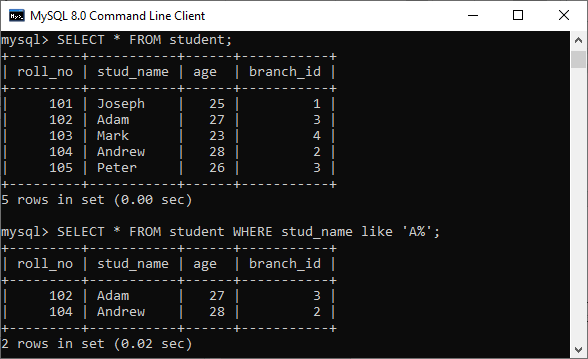
We can write the following query to get the student details whose name starts with A:

  1. SELECT * FROM student WHERE stud_name like ‘A%’;  

Here is the demo example where we have a table named student that contains two names starting with the ‘A’ character.
SQL Interview Questions and Answers

47) Write the SQL query to get the third maximum salary of an employee from a table named employees.

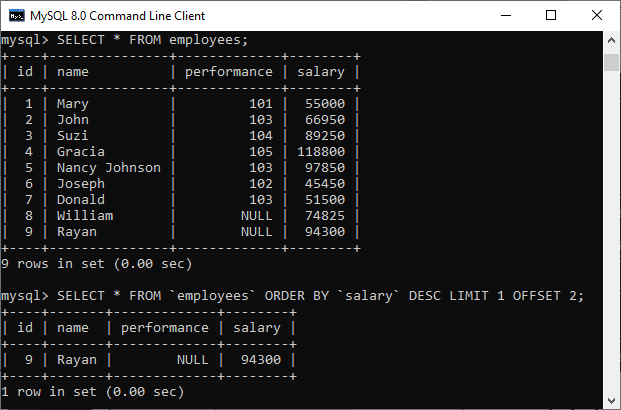
The following query is the simplest way to get the third maximum salary of an employee:

  1. SELECT * FROM `employees` ORDER BY `salary` DESC LIMIT 1 OFFSET 2  

Here is the demo example that shows how to get the third maximum salary of an employee.
SQL Interview Questions and Answers

The following are the alternative way to get the third-highest salary of an employee:

A. Using LIMIT Keyword

  1. SELECT salary FROM employees   
  2. ORDER BY salary DESC   
  3. LIMIT 2, 1;  

B. Using Subquery

  1. SELECT salary    
  2. FROM   
  3.     (SELECT salary   
  4.      FROM employees   
  5.      ORDER BY salary DESC   
  6.      LIMIT 3) AS Temp   
  7. ORDER BY salary LIMIT 1;  

C. Using TOP Keyword

  1. SELECT TOP 1 salary   
  2. FROM   
  3.     (SELECT DISTINCT TOP 3 salary   
  4.      FROM employees   
  5.      ORDER BY salary DESC) AS Temp   
  6. ORDER BY salary ASC;  

48) What is the difference between DELETE and TRUNCATE statements in SQL?

The main difference between them is that the delete statement deletes data without resetting a table’s identity, whereas the truncate command resets a particular table’s identity. The following comparison chart explains it more clearly:

No.DELETETRUNCATE
1)The delete statement removes single or multiple rows from an existing table depending on the specified condition.The truncate command deletes the whole contents of an existing table without the table itself. It preserves the table structure or schema.
2)DELETE is a DML command.TRUNCATE is a DML command.
3)We can use the WHERE clause in the DELETE command.We cannot use the WHERE clause with TRUNCATE.
4)DELETE statement is used to delete a row from a table.TRUNCATE statement is used to remove all the rows from a table.
5)DELETE is slower because it maintained the log.TRUNCATE statement is faster than DELETE statement as it deletes entire data at a time without maintaining transaction logs.
6)You can roll back data after using the DELETE statement.It is not possible to roll back after using the TRUNCATE statement.
7)DELETE query takes more space.TRUNCATE query occupies less space.


49) What is the ACID property in a database?

The ACID properties are meant for the transaction that goes through a different group of tasks. A transaction is a single logical order of data. It provides properties to maintain consistency before and after the transaction in a database. It also ensures that the data transactions are processed reliably in a database system.

The ACID property is an acronym for Atomicity, Consistency, Isolation, and Durability.

Atomicity: It ensures that all statements or operations within the transaction unit must be executed successfully. If one part of the transaction fails, the entire transaction fails, and the database state is left unchanged. Its main features are COMMIT, ROLLBACK, and AUTO-COMMIT.

Consistency: This property ensures that the data must meet all validation rules. In simple words, we can say that the database changes state only when a transaction will be committed successfully. It also protects data from crashes.

Isolation: This property guarantees that the concurrent property of execution in the transaction unit must be operated independently. It also ensures that statements are transparent to each other. The main goal of providing isolation is to control concurrency in a database.

Durability: This property guarantees that once a transaction has been committed, it persists permanently even if the system crashes, power loss, or failed.


50) Is a blank space or zero the same as a NULL value?

No. The NULL value is not the same as zero or a blank space. The following points explain their main differences:

  • A NULL value is a value, which is ‘unavailable, unassigned, unknown or not applicable.’ It would be used in the absence of any value. We can perform arithmetic operations on it. On the other hand, zero is a number, and a blank space is treated as a character.
  • The NULL value can be treated as an unknown and missing value, but zero and blank spaces differ from the NULL value.
  • We can compare a blank space or a zero to another blank space or a zero. On the other hand, one NULL may not be the same as another NULL. NULL indicates that no data has been provided or that no data exists.

51) What are functions and their usage in SQL?

SQL functions are simple code snippets that are frequently used and re-used in database systems for data processing and manipulation. Functions are the measured values. It always performs a specific task. The following rules should be remembered while creating functions:

  • A function should have a name, and the name cannot begin with a special character such as @, $, #, or other similar characters.
  • Functions can only work with the SELECT statements.
  • Every time a function is called, it compiles.
  • Functions must return value or result.
  • Functions are always used with input parameters.

SQL categories the functions into two types:

  • User-Defined Function: Functions created by a user based on their needs are termed user-defined functions.
  • System Defined Function: Functions whose definition is defined by the system are termed system-defined functions. They are built-in database functions.

SQL functions are used for the following purposes:

  • To perform calculations on data
  • To modify individual data items
  • To manipulate the output
  • To format dates and numbers
  • To convert data types

52) What is meant by case manipulation functions? Explains its different types in SQL.

Case manipulation functions are part of the character functions. It converts the data from the state in which it is already stored in the table to upper, lower, or mixed case. The conversion performed by this function can be used to format the output. We can use it in almost every part of the SQL statement. Case manipulation functions are mostly used when you need to search for data, and you don’t have any idea that the data you are looking for is in lower case or upper case.

There are three case manipulation functions in SQL:

LOWER: This function is used to converts a given character into lowercase. The following example will return the ‘STEPHEN’ as ‘stephen’:

  1. SELECT LOWER (‘STEPHEN’) AS Case_Reault FROM dual;  

NOTE: Here, ‘dual’ is a dummy table.

UPPER: This function is used to converts a given character into uppercase. The following example will return the ‘stephen’ as ‘STEPHEN’:

  1. SELECT UPPER (‘stephen’) AS Case_Reault FROM dual;  

INITCAP: This function is used to converts given character values to uppercase for the initials of each word. It means every first letter of the word is converted into uppercase, and the rest is in lower case. The following example will return the ‘hello stephen’ as ‘Hello Stephen’:

  1. SELECT INITCAP (‘hello stephen’) AS Case_Reault FROM dual;  

53) Explain character-manipulation functions? Explains its different types in SQL.

Character-manipulation functions are used to change, extract, and alter the character string. When one or more characters and words are passed into the function, the function will perform its operation on those input strings and return the result.

The following are the character manipulation functions in SQL:

A) CONCAT: This function is used to join two or more values together. It always appends the second string into the end of the first string. For example:

Input: SELECT CONCAT (‘Information-‘, ‘technology’) FROM DUAL;

Output: Information-technology

B) SUBSTR: It is used to return the portion of the string from a specified start point to an endpoint. For example:

Input: SELECT SUBSTR (‘Database Management System’, 9, 11) FROM DUAL;

Output: Management

C) LENGTH: This function returns the string’s length in numerical value, including the blank spaces. For example:

Input: SELECT LENGTH (‘Hello Javatpoint’) FROM DUAL;

Output: 16

D) INSTR: This function finds the exact numeric position of a specified character or word in a given string. For example:

Input: SELECT INSTR (‘Hello Javatpoint’, ‘Javatpoint’);

Output: 7

E) LPAD: It returns the padding of the left-side character value for right-justified value. For example:

Input: SELECT LPAD (‘200′, 6,’*’);

Output: ***200

F) RPAD: It returns the padding of the right-side character value for left-justified value. For example:

Input: SELECT RPAD (‘200′, 6,’*’);

Output: 200***

G) TRIM: This function is used to remove all the defined characters from the beginning, end, or both. It also trimmed extra spaces. For example:

Input: SELECT TRIM (‘A’ FROM ‘ABCDCBA’);

Output: BCDCB

H) REPLACE: This function is used to replace all occurrences of a word or portion of the string (substring) with the other specified string value. For example:

Input: SELECT REPLACE ( ‘It is the best coffee at the famous coffee shop.’, ‘coffee’, ‘tea’);

Output: It is the best tea at the famous tea shop.


54) What is the usage of the NVL() function?

The NVL() function is used to convert the NULL value to the other value. The function returns the value of the second parameter if the first parameter is NULL. If the first parameter is anything other than NULL, it is left unchanged. This function is used in Oracle, not in SQL and MySQL. Instead of NVL() function, MySQL have IFNULL() and SQL Server have ISNULL() function.


55) Which function is used to return remainder in a division operator in SQL?

The MOD function returns the remainder in a division operation.


56) What are the syntax and use of the COALESCE function?

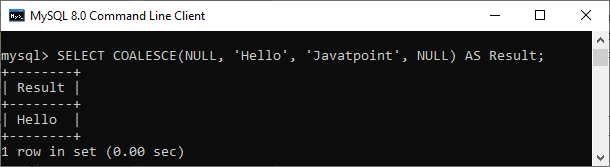
The COALESCE() function evaluates the arguments in sequence and returns the first NON-NULL value in a specified number of expressions. If it evaluates arguments as NULL or not found any NON-NULL value, it returns the NULL result.

The syntax of COALESCE function is given below:

  1. COALESCE (exp1, exp2, …. expn)   

Example:

  1. SELECT COALESCE(NULL, ‘Hello’, ‘Javatpoint’, NULL) AS Result;  

This statement will return the following output:
SQL Interview Questions and Answers

57) How do we use the DISTINCT statement? What is its use?

The DISTINCT keyword is used to ensure that the fetched value always has unique values. It does not allow to have duplicate values. The DISTINCT keyword is used with the SELECT statement and retrieves different values from the table’s column. We can use it with the help of the following syntax:

  1. SELECT DISTINCT column_lists FROM table_name WHERE [condition];  

Suppose we have a table ‘customer’ containing eight records in which the name column has some duplicate values.
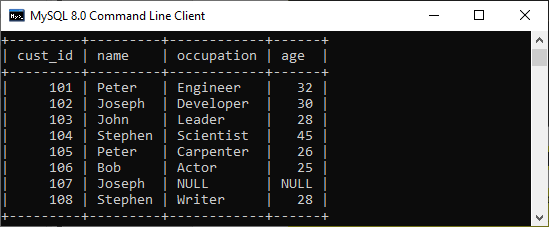
SQL Interview Questions and Answers

If we want to get the name column without any duplicate values, the DISTINCT keyword is required. Executing the below command will return a name column with unique values.
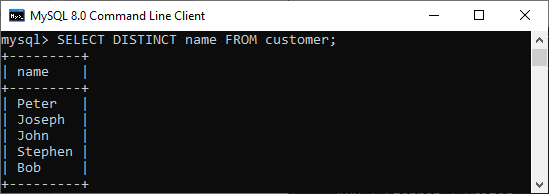
SQL Interview Questions and Answers

58) What is the default ordering of data using the ORDER BY clause? How could it be changed?

The ORDER BY clause is used to sort the table data either in ascending or descending order. By default, it will sort the table in ascending order. If we want to change its default behavior, we need to use the DESC keyword after the column name in the ORDER BY clause.

The syntax to do this is given below:

  1. SELECT expressions FROM tables    
  2. WHERE conditions    
  3. ORDER BY expression [ASC | DESC];    

We have taken a customer table in the previous example. Now, we will demonstrate the ORDER BY clause on them as well.

In the below output, we can see that the first query will sort the table data in ascending order based on the name column. However, if we run the second query by specifying the DESC keyword, the table’s order is changed in descending order.
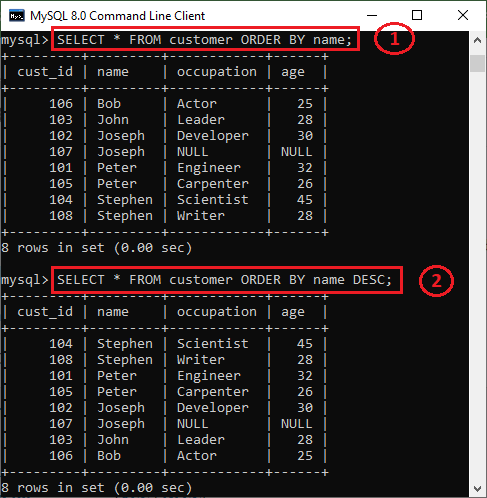
SQL Interview Questions and Answers

59) Is the following query returns the output?

  1. SELECT subject_code, AVG (marks)  
  2. FROM Students  
  3. WHERE AVG(marks) > 70  
  4. GROUP BY subject_code;  

Answer: No. The above query does not return the output because we cannot use the WHERE clause to restrict the groups. We need to use the HAVING clause instead of the WHERE clause to get the correct output.


60) What is the difference between the WHERE and HAVING clauses?

The main difference is that the WHERE clause is used to filter records before any groupings are established, whereas the HAVING clause is used to filter values from a group. The below comparison chart explains the most common differences:

WHEREHAVING
This clause is implemented in row operations.This clause is implemented in column operations.
It does not allow to work with aggregate functions.It can work with aggregate functions.
This clause can be used with the SELECT, UPDATE, and DELETE statements.This clause can only be used with the SELECT statement.


61) How many Aggregate functions are available in SQL?

The aggregate function is used to determine and calculate several values in a table and return the result as a single number. For example, the average of all values, the sum of all values, and the maximum and minimum value among particular groupings of values.

The following syntax illustrates how to use aggregate functions:

  1. function_name (DISTINCT | ALL expression)    

SQL provides seven (7) aggregate functions, which are given below:

  • AVG(): This function is used to returns the average value from specified columns.
  • COUNT(): This function is used to returns the number of table rows, including rows with null values.
  • MAX(): This function is used to returns the largest value among the group.
  • MIN(): This function is used to returns the smallest value among the group.
  • SUM(): This function is used to returns the total summed values(non-null) of the specified column.
  • FIRST(): This function is used to returns the first value of an expression.
  • LAST(): This function is used to returns the last value of an expression.

62) What is SQL Injection?

SQL injection is a type of vulnerability in website and web app code that allows attackers to control back-end operations and access, retrieve, and destroy sensitive data from databases. In this technique, malicious SQL statements are inserted into a database entry field, and once they are performed, the database becomes vulnerable to an attacker. This technique is commonly used to access sensitive data and perform administrative activities on databases by exploiting data-driven applications. It is also known as SQLi attack.

Some common examples of SQL injection are:

  • Accessing confidential data to modify an SQL query to get desired results.
  • UNION attacks to steal data from different database tables.
  • Examine the database to extract information regarding the version and structure of the database.

63) What is the difference between the RANK() and DENSE_RANK() functions?

The RANK function determines the rank for each row within your ordered partition in the result set. If the two rows are assigned the same rank, then the next number in the ranking will be its previous rank plus a number of duplicate numbers. For example, if we have three records at rank 4, the next rank listed would be ranked 7.

The DENSE_RANK function assigns a unique rank for each row within a partition as per the specified column value without any gaps. It always specifies ranking in consecutive order. If the two rows are assigned the same rank, this function will assign it with the same rank, and the next rank being the next sequential number. For example, if we have 3 records at rank 4, the next rank listed would be ranked 5.


64) Is it possible to implicitly insert a row for the identity column?

Yes. We can implicitly insert a row for the identity column. Here is an example of doing this:

  1. SET IDENTITY_INSERT TABLE1 ON  
  2. INSERT INTO demo_table1 (id, name, branch)  
  3. SELECT id, name, branch FROM demo_table2  
  4. SET IDENTITY_INSERT OFF  

65) What are SQL comments?

Comments are explanations or annotations in SQL queries that are readable by programmers. It’s used to make SQL statements easier to understand for humans. During the parsing of SQL code, it will be ignored. Comments can be written on a single line or across several lines.

  • Single Line Comments: It starts with two consecutive hyphens (–).
  • Multi-line Comments: It starts with /* and ends with */.
Uncategorized

API Testing Interview Questions

API Testing Interview Questions

A list of frequently asked API Testing interview questions and answers are given below.

1) What is API?

API (Application Programming Interface) helps in communication and data exchange between two software systems. API act as an interface between two applications and allows the two software systems communicate with one another. API is a collection of functions which can be executed by another software program.

API works as; it takes a request from the source, takes that request to the database, fetches the request data from the database and returns a response to the source. API takes the requests from the user and gives the response without exposing the internal details. API acts as Abstraction.

Example: Amazon API, Google Map API


2) What is API testing?

API testing is a type of software testing that involves testing APIs directly. API is a part of integration testing to check whether the API meets expectations in terms of functionality, reliability, performance, and security of applications. Multiple API system can performed API testing. In API testing, our primary focus is on Business Logic Layer of the software architecture.


3) What are the types of API testing?

API testing involves the following types of testing:

  • Unit Testing
  • Functional Testing
  • Load Testing
  • Runtime/Error Detection
  • Security Testing
  • UI Testing
  • Interoperability and WS compliance Testing
  • Penetration Testing
  • Fuzz Testing

4) What are the protocols used in API Testing?

Protocols used in API testing are:

  • HTTP
  • REST
  • SOAP
  • JMS
  • UDDI

5) What are the tools used for API Testing?

Tools used for API testing are:

  • Parasoft SOAtest
  • PostMan
  • AlertSite API monitoring

6) What is API test environment?

For API the test environment is a quite complex method where the configuration of server and database is done as per the requirement of the software application. API testing does not involve graphical user interface (GUI).

API is checked for its proper functioning after installation.


7) What is API framework?

API framework is described by the config. File which consist of the list of all APIs that are required to be activated and are activated for any particular program run. This is essential as every test run does not require all APIs.


8) What are the limits of API usage?

Many APIs have certain limit set up by the provider. Hence, try to estimate our usage and understand how that will impact the overall cost of the offering.


9) What are the advantages of API testing?

Advantages of API testing are:

  • Test for core functionality: API testing provides access to the application without the user interface. The core functionality of the application will be tested before the GUI tests. This will help to detect the minor issue which can become bigger during the GUI testing.
  • Time effective: API testing is less time consuming than GUI testing. Particularly, API test requires less code so it can provide better and faster test coverage compare to GUI test automation. This will reduce the cost for the testing project.
  • Language Independent: In API testing data is exchange using XML or JSON. These transfer mode are completely language-independent, which allows users to select any code language when adopting automation test service for the project.
  • Easy Integration with GUI: API tests provide highly integrable tests which is useful to perform functional GUI tests after GUI tests. Simple integration would allow new user accounts to be created within the application before GUI started.

10) What are the principles of an API test design?

Here, are the seven principles of API test design.

  1. Exhaustive Testing: Exhaustive testing is not possible. Instead we need optimal amount of testing which is based on the risk assessment of the application.
  2. Defect Clustering: Defect Clustering states that a small number of modules contain the most of the defect detected. Approximately 80% of the defect found in 20% of the modules. By experience we can identify such risky modules. But this approach has its own problems. If the same tests are repeated over and over again, eventually the same test case will no longer find new bugs.
  3. Pesticide Paradox: Testers cannot depend on existing technique. They must have to look continually to improve the existing method to make testing more effective. But even all these hard work in testing we can never claim our product is bug free. To overcome this, test cases need to be regularly reviewed and revised add new and different test cases to help find more defects.
  4. Testing shows presence of defects: Testing principle states that- testing talks about the presence of defects not about the absence of defect. Software testing reduces the probability of undiscovered defects remaining in the software but even if no defects found, it is not a proof of correctness.
  5. Absence of error -fallacy: This can be possible the software which is 99% bug free is still unusable. The case can be if the system is tested for the wrong requirement. Software testing is not finding the defects but also to check that software addresses the business needs. The absence of error is fallacy i.e. finding and fixing defects does not help if the system build is unusable and doesn’t fulfill the user’s needs and requirements.
  6. Early Testing: Testing should start as soon as possible in the software development lifecycle. So that defects in the requirement or design phase captured in the early stages. It is cheaper to fix defect in the early stages of testing. We should start finding the bug at the moment the requirements are defined.
  7. Testing is context dependent: Testing is context dependent that we test an e-commerce site will be different from the way we test the commercial. All the developed software’s are not identical. We will use different methodology; techniques and type of testing depend on the application type.

11) What is API framework?

A framework or software framework is a platform for developing software applications. API framework is a foundation on which software developer can build applications for a specific platform.

Example: A framework can include predefined classes and functions that can be used to process input, manage hardware devices and interact with system software.

Framework is similar to an Application Programming Interface, technically framework includes API. Framework serves foundation for programming while API provides access to the elements supported by the framework. Framework also includes code libraries, compiler and other programs used in the software development process.

API framework is defined by configuration file which consists the list of all APIs that is required to be activated and activated for a particular program run.


12) What are the common tests that performed on API?

Here, are the common tests that performed on API are as:

  1. Response of the API should be verified based on the request. We will verify that the return value is based on request.
  2. When API is updating any data structure we should verify the system is authenticating the outcome.
  3. We will verify whether the API is trigger other event or request another API.
  4. We will verify the behavior of the API when no value is return.

13) What exactly needs to verify in API testing?

In API testing, we send a request to API with the known data and then analysis the response.

  1. We will verify the accuracy of the data.
  2. Will see the HTTP status code.
  3. We will see the response time.
  4. Error codes in case API returns any errors.
  5. Authorization would be check.
  6. Non-Functional testing such as performance testing, security testing.

14) What are the differences between API and Web Services?

Sr. No.APIWeb Services
1.API may or may not need network for its operations.Web Services always need network for its operation.
2.API can be communicated through SOAP, REST, XML-RPC and CURL calls as well.
API can also be exposed in number of ways like JAR, DLL, XML over HTTP, JSON over HTTP etc.
Web service can be communicated through SOAP, REST, AND RPC.
3.API can perform all the operations which web service can’t perform.Web service can’t perform all the operations like API.
4.All APIs are not web service.All web services are API

15) What is API documentation?

A good documentation is must for any foundation. API documentation serves as quick reference for accessing library or working within a program.

When we use any such documents, it must consists of proper plan, content source, proper layout, information related to each function etc.

There are various documentation tools like Doxygen and JavaDoc. Here, are the functions which are documented which revolve around the parameters like:

  • Function description
  • Type and syntax of error message that may occure
  • Syntax, elements and sequence needed for each parameter
  • Links regarding functions

16) What is the most used template for API documentation?

Here, are the various documentation template that make the whole process simple and easy. They are:

  • Swagger
  • Miredot
  • Slate
  • FlatDoc
  • API blueprint
  • RestDoc
  • Web service API specification

17) What are the types of bug that can be found during API testing?

API testing helps us to find many types of bugs which are:

  • Stress
  • Security
  • Duplicate or missing functionality
  • Reliability
  • Unused flags
  • Performance
  • Incompatible error handling
  • Multi-threaded issue
  • Improper errors

18) What are the difference between API testing and UI testing?

UI (User Interface) testing means the testing of the graphical user interface. The focus of UI testing is on the look and feel of the application. In user interface testing the main focus is on how users can interact with app elements such as images, fonts, layout etc. are checked.

API testing allows the communication between two software systems. API testing works on backend also known as backend testing.


19) What is SOAP?

SOAP (Simple Object Access Control) . It is an XML based protocol that helps in exchanging information among computers.


20) What is REST API?

REST API is a set of function helps the developers performing requests when the response is receiving. Through HTTP protocol interaction is made in REST API.

REST is defined as Representational state transfer. It is an effective standard for API creation.


21) What are the differences between SOAP and REST API?

Sr. No.SOAP APIREST API
1.SOAP stands as Simple Object Access Protocol.REST stands as Representational State Transfer.
2.SOAP is a protocol.REST is an architectural pattern.
3.SOAP can work with XML format. In SOAP all the data passed in XML format.REST permit different data format such as Plain text, HTML, XML, JSON etc. But the most preferred format for transferring data is in JSON.

22) What are the major challenges faced during API testing?

The major challenges faced during the API testing are:

  • Parameter Selection
  • Parameter Combination
  • Call sequencing
  • Output verification and validation
  • A major challenge is providing input values which are very difficult because GUI is not available.

23) What are the difference between API Testing and Unit Testing?

Difference between API testing and Unit testing are:

Sr. No.API TestingUNIT Testing
1.API testing is a form of black box testing.Unit testing is a form of white box testing.
2.API testing is performed after the project completion during the test.Unit testing is performed when the project is created.
3.In API testing there is a wide scope of testing.In Unit testing there is a limited scope of testing we can test only the basic functionality.
4.API testing is done by the testers. The whole purpose of API testing is end to end testing of the functionality.Unit testing is done by the developer. In unit testing every functionality is separately tested.

24) What is a RESTFUL web services?

There are two kinds of web services

  1. SOAP Web Services
  2. RESTFUL Web Services

1. SOAP (Simple Object Access Protocol) – SOAP is a XML based method which is used in Web Services.

2. RESTFUL Web Services – To implement the concept of REST architecture HTTP method is used. RESTFUL Web Services defines URI (Uniform Resource Identifier), and also provides resource representation like JSON and a set of HTTP method.


25) What is Resource in REST?

REST architecture treats any content as resource, which can be text files, HTML pages, images, videos or dynamic business information. REST server gives the functionality to access the resources and modifies them. We can identify the each resources by URIs/ global IDs.


26) What is the way to represent the resource in REST?

REST uses different representation to define the resources like text, JSON and XML. The most popular representation of resources is JSON and XML.


27) What protocol is used by the RESTFUL Web Services?

RESTFUL Web Services uses the HTTP protocol. They use the HTTP protocol as a medium of communication between the client and the server.


28) What are the characteristics of REST?

Here, are the two characteristics of REST.

  1. REST is stateless. With the use of the REST API the server has no status, we can restart the server between two calls, inspite of all the data is transferred to the server.
  2. Web Services uses POST method to perform operations, while REST uses GET method to access the resources.

29) What is messaging in RESTFUL Web Services?

RESTFUL Web Services use the HTTP protocol as a communication tool between the client and the server. This is the technique when the client sends a message in the form of HTTP request the server send back the HTTP reply which is called Messaging. This message consists message data and Meta data i.e. information on the message itself.


30) What are the components of an HTTP request?

An HTTP request have five components. These are:

  1. Action showing HTTP method like GET, PUT, POST, DELETE.
  2. Uniform Resource Identifier (URI): URI is the identifier for the resource on the server.
  3. HTTP version: Indicate the HTTP version like- HTTP V1.1.
  4. Request Header: Request Header carries metadata for the HTTP request message. Metadata could be a client type, format supported by the client, format of a message body, cache setting etc.
  5. Request Body: Resource body indicates message content or resource representation.

31) What is the HTTP protocol supported by REST?

GET: GET is used to request data from the specified resource.

GET request can be cached and bookmark. It remains in the browser history and has length restriction. When dealing with sensitive data GET requests should not be used.

POST: POST is used to send data to server for creation or updating the resources.

POST requests are never cached or bookmark.

PUT: PUT replaces the current representation of the target resource with the request payload.

DELETE: DELETE removes the specified resource.

OPTIONS: OPTION is used to describe the communication option for the target resources.

HEAD: HEAD asks for response which is identical to GET requests, but without the response body.


32) Can we use GET request instead of PUT to create a resource?

PUT or POST method is used create a resource. GET is only used to request the resources.


33) What is URI? What is the purpose of web-based service and what is it’s format?

URI stands for Uniform Resource Identifier. It is a string of characters designed for unambiguous identification of resources and extensibility by the URI scheme. The purpose of URI is to locate the resource on the server hosting of the web service.

A URIs format is <protocol>://<service-name>/<Resource Type>/<ResourceID>


34) What are SOAP Web Services?

SOAP (Simple Object Access Protocol) is defined as the XML based protocol. SOAP is also known for developing and designing web services and also enable the communication between the applications developed on different platform by using different programming languages on the internet. SOAP is platform and language independent.


35) When we can use SOAP API?

We can use SOAP API to perform the operation on records like create, retrieve, update or delete. We can use API to manage password, perform searches etc.

Automation Testing

Selenium Interview Questions

Selenium Interview Questions

Selenium is based on automating web applications for testing purpose, but it is certainly not limited to just that. The web-based administration tasks can be automated as well. It automates browsers

Selenium has the support of some of the leading browser vendors who have adopted it to make Selenium an essential part of their browser. It is also the core technology in many other browser automation tools, APIs, and frameworks.

A list of most frequently asked Selenium interview questions, and their answers are given below.

Basic Level – Selenium Interview Questions

1) What is test automation or automation testing?

Automation testing uses automation tools to write and execute test cases, no manual involvement is necessary for executing an automated test suite. Testers prefer automation tools to write test scripts and test cases and then group into test suites.

Automation testing enables the use of specialized tools to automate the execution of manually designed test cases without any human intervention. Automation testing tools can access the test data, controls the execution of tests and compares the actual result against the expected result. Consequently, generating detailed test reports of the system under test.

Selenium Interview Questions

2) What are the advantages of automation testing?

Some basic Advantages of automation testing are as follows.

  • Automation testing supports both functional and performance test on an application.
  • It supports the execution of repeated test cases.
  • It facilitates parallel execution.
  • It aids in testing a large test matrix.
  • It improves accuracy because there are no chances of human errors.
  • It saves time and money.

3) Name some of the commonly used Automation Testing tools that are used for Functional Automation.

Lists of top 10 used automation testing tools for Functional Automation are as follows.

  • Teleric Test Studio, Developed by Teleric.
  • TestingWhiz
  • HPE Unified Functional Testing (HP – UFT formerly QTP)
  • Tosca Testsuite
  • Watir
  • Quick Test Professional, provided by HP.
  • Rational Robot, provided by IBM.
  • Coded UI, provided by Microsoft.
  • Selenium, open source.
  • Auto It, Open Source.

4) Name some of the commonly used Automation Testing tools that are used for Non-Functional Automation.

Lists of some commonly used Automation Testing tools for Non-Functional Automation are as follows.

  • Load Runner, provided by Hp.
  • JMeter, provided by Apache.
  • Burp Suite, provided by PortSwigger.
  • Acunetix, provided by Acunetix.

5) What is Selenium?

Selenium is a portable framework for software testing. Selenium tool facilitates with a playback tool for authoring functional tests without the need to learn a test scripting language.

Selenium is one of the most widely used open source Web UI (User Interface) automation testing suite. Jason Huggins developed Selenium in 2004 as an internal tool at Thought Works. Selenium supports automation across different browsers, platforms, and programming languages.


6) What are the different components of Selenium?

Selenium is not just a single tool but a suite of software’s, each having a different approach to support automation testing. It comprises of four major components which include:

  1. Selenium Integrated Development Environment (IDE)
  2. Selenium Remote Control (Now Deprecated)
  3. WebDriver
  4. Selenium Grid

7) List out the names of programming languages, browsers and operating systems that are supported by Selenium.

Selenium supports various operating systems, browsers and programming languages. Following is the list:

  • Programming Languages: C#, Java, Python, PHP, Ruby, Perl, JavaScript.
  • Operating Systems: Android, iOS, Windows, Linux, Mac, Solaris.
  • Browsers: Google Chrome, Mozilla Firefox, Internet Explorer, Edge, Opera, Safari, etc.

8) What are the significant changes/upgrades in various Selenium versions?

Selenium v1.0:

  • Version 1.0 was the initial release of Selenium.
  • It included three tools: Selenium IDE, Selenium RC, and Selenium Grid.

Selenium v2.0:

  • Selenium WebDriver was introduced replacing Selenium RC in version “2.0”.
  • With the onset of WebDriver, RC got deprecated and moved to the legacy package.

Selenium v3:

  • The latest release Selenium 3 has new added features and functionalities.
  • It includes Selenium IDE, Selenium WebDriver, and Selenium Grid.

9) List some of the test types that are supported by Selenium.

Different types of testing’s that we can achieve through Selenium are.

  • Functional Testing
  • Regression Testing
  • Sanity Testing
  • Smoke Testing
  • Responsive Testing
  • Cross Browser Testing
  • UI testing (black box)
  • Integration Testing

10) What is Selenium IDE?

Selenium IDE is implemented as Firefox extension which provides record and playback functionality on test scripts. It allows testers to export recorded scripts in many languages like HTML, Java, Ruby, RSpec, Python, C#, JUnit and TestNG.

Selenium IDE has limited scope, and the generated test scripts are not very robust, and portable.


11) What do you mean by Selenese?

Selenium commands, also known as “Selenese” are the set of commands used in Selenium that run your tests. For example, command – open (URL); launches the desired URL in the specified browser and it accept both relative and absolute URLs.

A sequence of Selenium commands (Selenese) together is known as a test script.


12) What are the different ways of locating a web element in Selenium?

In Selenium, web elements are identified and located with the help of Locators. Locators specify a target location which uniquely defines the web element in the context of a web application. Thus, to identify web elements accurately and precisely we have different types of locators in Selenium:

  • ID
  • ClassName
  • Name
  • TagName
  • LinkText
  • PartialLinkText
  • Xpath
  • CSS Selector
  • DOM

13) How many types of WebDriver API’s are available in Selenium?

The list of WebDriver API’s which are used to automate browser include:

  • AndroidDriver
  • ChromeDriver
  • EventFiringWebDriver
  • FirefoxDriver
  • HtmlUnitDriver
  • InternetExplorerDriver
  • iPhoneDriver
  • iPhoneSimulatorDriver
  • RemoteWebDriver

14) List out some of the Automation tools which could be integrated with Selenium to achieve continuous testing.

Selenium can be used to automate functional tests and can be integrated with automation test tools such as Maven, Jenkins, &Docker to achieve continuous testing. It can also be integrated with tools such as TestNG, &JUnit for managing test cases and generating reports.


15) What do you mean by the assertion in Selenium?

The assertion is used as a verification point. It verifies that the state of the application conforms to what is expected. The types of assertion are “assert”, “verify” and “waitFor”.


16) Explain the difference between assert and verify commands?

Assert: Assert command checks if the given condition is true or false. If the condition is true, the program control will execute the next phase of testing, and if the condition is false, execution will stop, and nothing will be executed.

Verify: Verify command also checks if the given condition is true or false. It doesn’t halt program execution, i.e., any failure during verification would not stop the execution, and all the test phases would be executed.


17) What do you mean by XPath?

XPath is also defined as XML Path. It is a language used to query XML documents. It is an important approach to locate elements in Selenium. XPath consists of a path expression along with some conditions. Here, we can easily write XPath script/query to locate any element in the webpage. It is developed to allow the navigation of XML documents. The key factors that it considered while navigating are selecting individual elements, attributes, or some other part of an XML document for specific processing. It also produces reliable locators. Some other points about XPath are as follows.

  • XPath is a language used for locating nodes in XML documents.
  • XPath can be used as a substitute when you don’t have a suitable id or name attribute for the element you want to locate.
  • XPath provides locating strategies like:
    • XPath Absolute
    • XPath Attributes

18) Explain XPath Absolute and XPath attributes.

XPath Absolute:

  • XPath Absolute enables users to mention the complete XPath location from the root HTML tag to the specific elements.
  • Syntax: //html/body/tag1[index]/tag2[index]/…/tagN[index]
  • Example: //html/body/div[2]/div/div[2]/div/div/div/fieldset/form/div[1]/input[1]

XPath Attributes:

  • XPath Attributes is always recommended when you don’t have a suitable id or name attribute for the element you want to locate.
  • Syntax: //htmltag[@attribute1=’value1′ and @attribute2=’value2′]
  • Example: //input[@id=’passwd’ and @placeholder=’password’]

19) What is the difference between “/” and “//” in XPath?

Single Slash “/”: Single slash is used to create XPath with absolute path.

Double Slash “//”: Double slash is used to create XPath with the relative path.


20) What are the different types of annotations which are used in Selenium?

JUnit annotations which can be used are:

  • Test
  • Before
  • After
  • Ignore
  • BeforeClass
  • AfterClass
  • RunWith

21) What are the WebDriver supported Mobile Testing Drivers?

WebDriver supported “mobile testing drivers” are:

  • AndroidDriver
  • IphoneDriver
  • OperaMobileDriver

22) What are the popular programming languages supported by Selenium WebDriver to write Test Cases?

Selenium WebDriver supports the below languages to write Test Cases.

  • JAVA
  • PHP
  • Python
  • C#
  • Ruby
  • Perl

23) What is the difference between type keys and type commands?

TypeKeys() will trigger JavaScript event in most of the cases whereas .type() won’t.


24) What is the difference between “type” and “typeAndWait” command?

“type” command is used to type keyboard key values into the text box of software web application. It can also be used for selecting values of combo box whereas “typeAndWait” command is used when your typing is completed and software web page start reloading. This command will wait for software application page to reload. If there is no page reload event on typing, you have to use a simple “type” command.


25) What is the difference between findElement() and findElements()?

findElement(): It is used to find the first element within the current page using the given “locating mechanism”. It returns a single WebElement.

findElements(): It uses the given “locating mechanism” to find all the elements within the current page. It returns a list of web elements.


26) What is the wait? How many types of waits in selenium?

Selenium Webdriver introduces the concept of waits for the AJAX-based application. There are two types of waits:

  1. Implicit Wait
  2. Explicit Wait

27) What is the main disadvantage of implicit wait?

The main disadvantage of implicit wait is that it slows down test performance.

Another disadvantage of implicit wait is:

Suppose, you set the waiting limit to be 10 seconds, and the elements appear in the DOM in 11 seconds, your tests will be failed because you told it to wait a maximum of 10 seconds.


28) What is Selenium Grid?

Selenium Grid facilitates you to distribute your tests on multiple machines and all of them at the same time. So, you can execute tests on Internet Explorer on Windows and Safari on Mac machine using the same text script. It reduces the time of test execution and provides quick feedback.

Advance Level – Selenium Interview Questions

29) How can we launch different browsers in Selenium WebDriver?

We have to create an instance of a driver of that particular browser.

  1. WebDriver driver =newFirefoxDriver();  

Here, “WebDriver” is an interface, and we are creating a reference variable “driver” of type WebDriver, instantiated using “FireFoxDriver” class.


30) Write a code snippet to launch Firefox browser in WebDriver.

  1. public class FirefoxBrowserLaunchDemo {  
  2.   
  3. public static void main(String[] args) {  
  4.   
  5. //Creating a driver object referencing WebDriver interface  
  6. WebDriver driver;  
  7.   
  8. //Setting webdriver.gecko.driver property  
  9. System.setProperty(“webdriver.gecko.driver”, pathToGeckoDriver + “\\geckodriver.exe”);  
  10.   
  11. //Instantiating driver object and launching browser  
  12. driver = newFirefoxDriver();  
  13.   
  14. //Using get() method to open a webpage  
  15. driver.get(“http://javatpoint.com”);  
  16.   
  17. //Closing the browser  
  18. driver.quit();  
  19.   
  20.     }  
  21.   
  22. }  

31) Write a code snippet to launch Chrome browser in WebDriver.

  1. public class ChromeBrowserLaunchDemo {  
  2.   
  3. public static void main(String[] args) {  
  4.   
  5. //Creating a driver object referencing WebDriver interface  
  6. WebDriver driver;  
  7.   
  8. //Setting the webdriver.chrome.driver property to its executable’s location  
  9. System.setProperty(“webdriver.chrome.driver”, “/lib/chromeDriver/chromedriver.exe”);  
  10.       
  11. //Instantiating driver object  
  12. driver = newChromeDriver();  
  13.   
  14. //Using get() method to open a webpage  
  15. driver.get(“http://javatpoint.com”);  
  16.   
  17. //Closing the browser  
  18. driver.quit();  
  19.   
  20.     }  
  21.   
  22. }  

32) Write a code snippet to launch Internet Explorer browser in WebDriver.

  1. public class IEBrowserLaunchDemo {  
  2.   
  3. public static void main(String[] args) {  
  4.   
  5. //Creating a driver object referencing WebDriver interface  
  6. WebDriver driver;  
  7.   
  8. //Setting the webdriver.ie.driver property to its executable’s location  
  9. System.setProperty(“webdriver.ie.driver”, “/lib/IEDriverServer/IEDriverServer.exe”);  
  10.       
  11. //Instantiating driver object  
  12. driver = newInternetExplorerDriver();  
  13.   
  14. //Using get() method to open a webpage  
  15. driver.get(“http://javatpoint.com”);  
  16.   
  17. //Closing the browser  
  18. driver.quit();  
  19.   
  20.     }  
  21.   
  22. }  

33) Write a code snippet to perform right-click an element in WebDriver.

We will use Action class to generate user event like right-click an element in WebDriver.

  1. Actions action = newActions(driver);  
  2. WebElement element = driver.findElement(By.id(“elementId”));  
  3. action.contextClick(element).perform();  

34) Write a code snippet to perform mouse hover in WebDriver.

  1. Actions action = newActions(driver);  
  2. WebElement element = driver.findElement(By.id(“elementId”));  
  3. action.moveToElement(element).perform();  

35) How do you perform drag and drop operation in WebDriver?

Code snippet to perform drag and drop operation:

  1. //WebElement on which drag and drop operation needs to be performed  
  2. WebElementfromWebElement = driver.findElement(By Locator of fromWebElement);  
  3.   
  4. //WebElement to which the above object is dropped  
  5. WebElementtoWebElement = driver.findElement(By Locator of toWebElement);  
  6.   
  7. //Creating object of Actions class to build composite actions  
  8. Actions builder = newActions(driver);  
  9.   
  10. //Building a drag and drop action  
  11. Action dragAndDrop = builder.clickAndHold(fromWebElement)  
  12.              .moveToElement(toWebElement)  
  13.              .release(toWebElement)  
  14.          .build();  
  15.   
  16. //Performing the drag and drop action  
  17. dragAndDrop.perform();  

36) What are the different methods to refresh a web page in WebDriver?

There are multiple ways of refreshing a page in Webdriver.

1. Using driver.navigate command –

  1. driver.navigate().refresh();  

2. Using driver.getCurrentUrl() with driver.get() command –

  1. driver.get(driver.getCurrentUrl());  

3. Using driver.getCurrentUrl() with driver.navigate() command –

  1. driver.navigate().to(driver.getCurrentUrl());  

4. Pressing an F5 key on any textbox using the sendKeys command –

  1. driver.findElement(By textboxLocator).sendKeys(Keys.F5);  

5. Passing ascii value of the F5 key, i.e., “\uE035” using the sendKeys command –

  1. driver.findElement(By textboxLocator).sendKeys(“\uE035”);  

37) Write a code snippet to navigate back and forward in browser history?

Navigate back in browser history:

  1. driver.navigate().back();  

Navigate forward in browser history:

  1. driver.navigate().forward();  

38) How to invoke an application in WebDriver?

  1. driver.get(“url”); or  
  2. driver.navigate().to(“url”);  

Misc. Questions – Selenium Interview Question.

39) What are the benefits of Automation Testing?

Benefits of Automation testing are as follows.

  • It allows execution of repeated test cases
  • It enables parallel execution
  • Automation Testing encourages unattended execution
  • It improves accuracy. Thus, it reduces human-generated errors
  • It saves time and money.

40) How can we get a text of a web element?

Get command is used to get the inner text of the specified web element. The get command doesn’t require any parameter, but it returns a string type value. It is also one of the widely used commands for verification of messages, labels, and errors,etc.,from web pages.

Syntax

  1. String Text = driver.findElement(By.id(“Text”)).getText();  

41) How to select value in a dropdown?

We use the WebDriver’s Select class to select the value in the dropdown.

Syntax:

selectByValue:

  1. Select selectByValue = new Select(driver.findElement(By.id(“SelectID_One”)));  
  2. selectByValue.selectByValue(“greenvalue”);  

selectByVisibleText:

  1. Select selectByVisibleText = new Select (driver.findElement(By.id(“SelectID_Two”)));  
  2. selectByVisibleText.selectByVisibleText(“Lime”);  

  1. Select selectByIndex = new Select(driver.findElement(By.id(“SelectID_Three”)));  
  2. selectByIndex.selectByIndex(2);  

42) What are the different types of navigation commands?

The navigation commands are as follows.

navigate().back()

The above command needs no parameters and takes back the user to the previous webpage.

Example

  1. driver.navigate().back();  

navigate().forward()

The above command allows the user to navigate to the next web page with reference to the browser’s history.

Example

  1. driver.navigate().forward();  

navigate().refresh()

The navigate().refresh() command allows the user to refresh the current web page by reloading all the web elements.

Example

  1. driver.navigate().refresh();  

navigate().to()

The navigate().to() command allows the user to launch a new web browser window and navigate to the specified URL.

Example

  1. driver.navigate().to(“https://google.com”);  

43) How to deal with frame in WebDriver?

An inline frame abbreviates as an iframe. It is used to insert another document within the current document. These document can be HTML document or simply web page and nested web page.

Select iframe by id

  1. driver.switchTo().frame(“ID of the frame”);  

Locating iframe using tagName

  1. driver.switchTo().frame(driver.findElements(By.tagName(“iframe”).get(0));  

Locating iframe using index

frame(index)

  1. driver.switchTo().frame(0);  

frame(Name of Frame)

  1. driver.switchTo().frame(“name of the frame”);  

frame(WebElement element)

Select Parent Window

  1. driver.switchTo().defaultContent();  

44) Is there an HtmlUnitDriver for .NET?

To use HtmlUnit first use the RemoteWebDriver and pass it in the desired capabilities.

  1. IWebDriver driver  
  2. new RemoteWebDriver(DesiredCapabilities.HtmlUnit())  

For the Firefox implementation to run, use

  1. IWebDriver driver  
  2. new RemoteWebDriver(DesiredCapabilities.HtmlUnitWithJavaScript())  

45) How can you redirect browsing from a browser through some proxy?

Selenium facilitates with a PROXY class to redirect browsing from a proxy. Look at the example below.

Example

  1. String PROXY = “199.201.125.147:8080”;  
  2. org.openqa.selenium.Proxy proxy = new.org.openqa.selenium.Proxy();  
  3. proxy.setHTTPProxy(Proxy)  
  4.  .setFtpProxy(Proxy)  
  5.  .setSslProxy(Proxy)  
  6. DesiredCapabilities cap = new DesiredCapabilities();  
  7. cap.setCapability(CapabilityType.PROXY, proxy);  
  8. WebDriver driver = new FirefoxDriver(cap);  

46) What is POM (Page Object Model)? What are its advantages?

Page Object Model is a design pattern for creating an Object directory for web UI elements. Each web page is required to have its page class. The page class is responsible for finding the WebElements in web pages and then perform operations on WebElements.

The benefits of using POM are as follows.

  • It facilitates with separate operations and flows in the UI from Verification – improves code readability
  • Multiple tests can use the same Object Repository because the Object Repository is independent of Test Cases.
  • Reusability of code

47) How to capture screenshot in WebDriver?

Below is the program to capture screenshot in WebDriver.

  1. import org.junit.After;  
  2. import org.junit.Before;  
  3. import org.junit.Test;  
  4. import java.io.File;  
  5. import java.io.IOException;  
  6. import org.apache.commons.io.FileUtils;  
  7. import org.openqa.selenium.OutputType;  
  8. import org.openqa.selenium.TakesScreenshot;  
  9. import org.openqa.selenium.WebDriver;  
  10. import org.openqa.selenium.firefox.FirefoxDriver;  
  11.   
  12. public class TakeScreenshot {  
  13. WebDriver drv;  
  14. @Before  
  15. public void setUp() throws Exception {  
  16. driver = new FirefoxDriver();  
  17. drv.get(“https://google.com”);  
  18. }  
  19. @After  
  20. public void tearDown() throws Exception {  
  21. drv.quit();  
  22. }  
  23.   
  24. @Test  
  25. public void test() throws IOException {  
  26. //capture the screenshot  
  27. File scrFile = ((TakeScreenshot)drv).getScreenshotAs(OutputType.FILE);  
  28. // paste the screenshot in the desired location  
  29. FileUtils.copyFile(scrFile, new File(“C:\\Screenshot\\Scr.jpg”))  
  30. }  
  31. }  

48) How to type text in a textbox using Selenium?

The sendKeys(“String to be entered”) is used to enter the string in a textbox.

Syntax

  1. WebElement username = drv.findElement(By.id(“Email”));  
  2. // entering username  
  3. username.sendKeys(“sth”);  

49) How can you find if an element is displayed on the screen?

WebDriver allows user to check the visibility of the web elements. These web elements can be buttons, radio buttons, drop, checkboxes, boxes, labels etc. which are used with the following methods.

  • isDisplayed()
  • isSelected()
  • isEnabled()

Syntax:

  1. isDisplayed():  
  2. boolean buttonPresence = driver.findElement(By.id(“gbqfba”)).isDisplayed();  
  3. isSelected():  
  4. boolean buttonSelected = driver.findElement(By.id(“gbqfba”)).isSelected();  
  5. isEnabled():  
  6. boolean searchIconEnabled = driver.findElement(By.id(“gbqfb”)).isEnabled();  

50) How to click on a hyper link using linkText?

  1. driver.findElement(By.linkText(“Google”)).click();  

The above command search the element using a link text, then click on that element and thus the user will be re-directed to the corresponding page.

The following command can access the link mentioned earlier.

  1. driver.findElement(By.partialLinkText(“Goo”)).click();  

The above-given command searches the element based on the substring of the link provided in the parenthesis. And after that partialLinkText() finds the web element with the specified substring and then clicks on it.

Manual Testing

Software Testing Interview Questions

Software Testing Interview Questions

A list of mostly asked software testing interview questions or QTP interview questions and answers are given below.

1) What is the PDCA cycle and where testing fits in?

There are four steps in a normal software development process. In short, these steps are referred to as PDCA.

Software Testing Interview Questions

PDCA stands for Plan, Do, Check, Act.

  • Plan: It defines the goal and the plan for achieving that goal.
  • Do/ Execute: It depends on the plan strategy decided during the planning stage. It is done according to this phase.
  • Check: This is the testing part of the software development phase. It is used to ensure that we are moving according to plan and getting the desired result.
  • Act: This step is used to solve if there any issue has occurred during the check cycle. It takes appropriate action accordingly and revises the plan again.

The developers do the “planning and building” of the project while testers do the “check” part of the project.


2) What is the difference between the white box, black box, and gray box testing?

Black box Testing: The strategy of black box testing is based on requirements and specification. It requires no need of knowledge of internal path, structure or implementation of the software being tested.

White box Testing: White box testing is based on internal paths, code structure, and implementation of the software being tested. It requires a full and detail programming skill.

Gray box Testing: This is another type of testing in which we look into the box which is being tested, It is done only to understand how it has been implemented. After that, we close the box and use the black box testing.

Following are the differences among white box, black box, and gray box testing are:

Black box testingGray box testingWhite box testing
Black box testing does not need the implementation knowledge of a program.Gray box testing knows the limited knowledge of an internal program.In white box testing, implementation details of a program are fully required.
It has a low granularity.It has a medium granularity.It has a high granularity.
It is also known as opaque box testing, closed box testing, input-output testing, data-driven testing, behavioral testing and functional testing.It is also known as translucent testing.It is also known as glass box testing, clear box testing.
It is a user acceptance testing, i.e., it is done by end users.It is also a user acceptance testing.Testers and programmers mainly do it.
Test cases are made by the functional specifications as internal details are not known.Test cases are made by the internal details of a program.Test cases are made by the internal details of a program.

3)What are the advantages of designing tests early in the life cycle?

Designing tests early in the life cycle prevent defects from being in the main code.


4) What are the types of defects?

There are three types of defects: Wrong, missing, and extra.

Wrong: These defects are occurred due to requirements have been implemented incorrectly.

Missing: It is used to specify the missing things, i.e., a specification was not implemented, or the requirement of the customer was not appropriately noted.

Extra: This is an extra facility incorporated into the product that was not given by the end customer. It is always a variance from the specification but may be an attribute that was desired by the customer. However, it is considered as a defect because of the variance from the user requirements.


5) What is exploratory testing?

Simultaneous test design and execution against an application is called exploratory testing. In this testing, the tester uses his domain knowledge and testing experience to predict where and under what conditions the system might behave unexpectedly.


6) When should exploratory testing be performed?

Exploratory testing is performed as a final check before the software is released. It is a complementary activity to automated regression testing.


7) What are the advantages of designing tests early in the life cycle?

It helps you to prevent defects in the code.


8) Tell me about the risk-based testing.

The risk-based testing is a testing strategy that is based on prioritizing tests by risks. It is based on a detailed risk analysis approach which categorizes the risks by their priority. Highest priority risks are resolved first.


9) What is acceptance testing?

Acceptance testing is done to enable a user/customer to determine whether to accept a software product. It also validates whether the software follows a set of agreed acceptance criteria. In this level, the system is tested for the user acceptability.

Software Testing Interview Questions

Types of acceptance testing are:

  1. User acceptance testing: It is also known as end-user testing. This type of testing is performed after the product is tested by the testers. The user acceptance testing is testing performed concerning the user needs, requirements, and business processes to determine whether the system satisfies the acceptance criteria or not.
  2. Operational acceptance testing: An operational acceptance testing is performed before the product is released in the market. But, it is performed after the user acceptance testing.
  3. Contract and regulation acceptance testing: In the case of contract acceptance testing, the system is tested against certain criteria and the criteria are made in a contract. In the case of regulation acceptance testing, the software application is checked whether it meets the government regulations or not.
  4. Alpha and beta testing: Alpha testing is performed in the development environment before it is released to the customer. Input is taken from the alpha testers, and then the developer fixes the bug to improve the quality of a product. Unlike alpha testing, beta testing is performed in the customer environment. Customer performs the testing and provides the feedback, which is then implemented to improve the quality of a product.

10) What is accessibility testing?

Accessibility testing is used to verify whether a software product is accessible to the people having disabilities (deaf, blind, mentally disabled etc.).


11) What is Adhoc testing?

Ad-hoc testing is a testing phase where the tester tries to ‘break’ the system by randomly trying the system’s functionality.


12) What is Agile testing?

Agile testing is a testing practice that uses agile methodologies i.e. follow test-first design paradigm.


13) What is API (Application Programming Interface)?

Application Programming Interface is a formalized set of software calls and routines that can be referenced by an application program to access supporting system or network services.


14) What do you mean by automated testing?

Testing by using software tools which execute test without manual intervention is known as automated testing. Automated testing can be used in GUI, performance, API, etc.


15) What is Bottom-up testing?

The Bottom-up testing is a testing approach which follows integration testing where the lowest level components are tested first, after that the higher level components are tested. The process is repeated until the testing of the top-level component.


16) What is Baseline Testing?

In Baseline testing, a set of tests is run to capture performance information. Baseline testing improves the performance and capabilities of the application by using the information collected and make the changes in the application. Baseline compares the present performance of the application with its previous performance.


17) What is Benchmark Testing?

Benchmarking testing is the process of comparing application performance with respect to the industry standard given by some other organization.

It is a standard testing which specifies where our application stands with respect to others.


18) Which types are testing are important for web testing?

There are two types of testing which are very important for web testing:

  • Performance testing: Performance testing is a testing technique in which quality attributes of a system are measured such as responsiveness, speed under different load conditions and scalability. The performance testing describes which attributes need to be improved before the product is released in the market.
  • Security testing: Security testing is a testing technique which determines that the data and resources be saved from the intruders.

19) What is the difference between web application and desktop application in the scenario of testing?

The difference between a web application and desktop application is that a web application is open to the world with potentially many users accessing the application simultaneously at various times, so load testing and stress testing are important. Web applications are also prone to all forms of attacks, mostly DDOS, so security testing is also very important in the case of web applications.


20) What is the difference between verification and validation?

Difference between verification and validation:

VerificationValidation
Verification is Static Testing.Validation is Dynamic Testing.
Verification occurs before Validation.Validation occurs after Verification.
Verification evaluates plans, document, requirements and specification.Validation evaluates products.
In verification, inputs are the checklist, issues list, walkthroughs, and inspection.Invalidation testing, the actual product is tested.
Verification output is a set of document, plans, specification and requirement documents.Invalidation actual product is output.

21) What is the difference between Retesting and Regression Testing?

A list of differences between Retesting and Regression Testing:

RegressionRetesting
Regression is a type of software testing that checks the code change does not affect the current features and functions of an application.Retesting is the process of testing that checks the test cases which were failed in the final execution.
The main purpose of regression testing is that the changes made to the code should not affect the existing functionalities.Retesting is applied on the defect fixes.
Defect verification is not an element of Regression testing.Defect verification is an element of regression testing.
Automation can be performed for regression testing while manual testing could be expensive and time-consuming.Automation cannot be performed for Retesting.
Regression testing is also known as generic testing.Retesting is also known as planned testing.
Regression testing concern with executing test cases that was passed in earlier builds. Retesting concern with executing those test cases that are failed earlier.Regression testing can be performed in parallel with the retesting. Priority of retesting is higher than the regression testing.

22) What is the difference between preventative and reactive approaches to testing?

Preventative tests are designed earlier, and reactive tests are designed after the software has been produced.


23) What is the purpose of exit criteria?

The exit criteria are used to define the completion of the test level.


24) Why is the decision table testing used?

A decision table consists of inputs in a column with the outputs in the same column but below the inputs.

The decision table testing is used for testing systems for which the specification takes the form of rules or cause-effect combination. The reminders you get in the table explore combinations of inputs to define the output produced.


25) What is alpha and beta testing?

These are the key differences between alpha and beta testing:

No.Alpha TestingBeta Testing
1)It is always done by developers at the software development site.It is always performed by customers at their site.
2)It is also performed by Independent testing teamIt is not be performed by Independent testing team
3)It is not open to the market and public.It is open to the market and public.
4)It is always performed in a virtual environment.It is always performed in a real-time environment.
5)It is used for software applications and projects.It is used for software products.
6)It follows the category of both white box testing and Black Box Testing.It is only the kind of Black Box Testing.
7)It is not known by any other name.It is also known as field testing.

26) What is Random/Monkey Testing?

Random testing is also known as monkey testing. In this testing, data is generated randomly often using a tool. The data is generated either using a tool or some automated mechanism.

Random testing has some limitations:

  • Most of the random tests are redundant and unrealistic.
  • It needs more time to analyze results.
  • It is not possible to recreate the test if you do not record what data was used for testing.

27) What is the negative and positive testing?

Negative Testing: When you put an invalid input and receive errors is known as negative testing.

Positive Testing: When you put in the valid input and expect some actions that are completed according to the specification is known as positive testing.


28) What is the benefit of test independence?

Test independence is very useful because it avoids author bias in defining effective tests.


29) What is the boundary value analysis/testing?

In boundary value analysis/testing, we only test the exact boundaries rather than hitting in the middle. For example: If there is a bank application where you can withdraw a maximum of 25000 and a minimum of 100. So in boundary value testing we only test above the max and below the max. This covers all scenarios.

The following figure shows the boundary value testing for the above-discussed bank application.TC1 and TC2 are sufficient to test all conditions for the bank. TC3 and TC4 are duplicate/redundant test cases which do not add any value to the testing. So by applying proper boundary value fundamentals, we can avoid duplicate test cases, which do not add value to the testing.


30) How would you test the login feature of a web application?

There are many ways to test the login feature of a web application:

  • Sign in with valid login, Close browser and reopen and see whether you are still logged in or not.
  • Sign in, then log out and then go back to the login page to see if you are truly logged out.
  • Log in, then go back to the same page, do you see the login screen again?
  • Session management is important. You must focus on how do we keep track of logged in users, is it via cookies or web sessions?
  • Sign in from one browser, open another browser to see if you need to sign in again?
  • Log in, change the password, and then log out, then see if you can log in again with the old password.

31) What are the types of performance testing?

Performance testing: Performance testing is a testing technique which determines the performance of the system such as speed, scalability, and stability under various load conditions. The product undergoes the performance testing before it gets live in the market.

Types of software testing are:

Software Testing Interview Questions

1. Load testing:

  • Load testing is a testing technique in which system is tested with an increasing load until it reaches the threshold value.

Note: An increasing load means the increasing the number of users.

  • The main purpose of load testing is to check the response time of the system with an increasing amount of load.
  • Load testing is non-functional testing means that the only non-functional requirements are tested.
  • Load testing is performed to make sure that the system can withstand a heavy load

2. Stress testing:

  • Stress testing is a testing technique to check the system when hardware resources are not enough such as CPU, memory, disk space, etc.
  • In case of stress testing, software is tested when the system is loaded with the number of processes and the hardware resources are less.
  • The main purpose of stress testing is to check the failure of the system and to determine how to recover from this failure is known as recoverability.
  • Stress testing is non-functional testing means that the only non-functional requirements are tested.

3. Spike testing:

  • Spike testing is a subset of load testing. This type of testing checks the instability of the application when the load is varied.
  • There are different cases to be considered during testing:
    • The first case is not to allow the number of users so that the system will not suffer heavy load.
    • The second case is to provide warnings to the extra joiners, and this would slow down the response time.

4. Endurance testing:

  • Endurance testing is a subset of load testing. This type of testing checks the behavior of the system.
  • Endurance testing is non-functional testing means that the only non-functional requirements are tested.
  • Endurance testing is also known as Soak testing.
  • Endurance testing checks the issues such as memory leak. A memory leak occurs when the program does not release its allocated memory after its use. Sometimes the application does not release its memory even after its use and this unusable memory cause memory leak. This causes an issue when the application runs for a long duration.
  • Some of the main issues that are viewed during this testing are:
    • Memory leaks occurred due to an application.
    • Memory leaks occurred due to a database connection.
    • Memory leaks occurred due to a third party software.

5. Volume testing:

  • Volume testing is a testing technique in which the system is tested when the volume of data is increased.
  • Volume testing is also known as flood testing.
  • Volume testing is non-functional testing means that the only non-functional requirements are tested.
  • For example: If we want to apply the volume testing then we need to expand the database size, i.e., adding more data into the database table and then perform the test.

6. Scalability testing

  • Scalability testing is a testing technique that ensures that the system works well in proportion to the growing demands of the end users.
  • Following are the attributes checked during this testing:
    • Response time
    • Throughput
    • Number of users required for performance test
    • Threshold load
    • CPU usage
    • Memory usage
    • Network usage

32) What is the difference between functional and non-functional testing?

Basis of comparisonFunctional testingNon-functional testing
DescriptionFunctional testing is a testing technique which checks that function of the application works under the requirement specification.Non-functional testing checks all the non-functional aspects such as performance, usability, reliability, etc.
ExecutionFunctional testing is implemented before non-functional testing.Non-functional testing is performed after functional testing.
Focus areaIt depends on the customer requirements.It depends on the customer expectations.
RequirementFunctional requirements can be easily defined.Non-functional requirements cannot be easily defined.
Manual testingFunctional testing can be performed by manual testing.Non-functional testing cannot be performed by manual testing.
Testing typesFollowing are the types of functional testing:Unit testingAcceptance testingIntegration testingSystem testingFollowing are the types of non-functional testing:Performance testingLoad testingStress testingVolume testingSecurity testingInstallation testingRecovery testing

33) What is the difference between static and dynamic testing?

Static testingDynamic testing
Static testing is a white box testing technique which is done at the initial stage of the software development lifecycle.Dynamic testing is a testing process which is done at the later stage of the software development lifecycle.
Static testing is performed before the code deployment.Dynamic testing is performed after the code deployment.
It is implemented at the verification stage.It is implemented at the validation stage.
Execution of code is not done during this type of testing.Execution of code is necessary for the dynamic testing.
In the case of static testing, the checklist is made for the testing process.In the case of dynamic testing, test cases are executed.

34) What is the difference between negative and positive testing?

Positive testingNegative testing
Positive testing means testing the application by providing valid data.Negative testing means testing the application by providing the invalid data.
In case of positive testing, tester always checks the application for a valid set of values.In the case of negative testing, tester always checks the application for the invalid set of values.
Positive testing is done by considering the positive point of view for example: checking the first name field by providing the value such as “Akshay”.Negative testing is done by considering the negative point of view for example: checking the first name field by providing the value such as “Akshay123”.
It verifies the known set of test conditions.It verifies the unknown set of conditions.
The positive testing checks the behavior of the system by providing the valid set of data.The negative testing tests the behavior of the system by providing the invalid set of data.
The main purpose of the positive testing is to prove that the project works well according to the customer requirements.The main purpose of the negative testing is to break the project by providing the invalid set of data.
The positive testing tries to prove that the project meets all the customer requirements.The negative testing tries to prove that the project does not meet all the customer requirements.

35) What are the different models available in SDLC?

There are various models available in software testing, which are the following:

  • Waterfall model
  • Spiral Model
  • Prototype model
  • Verification and validation model
  • Hybrid model
  • Agile model
  • Rational unified process model[RUP]
  • Rapid Application development [RAD]

36) List out the difference between smoke testing and sanity testing and dry run testing?

Following are the differences between smoke, sanity, and dry run testing:

Smoke testingSanity testingDry-run testing
It is shallow, wide and scripted testing.It is narrow and deep and unscripted testingA dry run testing is a process where the effects of a possible failure are internally mitigated.
When the builds come, we will write the automation script and execute the scripts. So it will perform automatically.It will perform manually.For Example, An aerospace company may conduct a Dry run of a takeoff using a new aircraft and a runway before the first test flight.
It will take all the essential features and perform high-level testing.It will take some significant features and perform in-depth testing.

37) How do we test a web application? What are the types of tests we perform on the web application?

To test any web application such as Yahoo, Gmail, and so on, we will perform the following testing:

  • Functional testing
  • Integration testing
  • System testing
  • Performance testing
  • Compatibility testing ( test the application on the various operating systems, multiple browsers, and different version)
  • Usability testing ( check whether it is user friendly)
  • Ad-hoc testing
  • Accessibility testing
  • Smoke testing
  • Regression testing
  • Security testing
  • Globalization testing ( only if it is developed in different languages)

38) Why do we need to perform compatibility testing?

We might have developed the software in one platform, and the chances are there that users might use it in the different platforms. Hence, it could be possible that they may encounter some bugs and stop using the application, and the business might get affected. Therefore, we will perform one round of Compatibility testing.


39) How many test cases we can write in a day?

We can tell anywhere between 2-5 test cases.

  • First test case → 1st day, 2nd day.
  • Second test case → 3rd day, 4th day.
  • Forth test case → 5th day.
  • 9-10 test cases → 19th day.

Primarily, we use to write 2-5 test cases, but in future stages we write around 6-7 because, at that time, we have the better product knowledge, we start re-using the test cases, and the experience on the product.


40) How many test cases can we review per day?

It would be around 7 test cases we write so that we can review 7*3=21 test cases. And we can say that 25-30 test case per day.


41) How many test cases can we run in a day?

We can run around 30-55 test cases per day.

Note: For these types of questions (39-41), always remember the ratio: x test cases we can write, 3x test cases we can review, and 5x test cases we can execute per day.


42) Does the customer get a 100% bug-free product?

  1. The testing team is not good
  2. Developers are super
  3. Product is old
  4. All of the above

The correct answer is testing team is not good because sometimes the fundamentals of software testing define that no product has zero bugs.


43) How to track the bug manually and with the help of automation?

We can track the bug manually as:

  • Identify the bug.
  • Make sure that it is not duplicate (that is, check it in bug repository).
  • Prepare a bug report.
  • Store it in bug repository.
  • Send it to the development team.
  • Manage the bug life cycle (i.e., keep modifying the status).
Software Testing Interview Questions

Tracking the bug with the help of automation i.e., bug tracking tool:

We have various bug tracking tools available in the market, such as:

  • Jira
  • Bugzilla
  • Mantis
  • Telelogic
  • Rational Clear Quest
  • Bug_track
  • Quality center ( it is a test management tool, a part of it is used to track the bugs)

Note: Here, we have two categories of tools:

A product based: In the product based companies, they will use only one bug tracking tool.

Service-based: In service-based companies, they have many projects of different customers, and every project will have different bug tracking tools.


44) Why does an application have bugs?

The software can have a bug for the following reasons:

  • Software complexity
  • Programming errors
  • If no communications are happening between the customer and the company, i.e., an application should or should not perform according to the software’s needs.
  • Modification in requirements
  • Time pressure.

45) When we perform testing?

We will perform testing whenever we need to check all requirements are executed correctly or not, and to make sure that we are delivering the right quality product.


46) When do we stop the testing?

We can stop testing whenever we have the following:

  • Once the functionality of the application is stable.
  • When the time is less, then we test the necessary features, and we stop it.
  • The client’s budget.
  • When the essential feature itself is not working correctly.

47) For which and all types of testing do we write test cases?

We can write test cases for the following types of testing:

Different types of testingTest cases
Smoke testingIn this, we will write only standard features; thus, we can pull out some test cases that have all the necessary functions. Therefore, we do not have to write a test case for smoke testing.
Functional/unit testingYes, we write the test case for unit testing.
Integration testingYes, we write the test case for integration testing.
System testingYes, we write the test case for system testing.
Acceptance testingYes, but here the customer may write the test case.
Compatibility testingIn this, we don’t have to write the test case because the same test cases as above are used for testing on different platforms.
Adhoc testingWe don’t write the test case for the Adhoc testing because there are some random scenarios or the ideas, which we used at the time of Adhoc time. Though, if we identify the critical bug, then we convert that scenario into a test case.
Performance testingWe might not write the test cases because we will perform this testing with the help of performance tools.
Usability testingIn this, we use the regular checklist; therefore, we don’t write the test case because here we are only testing the look and feel of the application.
Accessibility testingIn accessibility testing, we also use the checklist.
Reliability testingHere, we don’t write the manual test cases as we are using the automation tool to perform reliability testing.
Regression testingYes, we write the test cases for functional, integration, and system testing.
Recovery testingYes, we write the test cases for recovery testing, and also check how the product recovers from the crash.
Security testingYes, we write the test case for security testing.
Globalization testing:
Localization testing
Internationalization testing
Yes, we write the test case for L10N testing.
Yes, we write the test case for I18N testing.

48) What is the difference between the traceability matrix and the test case review process?

Traceability matrixTest case review
In this, we will make sure that each requirement has got at least one test case.In this, we will check whether all the scenarios are covered for the particular requirements.

49) What is the difference between use case and test case?

Following are the significant differences between the use case and the test case:

Test caseUse Case
It is a document describing the input, action, and expected response to control whether the application is working fine based on the customer requirements.It is a detailed description of Customer Requirements.
It is derived from test scenarios, Use cases, and the SRS.It is derived from BRS/SRS.
While developing test cases, we can also identify loopholes in the specifications.A business analyst or QA Lead prepares it.

50) How to test a pen?

We can perform both manual and automation testing. First, we will see how we perform manual testing:

Different types of testingScenario
Smoke testingChecks that basic functionality is written or not.
Functional/unit testingCheck that the Refill, pen body, pen cap, and pen size as per the requirement.
Integration testingCombine pen and cap and integrate other different sizes and see whether they work fine.
Compatibility testingVarious surfaces, multiple environments, weather conditions, and keep it in oven and then write, keep it in the freezer and write, try and write on water.
Adhoc testingThrow the pen down and start writing, keep it vertically up and write, write on the wall.
Performance testingTest the writing speed of the pen.
Usability testingCheck whether the pen is user friendly or not, whether we can write it for more extended periods smoothly.
Accessibility testingHandicapped people use them.
Reliability testingDrop it down and write, and continuously write and see whether it leaks or not
Recovery testingThrow it down and write.
Globalization testing
Localization testing
Price should be standard, expiry date format.
Internationalize testingCheck whether the print on the pen is as per the country language.

Now, we will see how we perform automation testing on a pen:

Software Testing Interview Questions

For this take a roller, now put some sheets of paper on the roller, then connects the pen to the motor and switch on the motor. The pen starts writing on the paper. Once the pen has stopped writing, now observe the number of lines that it has written on each page, length of each track, and multiplying all this, so we can get for how many kilometers the pen can write.

Difference

GUI Testing VS Usability Testing

Let’s understand the difference between GUI testing and Usability Testing on the following comparison basis table:

GUI Testing vs Usability Testing
S.NOComparison BasisGUI TestingUsability Testing
1.DefinitionIt is used to verify if the functional attributes creating the product design are working according to the user’s prospects.It is used to test the simplicity, availability of the product from the end-user’s perspective.
2.Emphasis onThe GUI testing emphasizes the look and feel of an application and involves the interface part of the software.On the other hand, usability testing emphasizes the user-friendliness and product quality of an application.
3.TestGenerally, in graphical user interface testing, the functionality of an application is not tested.Whereas in usability testing, the functionality of an application is tested to verify whether it is user-friendly or not.
4.ValidationIn GUI testing, we validate the design specifications for the products.The usability testing test if the creation of the user interface has been well created and is user- friendly.
5.TargetThe GUI testing is essential when the developers are targeting a precise user base like disabled people.On the other hand, usability testing is not beneficial while developing an application for a unique user base.
6.EnsuresThe execution of GUI testing ensures the look and feel of an application by fulfilling the given user requirements and standards.While the execution of usability testing ensures the user comfortless while using any application.
7.DetermineGraphical user interface testing is used to determine the front-end portion of any application.Usability testing determines the extent of the user-friendliness Interface as well as overall functioning of the software.
8.Platform dependencyThe GUI testing is implemented on several platforms to ensures its perfect look of the application.The usability testing tests the application at its difficulty level.
9.ImportanceIt is beneficial but less important as compared to usability testing.Usability testing’s importance is more as compared to the GUI testing.
10.System FlowThe system flow of the product is left untouched by GUI testing.In this, the systematic flow between various modules within the product gets tested.
11.AdvantageThe output we received after executing the Graphical user interface testing helps us engage more significant users due to its enhanced attractiveness.On the other hand, getting an output by implementing the usability testing will also beneficial for drawing a more significant part of users in the market.
12.CoverageThe GUI testing gets covered the look and development of the application.On the other hand, usability testing gets covered the features and capabilities of the product.
13.ExampleThe graphical user interface testing tests all objects such as the size of the icon, setting the right combinations for font, the dialog box, contrast, attributes if they are appropriately exhibited throughout the screen.The usability testing especially used to test the text input boxes for the users. And another example of usability testing is the scroll bars, which succeed for easy navigation of a website’s pages.

Conclusion

After seeing all the significant differences between the GUI testing and Usability testing, we can conclude that the execution of both Graphical user interface testing and usability testing can test some of the key software features, such as Look and feel user-friendliness, efficiency, and accuracy of the application.

The Graphical user interface (GUI) testing and usability testing will help the testing team takes essential procedures to increase the performance, quality, user-friendliness, functionality, and other vital essentials of the software product.

At last, we can say that if we do not execute the GUI testing and usability testing techniques, the development and testing may not be able to deliver a good quality software or the application.

Difference

Positive Testing VS Negative Testing

Some of the significant difference between positive and negative testing is discussed in the following table:

Positive Testing vs Negative Testing
S.No.Positive TestingNegative Testing
1.Checking the application response with the help of valid input data is known as positive testing.Checking the application response by using the invalid input data set is known as negative testing.
2.Positive testing is implemented only for the expected conditions.Negative testing is implemented only for unexpected conditions.
3.Positive testing doesn’t guarantee a good quality of software product.Negative testing guarantees to deliver a good quality of software product.
4.The execution of positive testing takes less time as compared to negative testing.The execution of positive testing takes more time as compared to positive testing.
5.To validate the available set of test conditions, we will consistently implement the Positive testing.To break the project and product with an unidentified set of test conditions, we will consistently implement Negative testing.
6.The primary purpose of executing Positive testing is to guarantee that the software application always meets the developer’s requirements and specifications.The primary purpose of executing the negative testing is to test a web application’s constancy in contradiction to inaccurate validation data sets.
7.Positive testing doesn’t encompass all the possible cases.Negative testing encompasses all the possible cases.
8.It is a process where the system is validated in contradiction of the valid input data.It is a testing process which contain the validation in contrast to invalid input data.
9.Positive testing is less significant than Negative testing.Negative testing is more vital than Positive testing.
10.Positive testing can be implemented on every application.Negative testing can be implemented when the possibilities of unpredicted conditions.
11.The people having less knowledge can execute the positive testing.The testing professionals can execute the negative testing.
12.It makes sure that the software is standard.Negative testing makes sure to deliver 100 percent bug-free software.
Difference

Difference between Frontend Testing and Backend Testing

In the below table, we have listed some of the important differences between frontend and backend testing.

Frontend Testing VS. Backend Testing
S.NOFrontend testingBackend testing
1.It is executed on the presentation layer of the 3-tier architecture.It is performed on the Application and Database layer of the 3-tier architecture.
2.It is always performed on the Graphical user interface (GUI).It is always implemented on the Application User Interface (AUI).
3.While performing the frontend testing, we do not require to store any information in a database.While performing the backend testing, we need to store the data in the database.
4.The understanding of requirements is necessary in order to execute the frontend testing.The understanding of the database is essential to execute the backend testing.
5.It will analyze the overall capabilities of the application.It will analyze the deadlock, data corruption, or data loss.
6.In GUI-based frontend testing, the resources are centrally achieved in cloud computing.In AUI based backend testing, the resources are executed on a collaboration pattern in Grid Computing.
7.Knowledge about the automation frameworks tools like QTP, Selenium is mandatory to perform the Frontend testing.Knowledge about SQL (Structured Query Language) language concepts is compulsory to implement the backend testing.
8.Frontend testing includes the verification of the application and checks the performance of application whether it is working according to the requirement.Backend testing execution makes sure that the data is continuing as there is no performance hit.
9.System testing and Acceptance Testing, unit testing, accessibility testing, and regression testing are performed under frontend testing.The database testing (API testing and SQL testing) are performed under backend testing.
10.Just like other types of testing frontend testing also contains some tools, which are as follows:LiveReloadKarmaGruntTo execute the backend testing, we have some tools available in the market, which are as follows:DTM Data GeneratorTurboDataData Factory
Difference

Testing Vs. Debugging

Testing vs Debugging

In the below table, we have listed some of the significant difference between testing and debugging:

S.NOTestingDebugging
1.It is the implementation of the software with the intent of identifying the defectsThe process of fixing and resolving the defects is known as debugging.
2.Testing can be performed either manually or with the help of some automation tools.The debugging process cannot be automated.
3.A group of test engineers executes testing, and sometimes it can be performed by the developers.Debugging is done by the developer or the programmer.
4.The test engineers perform manual and automated test cases on the application, and if they detect any bug or error, they can report back to the development team for fixing.The developers will find, evaluates, and removes the software errors.
5.Programming knowledge is not required to perform the testing process.Without having an understanding of the programming language, we cannot proceed with the debugging process.
6.Once the coding phase is done, we proceed with the testing process.After the implementation of the test case, we can start the Debugging process.
7.Software Testing includes two or more activities such as validation and verification of the software.Debugging tries to match indication with cause, hence leading to the error correction.
8.It is built on different testing levels such as Unit Testing, Integration Testing, System Testing, etc.It is built on different kinds of bugs because there is no such level of debugging is possible.
9.Software testing is the presentation of defects.It is a logical procedure.
10.Software testing is the vital phase of SDLC (Software Development Life Cycle).It is not a part of SDLC because it occurs as a subset of testing.
11.Some advantages of software testing are as below:It can easily understand by the new test engineers or the beginner.The test engineer can interact with software as a real end-user to check the usability and user interface issues.It is used to test dynamically altering GUI designs.Testing is a cost-effective and time-saving process.Software testing delivers a consistence software.It will help us to execute the root cause analysis that will enhance the software’s productivity.The testing process also helps detect and fixing the bugs before the software becomes active, which significantly reduces the risk of failure.Some advantages of debugging process are as follows:It supports the developer in minimizing the data.If the perform the debugging, we can report the error condition directly.During the debugging process, the developer can avoid complex one-use testing code thathelps the developer save time and energy.Debugging delivers maximum useful information of data structures and allows its informal understanding.
12.Software testing contains various type of testing methods, which are as follow:Black-box testingWhite-box testingGrey-box testingAnd some other type of testing types is as below:Unit testingIntegration TestingSystem TestingStress TestingPerformance TestingCompatibility TestingBeta TestingAlpha TestingSmoke TestingRegression TestingUser Acceptance Testing and so on.Debugging involves a various type of approaches, which are as follows:InductionBrute ForceDeduction
13.The testing team can subcontract to the outside team as well.Debugging cannot be subcontracted to an outside team because the inside development team only does it.
14.We can plan, design, and implement the testing process.As compared to the testing process, the debugging process cannot be forced.
Difference

Difference between SDLC and STLC

In the below table, we have listed some of the important difference between the Software Development Life Cycle and Software Testing Life Cycle:

SDLC VS. STLC
S.NOComparison basisSDLCSTLC
1.ExplanationsIt is primarily connected to software development, which means that it is the procedure of developing a software application.It is mainly linked to software testing, which means that it is a software testing process that contains various phases of the testing process.
2.RepresentationSDLC stands for Software Development Life Cycle.STLC stands for Software Testing Life cycle.
3.ResourcesWhile performing the SDLC process, we needed a greater number of developers to complete the development process.The STLC process needed a smaller number of testers to complete the testing process.
4.Focuses onBesides the development phase, other phases like testing are also included.The STLC concentrate only on testing the software.
5.ObjectiveThe objective of the Software development life cycle is to complete the development of software successfully.The objective of the Software testing life cycle is to complete the testing of software successfully.
6.Help inThe SDLC will help us to develop a good quality software product.The STLC will helps to create the software bug-free.
7.Different phasesThe various phase includes in Software Development Life Cycle are as follows:Requirements CollectionFeasibility StudyDesignProgramming or CodingTestingInstallationMaintenanceThe various phase includes in Software Testing Life Cycle are as follows:Requirement collection or System studyTest PlanWrite test caseTraceability MatrixDefect TrackingTest Execution ReportRetrospect meeting
8.Requirement collection phaseIn the SDLC Requirement collection phase, the BA [Business Analyst] and PA [ Product Analyst] will collect the requirements and interpret business language into software language.In the Requirement Analysis phase of the STLC, the QA [ Quality Assurance]
team will study requirement documents and prepare the System Test Plan.
9.Designing phaseBased on the requirement understanding, the development team will develop the HLD [High-Level Design] and LLD [Low-Level Design] of the software.Generally, in STLC, the Test Architect or a Test Lead plan the test strategy.
And also finds the testing points.
10.Coding phaseIn the SDLC coding phase, the developer will start writing the code as per the designed document and beginning of building the software.In STLC, the QA team writes the test scenarios to authenticate the quality of the product.
11.Environment Set upAfter writing the code, the development team sets up a test environment with the developed product to validate the code.Based on the prerequisites, the Test team confirms the environment set up. And do one round of smoke testing to ensure that the environment is stable for the product and ready for testing.
12.Testing PhaseOnce the environment has been set, the test engineer will perform various types of testing, such as Unit, Integration, System, Retesting, Regression testing, and so on.
And the development team is also involving to fixing the bugs and report back to the tester.
Based on the test cases, the tester will do one round of integration and system testing.
While performing the testing, if they encounter with any bugs, it will be reported and fixed after the retesting.
13.Deployment/ Product Release phaseIn the SDLC deployment phase, when we received sign-off from various testing teams, the application is deployed or installed in a production environment for real end-users.In STLC, the Smoke and sanity testing are performed in the production environment as soon as the product is deployed.
And the testing team will prepare the test reports and matrix to analyze the product.
14.Maintenance PhaseOnce the product has been deployed, the development team includes support and release updates.To check maintenance code deployed, the QA team performs the regression suites.
15.PerformedThe SDLC phases are done before the STLC phases.The STLC phases are completed after SDLC phases.
Difference

Black Box Testing vs. White Box Testing vs. Grey…

IndexBlack Box TestingWhite Box TestingGrey Box Testing
1Knowledge of internal working structure (Code) is not required for this type of testing. Only GUI (Graphical User Interface) is required for test cases.Knowledge of internal working structure (Coding of software) is necessarily required for this type of testing.Partially Knowledge of the internal working structure is required.
2Black Box Testing is also known as functional testing, data-driven testing, and closed box testing.White Box Testing is also known as structural testing, clear box testing, code-based testing, and transparent testing.Grey Box Testing is also known as translucent testing as the tester has limited knowledge of coding.
3The approach towards testing includes trial techniques and error guessing method because tester does not need knowledge of internal coding of the software.White Box Testing is proceeded by verifying the system boundaries and data domains inherent in the software as there is no lack of internal coding knowledge.If the tester has knowledge of coding, then it is proceeded by validating data domains and internal system boundaries of the software.
4The testing space of tables for inputs (inputs to be used for creating test cases) is pretty huge and largest among all testing spaces.The testing space of tables for inputs (inputs to be used for creating test cases) is less as compared to Black Box testing.The testing space of tables for inputs (inputs to be used for creating test cases) is smaller than Black Box and White Box testing.
5It is very difficult to discover hidden errors of the software because errors can be due to internal working which is unknown for Black Box testing.It is simple to discover hidden errors because it can be due to internal working which is deeply explored in White Box testing.Difficult to discover the hidden error. Might be found in user level testing.
6It is not considered for algorithm testing.It is well suitable and recommended for algorithm testing.It is not considered for algorithm testing.
7Time consumption in Black Box testing depends upon the availability of the functional specifications.White Box testing takes a long time to design test cases due to lengthy code.Test cases designing can be done in a short time period.
8Tester, developer and the end user can be the part of testing.Only tester and developer can be a part of testing; the end user can not involve.Tester, developer and the end user can be the part of testing.
9It is the least time-consuming process among all the testing processes.The entire testing process is the most time consuming among all the testing processes.less time consuming than White Box testing.
10Resilience and security against viral attacks are covered under Black Box testing.Resilience and security against viral attacks are not covered under White Box testing.Resilience and security against viral attacks are not covered under Grey Box testing.
11The base of this testing is external expectations internal behavior is unknown.The base of this testing is coding which is responsible for internal working.Testing based on high-level database diagrams and dataflow diagrams.
12It is less exhaustive than White Box and Grey Box testing methods.It is most exhaustive between Black Box and Grey Box testing methods.Partly exhaustive; depends upon the type of test cases are coding based or GUI based.