Difference

GUI Testing VS Usability Testing

Let’s understand the difference between GUI testing and Usability Testing on the following comparison basis table:
GUI Testing vs Usability Testing
S.NOComparison BasisGUI TestingUsability Testing
1.DefinitionIt is used to verify if the functional attributes creating the product design are working according to the user’s prospects.It is used to test the simplicity, availability of the product from the end-user’s perspective.
2.Emphasis onThe GUI testing emphasizes the look and feel of an application and involves the interface part of the software.On the other hand, usability testing emphasizes the user-friendliness and product quality of an application.
3.TestGenerally, in graphical user interface testing, the functionality of an application is not tested.Whereas in usability testing, the functionality of an application is tested to verify whether it is user-friendly or not.
4.ValidationIn GUI testing, we validate the design specifications for the products.The usability testing test if the creation of the user interface has been well created and is user- friendly.
5.TargetThe GUI testing is essential when the developers are targeting a precise user base like disabled people.On the other hand, usability testing is not beneficial while developing an application for a unique user base.
6.EnsuresThe execution of GUI testing ensures the look and feel of an application by fulfilling the given user requirements and standards.While the execution of usability testing ensures the user comfortless while using any application.
7.DetermineGraphical user interface testing is used to determine the front-end portion of any application.Usability testing determines the extent of the user-friendliness Interface as well as overall functioning of the software.
8.Platform dependencyThe GUI testing is implemented on several platforms to ensures its perfect look of the application.The usability testing tests the application at its difficulty level.
9.ImportanceIt is beneficial but less important as compared to usability testing.Usability testing’s importance is more as compared to the GUI testing.
10.System FlowThe system flow of the product is left untouched by GUI testing.In this, the systematic flow between various modules within the product gets tested.
11.AdvantageThe output we received after executing the Graphical user interface testing helps us engage more significant users due to its enhanced attractiveness.On the other hand, getting an output by implementing the usability testing will also beneficial for drawing a more significant part of users in the market.
12.CoverageThe GUI testing gets covered the look and development of the application.On the other hand, usability testing gets covered the features and capabilities of the product.
13.ExampleThe graphical user interface testing tests all objects such as the size of the icon, setting the right combinations for font, the dialog box, contrast, attributes if they are appropriately exhibited throughout the screen.The usability testing especially used to test the text input boxes for the users. And another example of usability testing is the scroll bars, which succeed for easy navigation of a website’s pages.

Conclusion

After seeing all the significant differences between the GUI testing and Usability testing, we can conclude that the execution of both Graphical user interface testing and usability testing can test some of the key software features, such as Look and feel user-friendliness, efficiency, and accuracy of the application.

The Graphical user interface (GUI) testing and usability testing will help the testing team takes essential procedures to increase the performance, quality, user-friendliness, functionality, and other vital essentials of the software product.

At last, we can say that if we do not execute the GUI testing and usability testing techniques, the development and testing may not be able to deliver a good quality software or the application.
Difference

Positive Testing VS Negative Testing

Some of the significant difference between positive and negative testing is discussed in the following table:

Positive Testing vs Negative Testing
S.No.Positive TestingNegative Testing
1.Checking the application response with the help of valid input data is known as positive testing.Checking the application response by using the invalid input data set is known as negative testing.
2.Positive testing is implemented only for the expected conditions.Negative testing is implemented only for unexpected conditions.
3.Positive testing doesn’t guarantee a good quality of software product.Negative testing guarantees to deliver a good quality of software product.
4.The execution of positive testing takes less time as compared to negative testing.The execution of positive testing takes more time as compared to positive testing.
5.To validate the available set of test conditions, we will consistently implement the Positive testing.To break the project and product with an unidentified set of test conditions, we will consistently implement Negative testing.
6.The primary purpose of executing Positive testing is to guarantee that the software application always meets the developer’s requirements and specifications.The primary purpose of executing the negative testing is to test a web application’s constancy in contradiction to inaccurate validation data sets.
7.Positive testing doesn’t encompass all the possible cases.Negative testing encompasses all the possible cases.
8.It is a process where the system is validated in contradiction of the valid input data.It is a testing process which contain the validation in contrast to invalid input data.
9.Positive testing is less significant than Negative testing.Negative testing is more vital than Positive testing.
10.Positive testing can be implemented on every application.Negative testing can be implemented when the possibilities of unpredicted conditions.
11.The people having less knowledge can execute the positive testing.The testing professionals can execute the negative testing.
12.It makes sure that the software is standard.Negative testing makes sure to deliver 100 percent bug-free software.
Difference

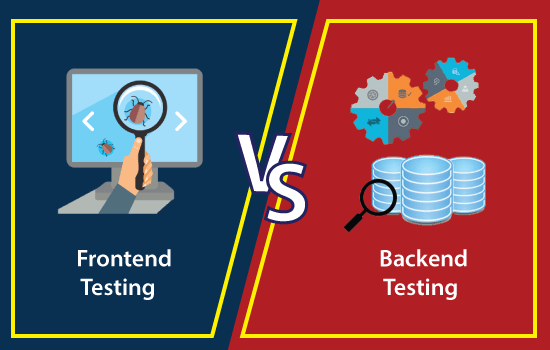
Difference between Frontend Testing and Backend Testing

In the below table, we have listed some of the important differences between frontend and backend testing.

Frontend Testing VS. Backend Testing
S.NOFrontend testingBackend testing
1.It is executed on the presentation layer of the 3-tier architecture.It is performed on the Application and Database layer of the 3-tier architecture.
2.It is always performed on the Graphical user interface (GUI).It is always implemented on the Application User Interface (AUI).
3.While performing the frontend testing, we do not require to store any information in a database.While performing the backend testing, we need to store the data in the database.
4.The understanding of requirements is necessary in order to execute the frontend testing.The understanding of the database is essential to execute the backend testing.
5.It will analyze the overall capabilities of the application.It will analyze the deadlock, data corruption, or data loss.
6.In GUI-based frontend testing, the resources are centrally achieved in cloud computing.In AUI based backend testing, the resources are executed on a collaboration pattern in Grid Computing.
7.Knowledge about the automation frameworks tools like QTP, Selenium is mandatory to perform the Frontend testing.Knowledge about SQL (Structured Query Language) language concepts is compulsory to implement the backend testing.
8.Frontend testing includes the verification of the application and checks the performance of application whether it is working according to the requirement.Backend testing execution makes sure that the data is continuing as there is no performance hit.
9.System testing and Acceptance Testing, unit testing, accessibility testing, and regression testing are performed under frontend testing.The database testing (API testing and SQL testing) are performed under backend testing.
10.Just like other types of testing frontend testing also contains some tools, which are as follows:LiveReloadKarmaGruntTo execute the backend testing, we have some tools available in the market, which are as follows:DTM Data GeneratorTurboDataData Factory
Difference

Testing Vs. Debugging

Testing vs Debugging

In the below table, we have listed some of the significant difference between testing and debugging:

S.NOTestingDebugging
1.It is the implementation of the software with the intent of identifying the defectsThe process of fixing and resolving the defects is known as debugging.
2.Testing can be performed either manually or with the help of some automation tools.The debugging process cannot be automated.
3.A group of test engineers executes testing, and sometimes it can be performed by the developers.Debugging is done by the developer or the programmer.
4.The test engineers perform manual and automated test cases on the application, and if they detect any bug or error, they can report back to the development team for fixing.The developers will find, evaluates, and removes the software errors.
5.Programming knowledge is not required to perform the testing process.Without having an understanding of the programming language, we cannot proceed with the debugging process.
6.Once the coding phase is done, we proceed with the testing process.After the implementation of the test case, we can start the Debugging process.
7.Software Testing includes two or more activities such as validation and verification of the software.Debugging tries to match indication with cause, hence leading to the error correction.
8.It is built on different testing levels such as Unit Testing, Integration Testing, System Testing, etc.It is built on different kinds of bugs because there is no such level of debugging is possible.
9.Software testing is the presentation of defects.It is a logical procedure.
10.Software testing is the vital phase of SDLC (Software Development Life Cycle).It is not a part of SDLC because it occurs as a subset of testing.
11.Some advantages of software testing are as below:It can easily understand by the new test engineers or the beginner.The test engineer can interact with software as a real end-user to check the usability and user interface issues.It is used to test dynamically altering GUI designs.Testing is a cost-effective and time-saving process.Software testing delivers a consistence software.It will help us to execute the root cause analysis that will enhance the software’s productivity.The testing process also helps detect and fixing the bugs before the software becomes active, which significantly reduces the risk of failure.Some advantages of debugging process are as follows:It supports the developer in minimizing the data.If the perform the debugging, we can report the error condition directly.During the debugging process, the developer can avoid complex one-use testing code thathelps the developer save time and energy.Debugging delivers maximum useful information of data structures and allows its informal understanding.
12.Software testing contains various type of testing methods, which are as follow:Black-box testingWhite-box testingGrey-box testingAnd some other type of testing types is as below:Unit testingIntegration TestingSystem TestingStress TestingPerformance TestingCompatibility TestingBeta TestingAlpha TestingSmoke TestingRegression TestingUser Acceptance Testing and so on.Debugging involves a various type of approaches, which are as follows:InductionBrute ForceDeduction
13.The testing team can subcontract to the outside team as well.Debugging cannot be subcontracted to an outside team because the inside development team only does it.
14.We can plan, design, and implement the testing process.As compared to the testing process, the debugging process cannot be forced.
Difference

Difference between SDLC and STLC

In the below table, we have listed some of the important difference between the Software Development Life Cycle and Software Testing Life Cycle:

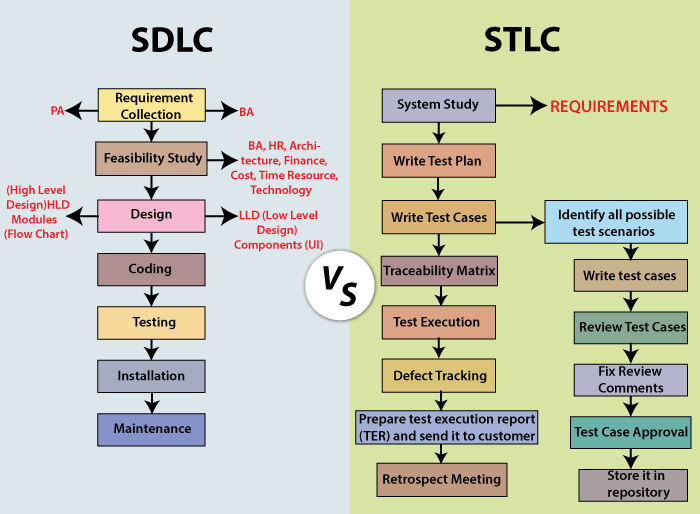
SDLC VS. STLC
S.NOComparison basisSDLCSTLC
1.ExplanationsIt is primarily connected to software development, which means that it is the procedure of developing a software application.It is mainly linked to software testing, which means that it is a software testing process that contains various phases of the testing process.
2.RepresentationSDLC stands for Software Development Life Cycle.STLC stands for Software Testing Life cycle.
3.ResourcesWhile performing the SDLC process, we needed a greater number of developers to complete the development process.The STLC process needed a smaller number of testers to complete the testing process.
4.Focuses onBesides the development phase, other phases like testing are also included.The STLC concentrate only on testing the software.
5.ObjectiveThe objective of the Software development life cycle is to complete the development of software successfully.The objective of the Software testing life cycle is to complete the testing of software successfully.
6.Help inThe SDLC will help us to develop a good quality software product.The STLC will helps to create the software bug-free.
7.Different phasesThe various phase includes in Software Development Life Cycle are as follows:Requirements CollectionFeasibility StudyDesignProgramming or CodingTestingInstallationMaintenanceThe various phase includes in Software Testing Life Cycle are as follows:Requirement collection or System studyTest PlanWrite test caseTraceability MatrixDefect TrackingTest Execution ReportRetrospect meeting
8.Requirement collection phaseIn the SDLC Requirement collection phase, the BA [Business Analyst] and PA [ Product Analyst] will collect the requirements and interpret business language into software language.In the Requirement Analysis phase of the STLC, the QA [ Quality Assurance]
team will study requirement documents and prepare the System Test Plan.
9.Designing phaseBased on the requirement understanding, the development team will develop the HLD [High-Level Design] and LLD [Low-Level Design] of the software.Generally, in STLC, the Test Architect or a Test Lead plan the test strategy.
And also finds the testing points.
10.Coding phaseIn the SDLC coding phase, the developer will start writing the code as per the designed document and beginning of building the software.In STLC, the QA team writes the test scenarios to authenticate the quality of the product.
11.Environment Set upAfter writing the code, the development team sets up a test environment with the developed product to validate the code.Based on the prerequisites, the Test team confirms the environment set up. And do one round of smoke testing to ensure that the environment is stable for the product and ready for testing.
12.Testing PhaseOnce the environment has been set, the test engineer will perform various types of testing, such as Unit, Integration, System, Retesting, Regression testing, and so on.
And the development team is also involving to fixing the bugs and report back to the tester.
Based on the test cases, the tester will do one round of integration and system testing.
While performing the testing, if they encounter with any bugs, it will be reported and fixed after the retesting.
13.Deployment/ Product Release phaseIn the SDLC deployment phase, when we received sign-off from various testing teams, the application is deployed or installed in a production environment for real end-users.In STLC, the Smoke and sanity testing are performed in the production environment as soon as the product is deployed.
And the testing team will prepare the test reports and matrix to analyze the product.
14.Maintenance PhaseOnce the product has been deployed, the development team includes support and release updates.To check maintenance code deployed, the QA team performs the regression suites.
15.PerformedThe SDLC phases are done before the STLC phases.The STLC phases are completed after SDLC phases.
Difference

Black Box Testing vs. White Box Testing vs. Grey…

IndexBlack Box TestingWhite Box TestingGrey Box Testing
1Knowledge of internal working structure (Code) is not required for this type of testing. Only GUI (Graphical User Interface) is required for test cases.Knowledge of internal working structure (Coding of software) is necessarily required for this type of testing.Partially Knowledge of the internal working structure is required.
2Black Box Testing is also known as functional testing, data-driven testing, and closed box testing.White Box Testing is also known as structural testing, clear box testing, code-based testing, and transparent testing.Grey Box Testing is also known as translucent testing as the tester has limited knowledge of coding.
3The approach towards testing includes trial techniques and error guessing method because tester does not need knowledge of internal coding of the software.White Box Testing is proceeded by verifying the system boundaries and data domains inherent in the software as there is no lack of internal coding knowledge.If the tester has knowledge of coding, then it is proceeded by validating data domains and internal system boundaries of the software.
4The testing space of tables for inputs (inputs to be used for creating test cases) is pretty huge and largest among all testing spaces.The testing space of tables for inputs (inputs to be used for creating test cases) is less as compared to Black Box testing.The testing space of tables for inputs (inputs to be used for creating test cases) is smaller than Black Box and White Box testing.
5It is very difficult to discover hidden errors of the software because errors can be due to internal working which is unknown for Black Box testing.It is simple to discover hidden errors because it can be due to internal working which is deeply explored in White Box testing.Difficult to discover the hidden error. Might be found in user level testing.
6It is not considered for algorithm testing.It is well suitable and recommended for algorithm testing.It is not considered for algorithm testing.
7Time consumption in Black Box testing depends upon the availability of the functional specifications.White Box testing takes a long time to design test cases due to lengthy code.Test cases designing can be done in a short time period.
8Tester, developer and the end user can be the part of testing.Only tester and developer can be a part of testing; the end user can not involve.Tester, developer and the end user can be the part of testing.
9It is the least time-consuming process among all the testing processes.The entire testing process is the most time consuming among all the testing processes.less time consuming than White Box testing.
10Resilience and security against viral attacks are covered under Black Box testing.Resilience and security against viral attacks are not covered under White Box testing.Resilience and security against viral attacks are not covered under Grey Box testing.
11The base of this testing is external expectations internal behavior is unknown.The base of this testing is coding which is responsible for internal working.Testing based on high-level database diagrams and dataflow diagrams.
12It is less exhaustive than White Box and Grey Box testing methods.It is most exhaustive between Black Box and Grey Box testing methods.Partly exhaustive; depends upon the type of test cases are coding based or GUI based.
Difference

Differences between the Alpha testing and Beta testing are:

Sr. No.Alpha TestingBeta Testing
1.Alpha testing performed by a team of highly skilled testers who are usually the internal employee of the organization.Beta testing performed by clients or end-users in a real-time environment, who is not an employee of the organization.
2.Alpha testing performed at the developer’s site; it always needs a testing environment or lab environment.Beta testing doesn’t need any lab environment or the testing environment; it is performed at a client’s location or end-user of the product.
3.Reliability or security testing not performed in-depth in alpha testing.Reliability, security, and robustness checked during beta testing.
4.Alpha testing involves both white box and black-box techniques.Beta testing uses only black-box testing.
5.Long execution cycles maybe require for alpha testing.Only a few weeks are required for the execution of beta testing.
6.Critical issues or fixes can be identified by developers immediately in alpha testing.Most of the issues or feedback is collecting from the beta testing will be implemented for the future versions of the product.
7.Alpha testing performed before the launch of the product into the market.At the time of software product marketing.
8.Alpha testing focuses on the product’s quality before going to beta testing.Beta testing concentrates on the quality of the product, but gathers users input on the product and ensures that the product is ready for real-time users.
9.Alpha testing performed nearly the end of the software development.Beta testing is a final test before shipping a product to the customers.
10.Alpha testing is conducting in the presence of developers and the absence of end-users.Beta testing reversed of alpha testing.
Difference

Difference between verification and validation testing

VerificationValidation
We check whether we are developing the right product or not.We check whether the developed product is right.
Verification is also known as static testing.Validation is also known as dynamic testing.
Verification includes different methods like Inspections, Reviews, and Walkthroughs.Validation includes testing like functional testing, system testing, integration, and User acceptance testing.
It is a process of checking the work-products (not the final product) of a development cycle to decide whether the product meets the specified requirements.It is a process of checking the software during or at the end of the development cycle to decide whether the software follow the specified business requirements.
Quality assurance comes under verification testing.Quality control comes under validation testing.
The execution of code does not happen in the verification testing.In validation testing, the execution of code happens.
In verification testing, we can find the bugs early in the development phase of the product.In the validation testing, we can find those bugs, which are not caught in the verification process.
Verification testing is executed by the Quality assurance team to make sure that the product is developed according to customers’ requirements.Validation testing is executed by the testing team to test the application.
Verification is done before the validation testing.After verification testing, validation testing takes place.
In this type of testing, we can verify that the inputs follow the outputs or not.In this type of testing, we can validate that the user accepts the product or not.
Difference

Difference between Load testing and Stress testing

Load testingStress testing
Load testing is used to find the performance of the application by testing the database, networks, and website servers.Stress testing is used to find the stability and response time of the given system.
Load testing helps the tester to identify the bottleneck and also able to tell the cause of bottlenecks before deployment to the production server.Stress testing helps the tester to check the system capacity when number of users increased suddenly before the system failure or crashed.
This type of testing reproduced the load on any application and software.It is used to figure out the robustness and stability of the application.
Load testing is used to test web-based and client-server types of application.Stress testing tests suddenly increased traffic of the application.
WebLOAD, LoadView, LoadRunner, SmartMeter.io, and LoadUI NG Pro are some of the load testing tools which help us to perform load testing on the applications.LoadRunner, JMeter, NeoLoad are some of the stress testing tools which help us to perform stress testing on the applications.
After doing the load testing on the application, the cost of failure may reduce, and the satisfaction of the customer is increased.After doing Stress testing on the application, if the system got to fail, it will recover quickly by finding the breaking point early and also see where the system got crashed.
For example: if we have one scenario where the load is 100 users using the application at a 2.5\sec of goal time.
And, the desired load is 100 user.
This scenario got passed because the desired load is equal to the load, which satisfies the load testing condition.
For example: if we took the same scenario where the actual load of 100 users which are using the application at a 2.5\sec of goal time.
When the desired load got increased by 200 users, and it will become 300. So now, 300 users using the application at 2.5\sec of goal time.
It will pass because the desired load is greater than the load according to the stress testing condition.
Difference

Smoke Testing vs Sanity Testing

The below comparison table enlightens the important differences between smoke testing and sanity testing in a quick manner:

S.No.Comparison BasisSmoke TestingSanity Testing
1Test coverageIt is a broad approach to testing where all parts of the application are tested.It is a narrow approach to testing where specific parts of the application are tested.
2MeasuresIt measures the stability of the system by performing rigorous testing.It measures the rationality of the system by performing rigorous testing.
3TechniqueSmoke testing can be either manual or automated.Sanity testing can be done without test cases or scripts.
4Executed byIt is performed by both testers and developers.It is performed by only testers.
5PurposeTesting is done without getting into deep but whenever needed tester has to go into deep.Sanity testing does not need to go into deep of the application.
6.Performed atSmoke testing is the first testing performed on the initial build.Sanity testing is performed when the build is comparatively stable.
7DocumentationSmoke testing is documented.Sanity testing is not documented.
8Used toIt is used to test End to End function of the application.It is used to test only modified or defect fixed functions.
9SubsetIt is considered as a subset of acceptance testing.It is considered as a subset of regression testing.