Automation for facebook Automation Testing

Selenium Assignment – 2

This is the second assignment in the series of real-time scenarios

Facebook Sign up:

Scenario:

  1. Open a Firefox browser.
  2. Navigate to “http://www.facebook.com/register”
  3. Verify that the page is redirected to “http://www.facebook.com/register”, by getting the current URL. use Assert.assertequals() in case you are familiar with TestNG or JUnit
  4. Verify that there is a “Create an account” section on the page.
  5. Fill in the text boxes: First Name, Surname, Mobile Number or email address, “Re-enter mobile number”, new password.
  6. Update the date of birth in the drop-down.
  7. Select gender.
  8. Click on “Create an account”.
  9. Verify that the account is created successfully.
package com.test.traveltest;

import java.util.concurrent.TimeUnit;

import org.openqa.selenium.By;
import org.openqa.selenium.WebDriver;
import org.openqa.selenium.firefox.FirefoxDriver;
import org.openqa.selenium.support.ui.Select;
import org.testng.Assert;
import org.testng.annotations.AfterClass;
import org.testng.annotations.BeforeClass;
import org.testng.annotations.BeforeTest;
import org.testng.annotations.Test;

public class Assignment2 {
	WebDriver driver;
	
	String fbUrl = "https://www.fb.com";
	String facebookUrl = "https://www.facebook.com/register";
	
	@BeforeClass
	public void invokeBrowser(){
		System.setProperty("webdriver.gecko.driver",
				"D:\\Selenium\\geckodriver-v0.31.0-win64\\geckodriver.exe");
		driver = new FirefoxDriver();

		driver.manage().window().maximize();

		driver.manage().timeouts().pageLoadTimeout(20, TimeUnit.SECONDS);

		driver.get(facebookUrl);
	}
	
	@Test
	public void verifyURL(){
		
		String urlFromBrowser = driver.getCurrentUrl();
		
		Assert.assertEquals(urlFromBrowser, facebookUrl, "No redirection happened");
		
		
	}
	
	
	@Test
	public void facebookSignUp() {
		
		driver.findElement(By.name("firstname")).sendKeys("Test");
		driver.findElement(By.name("lastname")).sendKeys("User");
		driver.findElement(By.name("reg_email__")).sendKeys("testuser@test.com");
		driver.findElement(By.name("reg_passwd__")).sendKeys("testPassword");
		
		Select selDate = new Select(driver.findElement(By.id("day")));
		Select selMonth = new Select(driver.findElement(By.id("month")));
		Select selYear = new Select(driver.findElement(By.id("year")));
		
		selDate.selectByVisibleText("21");
		selMonth.selectByVisibleText("Jun");
		selYear.selectByVisibleText("1989");
		
		driver.findElement(By.xpath("//input[@type='radio' and @value='2']")).click();
		
		driver.findElement(By.xpath("//button[text()='Sign Up']")).click();
	}
	
	
	@AfterClass
	public void closeBrowser(){
		
		driver.quit();
		
	}

}
Automation Testing

Selenium Assignment – 1

Here is the first assignment of this series of real-time scenarios, to practice Selenium from TestingBuddy. This assignment mainly focuses on how to invoke the Firefox browser, maximizing the window, navigate commands, etc.

This assignment is not considering proper framework development. Once you are good with frameworks, try this again considering framework.

Note: If you are very new to selenium, go through Environment setup for Selenium WebDriver and other articles before starting.

Scenario:

  1. Open the Firefox browser.
  2. Maximize the browser window.
  3. Navigate to “https://testingbuddy.co.in/?p=169”.
  4. Write a method to print PASS if the title of the page matches with “QA Automation Tools Trainings and Tutorials | QA Tech Hub” else FAIL. (If you are familiar with TestNG or JUnit use assert statement like assert.assertequals(actual, expected) to give a verdict of the pass or fail status.
  5. Navigate to the Facebook page (https://www.facebook.com)
  6. Navigate back to the QA Tech Hub website.
  7. Print the URL of the current page.
  8. Navigate forward.
  9. Reload the page.
  10. Close the Browser.

Try this code. Send us your feedback and if you have any questions, queries or comments.

package com.test.traveltest;

import java.util.concurrent.TimeUnit;

import org.openqa.selenium.firefox.FirefoxDriver;
import org.testng.Assert;
import org.testng.annotations.AfterTest;
import org.testng.annotations.BeforeTest;
import org.testng.annotations.Test;

public class Assignment1 {
	FirefoxDriver driver;
	String tbUrl = "https://testingbuddy.co.in/?p=169";
	String facebookUrl = "https://www.facebook.com";
	
	@BeforeTest
	public void invokeBrowser(){
		System.setProperty("webdriver.gecko.driver",
				"D:\\Selenium\\geckodriver-v0.31.0-win64\\geckodriver.exe");
		driver = new FirefoxDriver();

		driver.manage().window().maximize();

		driver.manage().timeouts().pageLoadTimeout(20, TimeUnit.SECONDS);

		driver.get(tbUrl);
	}
	

	@Test(priority=0)
	public void Test1() {


		String titleOfThePage = driver.getTitle();
		System.out.println(titleOfThePage);
		Assert.assertEquals(titleOfThePage, "Difference between abstract class and interface - Testingbuddy");

	}

	@Test(priority= 1)
	public void Test2() {
		driver.navigate().to(facebookUrl);

		String currentUrl = driver.getCurrentUrl();

		System.out.println("Current URL :: " + currentUrl);
		driver.navigate().back();

		driver.navigate().forward();

		driver.navigate().refresh();

                
	}
	
	@AfterTest
	public void testComplete() {
		driver.quit();
	}

}
Automation Testing

Interview Question for Automation Testing

Here are Automation Testing interview questions and answers for fresher and experienced candidates to get their dream job.


1) What is Automation testing?
Automation Testing uses an automation tool to execute test cases. The main goal of Automation Testing is to reduce the number of test cases to be run manually and not eliminate Manual Testing.


2) When will you automate a test?
Automation is preferred in the following cases

Repetitive Tasks.
Regression Testing
Smoke and Sanity Tests.
Test with multiple data sets.
Testing is not recommended for one-off test cases. Usually, the decision on which test cases to automate is based on the ROI (Return on Investment). The more times the automated test is executed, the better the ROI.

3) When will you not Automate testing?
One should not automate in the following cases

When the Application Under Test changes frequently
One-time test cases
Adhoc – Random Testing
Exploratory Testing
Usability tests that generally need manual intervention to check the test results
Test cases with detailed setup requirements to be done before each execution
Test cases that return unpredicted test results
Exclude unplanned test case


4) What are the steps involved in the Automation Process?
In the automation process, the steps involved are

Selecting the Test tool
Define the scope of automation
Planning, design, and development
Test execution
Maintenance


5) What are the points covered while planning the phase of automation?
During the planning phase of automation, things that must be taken into concern are:

Selection of the “right” Automation tool
Selection Automation Framework, if any.
List of in-scope and out-of-scope items for automation.
Test Environment Setup.
Preparing Gantt Chart of Project timelines for test script development & execution.
Identify Test Deliverables.

6) In what condition you can’t use automation testing for the Agile method?
Automation testing is not helpful for agile methods in the following conditions:

When user stories are constantly changing
When an exhaustive level of documentation is required in Agile.
Only suitable for regression tests during agile testing, like continuous integration.
Learn more about Agile Testing.

7) What is a test script?
A test script is a code to perform a set of instructions on an application. It is used to verify whether the application is functioning as per the software requirements.

When you run your script, it gives the test results as a pass or fails, which is determined by whether the application works as per the expectations.

8) How to select a good test automation tool?
Wide Test Environment support
Easy to use
Good debugging facility
Robust object identification
Record and Playback
Supports common programming languages for test script creation, for example, Java
Image testing abilities
Testing of database
Parameterization
Support multiple automation frameworks
Type of support is available for the tools like documentation, tutorials, training, etc
Cost and budget
Good reporting system


9) Can you tell me some good coding practices while automation?
Here are good automation practices:

Add appropriate comments to explain that coding part.
You should identify the reusable methods and write them in a separate file.
Must follow the language-specific coding conventions.
Store the test data in a separate file.
Run your scripts regularly.

10) What is a Modular Testing framework?
Modular Testing framework is built on the concept of abstraction. In this type of framework, the tester creates scripts for all the application modules under test, and then these scripts are combined in a hierarchical order to create test cases.

11) Data-Driven Testing framework
Data Driven Testing Image
In Data driven testing framework, the input and expected output data corresponding to the input data is stored in a file or database.

The automated script runs the same test steps for multiple data sets. It also allows you to run multiple test cases where only the input data differs, but the steps of execution remain the same.

12) What version control systems do you use?
We use GitHub. Version control helps you to track code changes. It controls the test script source code with a recorded history of changes to simplify the modification process. You may also revert to previous code versions if you make a mistake.

13) What are XPath Axes? Name some of them.
XPath is a syntax that manipulates XML (Extensible Markup Language) data. They help to locate nodes related to those on the tree. Some important XPath Axes are ancestor, child, namespace, parent, etc.

14) How can you speed up an auto test suite?
Applications that require UI testing that interacts with multiple elements can slow down the testing process. It’s better to create a simple test script that speeds up test execution.

15) Is documentation necessary in Automation Testing?
Documentation plays a vital role in Test Automation. You should document all the methods and procedures to ensure their repeatability. Test specifications, designs, code changes, test cases, automation plans, bug reports

16) What types of frameworks are used in software automation testing?
Four types of frameworks used are

Data-driven automation framework
Keyword-driven automation framework
Modular automation framework
Hybrid automation framework
Learn more about automation frameworks

17) Is it possible to achieve 100% automation?
No, it is not possible to automate everything. Achieving 100% automation is difficult as there are some scenarios where a registration page has a captcha or some test cases we don’t execute often. Moreover, automating these test cases will not add value to the automation or bring positive ROI.

18) What is the average number of test cases you have automated per day?
The answer depends on the length and complexity of the test scenario. Generally, a QA tester can automate 2-4 test scenarios daily when the complexity is limited. However, sometimes it might reduce to 1-2 when the complexity is high.

19) What is the scripting standard while performing automation testing?
While writing the scripts for automation, you must consider the following things:

Uniform naming convention.
3 lines of comments for every 10 lines of code.
Adequate indentation.
Robust error handling and recovery scenario.
Use of Frameworks wherever possible.
20) What are the most popular tools for automation testing?
The most popular test tool for automation testing are:

Selenium
UFT.
Rational Robot.
Here is a complete list of automation testing tools.

21) How can you measure the success of automation testing?
Following criteria can map the success of automation testing:

Defect Detection Ratio
Automation execution time and time savings to release the product
Reduction in Labour & other costs
22) Can you list out some disadvantages of manual testing?
Manual testing requires more time and more resources.
Inaccuracy
Executing the same test case repeatedly is error-prone and tedious.
It is impractical to do manual testing on very large and time-bound projects.
23) What are the differences between open-source tools, vendor tools, & in-house tools in automation testing?
Here are the differences between all:

Open-Source Tools: They are free tools with source code available on the internet. Example: Selenium
Vendor Tools: These testing tools are developed by companies, and you need to purchase their licenses. Example: Microfocus UFT.
In-house Tools: It is built by companies for their use.
24) What are the Prerequisites of Automation Testing?
A few important pre-requisites of Automation Testing are:

A stable build
Functionalities to be tested
Test cases for automated Testing
25) Can you do automation without a framework?
Frameworks are guidelines and not mandatory to create and execute automation scripts. So, yes, we can automate without a framework. Enhancing and maintaining test scripts would be easy if we created and followed a framework.

26) Tell me what you know about Selenium
Selenium is a free (open source) test automation suite. It is used to automate Web and Mobile environments. It consists of the following.

Selenium IDE (Browser Addon–Record and Playback Tool)
Selenium WebDriver
Selenium Grid (Distributed Testing)
Selenium supports scripting in languages like Java, C#, Python, Ruby, PHP, Perl, and JavaScript.
27) Tell me about QTP
QTP (Quick Test Professional) is now known as Microfocus UFT. It is a commercial automation tool and supports an extensive range of test environments: Web, Desktop, SAP, Delphi, Net, ActiveX, Flex, Java, Oracle, Mobile, PeopleSoft, PowerBuilder, Siebel, Stingray, and Visual Basic, amongst others.

The scripting language is VBScript. The tool gels well with ALM (Test Management Tool) and LoadRunner (Performance Testing Tool).

Salient features of QTP include Business Process Testing, keyword-driven framework, XML support, robust checkpoints, and test results.

28) What is SikuliX?
SikuliX is a tool that uses the “Visual Image Match” method to automate the graphical user interface. All the web elements in SikuliX should be taken as an image and stored inside the project.

SikuliX is comprised of

SikuliX Script
Visual Scripting API for Jython
SikuliX IDE
Practical uses of SikuliX are:

It can automate window-based applications and anything you see on screen without using internal API support.
It provides a simple API.
It can be easily linked with tools like Selenium.
Web applications can be automated.
SikuliX offers extensive support to automate flash objects.
It can work on any technology -.NET, Java.
29) Mention what the difference between Selenium and SikuliX is?
SikuliX Selenium
It provides extensive support to automate flash objects It cannot automate flash objects like video players or audio players.
It has a simple API It has got complicated API
It uses a visual match to find elements on the screen. So, we can automate anything we see on the screen. It uses CSS, ID, locators, and other selected to identify GUI elements
It can automate the web as well as windows application It can automate only web applications
30) What are the attributes of a good automation framework?
Here are some important attributes of a good automation framework:

Modular: It is a framework that should be adaptable to change. So that testers should be able to modify the scripts as per the environment.
Reusable: It should be reusable so that methods or utilities should be written in a common file accessible to all the scripts.
Consistent: It should be written in a consistent format.
Independent: The automation scripts should be written in such a way that they are independent of each other.
Integration: Automation Framework should be developed in such a way that it is easy to integrate with other applications.
31) What is Cross-Browser Testing?
It is a subset of browser automation testing that helps you ensure that the online application operates correctly across different browsers. Google Chrome, Mozilla Firefox, Microsoft Edge, Safari, etc.

Cross Browser Testing using Selenium WebDriver
The main aim of cross-browser testing is to check that your website or web app works correctly on different combinations of browsers and OS.

32) Which Testing can be done using the Selenium Framework?
You can use a Selenium framework for the following testing:

Load testing of web applications.
Regression testing of web applications.
Functional testing of web applications.
33) Is Automation testing white box testing or black box testing?
Automation testing is primarily black box testing.

34) What keyword is used to fetch the URL of the current page in Selenium?
Selenium WebDriver can help you find the current URL of a page with the getcurrentURL(). This method will find the URL of the open applications and result in a string.

35) Where will you maintain information like URL, login, and password?
URL, login, and password are important information used very often and change frequently. They should always be maintained in a separate file. If not done, then the automation tester must change it in every file with its reference.

36) What are the Extensions and Test Assets of QTP?
Some Important Test Assets and extensions of QTP are:

Results .xml
Recovery scenario .qrs
Test batch runner .mtb
Shared object repository .tsr
Local object repository .mtr
Test file .mts
Function library .qfl
37) What are the differences between manual testing and automation testing?
Here are some major differences between manual and automation testing:

Parameters Manual Testing Automation Testing
Time consumption More Less
STLC Follow manually Follows using tool
Cos Less expensive Expensive
Reliability Less Reliable Highly Reliable
Quality Low High
Skill Set Less skill set required High skill set is required.
38) What are the essential modules of an automation testing framework?
Here are some essential modules of the automation testing framework:

Test Assertion Tool: This testing tool will provide assert statements for assessing the expected values in the application under test. For Example, Junit, TestNG, Junit, etc.
Data Setup: Ensures that each test case takes the test data from the database, a file, or embedded in the test script.
Build Management Tool: The framework requires to be built and deployed to create test scripts.
Continuous integration tool: They are required to integrate and deploy the changes done in the framework at each iteration.
Reporting tool: It helps to generate a readable report after the test cases for a better view of the steps, failures, and results.
Logging tool: They help in better debugging of the error and bugs.
39) What is Cucumber?
Cucumber is an open-source (BDE) behavior-driven development tool. It is used tool for web-based application automation testing and supports languages like Java, Ruby, Ruby, Scala, Groovy, etc. Cucumber reads executable specifications written in plain text and tests the application under test for those specifications.

40) What is Test Complete?
TestComplete is an automated UI testing tool for desktop applications, web, mobile, etc. It offers the flexibility to record a test case on one browser and run it on multiple browsers, thus supporting cross browsers testing.

41) What is Cypress?
Cypress is an open-source testing framework. It is developed in JavaScript and has lately gained popularity because of its simplicity and extensive capabilities that enable browser testing, and user manuals should be thoroughly documented.

42) How can you handle the alert popups in Selenium WebDriver?
Selenium gives alerts if there are issues while you test. The pop-up interface allows you to handle the alert by switching the control to the pop-up, pressing the OK or Cancel buttons, and turning back to the source page screen.

String srcPage = driver.getWindowHandle();
Alert pop = driver.switchTo().alert(); // shift control to the alert pop-up.
Pop.accept(); // click k button.


43) What is a Hybrid Testing framework?
The Hybrid Testing framework develops the test cases from modular scripts by combining them in the modular testing framework.

44) Write steps to automate primary “login” functionality test cases for an application?
Here are the steps to automate basic login functionality:

Step 1) Understand the project requirement.

Step 2) Identify the Test scenarios

Step 3) Prepare a data input file with the data corresponding to each scenario

Step 4) Launch the tool from the program.

Step 5) Identify the username, password, and login buttons.

Step 6) Verify that the error message for negative scenarios is the same as the success message for positive test -scenarios.

These are the interview questions

Automation Testing

How to obtain the page title using Selenium webdriver?

We can obtain the page title using Selenium webdriver. The method getTitle() is used to obtain the present page title and then we can get the result in the console.

Syntax

t = driver.getTitle();

Let us find the title of the current page

package RK1.Building_a_selenium_project;

import java.util.concurrent.TimeUnit;

import org.openqa.selenium.WebDriver;
import org.openqa.selenium.chrome.ChromeDriver;

public class PageTitle {
	
	public static WebDriver wd;

	public static void main(String[] args) {
		// TODO Auto-generated method stub
		
		System.setProperty("webdriver.chrome.driver", "F:\\Work Environment\\MyProject\\chromedriver.exe");
		wd = new ChromeDriver();


		//application launch
	    wd.get("https://www.testingbuddy.co.in/");
	    wd.manage().timeouts().implicitlyWait(5, TimeUnit.SECONDS);
	    wd.manage().window().maximize();
	    
	    // getTitle() to obtain page title
	    String title = wd.getTitle();
	    
	    System.out.println(wd.getTitle());
	    System.out.println(wd.getCurrentUrl());
		
	    wd.quit();


	}

}
Automation Testing

How to obtain the tagname of the parent element…

We can obtain the tagname of the parent element in Selenium webdriver. First of all, we need to identify the child element with help of any of the locators like id, class, name, xpath, or CSS. Then we have to identify the parent with the findElement(By.xpath()) method.

We can identify the parent from the child, by localizing it with the child and then passing (parent::*) as a parameter to the findElement(By.xpath()). Next, to get the tagname of the parent, we have to use the getTagName() method.

Syntax

child.findElement(By.xpath("parent::*"));

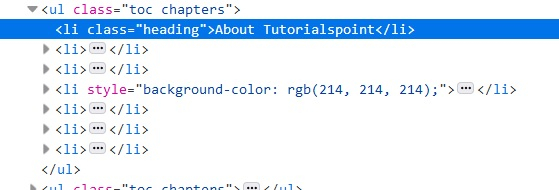
Let us identify tagname of the parent of child element li in the below html code −

The tagname of the parent should be ul.

Example

Code Implementation.

package RK1.Building_a_selenium_project;

import java.util.concurrent.TimeUnit;

import org.openqa.selenium.By;
import org.openqa.selenium.WebDriver;
import org.openqa.selenium.WebElement;
import org.openqa.selenium.chrome.ChromeDriver;

public class ParentTagName {

	public static void main(String[] args) {
		// TODO Auto-generated method stub
		
		System.setProperty("webdriver.chrome.driver", "F:\\Work Environment\\MyProject\\chromedriver.exe");
		WebDriver wd = new ChromeDriver();
		
		String url = "https://www.tutorialspoint.com/about/about_careers.htm";
		
		wd.get(url);
		wd.manage().window().maximize();
		wd.manage().timeouts().implicitlyWait(5, TimeUnit.SECONDS);
		
		// identify element
	      WebElement p=wd.findElement(By.xpath("//li[@class='heading']"));

	      //identify parent from child element
	      WebElement t= p.findElement(By.xpath("parent::*"));

	      //getTagName() to get parent element tag
	      System.out.println("Parent tagname: " + t.getTagName());
	      wd.close();

	}

}

Output

Starting ChromeDriver 104.0.5112.79 (3cf3e8c8a07d104b9e1260c910efb8f383285dc5-refs/branch-heads/5112@{#1307}) on port 16278
Only local connections are allowed.
Please see https://chromedriver.chromium.org/security-considerations for suggestions on keeping ChromeDriver safe.
ChromeDriver was started successfully.
Aug 19, 2022 3:05:02 PM org.openqa.selenium.remote.ProtocolHandshake createSession
INFO: Detected dialect: W3C
Parent tagname: ul
Automation Testing

How to scroll up/down a page using Actions class…

We can perform scroll up/down a page using Actions class in Selenium webdriver. First of all, we have to create an object of this Actions class and then apply the sendKeys method on it.

Now, to scroll down a page, we have to pass the parameter Keys.PAGE_DOWN to this method. To again scroll up a page, we have to pass the parameter Keys.PAGE_UP to the sendKeys method. Finally, we have to use the build and perform methods to actually perform this action.

Syntax

Actions a = new Actions(driver);
//scroll down a page
a.sendKeys(Keys.PAGE_DOWN).build().perform();
//scroll up a page
a.sendKeys(Keys.PAGE_UP).build().perform();
package RK1.Building_a_selenium_project;

import java.util.concurrent.TimeUnit;

import org.openqa.selenium.By;
import org.openqa.selenium.Keys;
import org.openqa.selenium.WebDriver;
import org.openqa.selenium.WebElement;
import org.openqa.selenium.chrome.ChromeDriver;
import org.openqa.selenium.interactions.Actions;

public class ScrollUpDownAction {

	public static void main(String[] args) {
		// TODO Auto-generated method stub
		
		System.setProperty("webdriver.chrome.driver", "F:\\Work Environment\\MyProject\\chromedriver.exe");
		WebDriver wd = new ChromeDriver();
		
		String url = "https://www.tutorialspoint.com/index.htm";
		
		wd.get(url);
		wd.manage().window().maximize();
		wd.manage().timeouts().implicitlyWait(5, TimeUnit.SECONDS);
		
		// object of Actions class to scroll up and down
	      Actions at = new Actions(wd);
	      at.sendKeys(Keys.PAGE_DOWN).build().perform();
	      //identify element on scroll down
	      WebElement l = wd.findElement(By.linkText("Careers"));
	      String strn = l.getText();
	      System.out.println("Text obtained by scrolling down is :"+strn);

	      at.sendKeys(Keys.PAGE_UP).build().perform();
	      //identify element on scroll up
	      WebElement m = wd.findElement(By.tagName("h1"));
	      String s = m.getText();
	      System.out.println("Text obtained by scrolling up is :"+s);
	      wd.quit();
		

	}

}
Automation Testing

How to automate drag & drop functionality using Selenium…

The drag and drop action is done with the help of a mouse. It happens when we drag and then place an element from one place to another. This is a common scenario when we try to move a file from one folder to another by simply drag and drop action.

Selenium uses the Actions class to perform the drag drop action. The dragAndDrop(source, destination) is a method under Actions class to do drag and drop operation. The method will first do a left click on the element, then continue the click to hold the source element. Next it shall move to the destination location and release the mouse.

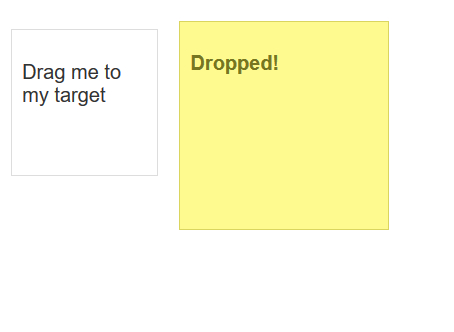
Our aim to drag and drop the first box to the second box.

Example

Code Implementation.

package RK1.Building_a_selenium_project;

import java.util.concurrent.TimeUnit;

import org.openqa.selenium.By;
import org.openqa.selenium.WebDriver;
import org.openqa.selenium.WebElement;
import org.openqa.selenium.chrome.ChromeDriver;
import org.openqa.selenium.interactions.Actions;

public class DragandDrop {

	public static void main(String[] args) {
		// TODO Auto-generated method stub
		System.setProperty("webdriver.chrome.driver", "F:\\Work Environment\\MyProject\\chromedriver.exe");
		WebDriver wd = new ChromeDriver();
		
		String url = "https://jqueryui.com/droppable/";
		
		wd.get(url);
		wd.manage().window().maximize();
		wd.manage().timeouts().implicitlyWait(5, TimeUnit.SECONDS);
		
	    wd.switchTo().frame(0);
	      // identify source and target element
	      WebElement s=wd.findElement(By.id("draggable"));
	      WebElement t=wd.findElement(By.id("droppable"));
	      //Actions class with dragAndDrop()
	      Actions act = new Actions(wd);
	      act.dragAndDrop(s, t).build().perform();
	      wd.quit();


	}

}
Automation Testing

TestNG Interview Questions

TestNG Interview Questions

A list of top frequently asked TestNG Interview Questions and answers are given below.

1) What is TestNG?

TestNG stands for “Testing Next Generation“. It is an` automation testing framework used for java programming language developed by Credric beust, and it comes after the inspiration from the JUnit framework. TestNG consists of all the features of JUnit framework but also contains some more additional features that make TestNG more powerful.


2) What are the advantages of TestNG?

The following are the advantages of TestNG are:

  • It generates the report in a proper format, which includes the following information:
    • Number of test cases executed.
    • Number of test cases passed.
    • Number of test cases failed.
    • Number of test cases skipped
  • Multiple test cases can be grouped easily by converting them into a testng.xml file, in which you can set the priority of each test case that determines which test case should be executed first.
  • With the help of TestNG, you can execute the multiple test cases on multiple browsers known as cross-browser testing.
  • The TestNG framework can be easily integrated with other tools such as Maven. Jenkins, etc.
  • Annotations used in a TestNG framework are easily understandable such as @BeforeMethod, @AfterMethod, @BeforeTest, @AfterTest.
  • WebDriver does not generate the reports while TestNG generates the reports in a readable format.
  • TestNG simplifies the way the test cases are coded. We do not have to write the static main method. The sequence of actions is maintained by the annotations only.
  • TestNG allows you to execute the test cases separately. For example, if you have six test cases, then one method is written for each test case. When we run the program, five methods are executed successfully, and the sixth method is failed. To remove the error, we need to run only the sixth method, and this can be possible only through TestNG. Because TestNG generates testng-failed.xml file in the test output folder, we will run only this xml file to execute the failed test case.

3) How to run the test script in TestNG?

You can run the test script in TestNG by clicking right click on the TestNG class, click on “Run As” and then select “TestNG test”.


4) What are the annotations used in the TestNG?

The following are the annotations used in the TestNG are:

  • Precondition annotations
    Precondition annotations are executed before the execution of test methods The Precondition annotations are @BeforeSuite, @BeforeClass, @BeforeTest, @BeforeMethod.
  • Test annotation
    Test annotation is specified before the definition of the test method. It is specified as @Test.
  • Postcondition annotations
    The postcondition annotations are executed after the execution of all the test methods. The postcondition annotation can be @AfterSuite, @AfterClass, @AfterTest, @AfterMethod.

5) What is the sequence of execution of all the annotations in TestNG?

The sequence of execution of all the annotations in TestNG is given below:

  • @BeforeSuite
  • @BeforeTest
  • @BeforeClass
  • @BeforeMethod
  • @Test
  • @AfterSuite
  • @AfterTest
  • @AfterClass
  • @AfterMethod

6) How to set the priorities in TestNG?

If we do not prioritize the test methods, then the test methods are selected alphabetically and executed. If we want the test methods to be executed in the sequence we want, then we need to provide the priority along with the @Test annotation.

Let’s understand through an example.

  1. package com.javatpoint;  
  2. import org.testng.annotations.Test;  
  3. public class Test_methods   
  4. {  
  5. @Test(priority=2)  
  6. public void test1()  
  7. {  
  8. System.out.println(“Test1”);  
  9. }  
  10. @Test(priority=1)  
  11. public void test2()  
  12. {  
  13. System.out.print(“Test2”);  
  14. }  
  15. }  

7) Define grouping in TestNG?

The group is an attribute in TestNG that allows you to execute the multiple test cases. For example, if we have 100 test cases of it_department and 10 test cases of hr_department, and if you want to run all the test cases of it_department together in a single suite, this can be possible only through the grouping.

Let’s understand through an example.

  1. package com.javatpoint;  
  2. import org.testng.annotations.Test;  
  3. public class Test_methods   
  4. {  
  5. @Test(groups=”it_department”)  
  6. public void java()  
  7. {  
  8. System.out.println(“I am a java developer”);  
  9. }  
  10. @Test(groups=”it_department”)  
  11. public void dot_net()  
  12. {  
  13. System.out.println(“I am a .Net developer”);  
  14. }  
  15. @Test(groups=”it_department”)  
  16. public void tester()  
  17. {  
  18. System.out.println(“I am a software tester”);  
  19. }  
  20. @Test (groups=”hr”)  
  21. public void hr()  
  22. {  
  23. System.out.print(“I am hr”);  
  24. }  
  25. }  

testng.xml

  1. ?xml version=”1.0″ encoding=”UTF-8″?>  
  2. <!DOCTYPE suite SYSTEM “http://testng.org/testng-1.0.dtd”>  
  3. <suite name=”Suite”>  
  4. <test name=”It Company”>  
  5. <groups>  
  6. <run>  
  7. <include name=”it_department”/>  
  8. </run>  
  9. </groups>  
  10. <classes>  
  11. <class name=”com.javatpoint.Test_methods”></class>  
  12. </classes>  
  13. </test>  
  14. </suite> <!– Suite –>  

8) What is dependency in TestNG?

When we want to run the test cases in a specific order, then we use the concept of dependency in TestNG.

Two types of dependency attributes used in TestNG:

  • dependsOnMethods
    The dependsOnMethods attribute tells the TestNG on which methods this test will be dependent on, so that those methods will be executed before this test method.

  1. package com.javatpoint;  
  2. import org.testng.annotations.Test;  
  3. public class Login   
  4. {  
  5.  @Test  
  6.  public void login()  
  7.  {  
  8.      System.out.println(“Login page”);  
  9.  }  
  10.  @Test(dependsOnMethods=”login”)  
  11.  public void home()  
  12.  {  
  13.      System.out.println(“Home page”);  
  14.        
  15.  }  
  16. }  
  • dependsOnGroups
    It is similar to the dependsOnMethods attribute. It allows the test methods to depend on the group of test methods. It executes the group of test methods before the dependent test method.

  1. package com.javatpoint;  
  2. import org.testng.annotations.Test;  
  3. public class Test_cases  
  4. {  
  5.  @Test(groups=”test”)  
  6.  public void testcase1()  
  7.  {  
  8.      System.out.println(“testcase1”);  
  9.  }  
  10.  @Test(groups=”test”)  
  11.  public void testcase2()  
  12.  {  
  13.      System.out.println(“testcase2”);  
  14.  }  
  15.  @Test(dependsOnGroups=”test”)  
  16.  public void testcase3()  
  17.  {  
  18.      System.out.println(“testcase3”);  
  19.  }  
  20. }  

9) What is timeOut in TestNG?

While running test cases, there can be a case when some test cases take much more time than expected. In such a case, we can mark the test case as a failed test case by using timeOut.

TimeOut in TestNG allows you to configure the time period to wait for a test to get completely executed. It can be configured in two levels:

  • At the suit level: It will be available to all the test methods.
  • At each method level: It will be available to a particular test method.

The timeOut attribute can be specified as shown below:

  1. @Test( timeOut = 700)  

The above @Test annotation tells that the test method will be given 700 ms to complete its execution otherwise it will be marked as a failed test case.


10) What is invocationCount in TestNG?

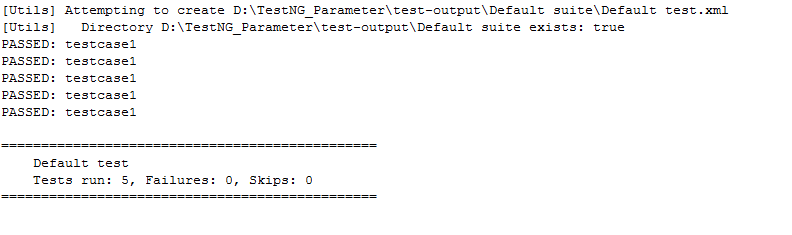
An invocationCount in TestNG is the number of times that we want to execute the same test.

  1. package com.javatpoint;  
  2. import org.testng.annotations.Test;  
  3. public class Test_cases  
  4. {  
  5.  @Test(invocationCount=5)  
  6.  public void testcase1()  
  7.  {  
  8.      System.out.println(“testcase1”);  
  9.  }  
  10.   
  11. }  

Output

TestNG Interview Questions

11) What is the importance of testng.xml file?

The testng.xml file is important because of the following reasons:

  • It defines the order of the execution of all the test cases.
  • It allows you to group the test cases and can be executed as per the requirements.
  • It executes the selected test cases.
  • In TestNG, listeners can be implemented at the suite level.
  • It allows you to integrate the TestNG framework with tools such as Jenkins.

12) How to pass the parameter in test case through testng.xml file?

We can also pass the value to test methods at runtime, we can achieve this by sending parameter values through the testng.xml file. We can use the @Parameter annotation:

  1. @Parameter(“param-name”);  

Let’s understand through an example:

  1. package com.javatpoint;  
  2. import org.openqa.selenium.By;  
  3. import org.openqa.selenium.WebDriver;  
  4. import org.openqa.selenium.chrome.ChromeDriver;  
  5. import org.testng.annotations.Test;  
  6. import org.testng.annotations.Parameters;  
  7. public class Web {  
  8. @Parameters({“text”})  
  9. @Test  
  10. public void search()  
  11. {  
  12. // TODO Auto-generated method stub  
  13. System.setProperty(“webdriver.chrome.driver”, “D:\\chromedriver.exe”);  
  14. WebDriver driver=new ChromeDriver();  
  15. driver.get(“http://www.google.com/”);  
  16. driver.findElement(By.name(“q”)).sendKeys(“javatpoint tutorial”);  
  17. }  
  18. }  

testng.xml file

  1. <?xml version=”1.0″ encoding=”UTF-8″?>  
  2. <!DOCTYPE suite SYSTEM “http://testng.org/testng-1.0.dtd”>  
  3. <suite name=”Suite”>  
  4. <test name=”It Company”>  
  5. <parameter name=”text” value=”javatpoint”/>  
  6. <classes>  
  7. <class name=”com.javatpoint.Web”></class>  
  8. </classes>  
  9. </test>  
  10. </suite> <!– Suite –>  

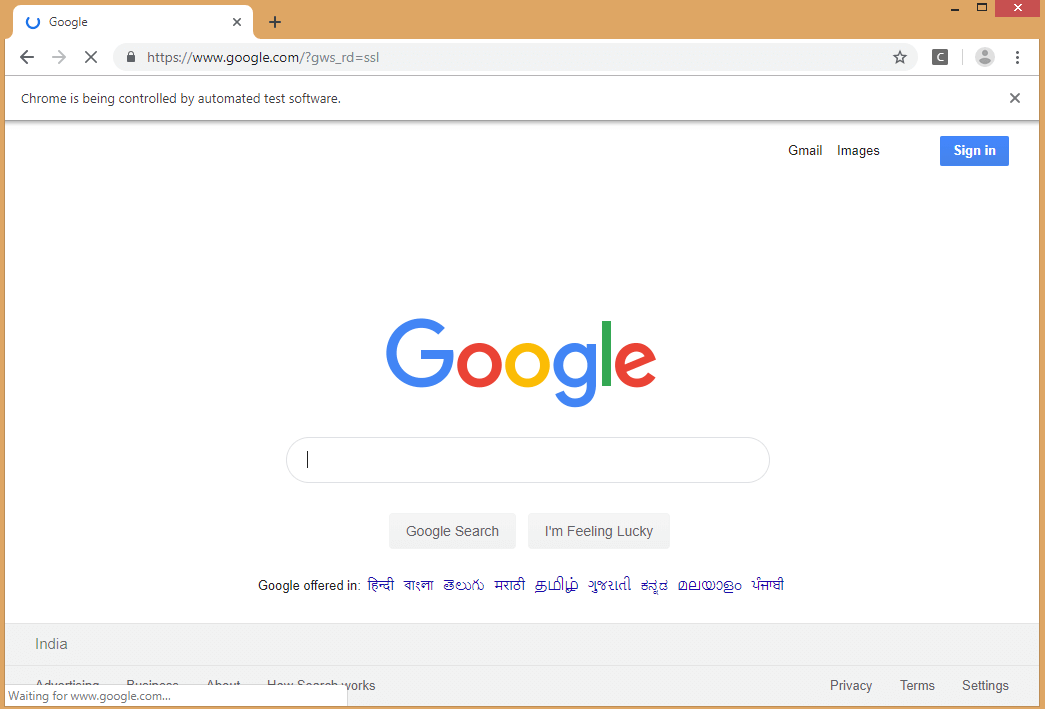
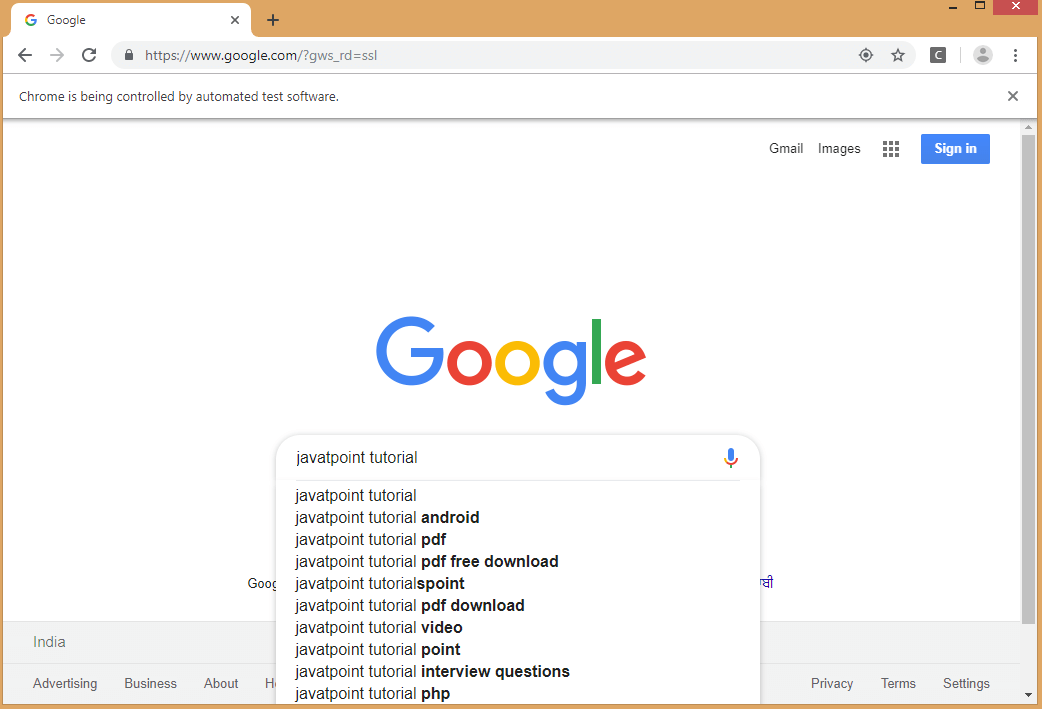
On running the testng.xml file, we get the output as shown below:

TestNG Interview Questions

13) How can we disable the test case from running?

We can disable the test case from running by using the enabled attribute. We can assign the false value to the enabled attribute, in this way we can disable the test case from running.

  1. package com.javatpoint;  
  2. import org.testng.annotations.Test;  
  3. public class Test_cases  
  4. {  
  5.  @Test(enabled=false)  
  6.  public void testcase1()  
  7.  {  
  8.      System.out.println(“testcase1”);  
  9.  }  
  10.  @Test   
  11.  public void testcase2()  
  12.  {  
  13.      System.out.println(“testcase2”);  
  14.  }  
  15.   
  16. }  

14) What is the difference between soft assertion and hard assertion?

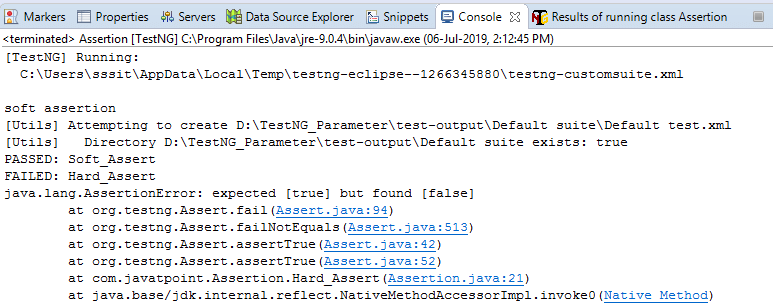
Soft Assertion: In case of Soft Assertion, if TestNG gets an error during @Test, it will throw an exception when an assertion fails and continues with the next statement after the assert statement.

Hard Assertion: In the case of Hard Assertion, if TestNG gets an error during @Test, it will throw an AssertException immediately when an assertion fails and stops execution after the assert statement.

Let’s understand through an example.

  1. package com.javatpoint;  
  2. import org.testng.Assert;  
  3. import org.testng.annotations.Test;  
  4. import org.testng.asserts.SoftAssert;  
  5. public class Assertion {  
  6. SoftAssert soft_assert=new SoftAssert();  
  7. @Test  
  8. public void Soft_Assert()  
  9. {  
  10.  soft_assert.assertTrue(false);  
  11.  System.out.println(“soft assertion”);  
  12. }  
  13. @Test  
  14. public void Hard_Assert()  
  15. {  
  16.  Assert.assertTrue(false);  
  17.  System.out.println(“hard assertion”);  
  18. }  
  19. }  

Output

TestNG Interview Questions

15) What is the use of @Listener annotation in TestNG?

TestNG provides different kinds of listeners which can perform different actions whenever the event is triggered. The most widely used listener in TestNG is ITestListener interface. The ITestListener interface contains methods such as onTestSuccess, onTestfailure, onTestSkipped, etc.

Following are the scenarios that can be made:

  • If the test case is failed, then what action should be performed by the listener.
  • If the test case is passed, then what action should be performed by the listener.
  • If the test case is skipped, then what action should be performed by the listener.

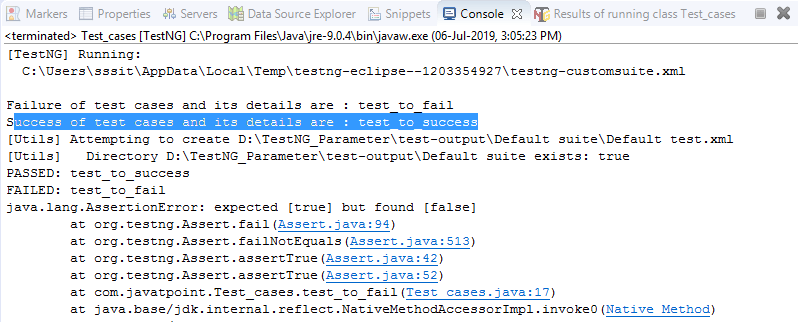
Let’s understand through an example.

  1. package com.javatpoint;  
  2. import org.testng.Assert;  
  3. import org.testng.annotations.Listeners;  
  4. import org.testng.annotations.Test;  
  5. @Listeners(com.javatpoint.Listener.class)  
  6. public class Test_cases  
  7. {  
  8.       
  9.  @Test  
  10.  public void test_to_success()  
  11.  {  
  12.      Assert.assertTrue(true);  
  13.  }  
  14.  @Test  
  15.  public void test_to_fail()  
  16.  {  
  17.      Assert.assertTrue(false);  
  18.  }  
  19.   
  20. }  

Listener.java

  1. package com.javatpoint;  
  2. import org.testng.ITestContext;  
  3. import org.testng.ITestListener;  
  4. import org.testng.ITestResult;  
  5. public class Listener implements ITestListener   
  6. {  
  7. @Override  
  8. public void onTestStart(ITestResult result) {  
  9. // TODO Auto-generated method stub  
  10. }  
  11. @Override  
  12. public void onTestSuccess(ITestResult result) {  
  13. // TODO Auto-generated method stub  
  14. System.out.println(“Success of test cases and its details are : “+result.getName());  
  15. }  
  16. @Override  
  17. public void onTestFailure(ITestResult result) {  
  18. // TODO Auto-generated method stub  
  19. System.out.println(“Failure of test cases and its details are : “+result.getName());  
  20. }  
  21. @Override  
  22. public void onTestSkipped(ITestResult result) {  
  23. // TODO Auto-generated method stub  
  24. System.out.println(“Skip of test cases and its details are : “+result.getName());  
  25. }  
  26. @Override  
  27. public void onTestFailedButWithinSuccessPercentage(ITestResult result) {  
  28. // TODO Auto-generated method stub  
  29. System.out.println(“Failure of test cases and its details are : “+result.getName());  
  30. }  
  31. @Override  
  32. public void onStart(ITestContext context) {  
  33. // TODO Auto-generated method stub  
  34. }  
  35. @Override  
  36. public void onFinish(ITestContext context) {  
  37. // TODO Auto-generated method stub  
  38. }}  

Output

TestNG Interview Questions

16) What is the use of @Factory annotation?

The @Factory annotation is useful when we want to run multiple test cases through a single test class. It is mainly used for the dynamic execution of test cases.

Let’s understand through an example.

testcase1.java

  1. package com.javatpoint;  
  2. import org.testng.annotations.Test;  
  3. public class Testcase1  
  4. {  
  5. @Test  
  6. public void test1()  
  7. {  
  8. System.out.println(“testcase 1”);  
  9. }  
  10. }  

testcase2.java

  1. package com.javatpoint;  
  2. import org.testng.annotations.Test;  
  3. public class Testcase2   
  4. {  
  5. @Test  
  6. public void test1()  
  7. {  
  8. System.out.println(“testcase 2”);  
  9. }  
  10. }  

Factory.java

  1. import org.testng.annotations.Factory;  
  2. public class Factory1  
  3. {  
  4. @Factory  
  5. public Object[] getTestClasses()  
  6. {  
  7. Object tests[]=new Object[2];  
  8. tests[0]=new Testcase1();  
  9. tests[1]=new Testcase2();  
  10. return tests;  
  11. }  
  12. }  

17) What is the difference between @Factory and @DataProvider annotation?

@DataProvider: It is annotation used by TestNG to execute the test method multiple numbers of times based on the data provided by the DataProvider.

@Factory: It is annotation used by the TestNG to execute the test methods present in the same test class using different instances of the respective class.

Agile Methodology

Agile Interview Questions

Agile Interview Questions

Here, we are giving the most relevant Agile Scrum interview questions with answers and hope these questions will help you while preparing for the agile scrum interview.

1) What is an agile or agile methodology?

Agile is an iterative approach of software development methodology using short iterations of 1 to 4 weeks. Due to the agile methodology, the development process is aligned to deliver the changing business requirement.


2) What are some quality strategies of agile?

Some quality strategies of agile are:

  • Iteration
  • Re-factoring
  • Dynamic code analysis
  • Short feedback cycles
  • Reviews and inspection
  • Standards and guidelines
  • Milestone reviews

3) What are an agile manifesto and its principle?

Agile manifesto uncovers the better way of developing software by doing it and helping others to do it. Agile has 4 manifesto and 12 principles which defines:

4

  • Individuals and interactions, i.e., self-motivating and self-organized should be encouraged.
  • Demonstrate the working software at regular intervals with comprehensive documentation.
  • Customers are collaboration over contact negotiation.
  • Responding to change over following a plan.

The principles of agile manifesto are-

  1. Customer Satisfaction: Manifesto provides high priority to satisfy the costumer’s requirements. Customer satisfaction is done through early and continuous delivery of valuable software.
  2. Welcome Change: Making change during software development is common and inevitable. Every changing requirement should be welcome, even in the late development phase. Agile process is used to increase the customer’s competitive advantage.
  3. Deliver the Working Software: Deliver the working software frequently, ranging from a few weeks to a few months with considering the shortest period.


4) Is there any disadvantage of the agile model (SDLC)?

Disadvantages of Agile SDLC:

  1. The development team should be highly professional and client-oriented.
  2. New requirement may be a conflict with the existing architecture.
  3. With further correction and change, there may be chances that the project will cross the expected time.
  4. There may be difficult to estimate the final coast of the project due to constant iteration.
  5. A defined requirement is absent.


5) What are the burn-up and burn-down chart?

The burn-up chart depicts the amount of work done in the project, whereas the burn-down chart illustrates the amount of work remaining in the project. Thus, the burn-up and burn-down are used to describe the progress report of the project.


6) What do you understand by Daily Stand-Up?

The daily stand-up is the day-to-day meeting (mostly in the morning) in which the whole team meets around 15 minutes to find the answer for the following three questions:

  • What was done yesterday?
  • What is your plan for today?
  • Is there any obstacle that restricts you to complete your task?

7) What do you understand about Scrum?

Scrum is a framework that helps agile teams work together to develop, deliver, and sustain the complex product in the shortest time. The product provides by scrum team in this shortest period is known as a sprint.


8) What are the different roles in Scrum?

There are three different roles in scrum. These are the Scrum MasterProduct OwnerAgile Development Team:

  • Scrum Master: The Scrum Master is a team leader and facility provider who help the team member to follow agile practices so that they can meet their commitments and customers requirements.
  • Product Owner: The Product Owner is one who runs the product from a business perspective. He defines the requirements and prioritizes their values.
  • Agile Development Team: Agile development team provides the judgment on the technical feasibilities or any dependencies.

9) What are the responsibilities of the Scrum Master?

The critical responsibility of Scrum Master includes:

  • Tracking and monitoring project development.
  • Understanding the user requirement correctly.
  • Work to obtain the project properly.
  • Improving the performance of the team.
  • Organized meetings and resolve issues.
  • Communicate and report to the customer and development team.

10) What are different ceremonies and their importance in Scrum?

To clearly express the Scrum planning, Scrum review, Scrum Daily stand up, and scrum retrospective is the purpose of the ceremony. The importance of these ceremonies is to use sprint as per your project.


11) What do you know about Scrum ban?

Scrum-ban is a Scrum and Kanban-based model for software development. This model is used in the project that needs continuous maintenance, various programming error, or some sudden changes.


12) What do you understand by the term agile testing?

The agile testing is the software testing process which is fully based on the principle of agile software development. It is the iterative approach where the user story becomes the output of the collaboration between the product owner and the development team.


13) What are the major principles of agile testing?

Some of the essential principles of agile testing are:

  • Customer satisfaction
  • Face to face communication
  • Sustainable development
  • Continuous feedback
  • Quick respond to changes
  • Successive improvement
  • Self-organized
  • Focus on essence
  • Error-free clean node
  • Collective work

14) What are the skills of a good agile tester?

The agile tester is one who implements the principle of agile software development principles for software testing. An excellent agile tester has the following skills:

  • He must be familiar with the principles and concept of agile.
  • He must be excellent communication skill to communicate with the team and the clients.
  • He can set the priority of a task according to customer requirements.
  • He should able to understand the customer requirement properly.
  • He should understand the project risk due to changing demand.

15) Name the agile frameworks.

Some of the agile frameworks are:

  • Scrum
  • Kanban
  • Feature Driven Development
  • Test Driven Development

16) Is it ever suggested to use waterfall over Scrum? If yes, explain when.

Yes, sometimes we use waterfall module over scrum. This is because when the client requirement is simple, small, well-defined, fully understood, predictable, and the subject does not change until the project complete.


17) Name some methodologies and development where you have used the agile model.

While answering this type of question, keep in mind to mention those methodologies from which you are familiar whit. Some of the methodologies where agile is used are:

  • Crystal methodologies
  • Lean software development
  • Dynamic development
  • Feature-driven development

18) What was the length of sprints/iterations in your project?

It is a common question for experienced people. The idea behind is to judge in which kind of environment you have worked? There will be follow up of the question that the length fixed in the beginning and never changed? Did you try with less than this length or more than that?


19) What is the difference between the agile & traditional way of working?

The traditional way of development is that which follow the sequential where design -> development -> testing etc. is performed whereas, in agile development, all of this is done in every iteration/sprint.


20) Why does Scrum encourage the use of automated testing for projects?

Due to faster possible delivery of the project, the Scrum development encourages to use automated (automated performance or automated regression) testing. While answering this question, you should explain some tools that you have used for automated testing.

Agile Methodology

JIRA Interview Questions

JIRA Interview Questions

A list of frequently asked JIRA Interview Questions and Answers are given below.

1) What is Jira?

  • Jira is a software testing tool developed by an Australian company, i.e., Atlassian.
  • It is a bug tracking tool used to track the issues and bugs related to your software and Mobile apps.
  • The name “Jira” comes from the Japanese word “Gojira”, which means Godzilla.
  • Jira is based on Agile methodology, and the current version of Jira is 6.

2) Explain Jira workflow.

Jira workflow is a set of activities performed to track and transition of an issue during the lifecycle of an issue where transition represents the link between the two statuses when an issue moves from one status to another status, and status determines the impact of the work on an issue filed by the tester.

The following are the phases that occur in a workflow:

  • TODO
  • In Progress
  • Done

The Jira workflow is known as defect lifecycle or bug lifecycle. The bug lifecycle consists of the following phases:

Open issue
When the issue is created by the tester, then the issue is assigned to the software developer, and they start working on it.

In Progress
This is the phase where the software developers start working on the issue.

Resolved issue
When the issue is resolved by the software developer and waiting for the verification by the software tester. If the verification is successful, then the issue is closed; otherwise, the issue gets reopened.

Reopened issue
If the verification is unsuccessful, then the issue is reopened and assigned to the software developer.

Close issue
If the verification of the fixed bug is successful, then the issue is closed by the tester.


3) Explain the report types generated by Jira.

Jira is a defect tracking tool that creates different reports which allow you to get an overview of the current status of a project.

JIRA report is a pictorial representation of the current status of a project in the form of charts, line-charts, bar-graphs, etc.

The following are the reports generated by Jira:

  • Average Age report
    The average report is a bar chart that displays the average age of unresolved issues for a project or filter.
  • The Average Age report is generated that depends upon the selected project, the type of issue selected in the filter, and time is chosen (hours/days/week/months).
  • Created vs. Resolved Issues report
  • The created vs. resolved issues report displays the difference chart between the number of issues created and the number of issues resolved within a timeframe.
  • Pie chart

The pie chart is used to display the issues grouped by a specified field, and the specified field can be priority, assignee, project, issue type, etc.

  • Recently created issue report

The recently created issue report represents a chart that shows the rate at which the new issues are created and how many issues are resolved during the same interval.

  • Resolution Time Report

The resolution time report determines the length of the time taken to resolve the issues for a project/filter.

  • Single Level Group by the Report

The single-level group by the report does not display the chart, but it categorizes the issues grouped by a particular field for a filter.

  • Time Since Issue Reports

The time since the issue report is a bar chart that shows the number of issues of a particular data field which was set on a given date. Suppose I choose the “Created” as a data field then the bar chart shows the number of issues which are created.


4) Explain the process of how an issue is generated in Jira.

The following are the steps to create an issue:

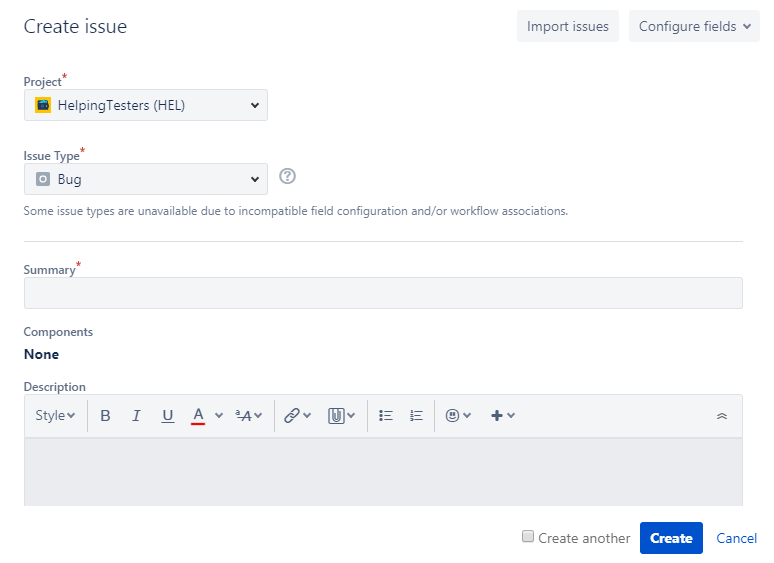
  • Click on the ‘+’ button to create an issue. On clicking on the ‘+’ button, the screen appears which is shown below:
JIRA Interview Questions

Project: It determines the name of the project.
Issue Type: It is a dropdown which displays the lists of all the issue types. You can choose either of them such as Bug, epic, task, sub task.
Summary: In the summary text field, you need to type the summary related to the issue that you are creating.
Priority: You can set the priority of an issue. It can be either medium, high, low.When you fill all the details related to your issue, click on the create button.


5) What is the way with which an issue can be shared with other users in Jira.

An issue can also be shared with other users in Jira. The following are the steps required to share an issue with other users in Jira:

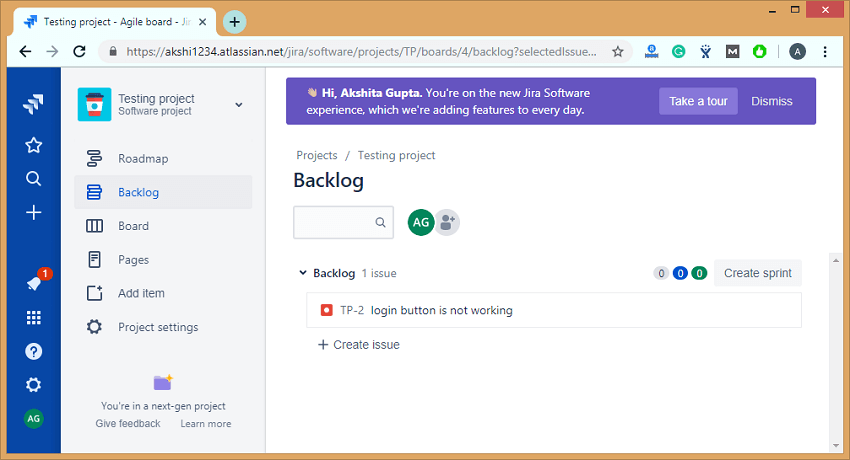
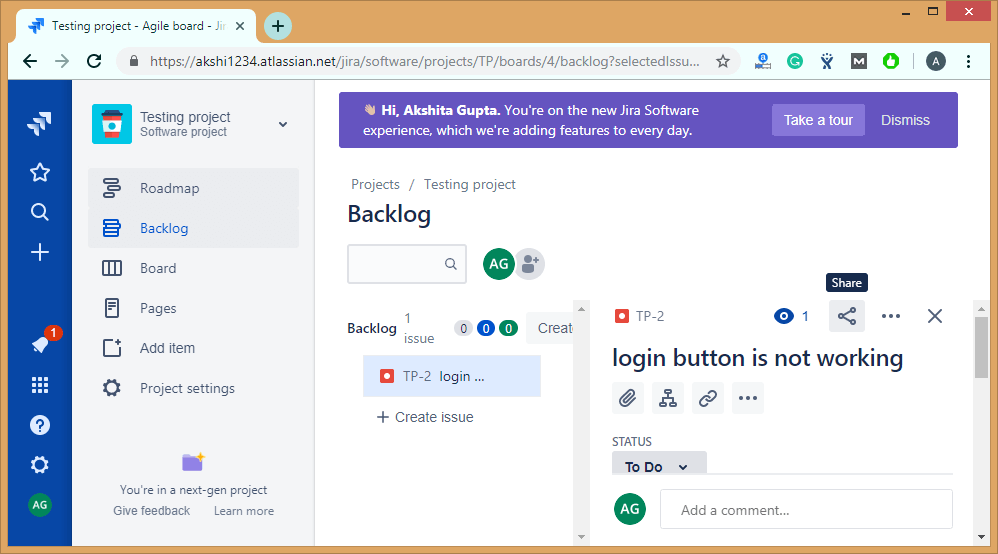
  • Suppose we have an issue that already exists in Jira, i.e., the login button is not working.
JIRA Interview Questions

The above screen shows that an issue “TP-2 login button is not working” has been created.

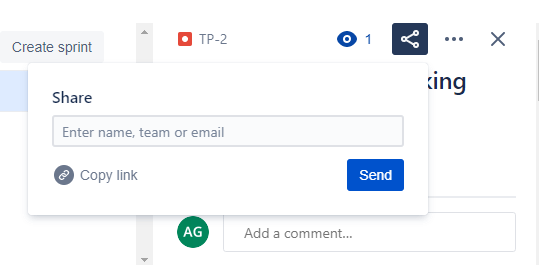
If we want to share the issue, then this can be achieved by using the share option available on the issue’s description, it can be shown in the below screenshot:

JIRA Interview Questions
  • Click on the share shown in the above screenshot. On clicking on the share, the screen appears shown below:
JIRA Interview Questions

The above screen shows that the dialog box appears on clicking on the share button, and in a dialog box, you need to enter the name, team or email address of a user to which you want to share your issue.


6) What is the purpose of Dashboard?

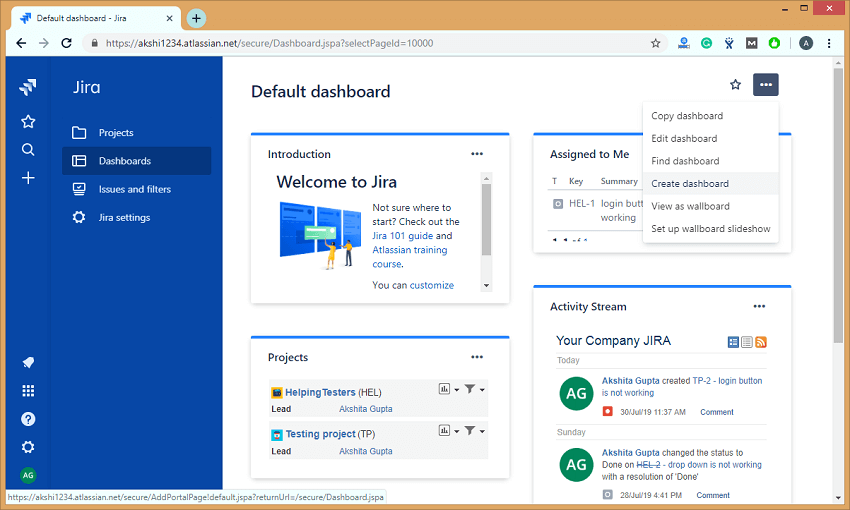
Once you log in to the Jira, Dashboard is the first display which you see. Jira admin can change the view of the dashboard, and also you can change the things that are visible on the dashboard.

A dashboard displays gadgets and apps that help the team members to track the project’s progress.

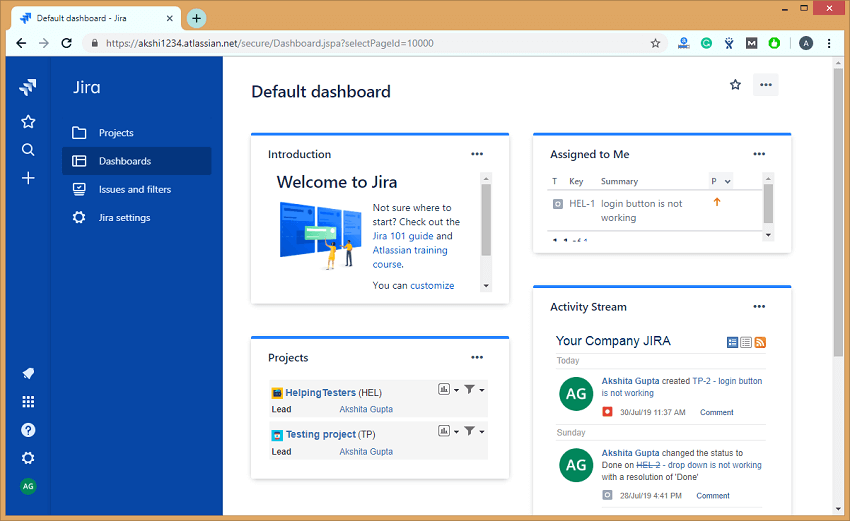
The dashboard contains useful information, such as the issues assigned to the logged-in user and the user’s activity stream.

On clicking on the Dashboard link appearing at the left side of the panel, the page appears which is shown below:

JIRA Interview Questions

Following are the steps required to create a Dashboard:

  • Click on the Dashboards appearing on the left side of the panel.
  • Click on the (…) button appearing at the top right corner of the page.
JIRA Interview Questions
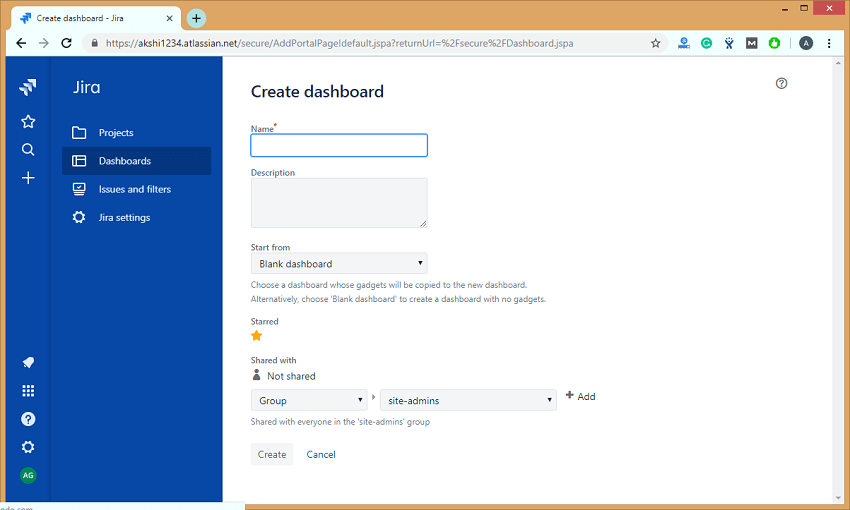
  • Click on the Create dashboard option appearing in the dropdown menu of (…) option.
  • On clicking on the Create dashboard, the screen appears, which is shown below:
JIRA Interview Questions

Where,

Name: It provides the descriptive name of a dashboard.

Description: It is not a mandatory field. In this field, you can add the description of a dashboard that you are creating.

Start from: Start from is a field that contains the dropdown in which you can choose either Blank Dashboard (It is a blank dashboard which does not contain any gadgets, but you can customize the dashboard according to your needs) or Default dashboard (It is pre-existing dashboard).

Shared with: Select the user and group to which you want to share your Dashboard.


7) What do you mean by scheduling an issue?

We can schedule the issues due dates which are used to track, review, and inform the team about due dates. Scheduling an issue is the most powerful feature that performs the fixed and relative date searches based on the due dates.

Advanced searches can also be performed by using the Jira Query Language.

You can schedule an issue by using the Date field. It can be done either by creating a new issue or editing an issue.


8) Explain how project details are listed in Jira?

Project in Jira comes with the main attributes, and these attributes can be a Name of the project, key, components, versions.

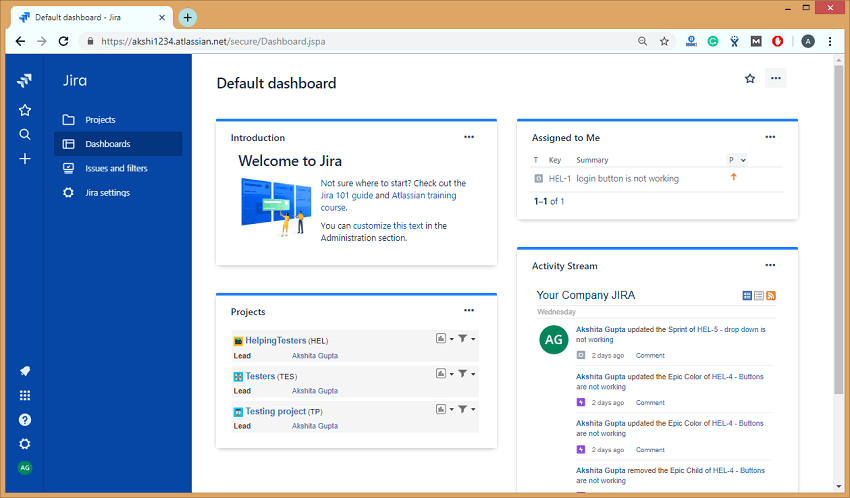
When you log in to the Jira, the first page that appears is the Dashboard.

JIRA Interview Questions

In the above screen, the right-hand side section represents the Activity Stream that contains all the activities which you performed on an issue or a project.


9) What are the issue types that are created and tracked via JIRA?

An issue in Jira can be a bug, feature, task, or any project work. Each Jira project comes with default issue types, and these issue types depend on the type of project that you are using.

There are three types of Jira projects:

  • Jira Core (business projects)
  • Jira Software (software projects)
  • Jira Service Desk (service desk projects)

Two types of issue exist in Jira Core:

  • Task
    The task is a work that needs to be completed.
  • Subtask
    Subtask is a piece of work which needs to be done to complete a task.

Five types of issue exist in Jira Software:

  • Bug
    A bug is a problem that exists in the functionality of a product.
  • Epic
    Epic is a big user story which needs to be broken into smaller stories.
  • Subtask
    Subtask is a piece of work which needs to be done to complete a task.
  • Task
    Task is a work that needs to be completed.
  • Story
    The story is the smallest unit of work which needs to be completed.

Eight types of issue exist in Jira Service Desk:

  • Change
    It requests a change in a current IT profile.
  • IT help
    It requests for help related to an IT-related problem.
  • Incident
    It is used for reporting an incident.
  • New feature
    It requests for adding a new feature or capability in software.
  • Problem
    It is used for investigating and reporting the root cause of multiple incidents.
  • Service request
    It is requesting for help from an internal or customer service desk.
  • Service request with approval
    It is used for requesting help that requires the approval of a manager or a board.
  • Support
    It is used for requesting help for customer support related issues.

10) How is sub-task created in Jira?

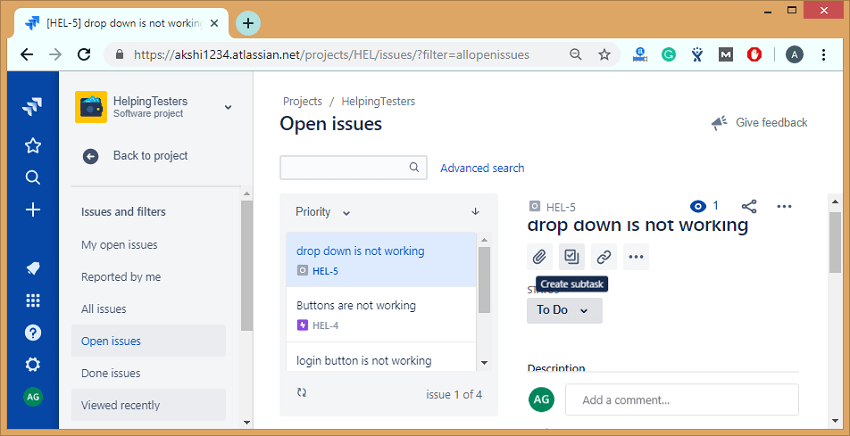
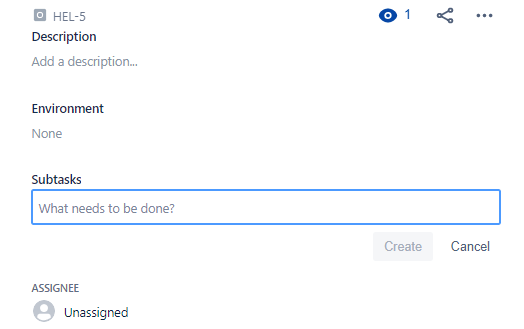
The following are the steps required to create a sub-task:

Step 1: Open the issue for which you want to create the sub-task.

Step 2: Click on theJIRA Interview Questionsicon to create a sub-task.

JIRA Interview Questions

Step 3: To create a sub task, you need to enter the following screen shown in the below screen:

JIRA Interview Questions

11) Explain the term cloning an issue?

  • Cloning an issue means creating the duplicate copy of an issue within the same project. The clone issue is basically a copy of the original issue which is pertaining to the same information stored in the original issue.
  • A clone issue is a separate entity from the original issue, but it can be linked to the original issue.
  • Operations applied to the original issue will not have any effect on the clone issue

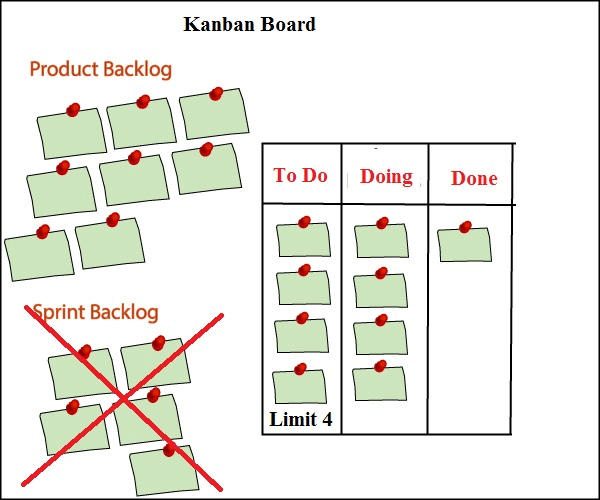
12) Explain Kanban board?

Kanban board is a tool used to visualize the work and limit work-in-progress.

As in scrum, we are taking some activities from a product backlog and adding in a sprint backlog. However, in Kanban, we do not have sprint, so sprint backlog activity will not be performed. This is the main difference between scrum and Kanban that scrum contains sprint backlog while kanban does not contain the sprint backlog.

Kanban board consists of three states:

  • To Do
  • Doing
  • Done
JIRA Interview Questions

When the project is started, then we put all the activities from the product backlog to the ‘To Do‘ state. When the team member starts working on an activity, then that activity is put in a ‘Doing‘ state, and when the activity is placed, then it is placed in a ‘Done‘ state.

From the Kanban board, one can get to know which activities have been done and which activities they need to develop.

One of the most important features of the Kanban board is a Limit option. In the above figure, we have eight tasks in a product backlog and limit set is 4. At a time, it will take only four tasks in a ‘To Do‘ state, and if any of the tasks come in a ‘Doing‘ state, then one more task from the product backlog will be placed in a ‘To Do‘ state. In this way, we can set the limit depending on the availability of the resources.


13) Explain Scrum board?

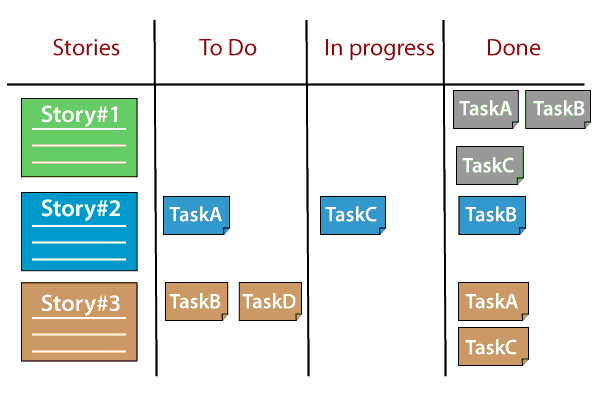
The Scrum Board is a physical board on which the user stories present in the current sprint backlog are displayed.

JIRA Interview Questions

Scrum board is divided into columns such as:

  • Stories: This column contains all the user stories available in the current sprint backlog.
  • TODO: This state contains the subtasks of the stories on which the work has not started on.
  • In Progress: This state contains all the tasks on which the work has started.
  • Done: This state contains all the tasks at which all the work have been completed.

14) List all the reports generated by Kanban projects in Jira?

The two types of reports are generated by Kanban projects:

  • Control chart

The control chart is a useful chart which helps in measuring the team’s performance. The control chart displays the average cycle time of your team over a period of time. The control chart plots the following issues on the chart:

  • Any issues which are outside the standard deviation known as outliers.
  • It displays the average time taken to complete the tasks.
  • It also displays the team’s rolling average.

It displays the average cycle time of your product, version, or a sprint.

It helps you to identify whether the data from the current sprint determines the future performance of a product, i.e., the less variance in the cycle time means that median or mean can determine the future performance.

How to create a Control flow chart

The following are the steps to create a control flow chart:

  • Go to the Jira official website.
  • Click on the project on which you are working.
  • Click on the Reports appearing at the left side of the panel.
  • Select the Control chart.
  • Cumulative flow diagram
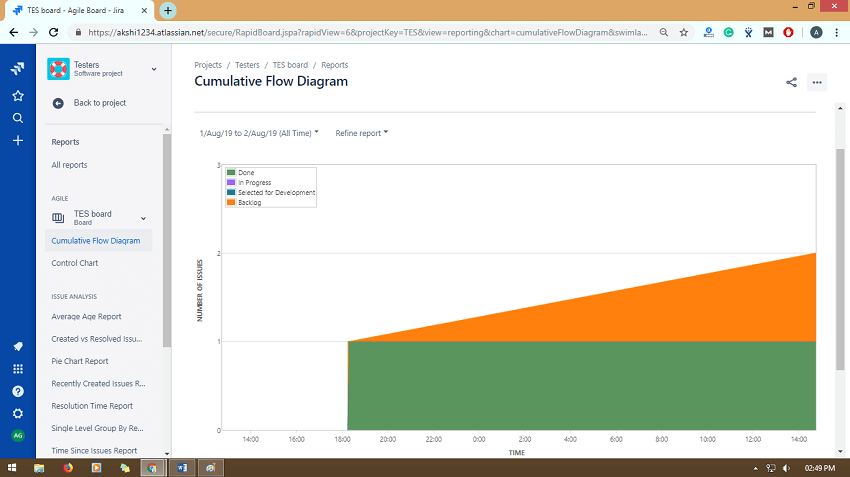
    • Cumulative flow diagram is a kanban tool that allows the team to view the effort and project’s effort.
    • Cumulative diagram consists of two axis, i.e., X-axis and Y-axis where X-axis (horizontal axis) represents the time taken to complete a task and Y-axis (vertical axis) represents the number of issues or tasks.
    • The size of the area represents the number of work items currently involved in each state for the selected time period.
JIRA Interview Questions

Features of Cumulative flow diagram:

  • Monitor how WIP builds over time
    If the line goes up, which means that WIP (Work In Progress) goes up means that the team is working on more tasks than handling them at a time. Increase in WIP results in increased cycle times, and this reduces team efficiency. So, it is important to keep the line straight.
  • Observe how much team delivers
    With the help of CFD diagram, we can keep track of all the tasks which have been delivered by the team. If the bottom line of the CFD diagram represents the Done state, then the slope of the line between any two points would represent the average throughput between these two points.
  • Spot bottlenecks instantly
    Cumulative diagram determines the exact amount of work in each state of your project. If one or more areas represent that WIP is expanding, then CFD spots this bottleneck instantly.
  • Measure your past performance
    The horizontal difference between the top line and bottom line at any point provides the process approximate average cycle time. The comparison between the exact cycle time and approximate cycle time provides you a good understanding of the process performance.
  • Monitor your process health
    Cumulative flow diagram is used to evaluate the efficiency of a process and also helps to identify the problems to achieve a stable and healthy process. The average arrival rate must be close to the average throughput to achieve a stable system, i.e., Average Cycle Time= Average Throughput.

15) List all the reports generated by scrum projects in Jira?

The following are the reports generated by scrum projects in Jira are:

  • Burndown chart
    Burndown chart displays the amount of work that has been completed in a sprint, and the total work is remaining.
    Burndown chart is useful as it provides the following observations:
    • If the team finishes its work early, which means that the team is not committed with sufficient work during sprint planning.
    • If the team does not finish its work within a sprint means that they are committed with a lot of work.
    • If the burndown chart drops sharply which means that the work has not been estimated properly.

How to create a Burndown chart

The following are the steps required to create a Burndown chart:

  • Go the Jira official website.
  • Click on the project on which you are working.
  • Click on the Reports appearing at the left side of the panel.
  • Select the Burndown chart.
  • Burnup chart

Burnup chart is the visual representation of a sprint’s completed work compared with the total scope. It is used to identify problems such as deviation from the planned project path.

How to create a Burnup chart

The following are the steps required to create a Burnup chart:

  • Go to the Jira official website.
  • Click on the project on which you are working.
  • Click on the Reports appearing at the left side of the panel.
  • Select the Burnup chart from the Reports dropdown.

The following are the important points related to the Burnup chart:

  • The vertical axis represents the amount of work, and it can be measured in different ways such as Story points, issues count, or estimates while the horizontal axis represents the time in days.
  • The distance between the lines on a chart is the remaining amount of work. When all the issues have been completed, the lines will meet.

16) Define a component in Jira?

Components are the subdivisions of a project and used to group the issues within a project into smaller parts.


17) How to delete a component in Jira?

Follow the below steps to delete a component in Jira:

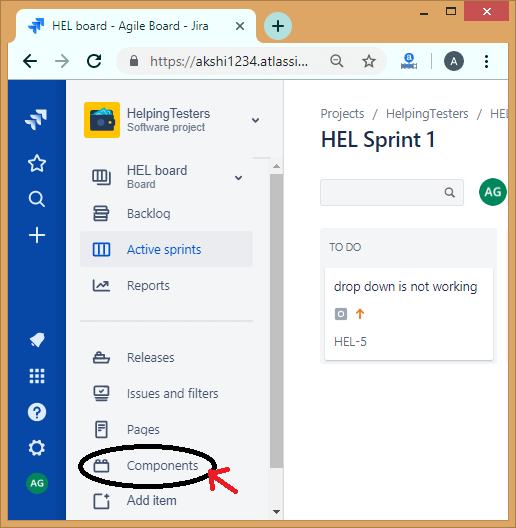
  • Click on the Components appearing at the left side of the panel.
JIRA Interview Questions
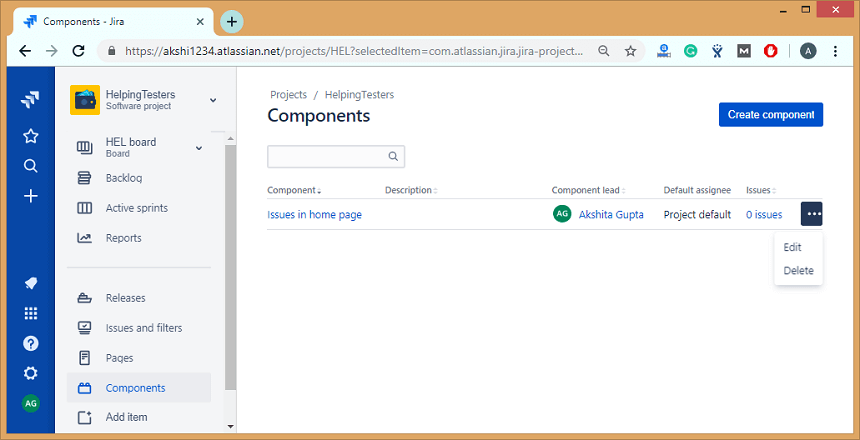
  • Click on the ‘…’ icon then the dropdown appears which shows two options, i.e., Edit and Delete.
JIRA Interview Questions
  • Click on the Delete option to delete the component from the Jira project.

18) What is a validator in Jira?

Validators check whether the input provided by the user is valid before the transition is performed.

If the validation fails, then the issue does not proceed to the destination status of the transition.

List of validators:

  • Required Field validators
    Required field validator ensures that the field is mandatory or required. The required fields marked with the red asterisk (*) on every transition screen. In Jira, we can use the field configuration to make the fields compulsory or mandatory. With the help of Required field validators, it is possible to make the fields mandatory that makes the overall process more user-friendly.
  • Regular Expression Validator
    Regular Expression Validator checks whether the input given to a certain field matches the regular expression that you define. It is a quite powerful validator, and its use cases vary from the simple validation, the user should provide the exact value that matches the use cases.

Parameters

Regular expression: It is an expression that the input field should match.

User define message: This message appears when the validation fails.

  • Validator to compare to two fields with each other
    This validator is used to compare the two fields. To use this validator, both the fields must be of the same type.
    The following is the list of operators that this validator supports:
    • > ( greater than)
    • < ( less than)
    • >= (greater than or equal to)
    • <= (less than or equal to)
    • = (equal)
    • != (Not equal)
  • Date Compare Validator
    The Date Compare Validator is used to compare the date field with the fixed date. It can support the date field types such as Date fields (Date and date with time). We can use a fixed date in the format yyyy-mm-dd hh:mm or a pattern (days, months, weeks, years).
  • Field Compare Validator
    Field Compare Validator is a validator that compares the fields against the fixed values.
    It supports the following operators:
    • = (equal to)
    • != (Not equal to)
    • > (greater than)
    • >= (greater than or equal to)
    • < (less than)
    • <= (less than or equal to)
    • IN
    • NOT IN
    • CONTAINS
    It supports the comparison types such as String, Number, and Option ID. For example, we have a field named “Salary”, and its field value should not be less than 30,000, it can be represented as:
    Salary>=30,000;
  • User in Project Role Validator
    This validator ensures that the currently logged in user should be in a certain specific role. For example, only a user with a role “Developer” can do this workflow transition.
  • User in Group Validator
    It validates that the current user should be in any of the specified groups.
  • User in Field Validator
    This validator ensures that the current logged in user is set on a certain field.
    There are two options available in this validator:
    • You can set the status of a current user in a field.
    • He/she is not set in this field.
  • Parent Issue Type Validator
    This validator is used to prevent creating the subtasks from the parent issue. We can achieve this by adding a validator to the “Create” transition from the subtask. You can also provide a custom error message for this type of validator.
  • Parent Issue Status Validator
    This validator ensures that the parent issue should have some specific status. The status can be Reopened, In Progress, Backlog, etc.
  • Field Values Changed Validator
    Field Values Changed Validator ensures that the user can change the value in a field.
  • JQL Validator
    JQL (Jira Query Language) evaluates the current issue against the JQL query. In JQL Validator, the query is generated automatically related to the issue.
    JQL Validator provides some additional fields:
    Validator message: It is used to define the custom error message if the validation fails. If you do not want to provide the custom error message, then you can leave this field as empty.
    Run as user: In this field, we can define a technical user with which the JQL expression will be evaluated. If you leave this field as empty, then the current user will be considered for this transition.

19) What is an issue collector?

An issue collector allows you to gather the feedback form of any website in the form of Jira issues. It can also collect the issues who do not have a Jira account.


20) What are the differences between Scrum board and Kanban board?

The following are the differences between Scrum board and kanban board:

ScrumKanban
PlanningIt has fixed planning. It focussed on planning. It starts with the sprint planning and ends with the sprint review, retrospective. The daily meeting is held so that the team knows the next steps, priorities, and the learnings from the previous steps.It has no fixed planning, and no daily meetings are conducted. In Kanban, changes can occur at any time, i.e., frequent changes occur.
TimelineIn scrum, we work on the sprint that has the fixed-time duration means that after some fixed-time, we are delivering something to the client.Kanban does not have the concept of a sprint, so it has no fixed timeline for delivering the product to the client.
Task estimatesDuring sprint planning, it is decided that how many activities are to be pulled from the product backlog and add in a sprint backlog. For example, if the sprint is for two weeks, then the number of activities are selected in such a way that they can be completed within the sprint, i.e., in two weeks.It does not estimate the task.
Scrum MasterIn scrum methodology, we have one scrum master who handles the team and conducts the meeting on a daily basis.In Kanban methodology, we do not have any scrum master. It’s the responsibility of each individual to deliver a valuable product.
SuitabilityThis methodology is suitable for large-sized projects as large-sized projects can be divided into multiple sprints.It is mainly suitable for small-sized projects.
Constant changesIn Scrum, constant changes can be adapted easily in shorter sprints.If any major change occurs, then Kanban methodology gets failed.
CostIn Scrum, the task is estimated, i.e., a fixed number of activities are taken in a sprint, so the total cost of the project is minimal.In Kanban, the task is not estimated, so the total cost of the project is not accurate.
Roles and responsibilitiesIn Scrum, a specific role is assigned to the team members by the Scrum Master while the product owner tells the objectives of the product on which team members have to work.No predefined role is assigned to the team members. It’s the responsibility of all the team members to work in collaboration to deliver a valuable product.
Measurement of ProductivityThe productivity is measured by using cycle time or the time taken to complete the whole project from start to the end.Productivity is measured by using velocity through sprints.
Release MethodologySmall release after the end of each sprint.It provides continuous delivery.