Manual Testing

Test Cases for Footer

Here are some manual test cases for the footer:

Test Case 1: Verify that the footer is displayed correctly

Steps:

  1. Open the website.
  2. Navigate to the homepage.
  3. Scroll down to the bottom of the page.
  4. Verify that the footer is displayed.
  5. Check that the footer contains the following elements:
    • Website logo or name
    • Navigation links to important pages
    • Social media links
    • Copyright information
    • Contact information

Expected Result:

  • The footer is displayed correctly with all the required elements.

Test Case 2: Verify that the website logo or name links to the homepage

Steps:

  1. Open the website.
  2. Navigate to the homepage.
  3. Scroll down to the bottom of the page.
  4. Click on the website logo or name in the footer.

Expected Result:

  • The user is redirected to the homepage.

Test Case 3: Verify that the navigation links are clickable and lead to the correct pages

Steps:

  1. Open the website.
  2. Navigate to the homepage.
  3. Scroll down to the bottom of the page.
  4. Click on each navigation link in the footer.
  5. Verify that the user is redirected to the correct page for each link.

Expected Result:

  • Each navigation link is clickable and leads to the correct page.

Test Case 4: Verify that the social media links are functional

Steps:

  1. Open the website.
  2. Navigate to the homepage.
  3. Scroll down to the bottom of the page.
  4. Click on each social media link in the footer.
  5. Verify that the user is redirected to the correct social media page.

Expected Result:

  • The social media links are functional and redirect the user to the correct social media page.

Test Case 5: Verify that the copyright information is displayed correctly

Steps:

  1. Open the website.
  2. Navigate to the homepage.
  3. Scroll down to the bottom of the page.
  4. Check that the copyright information is displayed in the footer.

Expected Result:

  • The copyright information is displayed correctly in the footer.

Test Case 6: Verify that the contact information is displayed correctly

Steps:

  1. Open the website.
  2. Navigate to the homepage.
  3. Scroll down to the bottom of the page.
  4. Check that the contact information is displayed in the footer.
  5. Click on the contact information in the footer.
  6. Verify that the user is redirected to the correct page.

Expected Result:

  • The contact information is displayed correctly in the footer, and the user is redirected to the correct page when clicking on it.

Test Case 7: Verify that the footer is responsive

Steps:

  1. Open the website.
  2. Resize the browser window to different screen sizes.
  3. Verify that the footer elements adjust to fit the screen size.
  4. Check that the footer remains functional on smaller screen sizes.

Expected Result:

  • The footer elements adjust to fit the screen size, and the footer remains functional on smaller screen sizes.

Test Case 8: Verify that the footer is accessible

Steps:

  1. Open the website using a screen reader.
  2. Navigate to the homepage.
  3. Scroll down to the bottom of the page.
  4. Verify that the screen reader can read out all the footer elements.
  5. Check that the footer is accessible using only the keyboard.

Expected Result:

  • The footer is accessible using a screen reader and keyboard-only navigation.
Manual Testing

Test Case for Registration in Gmail.

Test Case Title: Registration in Gmail

Test Case ID: RG001

Precondition:

  • The user has a web browser and a stable internet connection.
  • The user has not registered with the email address being used for this test case.

Test Steps:

  1. Open a web browser and navigate to the Gmail registration page.
  2. Enter a valid first name and last name in the respective fields.
  3. Enter a valid email address that has not been used for a Gmail account before.
  4. Create a strong password that meets the password requirements provided on the page.
  5. Confirm the password by re-entering it in the provided field.
  6. Click on the “Next” button to proceed to the next step.
  7. Enter the user’s birthdate in the respective fields.
  8. Select the user’s gender from the options provided.
  9. Optionally, enter a phone number and/or recovery email address.
  10. Complete the captcha challenge.
  11. Read and agree to the terms of service and privacy policy by checking the corresponding checkboxes.
  12. Click on the “Create Account” button to submit the registration form.

Expected Results:

  • The user should be able to complete the registration process without encountering any errors or issues.
  • After submitting the registration form, the user should be redirected to the Gmail welcome page or the Gmail inbox.
  • The user should receive an email confirmation of the new Gmail account creation.
  • The new account should be accessible from any device by logging in with the email address and password provided during registration.
Manual Testing

Test Case for Login into Gmail

Test Case Name: Login to Gmail

Test Objective: To verify that a user can successfully login to their Gmail account

Test Steps:

  1. Open a web browser and navigate to the Gmail login page (https://www.gmail.com)
  2. Enter a valid email address in the “Email or phone” field
  3. Click on the “Next” button
  4. Enter a valid password in the “Password” field
  5. Click on the “Next” button
  6. Verify that the user is successfully logged in to their Gmail account and the inbox is displayed

Test Data:

  • Valid email address
  • Valid password

Expected Result:

  • The user should be able to successfully login to their Gmail account and the inbox should be displayed.

Test Environment:

  • Web browser (Google Chrome, Mozilla Firefox, etc.)
  • Internet connection

Test Execution:

  • Execute the above test steps in the test environment using the provided test data.
  • Observe the behavior of the application during the test execution.
  • If the actual result matches the expected result, mark the test case as “Pass”. If the actual result does not match the expected result, mark the test case as “Fail”.
  • Record any defects or issues encountered during the test execution in a defect tracking system.
Manual Testing

Test Cases for Login Page

Here are some manual test cases for a login page:

  1. Verify that the correct URL opens the login page
  2. Check that the correct page title is displayed for the login page
  3. Validate that the login form is displayed and contains the expected fields (e.g. username, password)
  4. Verify that the input fields only accept valid characters (e.g. no special characters in the username field)
  5. Test the error message displayed when an incorrect username or password is entered
  6. Verify that the password field is masked (e.g. ***)
  7. Check that the user is redirected to the appropriate page after successful login
  8. Validate that the “Remember Me” checkbox works as expected
  9. Verify that the user can reset their password if they have forgotten it
  10. Test the login functionality with both valid and invalid input on both mobile and desktop devices.
  11. Check that the login page is secure (e.g. SSL enabled)
  12. Validate that the login functionality works on different browsers (e.g. Chrome, Firefox, Safari, etc.)
  13. Verify that the user is logged out after a set amount of time (e.g. 30 minutes)
  14. Test the login functionality with different types of accounts (e.g. new accounts, existing accounts, etc.)
  15. Validate that the correct error message is displayed when an invalid username or password is entered multiple times
  16. Verify that the login functionality works even if the network is slow or unstable
  17. Test the login functionality with different types of input (e.g. long username, special characters, etc.)
  18. Validate that the user is redirected to the appropriate page after logging out
  19. Verify that the user can still access the login page after logging out
  20. Check that the login page is accessible for users with disabilities (e.g. screen readers).
Manual Testing

Test Cases for OTP verification

Here are some manual test cases for OTP verification:

  1. Verify that OTP is sent to the correct phone number or email
  2. Check if the OTP format is correct (e.g. 6 digits)
  3. Validate that OTP is sent within the expected time frame
  4. Verify that OTP can be resend if it has expired or not received
  5. Test that the OTP is only valid for a set amount of time
  6. Check that the same OTP cannot be used multiple times
  7. Validate that the OTP input field only accepts numbers
  8. Verify that an error message is displayed if an incorrect OTP is entered
  9. Test that the OTP verification process is successful after entering a valid OTP
  10. Verify that the user is redirected to the appropriate page after successful OTP verification.
  11. Test the OTP functionality with both valid and invalid input on both mobile and desktop devices
  12. Verify that OTP functionality works on different browsers (e.g. Chrome, Firefox, Safari, etc.)
  13. Check that the OTP is sent even if the network is slow or unstable
  14. Test the OTP functionality with different types of accounts (e.g. new accounts, existing accounts, etc.)
  15. Verify that the OTP is sent even if the user is not logged in
  16. Check that the OTP is not sent if the user has opted out of receiving OTP
  17. Validate that the OTP verification process works after multiple attempts
  18. Test the OTP functionality with different types of phone numbers (e.g. landline, mobile, international, etc.)
  19. Verify that the OTP is sent only to the user who requested it
  20. Check that the OTP verification process fails if the user enters the incorrect OTP multiple times.
ChatGPT

What is bug matrix?

Bug Matrix is a term that refers to a measurement of the number and severity of defects or bugs in a software system. It is a way to track and measure the quality of the software. A bug matrix typically includes information such as the number of bugs found, the number of bugs fixed, and the number of bugs remaining. It can also include information about the severity of the bugs, such as whether they are critical, major, or minor defects.

A bug matrix can also be used to track the progress of the testing and development process, as well as to identify areas of the software that need improvement. For example, if a high number of bugs are found in a particular area of the software, it may indicate that more testing or development resources are needed in that area.

Bug matrix can be used to track the performance of individual testers, development teams or even vendors. The matrix can be used to understand the test coverage, defects found, the time to fix them, etc. It can also be used to identify patterns in defects, such as which types of defects are most common or which areas of the software are most likely to have bugs. This information can then be used to improve the overall quality of the software.

ChatGPT

What is Test Management?

Test management is the process of planning, organizing, and managing the testing activities in a software development project. It is the overall process of coordinating all the testing resources, including test cases, test data, test environments, test scripts, and test results. Test management includes the following key activities:

  1. Test Planning: This involves creating a test plan that outlines the objectives, scope, and schedule for the testing activities. The test plan also includes details of the testing approach, resources, and risks.
  2. Test Design: This involves creating test cases, test scripts, and test data that will be used to test the software. Test design also includes identifying the test environments and tools that will be used for testing.
  3. Test Execution: This involves running the tests and recording the results. Test execution also includes monitoring the progress of testing and reporting any issues that arise.
  4. Test Reporting: This involves documenting and communicating the results of testing, including the number of tests run, the number of defects found, and the overall quality of the software.
  5. Test Closure: This involves finalizing all testing activities and archiving the test artifacts for future reference.

Test management is an essential part of the software development life cycle, and it helps ensure that the software is of high quality and meets the requirements of the customer. It also helps to identify and resolve defects early in the development process, which can save time and money in the long run.

Software Testing Manual Testing

Software Testing in Brief

How does software testing work?

Software testing is the process of evaluating and verifying that a software product or application does what it is supposed to do. The benefits of testing include preventing bugs, reducing development costs and improving performance.


Types of software testing

There are many different types of software tests, each with specific objectives and strategies:

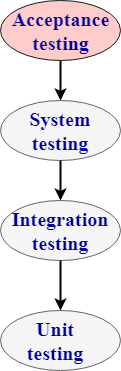
  • Acceptance testing: Verifying whether the whole system works as intended.
  • Integration testing: Ensuring that software components or functions operate together.
  • Unit testing: Validating that each software unit performs as expected. A unit is the smallest testable component of an application.
  • Functional testing: Checking functions by emulating business scenarios, based on functional requirements. Black-box testing is a common way to verify functions.
  • Performance testing: Testing how the software performs under different workloads. Load testing, for example, is used to evaluate performance under real-life load conditions.
  • Regression testing: Checking whether new features break or degrade functionality. Sanity testing can be used to verify menus, functions and commands at the surface level, when there is no time for a full regression test.
  • Stress testing: Testing how much strain the system can take before it fails. Considered to be a type of non-functional testing.
  • Usability testing: Validating how well a customer can use a system or web application to complete a task.

In each case, validating base requirements is a critical assessment. Just as important, exploratory testing helps a tester or testing team uncover hard-to-predict scenarios and situations that can lead to software errors.

Even a simple application can be subject to a large number and variety of tests. A test management plan helps to prioritize which types of testing provide the most value – given available time and resources. Testing effectiveness is optimized by running the fewest number of tests to find the largest number of defects.


History of software testing

Software testing arrived alongside the development of software, which had its beginnings just after the second world war. Computer scientist Tom Kilburn is credited with writing the first piece of software, which debuted on June 21, 1948, at the University of Manchester in England. It performed mathematical calculations using machine code instructions.

Debugging was the main testing method at the time and remained so for the next two decades. By the 1980s, development teams looked beyond isolating and fixing software bugs to testing applications in real-world settings. It set the stage for a broader view of testing, which encompassed a quality assurance process that was part of the software development life cycle.

“In the 1990s, there was a transition from testing to a more comprehensive process called quality assurance, which covers the entire software development cycle and affects the processes of planning, design, creation and execution of test cases, support for existing test cases and test environments,” says Alexander Yaroshko in his post on the uTest developer site.

“Testing had reached a qualitatively new level, which led to the further development of methodologies, the emergence of powerful tools for managing the testing process and test automation tools.” 1

Continuous testing

Software testing has traditionally been separated from the rest of development. It is often conducted later in the software development life cycle after the product build or execution stage. A tester may only have a small window to test the code – sometimes just before the application goes to market. If defects are found, there may be little time for recoding or retesting. It is not uncommon to release software on time, but with bugs and fixes needed. Or a testing team may fix errors but miss a release date.

Doing test activities earlier in the cycle helps keep the testing effort at the forefront rather than as an afterthought to development. Earlier software tests also mean that defects are less expensive to resolve.

Many development teams now use a methodology known as continuous testing. It is part of a DevOps approach – where development and operations collaborate over the entire product life cycle. The aim is to accelerate software delivery while balancing cost, quality and risk. With this testing technique, teams don’t need to wait for the software to be built before testing starts. They can run tests much earlier in the cycle to discover defects sooner, when they are easier to fix.


Why software testing is important

Few can argue against the need for quality control when developing software. Late delivery or software defects can damage a brand’s reputation — leading to frustrated and lost customers. In extreme cases, a bug or defect can degrade interconnected systems or cause serious malfunctions.

Consider Nissan having to recall over 1 million cars due to a software defect in the airbag sensor detectors. Or a software bug that caused the failure of a USD 1.2 billion military satellite launch.  The numbers speak for themselves. Software failures in the US cost the economy USD 1.1 trillion in assets in 2016. What’s more, they impacted 4.4 billion customers. 

Though testing itself costs money, companies can save millions per year in development and support if they have a good testing technique and QA processes in place. Early software testing uncovers problems before a product goes to market. The sooner development teams receive test feedback, the sooner they can address issues such as:

  • Architectural flaws
  • Poor design decisions
  • Invalid or incorrect functionality
  • Security vulnerabilities
  • Scalability issues

When development leaves ample room for testing, it improves software reliability and high-quality applications are delivered with few errors. A system that meets or even exceeds customer expectations leads to potentially more sales and greater market share.


Software testing best practices

Software testing follows a common process. Tasks or steps include defining the test environment, developing test cases, writing scripts, analyzing test results and submitting defect reports.

Testing can be time-consuming. Manual testing or ad-hoc testing may be enough for small builds. However, for larger systems, tools are frequently used to automate tasks. Automated testing helps teams implement different scenarios, test differentiators (such as moving components into a cloud environment), and quickly get feedback on what works and what doesn’t.

A good testing approach encompasses the application programming interface (API), user interface and system levels. As well, the more tests that are automated, and run early, the better. Some teams build in-house test automation tools. However, vendor solutions offer features that can streamline key test management tasks such as:

  • Continuous testing: Project teams test each build as it becomes available. This type of software testing relies on test automation that is integrated with the deployment process. It enables software to be validated in realistic test environments earlier in the process – improving design and reducing risks.
  • Configuration management: Organizations centrally maintain test assets and track what software builds to test. Teams gain access to assets such as code, requirements, design documents, models, test scripts and test results. Good systems include user authentication and audit trails to help teams meet compliance requirements with minimal administrative effort.
  • Service virtualization: Testing environments may not be available, especially early in code development. Service virtualization simulates the services and systems that are missing or not yet completed, enabling teams to reduce dependencies and test sooner. They can reuse, deploy and change a configuration to test different scenarios without having to modify the original environment.
  • Defect or bug tracking : Monitoring defects is important to both testing and development teams for measuring and improving quality. Automated tools allow teams to track defects, measure their scope and impact, and uncover related issues.
  • Metrics and reporting: Reporting and analytics enable team members to share status, goals and test results. Advanced tools integrate project metrics and present results in a dashboard. Teams quickly see the overall health of a project and can monitor relationships between test, development and other project elements.
Manual Testing

Software Testing Interview Questions

Software Testing Interview Questions

A list of mostly asked software testing interview questions or QTP interview questions and answers are given below.

1) What is the PDCA cycle and where testing fits in?

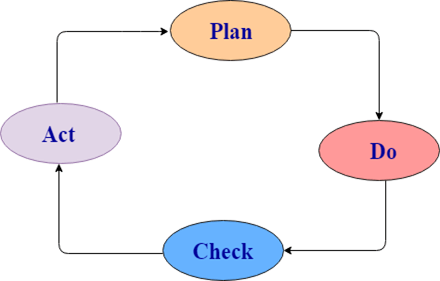
There are four steps in a normal software development process. In short, these steps are referred to as PDCA.

Software Testing Interview Questions

PDCA stands for Plan, Do, Check, Act.

  • Plan: It defines the goal and the plan for achieving that goal.
  • Do/ Execute: It depends on the plan strategy decided during the planning stage. It is done according to this phase.
  • Check: This is the testing part of the software development phase. It is used to ensure that we are moving according to plan and getting the desired result.
  • Act: This step is used to solve if there any issue has occurred during the check cycle. It takes appropriate action accordingly and revises the plan again.

The developers do the “planning and building” of the project while testers do the “check” part of the project.


2) What is the difference between the white box, black box, and gray box testing?

Black box Testing: The strategy of black box testing is based on requirements and specification. It requires no need of knowledge of internal path, structure or implementation of the software being tested.

White box Testing: White box testing is based on internal paths, code structure, and implementation of the software being tested. It requires a full and detail programming skill.

Gray box Testing: This is another type of testing in which we look into the box which is being tested, It is done only to understand how it has been implemented. After that, we close the box and use the black box testing.

Following are the differences among white box, black box, and gray box testing are:

Black box testingGray box testingWhite box testing
Black box testing does not need the implementation knowledge of a program.Gray box testing knows the limited knowledge of an internal program.In white box testing, implementation details of a program are fully required.
It has a low granularity.It has a medium granularity.It has a high granularity.
It is also known as opaque box testing, closed box testing, input-output testing, data-driven testing, behavioral testing and functional testing.It is also known as translucent testing.It is also known as glass box testing, clear box testing.
It is a user acceptance testing, i.e., it is done by end users.It is also a user acceptance testing.Testers and programmers mainly do it.
Test cases are made by the functional specifications as internal details are not known.Test cases are made by the internal details of a program.Test cases are made by the internal details of a program.

3)What are the advantages of designing tests early in the life cycle?

Designing tests early in the life cycle prevent defects from being in the main code.


4) What are the types of defects?

There are three types of defects: Wrong, missing, and extra.

Wrong: These defects are occurred due to requirements have been implemented incorrectly.

Missing: It is used to specify the missing things, i.e., a specification was not implemented, or the requirement of the customer was not appropriately noted.

Extra: This is an extra facility incorporated into the product that was not given by the end customer. It is always a variance from the specification but may be an attribute that was desired by the customer. However, it is considered as a defect because of the variance from the user requirements.


5) What is exploratory testing?

Simultaneous test design and execution against an application is called exploratory testing. In this testing, the tester uses his domain knowledge and testing experience to predict where and under what conditions the system might behave unexpectedly.


6) When should exploratory testing be performed?

Exploratory testing is performed as a final check before the software is released. It is a complementary activity to automated regression testing.


7) What are the advantages of designing tests early in the life cycle?

It helps you to prevent defects in the code.


8) Tell me about the risk-based testing.

The risk-based testing is a testing strategy that is based on prioritizing tests by risks. It is based on a detailed risk analysis approach which categorizes the risks by their priority. Highest priority risks are resolved first.


9) What is acceptance testing?

Acceptance testing is done to enable a user/customer to determine whether to accept a software product. It also validates whether the software follows a set of agreed acceptance criteria. In this level, the system is tested for the user acceptability.

Software Testing Interview Questions

Types of acceptance testing are:

  1. User acceptance testing: It is also known as end-user testing. This type of testing is performed after the product is tested by the testers. The user acceptance testing is testing performed concerning the user needs, requirements, and business processes to determine whether the system satisfies the acceptance criteria or not.
  2. Operational acceptance testing: An operational acceptance testing is performed before the product is released in the market. But, it is performed after the user acceptance testing.
  3. Contract and regulation acceptance testing: In the case of contract acceptance testing, the system is tested against certain criteria and the criteria are made in a contract. In the case of regulation acceptance testing, the software application is checked whether it meets the government regulations or not.
  4. Alpha and beta testing: Alpha testing is performed in the development environment before it is released to the customer. Input is taken from the alpha testers, and then the developer fixes the bug to improve the quality of a product. Unlike alpha testing, beta testing is performed in the customer environment. Customer performs the testing and provides the feedback, which is then implemented to improve the quality of a product.

10) What is accessibility testing?

Accessibility testing is used to verify whether a software product is accessible to the people having disabilities (deaf, blind, mentally disabled etc.).


11) What is Adhoc testing?

Ad-hoc testing is a testing phase where the tester tries to ‘break’ the system by randomly trying the system’s functionality.


12) What is Agile testing?

Agile testing is a testing practice that uses agile methodologies i.e. follow test-first design paradigm.


13) What is API (Application Programming Interface)?

Application Programming Interface is a formalized set of software calls and routines that can be referenced by an application program to access supporting system or network services.


14) What do you mean by automated testing?

Testing by using software tools which execute test without manual intervention is known as automated testing. Automated testing can be used in GUI, performance, API, etc.


15) What is Bottom-up testing?

The Bottom-up testing is a testing approach which follows integration testing where the lowest level components are tested first, after that the higher level components are tested. The process is repeated until the testing of the top-level component.


16) What is Baseline Testing?

In Baseline testing, a set of tests is run to capture performance information. Baseline testing improves the performance and capabilities of the application by using the information collected and make the changes in the application. Baseline compares the present performance of the application with its previous performance.


17) What is Benchmark Testing?

Benchmarking testing is the process of comparing application performance with respect to the industry standard given by some other organization.

It is a standard testing which specifies where our application stands with respect to others.


18) Which types are testing are important for web testing?

There are two types of testing which are very important for web testing:

  • Performance testing: Performance testing is a testing technique in which quality attributes of a system are measured such as responsiveness, speed under different load conditions and scalability. The performance testing describes which attributes need to be improved before the product is released in the market.
  • Security testing: Security testing is a testing technique which determines that the data and resources be saved from the intruders.

19) What is the difference between web application and desktop application in the scenario of testing?

The difference between a web application and desktop application is that a web application is open to the world with potentially many users accessing the application simultaneously at various times, so load testing and stress testing are important. Web applications are also prone to all forms of attacks, mostly DDOS, so security testing is also very important in the case of web applications.


20) What is the difference between verification and validation?

Difference between verification and validation:

VerificationValidation
Verification is Static Testing.Validation is Dynamic Testing.
Verification occurs before Validation.Validation occurs after Verification.
Verification evaluates plans, document, requirements and specification.Validation evaluates products.
In verification, inputs are the checklist, issues list, walkthroughs, and inspection.Invalidation testing, the actual product is tested.
Verification output is a set of document, plans, specification and requirement documents.Invalidation actual product is output.

21) What is the difference between Retesting and Regression Testing?

A list of differences between Retesting and Regression Testing:

RegressionRetesting
Regression is a type of software testing that checks the code change does not affect the current features and functions of an application.Retesting is the process of testing that checks the test cases which were failed in the final execution.
The main purpose of regression testing is that the changes made to the code should not affect the existing functionalities.Retesting is applied on the defect fixes.
Defect verification is not an element of Regression testing.Defect verification is an element of regression testing.
Automation can be performed for regression testing while manual testing could be expensive and time-consuming.Automation cannot be performed for Retesting.
Regression testing is also known as generic testing.Retesting is also known as planned testing.
Regression testing concern with executing test cases that was passed in earlier builds. Retesting concern with executing those test cases that are failed earlier.Regression testing can be performed in parallel with the retesting. Priority of retesting is higher than the regression testing.

22) What is the difference between preventative and reactive approaches to testing?

Preventative tests are designed earlier, and reactive tests are designed after the software has been produced.


23) What is the purpose of exit criteria?

The exit criteria are used to define the completion of the test level.


24) Why is the decision table testing used?

A decision table consists of inputs in a column with the outputs in the same column but below the inputs.

The decision table testing is used for testing systems for which the specification takes the form of rules or cause-effect combination. The reminders you get in the table explore combinations of inputs to define the output produced.


25) What is alpha and beta testing?

These are the key differences between alpha and beta testing:

No.Alpha TestingBeta Testing
1)It is always done by developers at the software development site.It is always performed by customers at their site.
2)It is also performed by Independent testing teamIt is not be performed by Independent testing team
3)It is not open to the market and public.It is open to the market and public.
4)It is always performed in a virtual environment.It is always performed in a real-time environment.
5)It is used for software applications and projects.It is used for software products.
6)It follows the category of both white box testing and Black Box Testing.It is only the kind of Black Box Testing.
7)It is not known by any other name.It is also known as field testing.

26) What is Random/Monkey Testing?

Random testing is also known as monkey testing. In this testing, data is generated randomly often using a tool. The data is generated either using a tool or some automated mechanism.

Random testing has some limitations:

  • Most of the random tests are redundant and unrealistic.
  • It needs more time to analyze results.
  • It is not possible to recreate the test if you do not record what data was used for testing.

27) What is the negative and positive testing?

Negative Testing: When you put an invalid input and receive errors is known as negative testing.

Positive Testing: When you put in the valid input and expect some actions that are completed according to the specification is known as positive testing.


28) What is the benefit of test independence?

Test independence is very useful because it avoids author bias in defining effective tests.


29) What is the boundary value analysis/testing?

In boundary value analysis/testing, we only test the exact boundaries rather than hitting in the middle. For example: If there is a bank application where you can withdraw a maximum of 25000 and a minimum of 100. So in boundary value testing we only test above the max and below the max. This covers all scenarios.

The following figure shows the boundary value testing for the above-discussed bank application.TC1 and TC2 are sufficient to test all conditions for the bank. TC3 and TC4 are duplicate/redundant test cases which do not add any value to the testing. So by applying proper boundary value fundamentals, we can avoid duplicate test cases, which do not add value to the testing.


30) How would you test the login feature of a web application?

There are many ways to test the login feature of a web application:

  • Sign in with valid login, Close browser and reopen and see whether you are still logged in or not.
  • Sign in, then log out and then go back to the login page to see if you are truly logged out.
  • Log in, then go back to the same page, do you see the login screen again?
  • Session management is important. You must focus on how do we keep track of logged in users, is it via cookies or web sessions?
  • Sign in from one browser, open another browser to see if you need to sign in again?
  • Log in, change the password, and then log out, then see if you can log in again with the old password.

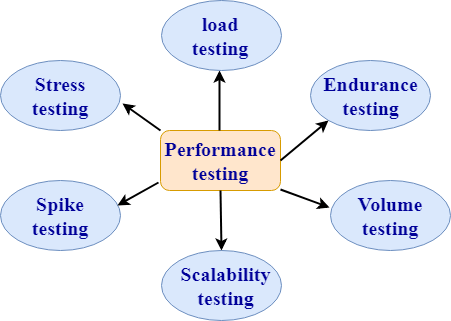
31) What are the types of performance testing?

Performance testing: Performance testing is a testing technique which determines the performance of the system such as speed, scalability, and stability under various load conditions. The product undergoes the performance testing before it gets live in the market.

Types of software testing are:

Software Testing Interview Questions

1. Load testing:

  • Load testing is a testing technique in which system is tested with an increasing load until it reaches the threshold value.

Note: An increasing load means the increasing the number of users.

  • The main purpose of load testing is to check the response time of the system with an increasing amount of load.
  • Load testing is non-functional testing means that the only non-functional requirements are tested.
  • Load testing is performed to make sure that the system can withstand a heavy load

2. Stress testing:

  • Stress testing is a testing technique to check the system when hardware resources are not enough such as CPU, memory, disk space, etc.
  • In case of stress testing, software is tested when the system is loaded with the number of processes and the hardware resources are less.
  • The main purpose of stress testing is to check the failure of the system and to determine how to recover from this failure is known as recoverability.
  • Stress testing is non-functional testing means that the only non-functional requirements are tested.

3. Spike testing:

  • Spike testing is a subset of load testing. This type of testing checks the instability of the application when the load is varied.
  • There are different cases to be considered during testing:
    • The first case is not to allow the number of users so that the system will not suffer heavy load.
    • The second case is to provide warnings to the extra joiners, and this would slow down the response time.

4. Endurance testing:

  • Endurance testing is a subset of load testing. This type of testing checks the behavior of the system.
  • Endurance testing is non-functional testing means that the only non-functional requirements are tested.
  • Endurance testing is also known as Soak testing.
  • Endurance testing checks the issues such as memory leak. A memory leak occurs when the program does not release its allocated memory after its use. Sometimes the application does not release its memory even after its use and this unusable memory cause memory leak. This causes an issue when the application runs for a long duration.
  • Some of the main issues that are viewed during this testing are:
    • Memory leaks occurred due to an application.
    • Memory leaks occurred due to a database connection.
    • Memory leaks occurred due to a third party software.

5. Volume testing:

  • Volume testing is a testing technique in which the system is tested when the volume of data is increased.
  • Volume testing is also known as flood testing.
  • Volume testing is non-functional testing means that the only non-functional requirements are tested.
  • For example: If we want to apply the volume testing then we need to expand the database size, i.e., adding more data into the database table and then perform the test.

6. Scalability testing

  • Scalability testing is a testing technique that ensures that the system works well in proportion to the growing demands of the end users.
  • Following are the attributes checked during this testing:
    • Response time
    • Throughput
    • Number of users required for performance test
    • Threshold load
    • CPU usage
    • Memory usage
    • Network usage

32) What is the difference between functional and non-functional testing?

Basis of comparisonFunctional testingNon-functional testing
DescriptionFunctional testing is a testing technique which checks that function of the application works under the requirement specification.Non-functional testing checks all the non-functional aspects such as performance, usability, reliability, etc.
ExecutionFunctional testing is implemented before non-functional testing.Non-functional testing is performed after functional testing.
Focus areaIt depends on the customer requirements.It depends on the customer expectations.
RequirementFunctional requirements can be easily defined.Non-functional requirements cannot be easily defined.
Manual testingFunctional testing can be performed by manual testing.Non-functional testing cannot be performed by manual testing.
Testing typesFollowing are the types of functional testing:Unit testingAcceptance testingIntegration testingSystem testingFollowing are the types of non-functional testing:Performance testingLoad testingStress testingVolume testingSecurity testingInstallation testingRecovery testing

33) What is the difference between static and dynamic testing?

Static testingDynamic testing
Static testing is a white box testing technique which is done at the initial stage of the software development lifecycle.Dynamic testing is a testing process which is done at the later stage of the software development lifecycle.
Static testing is performed before the code deployment.Dynamic testing is performed after the code deployment.
It is implemented at the verification stage.It is implemented at the validation stage.
Execution of code is not done during this type of testing.Execution of code is necessary for the dynamic testing.
In the case of static testing, the checklist is made for the testing process.In the case of dynamic testing, test cases are executed.

34) What is the difference between negative and positive testing?

Positive testingNegative testing
Positive testing means testing the application by providing valid data.Negative testing means testing the application by providing the invalid data.
In case of positive testing, tester always checks the application for a valid set of values.In the case of negative testing, tester always checks the application for the invalid set of values.
Positive testing is done by considering the positive point of view for example: checking the first name field by providing the value such as “Akshay”.Negative testing is done by considering the negative point of view for example: checking the first name field by providing the value such as “Akshay123”.
It verifies the known set of test conditions.It verifies the unknown set of conditions.
The positive testing checks the behavior of the system by providing the valid set of data.The negative testing tests the behavior of the system by providing the invalid set of data.
The main purpose of the positive testing is to prove that the project works well according to the customer requirements.The main purpose of the negative testing is to break the project by providing the invalid set of data.
The positive testing tries to prove that the project meets all the customer requirements.The negative testing tries to prove that the project does not meet all the customer requirements.

35) What are the different models available in SDLC?

There are various models available in software testing, which are the following:

  • Waterfall model
  • Spiral Model
  • Prototype model
  • Verification and validation model
  • Hybrid model
  • Agile model
  • Rational unified process model[RUP]
  • Rapid Application development [RAD]

36) List out the difference between smoke testing and sanity testing and dry run testing?

Following are the differences between smoke, sanity, and dry run testing:

Smoke testingSanity testingDry-run testing
It is shallow, wide and scripted testing.It is narrow and deep and unscripted testingA dry run testing is a process where the effects of a possible failure are internally mitigated.
When the builds come, we will write the automation script and execute the scripts. So it will perform automatically.It will perform manually.For Example, An aerospace company may conduct a Dry run of a takeoff using a new aircraft and a runway before the first test flight.
It will take all the essential features and perform high-level testing.It will take some significant features and perform in-depth testing.

37) How do we test a web application? What are the types of tests we perform on the web application?

To test any web application such as Yahoo, Gmail, and so on, we will perform the following testing:

  • Functional testing
  • Integration testing
  • System testing
  • Performance testing
  • Compatibility testing ( test the application on the various operating systems, multiple browsers, and different version)
  • Usability testing ( check whether it is user friendly)
  • Ad-hoc testing
  • Accessibility testing
  • Smoke testing
  • Regression testing
  • Security testing
  • Globalization testing ( only if it is developed in different languages)

38) Why do we need to perform compatibility testing?

We might have developed the software in one platform, and the chances are there that users might use it in the different platforms. Hence, it could be possible that they may encounter some bugs and stop using the application, and the business might get affected. Therefore, we will perform one round of Compatibility testing.


39) How many test cases we can write in a day?

We can tell anywhere between 2-5 test cases.

  • First test case → 1st day, 2nd day.
  • Second test case → 3rd day, 4th day.
  • Forth test case → 5th day.
  • 9-10 test cases → 19th day.

Primarily, we use to write 2-5 test cases, but in future stages we write around 6-7 because, at that time, we have the better product knowledge, we start re-using the test cases, and the experience on the product.


40) How many test cases can we review per day?

It would be around 7 test cases we write so that we can review 7*3=21 test cases. And we can say that 25-30 test case per day.


41) How many test cases can we run in a day?

We can run around 30-55 test cases per day.

Note: For these types of questions (39-41), always remember the ratio: x test cases we can write, 3x test cases we can review, and 5x test cases we can execute per day.


42) Does the customer get a 100% bug-free product?

  1. The testing team is not good
  2. Developers are super
  3. Product is old
  4. All of the above

The correct answer is testing team is not good because sometimes the fundamentals of software testing define that no product has zero bugs.


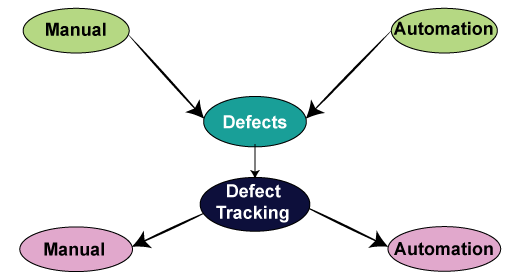
43) How to track the bug manually and with the help of automation?

We can track the bug manually as:

  • Identify the bug.
  • Make sure that it is not duplicate (that is, check it in bug repository).
  • Prepare a bug report.
  • Store it in bug repository.
  • Send it to the development team.
  • Manage the bug life cycle (i.e., keep modifying the status).
Software Testing Interview Questions

Tracking the bug with the help of automation i.e., bug tracking tool:

We have various bug tracking tools available in the market, such as:

  • Jira
  • Bugzilla
  • Mantis
  • Telelogic
  • Rational Clear Quest
  • Bug_track
  • Quality center ( it is a test management tool, a part of it is used to track the bugs)

Note: Here, we have two categories of tools:

A product based: In the product based companies, they will use only one bug tracking tool.

Service-based: In service-based companies, they have many projects of different customers, and every project will have different bug tracking tools.


44) Why does an application have bugs?

The software can have a bug for the following reasons:

  • Software complexity
  • Programming errors
  • If no communications are happening between the customer and the company, i.e., an application should or should not perform according to the software’s needs.
  • Modification in requirements
  • Time pressure.

45) When we perform testing?

We will perform testing whenever we need to check all requirements are executed correctly or not, and to make sure that we are delivering the right quality product.


46) When do we stop the testing?

We can stop testing whenever we have the following:

  • Once the functionality of the application is stable.
  • When the time is less, then we test the necessary features, and we stop it.
  • The client’s budget.
  • When the essential feature itself is not working correctly.

47) For which and all types of testing do we write test cases?

We can write test cases for the following types of testing:

Different types of testingTest cases
Smoke testingIn this, we will write only standard features; thus, we can pull out some test cases that have all the necessary functions. Therefore, we do not have to write a test case for smoke testing.
Functional/unit testingYes, we write the test case for unit testing.
Integration testingYes, we write the test case for integration testing.
System testingYes, we write the test case for system testing.
Acceptance testingYes, but here the customer may write the test case.
Compatibility testingIn this, we don’t have to write the test case because the same test cases as above are used for testing on different platforms.
Adhoc testingWe don’t write the test case for the Adhoc testing because there are some random scenarios or the ideas, which we used at the time of Adhoc time. Though, if we identify the critical bug, then we convert that scenario into a test case.
Performance testingWe might not write the test cases because we will perform this testing with the help of performance tools.
Usability testingIn this, we use the regular checklist; therefore, we don’t write the test case because here we are only testing the look and feel of the application.
Accessibility testingIn accessibility testing, we also use the checklist.
Reliability testingHere, we don’t write the manual test cases as we are using the automation tool to perform reliability testing.
Regression testingYes, we write the test cases for functional, integration, and system testing.
Recovery testingYes, we write the test cases for recovery testing, and also check how the product recovers from the crash.
Security testingYes, we write the test case for security testing.
Globalization testing:
Localization testing
Internationalization testing
Yes, we write the test case for L10N testing.
Yes, we write the test case for I18N testing.

48) What is the difference between the traceability matrix and the test case review process?

Traceability matrixTest case review
In this, we will make sure that each requirement has got at least one test case.In this, we will check whether all the scenarios are covered for the particular requirements.

49) What is the difference between use case and test case?

Following are the significant differences between the use case and the test case:

Test caseUse Case
It is a document describing the input, action, and expected response to control whether the application is working fine based on the customer requirements.It is a detailed description of Customer Requirements.
It is derived from test scenarios, Use cases, and the SRS.It is derived from BRS/SRS.
While developing test cases, we can also identify loopholes in the specifications.A business analyst or QA Lead prepares it.

50) How to test a pen?

We can perform both manual and automation testing. First, we will see how we perform manual testing:

Different types of testingScenario
Smoke testingChecks that basic functionality is written or not.
Functional/unit testingCheck that the Refill, pen body, pen cap, and pen size as per the requirement.
Integration testingCombine pen and cap and integrate other different sizes and see whether they work fine.
Compatibility testingVarious surfaces, multiple environments, weather conditions, and keep it in oven and then write, keep it in the freezer and write, try and write on water.
Adhoc testingThrow the pen down and start writing, keep it vertically up and write, write on the wall.
Performance testingTest the writing speed of the pen.
Usability testingCheck whether the pen is user friendly or not, whether we can write it for more extended periods smoothly.
Accessibility testingHandicapped people use them.
Reliability testingDrop it down and write, and continuously write and see whether it leaks or not
Recovery testingThrow it down and write.
Globalization testing
Localization testing
Price should be standard, expiry date format.
Internationalize testingCheck whether the print on the pen is as per the country language.

Now, we will see how we perform automation testing on a pen:

Software Testing Interview Questions

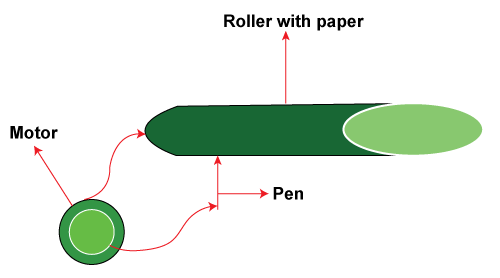
For this take a roller, now put some sheets of paper on the roller, then connects the pen to the motor and switch on the motor. The pen starts writing on the paper. Once the pen has stopped writing, now observe the number of lines that it has written on each page, length of each track, and multiplying all this, so we can get for how many kilometers the pen can write.

Difference

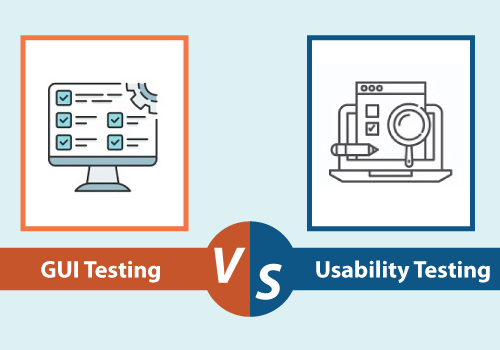
GUI Testing VS Usability Testing

Let’s understand the difference between GUI testing and Usability Testing on the following comparison basis table:

GUI Testing vs Usability Testing
S.NOComparison BasisGUI TestingUsability Testing
1.DefinitionIt is used to verify if the functional attributes creating the product design are working according to the user’s prospects.It is used to test the simplicity, availability of the product from the end-user’s perspective.
2.Emphasis onThe GUI testing emphasizes the look and feel of an application and involves the interface part of the software.On the other hand, usability testing emphasizes the user-friendliness and product quality of an application.
3.TestGenerally, in graphical user interface testing, the functionality of an application is not tested.Whereas in usability testing, the functionality of an application is tested to verify whether it is user-friendly or not.
4.ValidationIn GUI testing, we validate the design specifications for the products.The usability testing test if the creation of the user interface has been well created and is user- friendly.
5.TargetThe GUI testing is essential when the developers are targeting a precise user base like disabled people.On the other hand, usability testing is not beneficial while developing an application for a unique user base.
6.EnsuresThe execution of GUI testing ensures the look and feel of an application by fulfilling the given user requirements and standards.While the execution of usability testing ensures the user comfortless while using any application.
7.DetermineGraphical user interface testing is used to determine the front-end portion of any application.Usability testing determines the extent of the user-friendliness Interface as well as overall functioning of the software.
8.Platform dependencyThe GUI testing is implemented on several platforms to ensures its perfect look of the application.The usability testing tests the application at its difficulty level.
9.ImportanceIt is beneficial but less important as compared to usability testing.Usability testing’s importance is more as compared to the GUI testing.
10.System FlowThe system flow of the product is left untouched by GUI testing.In this, the systematic flow between various modules within the product gets tested.
11.AdvantageThe output we received after executing the Graphical user interface testing helps us engage more significant users due to its enhanced attractiveness.On the other hand, getting an output by implementing the usability testing will also beneficial for drawing a more significant part of users in the market.
12.CoverageThe GUI testing gets covered the look and development of the application.On the other hand, usability testing gets covered the features and capabilities of the product.
13.ExampleThe graphical user interface testing tests all objects such as the size of the icon, setting the right combinations for font, the dialog box, contrast, attributes if they are appropriately exhibited throughout the screen.The usability testing especially used to test the text input boxes for the users. And another example of usability testing is the scroll bars, which succeed for easy navigation of a website’s pages.

Conclusion

After seeing all the significant differences between the GUI testing and Usability testing, we can conclude that the execution of both Graphical user interface testing and usability testing can test some of the key software features, such as Look and feel user-friendliness, efficiency, and accuracy of the application.

The Graphical user interface (GUI) testing and usability testing will help the testing team takes essential procedures to increase the performance, quality, user-friendliness, functionality, and other vital essentials of the software product.

At last, we can say that if we do not execute the GUI testing and usability testing techniques, the development and testing may not be able to deliver a good quality software or the application.