Difference

Positive Testing VS Negative Testing

Some of the significant difference between positive and negative testing is discussed in the following table:
Positive Testing vs Negative Testing
S.No.Positive TestingNegative Testing
1.Checking the application response with the help of valid input data is known as positive testing.Checking the application response by using the invalid input data set is known as negative testing.
2.Positive testing is implemented only for the expected conditions.Negative testing is implemented only for unexpected conditions.
3.Positive testing doesn’t guarantee a good quality of software product.Negative testing guarantees to deliver a good quality of software product.
4.The execution of positive testing takes less time as compared to negative testing.The execution of positive testing takes more time as compared to positive testing.
5.To validate the available set of test conditions, we will consistently implement the Positive testing.To break the project and product with an unidentified set of test conditions, we will consistently implement Negative testing.
6.The primary purpose of executing Positive testing is to guarantee that the software application always meets the developer’s requirements and specifications.The primary purpose of executing the negative testing is to test a web application’s constancy in contradiction to inaccurate validation data sets.
7.Positive testing doesn’t encompass all the possible cases.Negative testing encompasses all the possible cases.
8.It is a process where the system is validated in contradiction of the valid input data.It is a testing process which contain the validation in contrast to invalid input data.
9.Positive testing is less significant than Negative testing.Negative testing is more vital than Positive testing.
10.Positive testing can be implemented on every application.Negative testing can be implemented when the possibilities of unpredicted conditions.
11.The people having less knowledge can execute the positive testing.The testing professionals can execute the negative testing.
12.It makes sure that the software is standard.Negative testing makes sure to deliver 100 percent bug-free software.
Difference

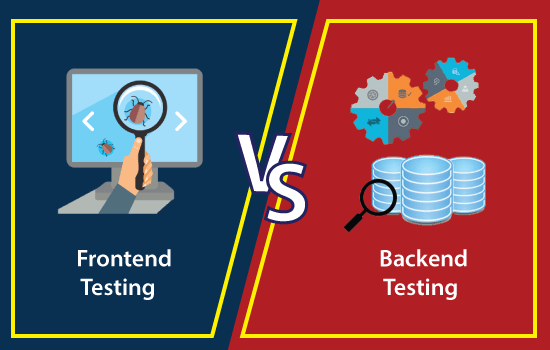
Difference between Frontend Testing and Backend Testing

In the below table, we have listed some of the important differences between frontend and backend testing.

Frontend Testing VS. Backend Testing
S.NOFrontend testingBackend testing
1.It is executed on the presentation layer of the 3-tier architecture.It is performed on the Application and Database layer of the 3-tier architecture.
2.It is always performed on the Graphical user interface (GUI).It is always implemented on the Application User Interface (AUI).
3.While performing the frontend testing, we do not require to store any information in a database.While performing the backend testing, we need to store the data in the database.
4.The understanding of requirements is necessary in order to execute the frontend testing.The understanding of the database is essential to execute the backend testing.
5.It will analyze the overall capabilities of the application.It will analyze the deadlock, data corruption, or data loss.
6.In GUI-based frontend testing, the resources are centrally achieved in cloud computing.In AUI based backend testing, the resources are executed on a collaboration pattern in Grid Computing.
7.Knowledge about the automation frameworks tools like QTP, Selenium is mandatory to perform the Frontend testing.Knowledge about SQL (Structured Query Language) language concepts is compulsory to implement the backend testing.
8.Frontend testing includes the verification of the application and checks the performance of application whether it is working according to the requirement.Backend testing execution makes sure that the data is continuing as there is no performance hit.
9.System testing and Acceptance Testing, unit testing, accessibility testing, and regression testing are performed under frontend testing.The database testing (API testing and SQL testing) are performed under backend testing.
10.Just like other types of testing frontend testing also contains some tools, which are as follows:LiveReloadKarmaGruntTo execute the backend testing, we have some tools available in the market, which are as follows:DTM Data GeneratorTurboDataData Factory
Difference

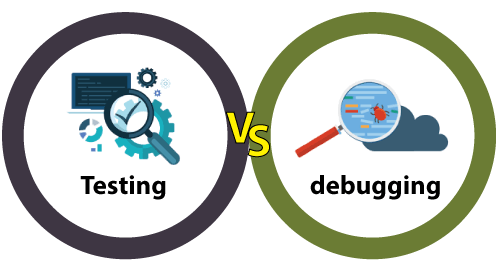
Testing Vs. Debugging

Testing vs Debugging

In the below table, we have listed some of the significant difference between testing and debugging:

S.NOTestingDebugging
1.It is the implementation of the software with the intent of identifying the defectsThe process of fixing and resolving the defects is known as debugging.
2.Testing can be performed either manually or with the help of some automation tools.The debugging process cannot be automated.
3.A group of test engineers executes testing, and sometimes it can be performed by the developers.Debugging is done by the developer or the programmer.
4.The test engineers perform manual and automated test cases on the application, and if they detect any bug or error, they can report back to the development team for fixing.The developers will find, evaluates, and removes the software errors.
5.Programming knowledge is not required to perform the testing process.Without having an understanding of the programming language, we cannot proceed with the debugging process.
6.Once the coding phase is done, we proceed with the testing process.After the implementation of the test case, we can start the Debugging process.
7.Software Testing includes two or more activities such as validation and verification of the software.Debugging tries to match indication with cause, hence leading to the error correction.
8.It is built on different testing levels such as Unit Testing, Integration Testing, System Testing, etc.It is built on different kinds of bugs because there is no such level of debugging is possible.
9.Software testing is the presentation of defects.It is a logical procedure.
10.Software testing is the vital phase of SDLC (Software Development Life Cycle).It is not a part of SDLC because it occurs as a subset of testing.
11.Some advantages of software testing are as below:It can easily understand by the new test engineers or the beginner.The test engineer can interact with software as a real end-user to check the usability and user interface issues.It is used to test dynamically altering GUI designs.Testing is a cost-effective and time-saving process.Software testing delivers a consistence software.It will help us to execute the root cause analysis that will enhance the software’s productivity.The testing process also helps detect and fixing the bugs before the software becomes active, which significantly reduces the risk of failure.Some advantages of debugging process are as follows:It supports the developer in minimizing the data.If the perform the debugging, we can report the error condition directly.During the debugging process, the developer can avoid complex one-use testing code thathelps the developer save time and energy.Debugging delivers maximum useful information of data structures and allows its informal understanding.
12.Software testing contains various type of testing methods, which are as follow:Black-box testingWhite-box testingGrey-box testingAnd some other type of testing types is as below:Unit testingIntegration TestingSystem TestingStress TestingPerformance TestingCompatibility TestingBeta TestingAlpha TestingSmoke TestingRegression TestingUser Acceptance Testing and so on.Debugging involves a various type of approaches, which are as follows:InductionBrute ForceDeduction
13.The testing team can subcontract to the outside team as well.Debugging cannot be subcontracted to an outside team because the inside development team only does it.
14.We can plan, design, and implement the testing process.As compared to the testing process, the debugging process cannot be forced.
Difference

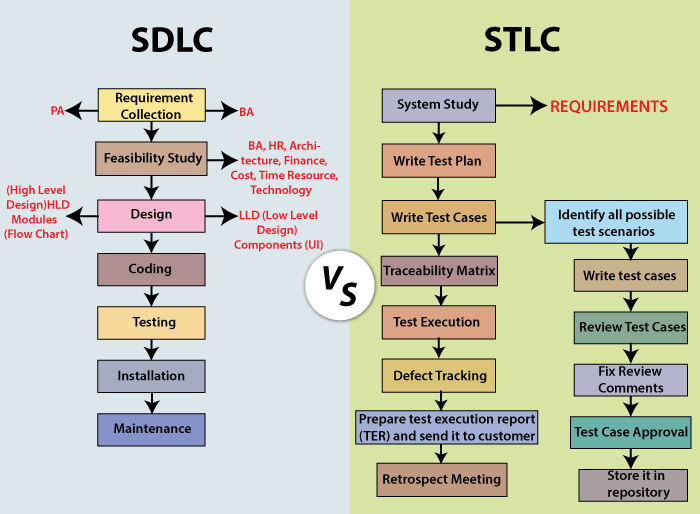
Difference between SDLC and STLC

In the below table, we have listed some of the important difference between the Software Development Life Cycle and Software Testing Life Cycle:

SDLC VS. STLC
S.NOComparison basisSDLCSTLC
1.ExplanationsIt is primarily connected to software development, which means that it is the procedure of developing a software application.It is mainly linked to software testing, which means that it is a software testing process that contains various phases of the testing process.
2.RepresentationSDLC stands for Software Development Life Cycle.STLC stands for Software Testing Life cycle.
3.ResourcesWhile performing the SDLC process, we needed a greater number of developers to complete the development process.The STLC process needed a smaller number of testers to complete the testing process.
4.Focuses onBesides the development phase, other phases like testing are also included.The STLC concentrate only on testing the software.
5.ObjectiveThe objective of the Software development life cycle is to complete the development of software successfully.The objective of the Software testing life cycle is to complete the testing of software successfully.
6.Help inThe SDLC will help us to develop a good quality software product.The STLC will helps to create the software bug-free.
7.Different phasesThe various phase includes in Software Development Life Cycle are as follows:Requirements CollectionFeasibility StudyDesignProgramming or CodingTestingInstallationMaintenanceThe various phase includes in Software Testing Life Cycle are as follows:Requirement collection or System studyTest PlanWrite test caseTraceability MatrixDefect TrackingTest Execution ReportRetrospect meeting
8.Requirement collection phaseIn the SDLC Requirement collection phase, the BA [Business Analyst] and PA [ Product Analyst] will collect the requirements and interpret business language into software language.In the Requirement Analysis phase of the STLC, the QA [ Quality Assurance]
team will study requirement documents and prepare the System Test Plan.
9.Designing phaseBased on the requirement understanding, the development team will develop the HLD [High-Level Design] and LLD [Low-Level Design] of the software.Generally, in STLC, the Test Architect or a Test Lead plan the test strategy.
And also finds the testing points.
10.Coding phaseIn the SDLC coding phase, the developer will start writing the code as per the designed document and beginning of building the software.In STLC, the QA team writes the test scenarios to authenticate the quality of the product.
11.Environment Set upAfter writing the code, the development team sets up a test environment with the developed product to validate the code.Based on the prerequisites, the Test team confirms the environment set up. And do one round of smoke testing to ensure that the environment is stable for the product and ready for testing.
12.Testing PhaseOnce the environment has been set, the test engineer will perform various types of testing, such as Unit, Integration, System, Retesting, Regression testing, and so on.
And the development team is also involving to fixing the bugs and report back to the tester.
Based on the test cases, the tester will do one round of integration and system testing.
While performing the testing, if they encounter with any bugs, it will be reported and fixed after the retesting.
13.Deployment/ Product Release phaseIn the SDLC deployment phase, when we received sign-off from various testing teams, the application is deployed or installed in a production environment for real end-users.In STLC, the Smoke and sanity testing are performed in the production environment as soon as the product is deployed.
And the testing team will prepare the test reports and matrix to analyze the product.
14.Maintenance PhaseOnce the product has been deployed, the development team includes support and release updates.To check maintenance code deployed, the QA team performs the regression suites.
15.PerformedThe SDLC phases are done before the STLC phases.The STLC phases are completed after SDLC phases.
Difference

Black Box Testing vs. White Box Testing vs. Grey…

IndexBlack Box TestingWhite Box TestingGrey Box Testing
1Knowledge of internal working structure (Code) is not required for this type of testing. Only GUI (Graphical User Interface) is required for test cases.Knowledge of internal working structure (Coding of software) is necessarily required for this type of testing.Partially Knowledge of the internal working structure is required.
2Black Box Testing is also known as functional testing, data-driven testing, and closed box testing.White Box Testing is also known as structural testing, clear box testing, code-based testing, and transparent testing.Grey Box Testing is also known as translucent testing as the tester has limited knowledge of coding.
3The approach towards testing includes trial techniques and error guessing method because tester does not need knowledge of internal coding of the software.White Box Testing is proceeded by verifying the system boundaries and data domains inherent in the software as there is no lack of internal coding knowledge.If the tester has knowledge of coding, then it is proceeded by validating data domains and internal system boundaries of the software.
4The testing space of tables for inputs (inputs to be used for creating test cases) is pretty huge and largest among all testing spaces.The testing space of tables for inputs (inputs to be used for creating test cases) is less as compared to Black Box testing.The testing space of tables for inputs (inputs to be used for creating test cases) is smaller than Black Box and White Box testing.
5It is very difficult to discover hidden errors of the software because errors can be due to internal working which is unknown for Black Box testing.It is simple to discover hidden errors because it can be due to internal working which is deeply explored in White Box testing.Difficult to discover the hidden error. Might be found in user level testing.
6It is not considered for algorithm testing.It is well suitable and recommended for algorithm testing.It is not considered for algorithm testing.
7Time consumption in Black Box testing depends upon the availability of the functional specifications.White Box testing takes a long time to design test cases due to lengthy code.Test cases designing can be done in a short time period.
8Tester, developer and the end user can be the part of testing.Only tester and developer can be a part of testing; the end user can not involve.Tester, developer and the end user can be the part of testing.
9It is the least time-consuming process among all the testing processes.The entire testing process is the most time consuming among all the testing processes.less time consuming than White Box testing.
10Resilience and security against viral attacks are covered under Black Box testing.Resilience and security against viral attacks are not covered under White Box testing.Resilience and security against viral attacks are not covered under Grey Box testing.
11The base of this testing is external expectations internal behavior is unknown.The base of this testing is coding which is responsible for internal working.Testing based on high-level database diagrams and dataflow diagrams.
12It is less exhaustive than White Box and Grey Box testing methods.It is most exhaustive between Black Box and Grey Box testing methods.Partly exhaustive; depends upon the type of test cases are coding based or GUI based.
Difference

Differences between the Alpha testing and Beta testing are:

Sr. No.Alpha TestingBeta Testing
1.Alpha testing performed by a team of highly skilled testers who are usually the internal employee of the organization.Beta testing performed by clients or end-users in a real-time environment, who is not an employee of the organization.
2.Alpha testing performed at the developer’s site; it always needs a testing environment or lab environment.Beta testing doesn’t need any lab environment or the testing environment; it is performed at a client’s location or end-user of the product.
3.Reliability or security testing not performed in-depth in alpha testing.Reliability, security, and robustness checked during beta testing.
4.Alpha testing involves both white box and black-box techniques.Beta testing uses only black-box testing.
5.Long execution cycles maybe require for alpha testing.Only a few weeks are required for the execution of beta testing.
6.Critical issues or fixes can be identified by developers immediately in alpha testing.Most of the issues or feedback is collecting from the beta testing will be implemented for the future versions of the product.
7.Alpha testing performed before the launch of the product into the market.At the time of software product marketing.
8.Alpha testing focuses on the product’s quality before going to beta testing.Beta testing concentrates on the quality of the product, but gathers users input on the product and ensures that the product is ready for real-time users.
9.Alpha testing performed nearly the end of the software development.Beta testing is a final test before shipping a product to the customers.
10.Alpha testing is conducting in the presence of developers and the absence of end-users.Beta testing reversed of alpha testing.
Difference

Difference between verification and validation testing

VerificationValidation
We check whether we are developing the right product or not.We check whether the developed product is right.
Verification is also known as static testing.Validation is also known as dynamic testing.
Verification includes different methods like Inspections, Reviews, and Walkthroughs.Validation includes testing like functional testing, system testing, integration, and User acceptance testing.
It is a process of checking the work-products (not the final product) of a development cycle to decide whether the product meets the specified requirements.It is a process of checking the software during or at the end of the development cycle to decide whether the software follow the specified business requirements.
Quality assurance comes under verification testing.Quality control comes under validation testing.
The execution of code does not happen in the verification testing.In validation testing, the execution of code happens.
In verification testing, we can find the bugs early in the development phase of the product.In the validation testing, we can find those bugs, which are not caught in the verification process.
Verification testing is executed by the Quality assurance team to make sure that the product is developed according to customers’ requirements.Validation testing is executed by the testing team to test the application.
Verification is done before the validation testing.After verification testing, validation testing takes place.
In this type of testing, we can verify that the inputs follow the outputs or not.In this type of testing, we can validate that the user accepts the product or not.
Difference

Difference between Load testing and Stress testing

Load testingStress testing
Load testing is used to find the performance of the application by testing the database, networks, and website servers.Stress testing is used to find the stability and response time of the given system.
Load testing helps the tester to identify the bottleneck and also able to tell the cause of bottlenecks before deployment to the production server.Stress testing helps the tester to check the system capacity when number of users increased suddenly before the system failure or crashed.
This type of testing reproduced the load on any application and software.It is used to figure out the robustness and stability of the application.
Load testing is used to test web-based and client-server types of application.Stress testing tests suddenly increased traffic of the application.
WebLOAD, LoadView, LoadRunner, SmartMeter.io, and LoadUI NG Pro are some of the load testing tools which help us to perform load testing on the applications.LoadRunner, JMeter, NeoLoad are some of the stress testing tools which help us to perform stress testing on the applications.
After doing the load testing on the application, the cost of failure may reduce, and the satisfaction of the customer is increased.After doing Stress testing on the application, if the system got to fail, it will recover quickly by finding the breaking point early and also see where the system got crashed.
For example: if we have one scenario where the load is 100 users using the application at a 2.5\sec of goal time.
And, the desired load is 100 user.
This scenario got passed because the desired load is equal to the load, which satisfies the load testing condition.
For example: if we took the same scenario where the actual load of 100 users which are using the application at a 2.5\sec of goal time.
When the desired load got increased by 200 users, and it will become 300. So now, 300 users using the application at 2.5\sec of goal time.
It will pass because the desired load is greater than the load according to the stress testing condition.
Difference

Smoke Testing vs Sanity Testing

The below comparison table enlightens the important differences between smoke testing and sanity testing in a quick manner:

S.No.Comparison BasisSmoke TestingSanity Testing
1Test coverageIt is a broad approach to testing where all parts of the application are tested.It is a narrow approach to testing where specific parts of the application are tested.
2MeasuresIt measures the stability of the system by performing rigorous testing.It measures the rationality of the system by performing rigorous testing.
3TechniqueSmoke testing can be either manual or automated.Sanity testing can be done without test cases or scripts.
4Executed byIt is performed by both testers and developers.It is performed by only testers.
5PurposeTesting is done without getting into deep but whenever needed tester has to go into deep.Sanity testing does not need to go into deep of the application.
6.Performed atSmoke testing is the first testing performed on the initial build.Sanity testing is performed when the build is comparatively stable.
7DocumentationSmoke testing is documented.Sanity testing is not documented.
8Used toIt is used to test End to End function of the application.It is used to test only modified or defect fixed functions.
9SubsetIt is considered as a subset of acceptance testing.It is considered as a subset of regression testing.
Types of Testing

What is Regression Testing?

Regression Testing is defined as a type of software testing to confirm that a recent program or code change has not adversely affected existing features. Regression Testing is nothing but a full or partial selection of already executed test cases which are re-executed to ensure existing functionalities work fine.

This testing is done to make sure that new code changes should not have side effects on the existing functionalities. It ensures that the old code still works once the latest code changes are done.

Need of Regression Testing

The Need of Regression Testing mainly arises whenever there is requirement to change the code and we need to test whether the modified code affects the other part of software application or not. Moreover, regression testing is needed, when a new feature is added to the software application and for defect fixing as well as performance issue fixing.

Example of Regression testing

Here we are going to take a case to define the regression testing efficiently:

Consider a product Y, in which one of the functionality is to trigger confirmation, acceptance, and dispatched emails. It also needs to be tested to ensure that the change in the code not affected them. Regressing testing does not depend on any programming language like JavaC++C#, etc. This method is used to test the product for modifications or any updates done. It ensures that any change in a product does not affect the existing module of the product. Verify that the bugs fixed and the newly added features not created any problem in the previous working version of the Software.

When can we perform Regression Testing?

We do regression testing whenever the production code is modified.

We can perform regression testing in the following scenario, these are:

1. When new functionality added to the application.

Example:

A website has a login functionality which allows users to log in only with Email. Now providing a new feature to do login using Facebook.

2. When there is a Change Requirement.

Example:

Remember password removed from the login page which is applicable previously.

3. When the defect fixed

Example:

Assume login button is not working in a login page and a tester reports a bug stating that the login button is broken. Once the bug fixed by developers, tester tests it to make sure Login Button is working as per the expected result. Simultaneously, tester tests other functionality which is related to the login button.

4. When there is a performance issue fix

Example:

Loading of a home page takes 5 seconds, reducing the load time to 2 seconds.

5. When there is an environment change

Example:

When we update the database from MySql to Oracle.

How to perform Regression Testing?

The need for regression testing comes when software maintenance includes enhancements, error corrections, optimization, and deletion of existing features. These modifications may affect system functionality. Regression Testing becomes necessary in this case.

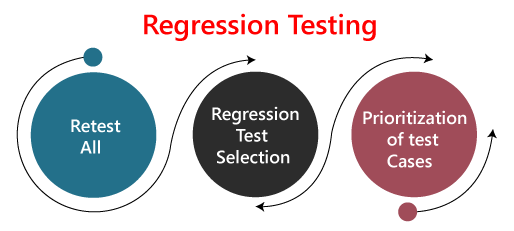
Regression testing can be performed using the following techniques:

regression testing

1. Re-test All:

Re-Test is one of the approaches to do regression testing. In this approach, all the test case suits should be re-executed. Here we can define re-test as when a test fails, and we determine the cause of the failure is a software fault. The fault is reported, we can expect a new version of the software in which defect fixed. In this case, we will need to execute the test again to confirm that the fault fixed. This is known as re-testing. Some will refer to this as confirmation testing.

The re-test is very expensive, as it requires enormous time and resources.

2. Regression test Selection:

  • In this technique, a selected test-case suit will execute rather than an entire test-case suit.
  • The selected test case suits divided in two cases
    1. Reusable Test cases.
    2. Obsolete Test cases.
  • Reusable test cases can use in succeeding regression cycle.
  • Obsolete test cases can’t use in succeeding regression cycle.

3. Prioritization of test cases:

Prioritize the test case depending on business impact, critical and frequently functionality used. Selection of test cases will reduce the regression test suite.

What are the Regression Testing tools?

Regression Testing is a vital part of the QA process; while performing the regression we may face the below challenges:

  • Time Consuming
    Regression Testing consumes a lot of time to complete. Regression testing involves existing tests again, so testers are not excited to re-run the test.
  • Complex
    Regression Testing is complex as well when there is a need to update any product; lists of the test are also increasing.
  • Communicating business rule
    Regression Testing ensures the existing product features are still in working order. Communication about regression testing with a non-technical leader can be a difficult task. The executive wants to see the product move forward and making a considerable time investment in regression testing to ensure existing functionality working can be hard.
  • Identify Impact Area
  • Test Cases Increases Release by Release
  • Less Resources
  • No Accuracy
  • Repetitive Task
  • Monotonous Job

Regression testing process

The regression testing process can be performed across the builds and the releases.

Regression testing across the builds

Whenever the bug fixed, we retest the Bug, and if there is any dependent module, we go for a Regression Testing.

regression testing

For example, How we perform the regression testing if we have different builds as Build 1, Build 2, and Build 3, which having different scenarios.

Build1

  • Firstly the client will provide the business needs.
  • Then the development team starts developing the features.
  • After that, the testing team will start writing the test cases; for example, they write 900 test cases for the release#1 of the product.
  • And then, they will start implementing the test cases.
  • Once the product is released, the customer performs one round of acceptance testing.
  • And in the end, the product is moved to the production server.

Build2

  • Now, the customer asks for 3-4 extra (new) features to be added and also provides the requirements for the new features.
  • The development team starts developing new features.
  • After that, the testing team will start writing the test case for the new features, and they write about 150 new test cases. Therefore, the total number of the test case written is 1050 for both the releases.
  • Now the testing team starts testing the new features using 150 new test cases.
  • Once it is done, they will begin testing the old features with the help of 900 test cases to verify that adding the new feature has damaged the old features or not.
  • Here, testing the old features is known as Regression Testing.
  • Once all the features (New and Old) have been tested, the product is handed over to the customer, and then the customer will do the acceptance testing.
  • Once the acceptance testing is done, the product is moved to the production server.

Build3

  • After the second release, the customer wants to remove one of the features like Sales.
  • Then he/she will delete all the test cases which are belonging to the sales module (about 120 test cases).
  • And then, test the other feature for verifying that if all the other features are working fine after removing the sales module test cases, and this process is done under the regression testing.

Note:

  • Testing the stable features to ensure that it is broken because of the changes. Here changes imply that the modification, addition, bug fixing, or the deletion.
  • Re-execution of the same test cases in the different builds or releases is to ensure that changes (modification, addition, bug fixing, or the deletion) are not introducing bugs in stable features.

Regression testing across the release

The regression testing process starts whenever there is a new Release for same project because the new feature may affect the old elements in the previous releases.

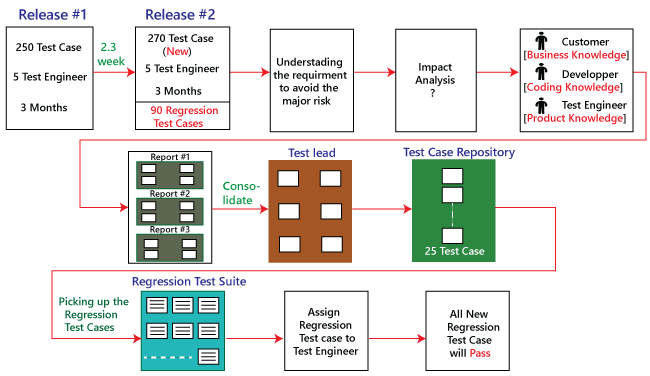
To understand the regression testing process, we will follow the below steps:

Step1

There is no regression testing in Release#1 because there is no modification happen in the Release#1 as the release is new itself.

Step2

The concept of Regression testing starts from Release#2 when the customer gives some new requirements.

Step3

After getting the new requirements (modifying features) first, they (the developers and test engineers) will understand the needs before going to the impact analysis.

Step4

After understanding the new requirements, we will perform one round of impact analysis to avoid the major risk, but here the question arises who will do the Impact analysis?

Step5

The impact analysis is done by the customer based on their business knowledge, the developer based on their coding knowledge, and most importantly, it is done by the test engineer because they have the product knowledge.

Note: If a single person does, he/she may not cover all the impact areas, so we include all persons so that we may cover a maximum impact area, and Impact Analysis should be done at the early stages of the releases.

Step6

Once we are done with the impact area, then the developer will prepare the impact area (document), and the customer will also prepare the impact area document so that we can achieve the maximum coverage of impact analysis.

Step7

After completing the impact analysis, the developer, the customer, and the test engineer will send the Reports# of the impact area documents to the Test Lead. And in the meantime, the test engineer and the developer are busy working on the new test case.

Step8

Once the Test lead gets the Reports#, he/she will consolidate the reports and stored in the test case requirement repository for the release#1.

Note: Test case Repository: Here, we will save all the test case of releases.

Step9

After that, the Test Lead will take the help of RTM and pick the necessary regression test case from the test case repository, and those files will be placed in the Regression Test Suite.

Note:

  • The test lead will store the regression test case in the regression test suite for no further confusion.
  • Regression test suite: Here, we will save all the impact area test documents.
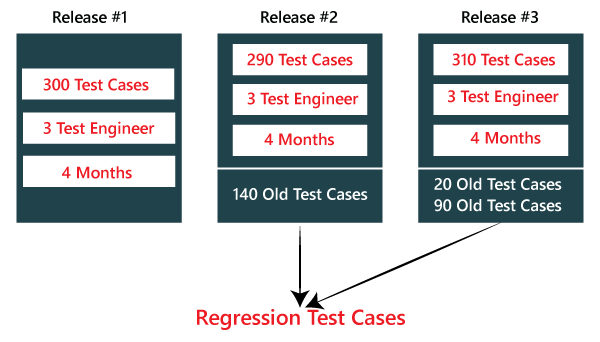
  • Regression Test Cases: These are the test cases of the old releases text document which need to be re-executed as we can see in the below image:
regression testing

Step10

After that, when the test engineer has done working on the new test cases, the test lead will assign the regression test case to the test engineer.

Step11

When all the regression test cases and the new features are stable and pass, then check the impact area using the test case until it is durable for old features plus the new features, and then it will be handed over to the customer.

regression testing

Types of Regression Testing

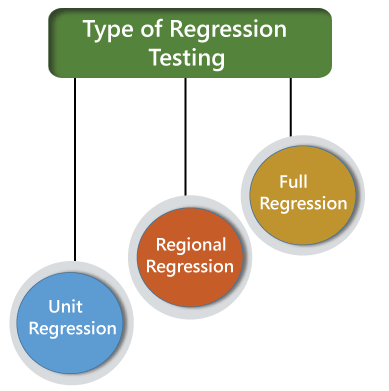
The different types of Regression Testing are as follows:

  • Unit Regression Testing [URT]
  • Regional Regression Testing[RRT]
  • Full or Complete Regression Testing [FRT]
regression testing

Unit Regression Testing [URT]

In this, we are going to test only the changed unit, not the impact area, because it may affect the components of the same module.

Example1

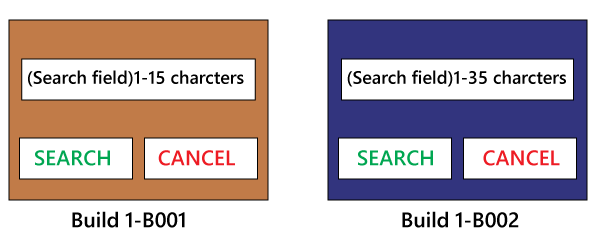
In the below application, and in the first build, the developer develops the Search button that accepts 1-15 characters. Then the test engineer tests the Search button with the help of the test case design technique.

regression testing

Now, the client does some modification in the requirement and also requests that the Search button can accept the 1-35 characters. The test engineer will test only the Search button to verify that it takes 1-35 characters and does not check any further feature of the first build.

Example2

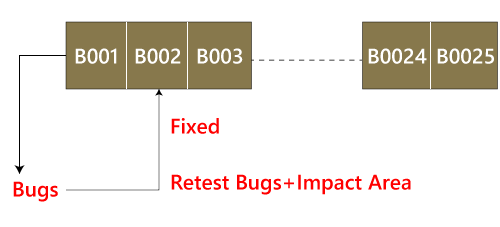
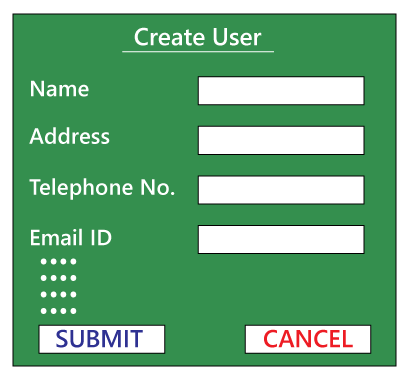
Here, we have Build B001, and a defect is identified, and the report is delivered to the developer. The developer will fix the bug and sends along with some new features which are developed in the second Build B002. After that, the test engineer will test only after the defect is fixed.

  • The test engineer will identify that clicking on the Submit button goes to the blank page.
  • And it is a defect, and it is sent to the developer for fixing it.
  • When the new build comes along with the bug fixes, the test engineer will test only the Submit button.
  • And here, we are not going to check other features of the first build and move to test the new features and sent in the second build.
  • We are sure that fixing the Submitbutton is not going to affect the other features, so we test only the fixed bug.
regression testing

Therefore, we can say that by testing only the changed feature is called the Unit Regression Testing.

Regional Regression testing [RRT]

In this, we are going to test the modification along with the impact area or regions, are called the Regional Regression testing. Here, we are testing the impact area because if there are dependable modules, it will affect the other modules also.

For example:

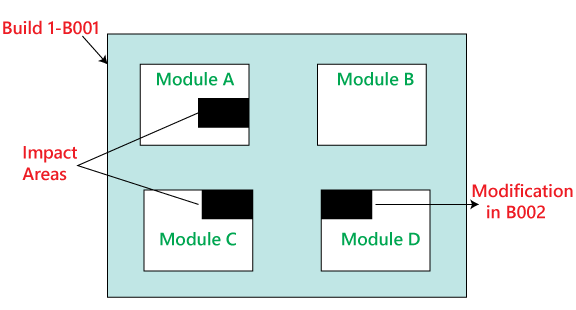
In the below image as we can see that we have four different modules, such as Module A, Module B, Module C, and Module D, which are provided by the developers for the testing during the first build. Now, the test engineer will identify the bugs in Module D. The bug report is sent to the developers, and the development team fixes those defects and sends the second build.

regression testing

In the second build, the previous defects are fixed. Now the test engineer understands that the bug fixing in Module D has impacted some features in Module A and Module C. Hence, the test engineer first tests the Module D where the bug has been fixed and then checks the impact areas in Module A and Module C. Therefore, this testing is known as Regional regression testing.

While performing the regional regression testing, we may face the below problem:

Problem:

In the first build, the client sends some modification in requirement and also wants to add new features in the product. The needs are sent to both the teams, i.e., development and testing.

After getting the requirements, the development team starts doing the modification and also develops the new features based on the needs.

Now, the test lead sends mail to the clients and asks them that all are the impact areas that will be affected after the necessary modification have been done. Therefore, the customer will get an idea, which all features are needed to be tested again. And he/she will also send a mail to the development team to know which all areas in the application will be affected as a result of the changes and additions of new features.

And similarly, the customer sends a mail to the testing team for a list of impact areas. Hence, the test lead will collect the impact list from the client, development team, and the testing team as well.

This Impact list is sent to all the test engineers who look at the list and check if their features are modified and if yes, then they do regional regression testing. The impact areas and modified areas are all tested by the respective engineers. Every test engineer tests only their features that could have been affected as a result of the modification.

The problem with this above approach is that the test lead may not get the whole idea of the impact areas because the development team and the client may not have so much time to revert his/her mails.

Solution

To resolve the above problem, we will follow the below process:

When a new build comes along with the latest features and bug fixes, the testing team will arrange the meeting where they will talk about if their features are affecting because of the above modification. Therefore, they will do one round of Impact Analysis and generate the Impact List. In this particular list, the test engineer tries to enclose the maximum probable impact areas, which also decreases the chance of getting the defects.

When a new build comes, the testing team will follow the below procedure:

  • They will do smoke testing to check the basic functionality of an application.
  • Then they will test new features.
  • After that, they will check the changed features.
  • Once they are done with checking the changed features, the test engineer will re-test the bugs.
  • And then they will check the impact area by performing the regional regression testing.

Disadvantage of using Unit and Regional Regression testing

Following are some of the drawbacks of using unit and Regional regression testing:

  • We may miss some impact area.
  • It is possible that we may identify the wrong impact area.

Note: We can say that the major work we do on the regional regression testing will lead us to get more number of defects. But, if we will perform the same dedication to work on the full regressing testing, we will get less number of defects. Therefore, we can determine here that enhancement in the testing effort will not help us to get more defects.

Full Regression testing [FRT]

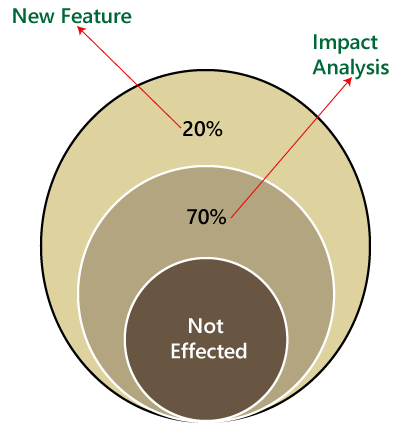
During the second and the third release of the product, the client asks for adding 3-4 new features, and also some defects need to be fixed from the previous release. Then the testing team will do the Impact Analysis and identify that the above modification will lead us to test the entire product.

Therefore, we can say that testing the modified features and all the remaining (old) features is called the Full Regression testing.

regression testing

When we perform Full Regression testing?

We will perform the FRT when we have the following conditions:

  • When the modification is happening in the source file of the product. For example, JVM is the root file of the JAVA application, and if any change is going to happen in JVM, then the entire JAVA program will be tested.
  • When we have to perform n-number of changes.

Note:

The regional regression testing is the ideal approach of regression testing, but the issue is, we may miss lots of defects while performing the Regional Regression testing.

And here we are going to solve this issue with the help of the following approach:

  • When the application is given for the testing, the test engineer will test the first 10-14 cycle, and will do the RRT.
  • Then for the 15th cycle, we do FRT. And again, for the next 10-15 cycle, we do Regional regression testing, and for the 31th cycle, we do the full regression testing, and we will continue like this.
  • But for the last ten cycle of the release, we will perform only complete regression testing.

Therefore, if we follow the above approach, we can get more defects.

The drawback of doing regression testing manually repeatedly:

  • Productivity will decrease.
  • It is a difficult job to do.
  • There is no consistency in test execution.
  • And the test execution time is also increased.

Hence, we will go for the automation to get over with these issues; when we have n-number of the regression test cycle, we will go for the automation regression testing process.

Automated Regression testing process

Generally we go for the automation whenever there are multiple releases or multiple regression cycle or there is the repetitive task.

The automation regression testing process can be done in the following steps:

Note1:

The process of testing the application by using some tools is known as automation testing.

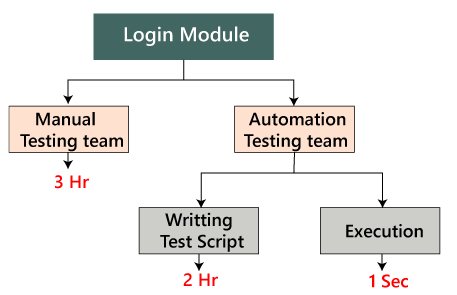
Suppose if we take one sample example of a Login module, then how we can perform the regression testing.

Here, the Login can be done in two ways, which are as follows:

regression testing

Manually: In this, we will perform regression only one and twice.

Automation: In this, we will do the automation multiple times as we have to write the test scripts and do the execution.

Note2: In real-time, if we have faced some issues such as:

IssuesHandle by
New featuresManual test engineer
Regressing testing featuresAutomation test engineer
Remaining ( 110 feature + Release#1)Manual test engineer

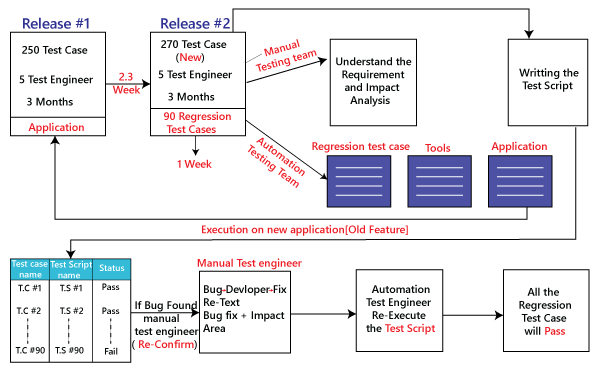
Step1

When the new release starts, we don’t go for the automation because there is no concept of regression testing and regression test case as we understood this in the above process.

Step2

When the new release and the enhancement starts, we have two teams, i.e., manual team and the automation team.

Step3

The manual team will go through the requirements and also identify the impact area and hand over the requirement test suite to the automation team.

Step4

Now, the manual team starts working on the new features, and the automation team will start developing the test script and also start automating the test case, which means that the regression test cases will be converted into the test script.

Step5

Before they (automation team) start automating the test case, they will also analyze which all cases can be automated or not.

Step6

Based on the analysis, they will start the automation i.e., converting every regression test cases into the test script.

Step7

During this process, they will take help of the Regression cases because they don’t have product knowledge as well as the tool and the application.

Step8

Once the test script is ready, they will start the execution of these scripts on the new application [old feature]. Since, the test script is written with the help of the regression feature or the old feature.

Step9

Once the execution is completed, we get a different status like Pass/fail.

Step10

If the status is failed, which means it needs to be re-confirmed manually, and if the Bug exists, then it will report to the concerned developer. When the developer fixes that bug, the Bug needs to be re-tested along with the Impact area by the manual test engineer, and also the script needs to be re-executed by the automation test engineer.

Step11

This process goes on until all the new features, and the regression feature will be passed.

regression testing

Benefits of doing regression testing by the automation testing:

  • Accuracy always exists because the task is done by the tools and tools never get bored or tired.
  • The test script can be re-used across multiple releases.
  • Batch execution is possible using the automation i.e.; all the written test scripts can be executed parallel or simultaneously.
  • Even though the number of regression test case increase release per release, and we don’t have to increase the automation resource since some regression case are already automated from the previous release.
  • It is a time-saving process because the execution is always faster than the manual method.

How to select test cases for regression testing?

It was found from industry inspection. The several defects reported by the customer were due to last-minute bug fixes. These creating side effects and hence selecting the Test Case for regression testing is an art, not an easy task.

Regression test can be done by:

  • A test case which has frequent defects
  • Functionalities which are more visible to users.
  • Test cases verify the core features of the product.
  • All integration test cases
  • All complex test cases
  • Boundary value test cases
  • A sample of successful test cases
  • Failure of test cases

Regression testing tools

If Software undergoes frequent changes, regression testing costs also increase. In those cases, manual execution of test cases increases test execution time as well as costs. In that case, automation testing is the best choice. The duration of automation depends on the number of test cases that remain reusable for successive regression cycles.

Following are the essential tools used for regression testing:

Selenium

Selenium is an open-source tool. This tool used for automated testing of a web application. For browser-based regression testing, selenium used. Selenium used for UI level regression test for web-based application.

Ranorex Studio

All in one regression test automation for desktop, web, and mobile apps with built-in Selenium Web Driver. Ranorex Studio includes full IDE plus tools for codeless automation.

Quick Test Professional (QTP)

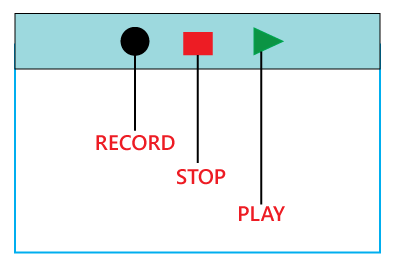
QTP is an automated testing tool used for Regression and Functional Testing. It is a Data-Driven, keyword-based tool. It used VBScript language for automation. If we open the QTP tool, we see the three buttons which are Record, Play and Stop. These buttons help to record every click and action performed on the computer system. It records the actions and play it back.

regression testing

Rational Functional Tester (RTF)

Rational functional tester is a Java tool used to automate the test cases of software applications. RTF used for automating regression test cases, and it also integrates with the rational functional tester.

For more information about regression and automation testing tools refer to the below link:

What are the Regression Testing and Configuration Management?

Configuration Management in the regression testing becomes imperative in Agile Environments, where a code is continuously modified. To ensure a valid regression test, we must follow the steps:

  • Changes are not allowed in the code during the regression testing phase.
  • A regression test case must be unaffected developer changes.
  • The database used for regression testing must be isolated; changes are not allowed in the database.

What are the differences between Retesting and Regression Testing?

Re-testing Testing means testing the functionality or bug again to ensure the code fixed. If not set, defects need not be re-opened. If fixed, the defect closed.

Re-testing is a type of testing which performed to check the test-cases that were unsuccessful in the final execution are successfully pass after the defects repaired.

Regression Testing means testing the software application when it undergoes a code change to ensure that new code has not affected other parts of the Software.

Regression testing is a type of testing executed to check whether a code has not changed the existing functionality of the application.

Differences between the Re-testing and Regression Testing are as follows:

Re-testingRegression Testing
Re-testing is performed to ensure that the test cases that are failed in the final execution are passing after the defects fixed.Regression Testing is done to confirm whether the code change has not affected the existing features.
Re-Testing works on defect fixes.The purpose of regression testing is to ensure that the code changes adversely not affect the existing functionality.
Defect verification is the part of the Retesting.Regression testing does not include defect verification
The priority of Retesting is higher than Regression Testing, so it is done before the Regression Testing.Based on the project type and availability of resources, regression testing can be parallel to Retesting.
Re-Test is a planned Testing.Regression testing is a generic Testing.
We cannot automate the test-cases for Retesting.We can do automation for regression testing; manual testing could be expensive and time-consuming.
Re-testing is for failed test-cases.Regression testing is for passed Test-cases.
Re-testing make sure that the original fault is corrected.Regression testing checks for unexpected side effect.
Retesting executes defects with the same data and the same environment with different input with a new build.Regression testing is when there is a modification or changes become mandatory in an existing project.
Re-testing cannot do before start testing.Regression testing can obtain test cases from the functional specification, user tutorials and manuals, and defects reports in regards to the corrected problem.

What are the advantages of Regression Testing?

Advantages of Regression Testing are:

  • Regression Testing increases the product’s quality.
  • It ensures that any bug fix or changes do not impact the existing functionality of the product.
  • Automation tools can be used for regression testing.
  • It makes sure the issues fixed do not occur again.

What are the disadvantages of Regression Testing?

There are several advantages of Regression Testing though there are disadvantages as well.

  • Regression Testing should be done for small changes in the code because even a slight change in the code can create issues in the existing functionality.
  • If in case automation is not used in the project for testing, it will time consuming and tedious task to execute the test again and again.

Conclusion

Regression Testing is one of the essential aspects as it helps to deliver a quality product which saves organizations time and money. It helps to provide a quality product by making sure that any change in the code does not affect the existing functionality.

For automating the regression test cases, there are several automation tools available. A tool should have the ability to update the test suite as the regression test suit needs to be updated frequently.