Mobile Testing

What is Info.plist in IOS App?

Info.plist is a configuration file used in iOS and macOS app development. It is an XML property list file that contains essential metadata and configuration details about the app. The Info.plist file is a crucial part of every iOS and macOS app bundle, and it is automatically created when you create a new project in Xcode.

In iOS development, the Info.plist file contains information about the app’s identity, version, supported devices, required permissions, app icons, and launch screen configuration, among other details. It is used by the iOS operating system to understand and manage the app during installation and runtime.

Key contents of the Info.plist file in iOS app development include:

  1. Bundle Identifier: A unique string that identifies the app, typically in reverse domain name notation (e.g., com.example.appname).
  2. App Version and Build Number: Version number and build number of the app for tracking different app releases.
  3. Supported Device Orientations: Specifies the supported interface orientations (portrait, landscape) for the app.
  4. Required Device Capabilities: Describes the hardware features and capabilities required by the app (e.g., camera, accelerometer).
  5. App Icons: The names of the app’s icon files to be used on the home screen and in the App Store.
  6. Launch Screen Configuration: Specifies the initial screen or storyboard to be shown when the app is launched.
  7. Supported iOS Versions: The minimum and maximum iOS versions supported by the app.
  8. Required Permissions: Declares the app’s permissions for accessing sensitive data, hardware, or system resources.

In macOS app development, the Info.plist file serves a similar purpose and includes configuration information specific to macOS apps.

The Info.plist file is an integral part of the app bundle and is automatically generated and updated by Xcode as developers modify the app’s settings and configurations. It ensures that the app is correctly recognized and managed by the operating system and provides essential information for app reviewers and users in the App Store. Developers should be cautious when editing the Info.plist file manually to avoid errors that could affect the app’s functionality and compatibility.

Automation Testing

TestNG Tutorial | What is Annotations & Framework in…

What is TestNG?

TestNG is an automation testing framework in which NG stands for “Next Generation”. TestNG is inspired by JUnit which uses the annotations (@). TestNG overcomes the disadvantages of JUnit and is designed to make end-to-end testing easy.

Using TestNG, you can generate a proper report, and you can easily come to know how many test cases are passed, failed, and skipped. You can execute the failed test cases separately.

For example:

  • Suppose, you have five test cases, one method is written for each test case (Assume that the program is written using the main method without using testNG). When you run this program first, three methods are executed successfully, and the fourth method is failed. Then correct the errors present in the fourth method, now you want to run only fourth method because first three methods are anyway executed successfully. This is not possible without using TestNG.
  • The TestNG in Selenium provides an option, i.e., testng-failed.xml file in test-output folder. If you want to run only failed test cases means you run this XML file. It will execute only failed test cases.

Beside above concept, you will learn more on TestNG, like what are the Advantages of TestNG, how to create test methods using @test annotations, how to convert these classes into testing suite file and execute through the eclipse as well as from the command line.

Why Use TestNG with Selenium?

Default Selenium tests do not generate a proper format for the test results. Using TestNG in Selenium, we can generate test results.

Most Selenium users use this more than Junit because of its advantages. There are so many features of TestNG, but we will only focus on the most important ones that we can use in Selenium. Following are the key features of Selenium TestNG:

  • Generate the report in a proper format including a number of test cases runs, the number of test cases passed, the number of test cases failed, and the number of test cases skipped.
  • Multiple test cases can be grouped more easily by converting them into testng.xml file. In which you can make priorities which test case should be executed first.
  • The same test case can be executed multiple times without loops just by using keyword called ‘invocation count.’
  • Using testng, you can execute multiple test cases on multiple browsers, i.e., cross browser testing.
  • The TestNG framework can be easily integrated with tools like TestNG Maven, Jenkins, etc.
  • Annotations used in the testing are very easy to understand ex: @BeforeMethod, @AfterMethod, @BeforeTest, @AfterTest
  • WebDriver has no native mechanism for generating reports. TestNG can generate the report in a readable format like the one shown below.
  • TestNG simplifies the way the tests are coded. There is no more need for a static main method in our tests. The sequence of actions is regulated by easy-to-understand annotations that do not require methods to be static.
  • Uncaught exceptions are automatically handled by TestNG without terminating the test prematurely. These exceptions are reported as failed steps in the report.

Advantages of TestNG over JUnit

There are three major advantages of TestNG over JUnit:

  • Annotations are easier to understand
  • Test cases can be grouped more easily
  • Parallel testing is possible

What is Annotation in TestNG?

Annotations in TestNG are lines of code that can control how the method below them will be executed. They are always preceded by the @ symbol. A very early and quick TestNG Example is the one shown below.

TestNG Tutorial

Annotations will be discussed later in the section named “Annotations used in TestNG,”so it is perfectly ok if you do not understand the above TestNG Example just yet. It is just important to note for now that annotations in TestNG are easier to code and understand than in JUnit.

The ability to run tests in parallel is available in TestNG but not in JUnit, so the TestNG framework is more preferred for testers using Selenium Grid.

How to Write Test Cases in TestNG?

Step 1) Write your business logic and insert the TestNG annotations in your code.
Step 2) Add more information like class name, groups name, package name, etc
Step 3) Run the TestNG.

Create Test Case Using TestNG Annotations

Now, we will learn how to create our first test case using TestNG Annotations in Selenium:

Before we create a test case, we should first setup a new TestNG Project in Eclipse and name it as “FirstTestNGProject”.

Setting up a new TestNG Project

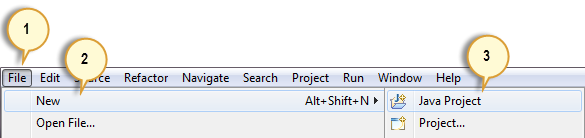
Step 1: Click File > New > Java Project

TestNG Tutorial

Step 2: Type “FirstTestNGProject” as the Project Name then click Next.

TestNG Tutorial

Step 3: We will now start to import the TestNG Libraries onto our project. Click on the “Libraries” tab, and then “Add Library…”

TestNG Tutorial

Step 4: On the Add Library dialog, choose “TestNG” and click Next.

TestNG Tutorial

Step 5: Click Finish.

TestNG Tutorial

You should notice that TestNG is included on the Libraries list.

TestNG Tutorial

Step 6: We will now add the JAR files that contain the Selenium API. These files are found in the Java client driver that we downloaded from https://www.selenium.dev/downloads/ when we were installing Selenium and Eclipse in the previous chapters.

TestNG Tutorial

Then, navigate to where you have placed the Selenium JAR files.

TestNG Tutorial

After adding the external JARs, your screen should look like this.

TestNG Tutorial

Step 7: Click Finish and verify that our FirstTestNGProject is visible on Eclipse’s Package Explorer window.

TestNG Tutorial

How to Create a New TestNG Test File

Now that we are done setting up our project in this TestNG tutorial, let us create a new TestNG file.

Step 1: Click on ‘src’ and Choose other.
Right-click on the “src” package folder then choose New > Other…

TestNG Tutorial

Step 2: Select TestNG class.
Click on the TestNG folder and select the “TestNG class” option. Click Next.

TestNG Tutorial

Step 3: Type the values.
Type the values indicated below on the appropriate input boxes and click Finish. Notice that we have named our Java file as “FirstTestNGFile”.

TestNG Tutorial

Step 4: Template Created.
Eclipse should automatically create the template for our TestNG file shown below.

TestNG Tutorial

Coding of our First TestNG Test Case Example

Let us now create our first Test Case that will check if Mercury Tours’ homepage is correct. Type your code as shown in the below TestNG Example:

package firsttestngpackage;
import org.openqa.selenium.*;
import org.openqa.selenium.firefox.FirefoxDriver;
import org.testng.Assert;
import org.testng.annotations.*;

public class firsttestngfile {
    public String baseUrl = "http://demo.guru99.com/test/newtours/";
    String driverPath = "C:\\geckodriver.exe";
    public WebDriver driver ; 
     
  @Test
  public void verifyHomepageTitle() {
       
      System.out.println("launching firefox browser"); 
      System.setProperty("webdriver.gecko.driver", driverPath);
      driver = new FirefoxDriver();
      driver.get(baseUrl);
      String expectedTitle = "Welcome: Mercury Tours";
      String actualTitle = driver.getTitle();
      Assert.assertEquals(actualTitle, expectedTitle);
      driver.close();
  }
}

Notice the following.

  • TestNG does not require you to have a main() method.
  • Methods need not be static.
  • We used the @Test annotation. @Test is used to tell that the method under it is a test case. In this case, we have set the verifyHomepageTitle() method to be our test case, so we placed an ‘@Test’ annotation above it.
  • Since we use annotations in TestNG, we needed to import the package org.testng.annotations.*.
  • We used the Assert class. The Assert class is used to conduct verification operations in TestNG. To use it, we need to import the org.testng.Assert package.

You may have multiple test cases (therefore, multiple @Test annotations) in a single TestNG file. This will be tackled in more detail later in the section “Annotations used in TestNG.”

Running the Test

To run the test, simply run the file in Eclipse as you normally do. Eclipse will provide two outputs – one in the Console window and the other on the TestNG Results window.

TestNG Tutorial
TestNG Tutorial

Checking reports created by TestNG

The Console window in Eclipse gives a text-based report of our test case results while the TestNG Results window gives us a graphical one.

TestNG Tutorial

Generating HTML Reports

TestNG has the ability to generate reports in HTML format.

Step 1: After running our FirstTestNGFile that we created in the previous section, right-click the project name (FirstTestNGProject) in the Project Explorer window then click on the “Refresh” option.

TestNG Tutorial

Step 2: Notice that a “test-output” folder was created. Expand it and look for an index.html file. This HTML file is a report of the results of the most recent test run.

TestNG Tutorial

Step 3: Double-click on that index.html file to open it within Eclipse’s built-in web browser. You can refresh this page any time after you rerun your test by simply pressing F5 just like in ordinary web browsers.

TestNG Tutorial

Annotations used in TestNG

In the previous section, you have been introduced to the @Test annotation. Now, we shall be studying more advanced annotations and their usages.

Multiple Test Cases

We can use multiple @Test annotations in a single TestNG file. By default, methods annotated by @Test are executed alphabetically. See the code below. Though the methods c_test, a_test, and b_test are not arranged alphabetically in the code, they will be executed as such.

TestNG Tutorial

Run this code and on the generated index.html page, click “Chronological view.”

TestNG Tutorial

Parameters

If you want the methods to be executed in a different order, use the parameter “priority”. Parameters are keywords that modify the annotation’s function.

  • Parameters require you to assign a value to them. You do.this by placing a “=” next to them, and then followed by the value.
  • Parameters are enclosed in a pair of parentheses which are placed right after the annotation like the code snippet shown below.
TestNG Tutorial

TestNG will execute the @Test annotation with the lowest priority value up to the largest. There is no need for your priority values to be consecutive.

TestNG Tutorial

The TestNG HTML report will confirm that the methods were executed based on the ascending value of priority.

TestNG Tutorial

Multiple Parameters

Aside from “priority,” @Test has another parameter called “alwaysRun” which can only be set to either “true” or “false.” To use two or more parameters in a single annotation, separate them with a comma such as the one shown below.

@Test(priority = 0, alwaysRun = true)
TestNG Tutorial

@BeforeTest and @AfterTest

@BeforeTestmethods under this annotation will be executed prior to the first test case in the TestNG file.
@AfterTestmethods under this annotation will be executed after all test cases in the TestNG file are executed.

Consider the code below.

package firsttestngpackage;
import org.openqa.selenium.*;
import org.openqa.selenium.firefox.FirefoxDriver;
import org.testng.Assert;
import org.testng.annotations.*;
public class firsttestngfile {
    public String baseUrl = "http://demo.guru99.com/test/newtours/";
    String driverPath = "C:\\geckodriver.exe";
    public WebDriver driver ; 
     
     @BeforeTest
      public void launchBrowser() {
          System.out.println("launching firefox browser"); 
          System.setProperty("webdriver.gecko.driver", driverPath);
          driver = new FirefoxDriver();
          driver.get(baseUrl);
      }
      @Test
      public void verifyHomepageTitle() {
          String expectedTitle = "Welcome: Mercury Tours";
          String actualTitle = driver.getTitle();
          Assert.assertEquals(actualTitle, expectedTitle);
     }
      @AfterTest
      public void terminateBrowser(){
          driver.close();
      }
}

Applying the logic presented by the table and the code above, we can predict that the sequence by which methods will be executed is:

  • 1st – launchBrowser()
  • 2nd – verifyHomepageTitle()
  • 3rd – terminateBrowser()

The placement of the annotation blocks can be interchanged without affecting the chronological order by which they will be executed.

Summary of TestNG Annotations

@BeforeSuite: The annotated method will be run before all tests in this suite have run.

@AfterSuite: The annotated method will be run after all tests in this suite have run.

@BeforeTest: The annotated method will be run before any test method belonging to the classes inside the tag is run.

@AfterTest: The annotated method will be run after all the test methods belonging to the classes inside the tag have run.

@BeforeGroups: The list of groups that this configuration method will run before. This method is guaranteed to run shortly before the first test method that belongs to any of these groups is invoked.

@AfterGroups: The list of groups that this configuration method will run after. This method is guaranteed to run shortly after the last test method that belongs to any of these groups is invoked.

@BeforeClass: The annotated method will be run before the first test method in the current class is invoked.

@AfterClass: The annotated method will be run after all the test methods in the current class have been run.

@BeforeMethod: The annotated method will be run before each test method.

@AfterMethod: The annotated method will be run after each test method.

@Test: The annotated method is a part of a test case

Uncategorized

TestNG | How to set Test Priority in Selenium

TestNG is a Testing framework, that covers different types of test designs like a unit test, functional test, end to end test, UI test and integration test.

You can run a single or multiple test cases in your Testng code.

If test priority is not defined while, running multiple test cases, TestNG assigns all @Test a priority as zero(0).

Now, while running; lower priorities will be scheduled first.

How to set Priority in TestNG

We will be modifying the @Test annotation with Priority Parameter so that each test should run against to the priority assigned to them.

Now as you can see we have assigned the Priority to each test case means test case will the lower priority value will be executed first.

Priority in testNG in action

import org.openqa.selenium.By;			
import org.openqa.selenium.WebDriver;			
import org.openqa.selenium.firefox.FirefoxDriver;			
import org.testng.Assert;			
import org.testng.annotations.Test;			

public class Priority_In_testNG {		
    WebDriver driver;			

    // Method 1: Open Browser say Firefox			
    @Test (priority=1)		
    public void openBrowser() {				
        driver = new FirefoxDriver();				
    }		

    // Method 2: Launch Google.com			
    @Test (priority=2)		
    public void launchGoogle() {				
        driver.get("http://www.google.co.in");						
    }		

    // Method 3: Perform a search using "Facebook"			
    @Test (priority=3)		
    public void peformSeachAndClick1stLink() {				
        driver.findElement(By.xpath(".//*[@title='Search']")).sendKeys("Facebook");								
    }		

    // Method 4: Verify Google search page title.			
    @Test (priority=4)		
    public void FaceBookPageTitleVerification() throws Exception {				
        driver.findElement(By.xpath(".//*[@value='Search']")).click();						
        Thread.sleep(3000);		
        Assert.assertEquals(driver.getTitle().contains("Facebook - Google Search"), true);				
    }		
}		

Explanation of Code

After assigning priority to each testcases, run the above code using testNG as shown in Video-2 mentioned below.

Here, you can see that test cases are prioritized. Test case having lower priority are executed first i.e. now there is a sequential execution according to priority in the test cases. Hence, all test cases are passing now.

Note the console of eclipse:

Output :

PASSED: openBrowser
PASSED: launchGoogle
PASSED: peformSearchAndClick1stLink
PASSED: FaceBookPageTitleVerification
Uncategorized

How to fetch Key and value from My SQL…

A database is a software subsystem that offers an efficient way to store data and request said data via a structured query language known as SQL. Databases store critical business information, thus functioning as the backbone of an entire application. Database testing is a vital part of software testing that involves verifying the accuracy and completeness of data stored in a database.

Automated database testing can cover a wide range of tests, such as data integrity, performance, security, and integration. It can also detect defects or issues in the database, such as data corruption, missing data, incorrect data, and duplicate data.

Naturally, database testing is essential to ensure the system is working correctly. As automation testing with Selenium is most frequently used by QAs, this article will detail how to perform database testing using Selenium.

Java Database Connectivity

JDBC is the standard Java API required for database-independent connectivity between the Java programming language and many databases. This application program interface (API) lets users encode access request statements in a Structured Query Language (SQL). They are then passed to the program that manages the database. It involves opening a connection, creating a SQL Database, executing SQL queries, and arriving at the output.

Steps to create a JDBC Application

To create a JDBC application, follow the steps below:

  1. Import the packages: Include the packages that contain the JDBC classes required for database programming.
  2. Register the JDBC driver: Initialize a driver to open a communication channel with the database. Register to the database with the command:
    Class.forName(“com.mysql.jdbc.Driver”); // class.forName load the Driver class
  3. Open a connection: After the driver registration, use the getConnection() method to create a Connection object, representing a physical connection with the database.
  4. Execute a query: Use an object of type ‘Statement’ to build and submit a SQL statement to the database.
  5. Extract data from the result set: Use the appropriate getXXX() method.
  6. Clean up the environment: Close all database resources that rely on JVM garbage collection.

2. Selenium Database Connection

Selenium is one of the prominent automation testing tools. As mentioned before, Selenium performs only UI validations. Thus, this article will depict a JDBC connection as Selenium doesn’t support database testing directly, but it can be done with connectors like JDBC and ODBC. This article uses JDBC to connect to a database, and test cases are verified using TestNG framework.

3. Database testing using Selenium

Step 1: Create a database in command prompt and insert the tables.
Step 2: Establish a connection to the database using JDBC.
Step 3: Execute the MySQL queries and process records present in the database.
Step 4: Integrate TestNG with JDBC to perform Database Testing.

Have a look at the script below:

package com.test.traveltest;

import org.openqa.selenium.By;
import org.openqa.selenium.WebDriver;
import org.openqa.selenium.chrome.ChromeDriver;
import org.testng.annotations.AfterTest;
import org.testng.annotations.BeforeTest;
import org.testng.annotations.Test;
import java.sql.Connection;
import java.sql.DriverManager;
import java.sql.ResultSet;
import java.sql.Statement;

public class SeleniumDatabaseTesting {
// Connection object
static Connection con = null;
// Statement object
private static Statement stmt;
// Constant for Database URL
public static String DB_URL = "jdbc:mysql://127.0.0.1:3306/hrmdb";
//Database Username
public static String DB_USER = "root";
// Database Password
public static String DB_PASSWORD = "rahul";

public static WebDriver driver;
public static String uname;
public static String uval;
public static String pwd;
public static String pval;
public static String loginbtn;

@BeforeTest
public void setUp() throws Exception {
	
	System.setProperty("webdriver.chrome.driver",System.getProperty("user.dir")+"\\src\\main\\java\\drivers\\chromedriver1.exe");
  	driver = new ChromeDriver();
	driver.manage().window().maximize();
	driver.get("https://opensource-demo.orangehrmlive.com/web/index.php/auth/login");
try{
// Database connection
String dbClass = "com.mysql.cj.jdbc.Driver";
Class.forName(dbClass).newInstance();
// Get connection to DB
Connection con = DriverManager.getConnection(DB_URL, DB_USER, DB_PASSWORD);
// Statement object to send the SQL statement to the Database
stmt = con.createStatement();
}
catch (Exception e)
{
e.printStackTrace();
}
}

@Test (priority = 0)
public void testuname() {
try{
String query = "select * from login where id = '" +1+"'";
// Get the contents of userinfo table from DB
ResultSet res = stmt.executeQuery(query);
// Print the result untill all the records are printed
// res.next() returns true if there is any next record else returns false
while (res.next())
{
System.out.print(res.getString(1));
System.out.print(" | " + res.getString(2));
System.out.print(" | " + res.getString(3));
System.out.println();
uname = res.getString(2);
uval = res.getString(3);
}
}
catch(Exception e)
{
e.printStackTrace();
}

driver.findElement(By.name(uname)).sendKeys(uval);

}

@Test (priority = 1)
public void testpwd() {
try{
String query = "select * from login where id = '" +2+"'";
// Get the contents of userinfo table from DB
ResultSet res = stmt.executeQuery(query);
// Print the result untill all the records are printed
// res.next() returns true if there is any next record else returns false
while (res.next())
{
System.out.print(res.getString(1));
System.out.print(" | " + res.getString(2));
System.out.print(" | " + res.getString(3));
System.out.println();
pwd = res.getString(2);
pval = res.getString(3);
}
}
catch(Exception e)
{
e.printStackTrace();
}

driver.findElement(By.name(pwd)).sendKeys(pval);

}

@Test (priority = 2)
public void testlogin() {
try{
String query = "select * from login where id = '" +3+"'";
// Get the contents of userinfo table from DB
ResultSet res = stmt.executeQuery(query);
// Print the result untill all the records are printed
// res.next() returns true if there is any next record else returns false
while (res.next())
{
System.out.print(res.getString(1));
System.out.print(" | " + res.getString(2));
System.out.print(" | " + res.getString(3));
System.out.println();
loginbtn = res.getString(2);

}
}
catch(Exception e)
{
e.printStackTrace();
}

driver.findElement(By.xpath(loginbtn)).click();

}

@AfterTest
public void tearDown() throws Exception {
// Close DB connection
if (con != null) {
con.close();
}
}
}
Uncategorized

Difference Between List and Set

S.NoListSet
1.The list implementation allows us to add the same or duplicate elements.The set implementation doesn’t allow us to add the same or duplicate elements.
2.The insertion order is maintained by the List.It doesn’t maintain the insertion order of elements.
3.List allows us to add any number of null values.Set allows us to add at least one null value in it.
4.The List implementation classes are LinkedList and ArrayList.The Set implementation classes are TreeSet, HashSet and LinkedHashSet.
5.We can get the element of a specified index from the list using the get() method.We cannot find the element from the Set based on the index because it doesn’t provide any get method().
6.It is used when we want to frequently access the elements by using the index.It is used when we want to design a collection of distinct elements.
7.The method of List interface listiterator() is used to iterate the List elements.The iterator is used when we need to iterate the Set elements.
ChatGPT

How i have created Ping pong game using Chat…

RK: Can you create ping pong game

AI: As an AI language model, I am not able to create a physical game like a ping pong game, but I can provide you with the basic guidelines to create a simple ping pong game in Python. Here is a sample code that you can use as a starting point:

import turtle

# Set up the screen
wn = turtle.Screen()
wn.title("Pong Game")
wn.bgcolor("black")
wn.setup(width=600, height=400)

# Create the paddles and ball
paddle_a = turtle.Turtle()
paddle_a.speed(0)
paddle_a.shape("square")
paddle_a.color("white")
paddle_a.shapesize(stretch_wid=5, stretch_len=1)
paddle_a.penup()
paddle_a.goto(-250, 0)

paddle_b = turtle.Turtle()
paddle_b.speed(0)
paddle_b.shape("square")
paddle_b.color("white")
paddle_b.shapesize(stretch_wid=5, stretch_len=1)
paddle_b.penup()
paddle_b.goto(250, 0)

ball = turtle.Turtle()
ball.speed(40)
ball.shape("circle")
ball.color("white")
ball.penup()
ball.goto(0, 0)
ball.dx = 2
ball.dy = -2

# Move the paddles
def paddle_a_up():
    y = paddle_a.ycor()
    y += 20
    paddle_a.sety(y)

def paddle_a_down():
    y = paddle_a.ycor()
    y -= 20
    paddle_a.sety(y)

def paddle_b_up():
    y = paddle_b.ycor()
    y += 20
    paddle_b.sety(y)

def paddle_b_down():
    y = paddle_b.ycor()
    y -= 20
    paddle_b.sety(y)

# Keyboard bindings
wn.listen()
wn.onkeypress(paddle_a_up, "w")
wn.onkeypress(paddle_a_down, "s")
wn.onkeypress(paddle_b_up, "Up")
wn.onkeypress(paddle_b_down, "Down")

# Main game loop
while True:
    wn.update()

    # Move the ball
    ball.setx(ball.xcor() + ball.dx)
    ball.sety(ball.ycor() + ball.dy)

    # Border checking
    if ball.ycor() > 190 or ball.ycor() < -190:
        ball.dy *= -1

    if ball.xcor() > 290:
        ball.goto(0, 0)
        ball.dx *= -1

    if ball.xcor() < -290:
        ball.goto(0, 0)
        ball.dx *= -1

    # Paddle and ball collision
    if ball.xcor() > 240 and ball.xcor() < 250 and (ball.ycor() < paddle_b.ycor() + 50 and ball.ycor() > paddle_b.ycor() - 50):
        ball.setx(240)
        ball.dx *= -1

    if ball.xcor() < -240 and ball.xcor() > -250 and (ball.ycor() < paddle_a.ycor() + 50 and ball.ycor() > paddle_a.ycor() - 50):
        ball.setx(-240)
        ball.dx *= -1

Then i have asked to modify code for adding players points:

RK: can you add points for the players

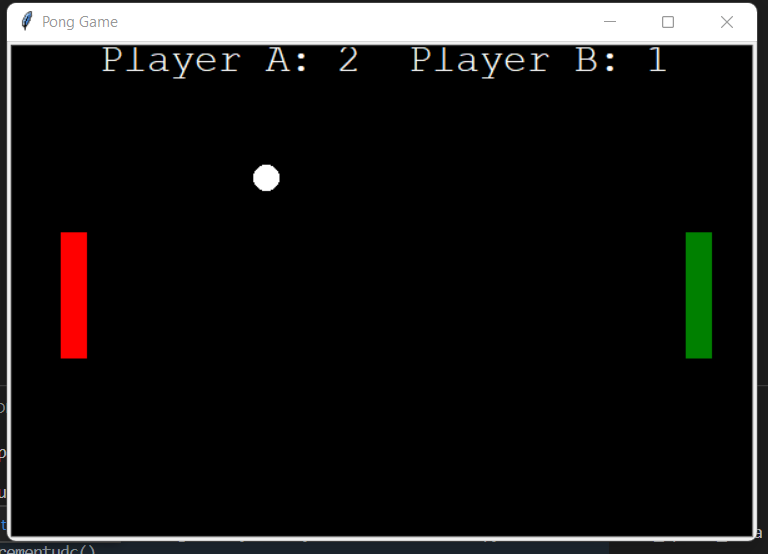
AI: Yes, I can modify the code to add points for the players. Here’s an updated version of the code that keeps track of the scores for each player:

import turtle

# Set up the screen
wn = turtle.Screen()
wn.title("Pong Game")
wn.bgcolor("black")
wn.setup(width=600, height=400)

# Create the paddles and ball
paddle_a = turtle.Turtle()
paddle_a.speed(10)
paddle_a.shape("square")
paddle_a.color("red")
paddle_a.shapesize(stretch_wid=5, stretch_len=1)
paddle_a.penup()
paddle_a.goto(-250, 0)

paddle_b = turtle.Turtle()
paddle_b.speed(10)
paddle_b.shape("square")
paddle_b.color("green")
paddle_b.shapesize(stretch_wid=5, stretch_len=1)
paddle_b.penup()
paddle_b.goto(250, 0)

ball = turtle.Turtle()
ball.speed(40)
ball.shape("circle")
ball.color("white")
ball.penup()
ball.goto(0, 0)
ball.dx = 2
ball.dy = -2

# Create the scoreboards
score_a = 0
score_b = 0

scoreboard = turtle.Turtle()
scoreboard.speed(0)
scoreboard.color("white")
scoreboard.penup()
scoreboard.hideturtle()
scoreboard.goto(0, 170)
scoreboard.write("Player A: {}  Player B: {}".format(score_a, score_b), align="center", font=("Courier", 24, "normal"))

# Move the paddles
def paddle_a_up():
    y = paddle_a.ycor()
    y += 20
    paddle_a.sety(y)

def paddle_a_down():
    y = paddle_a.ycor()
    y -= 20
    paddle_a.sety(y)

def paddle_b_up():
    y = paddle_b.ycor()
    y += 20
    paddle_b.sety(y)

def paddle_b_down():
    y = paddle_b.ycor()
    y -= 20
    paddle_b.sety(y)

# Keyboard bindings
wn.listen()
wn.onkeypress(paddle_a_up, "w")
wn.onkeypress(paddle_a_down, "s")
wn.onkeypress(paddle_b_up, "Up")
wn.onkeypress(paddle_b_down, "Down")

# Main game loop
while True:
    wn.update()

    # Move the ball
    ball.setx(ball.xcor() + ball.dx)
    ball.sety(ball.ycor() + ball.dy)

    # Border checking
    if ball.ycor() > 190 or ball.ycor() < -190:
        ball.dy *= -1

    if ball.xcor() > 290:
        ball.goto(0, 0)
        ball.dx *= -1
        score_a += 1
        scoreboard.clear()
        scoreboard.write("Player A: {}  Player B: {}".format(score_a, score_b), align="center", font=("Courier", 24, "normal"))

    if ball.xcor() < -290:
        ball.goto(0, 0)
        ball.dx *= -1
        score_b += 1
        scoreboard.clear()
        scoreboard.write("Player A: {}  Player B: {}".format(score_a, score_b), align="center", font=("Courier", 24, "normal"))


    # Paddle and ball collision
    if ball.xcor() > 240 and ball.xcor() < 250 and (ball.ycor() < paddle_b.ycor() + 50 and ball.ycor() > paddle_b.ycor() - 50):
        ball.setx(240)
        ball.dx *= -1

    if ball.xcor() < -240 and ball.xcor() > -250 and (ball.ycor() < paddle_a.ycor() + 50 and ball.ycor() > paddle_a.ycor() - 50):
        ball.setx(-240)
        ball.dx *= -1

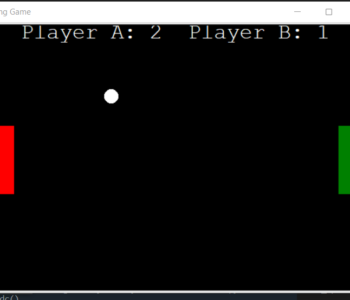
here is the output:

Manual Testing

Test Cases for Footer

Here are some manual test cases for the footer:

Test Case 1: Verify that the footer is displayed correctly

Steps:

  1. Open the website.
  2. Navigate to the homepage.
  3. Scroll down to the bottom of the page.
  4. Verify that the footer is displayed.
  5. Check that the footer contains the following elements:
    • Website logo or name
    • Navigation links to important pages
    • Social media links
    • Copyright information
    • Contact information

Expected Result:

  • The footer is displayed correctly with all the required elements.

Test Case 2: Verify that the website logo or name links to the homepage

Steps:

  1. Open the website.
  2. Navigate to the homepage.
  3. Scroll down to the bottom of the page.
  4. Click on the website logo or name in the footer.

Expected Result:

  • The user is redirected to the homepage.

Test Case 3: Verify that the navigation links are clickable and lead to the correct pages

Steps:

  1. Open the website.
  2. Navigate to the homepage.
  3. Scroll down to the bottom of the page.
  4. Click on each navigation link in the footer.
  5. Verify that the user is redirected to the correct page for each link.

Expected Result:

  • Each navigation link is clickable and leads to the correct page.

Test Case 4: Verify that the social media links are functional

Steps:

  1. Open the website.
  2. Navigate to the homepage.
  3. Scroll down to the bottom of the page.
  4. Click on each social media link in the footer.
  5. Verify that the user is redirected to the correct social media page.

Expected Result:

  • The social media links are functional and redirect the user to the correct social media page.

Test Case 5: Verify that the copyright information is displayed correctly

Steps:

  1. Open the website.
  2. Navigate to the homepage.
  3. Scroll down to the bottom of the page.
  4. Check that the copyright information is displayed in the footer.

Expected Result:

  • The copyright information is displayed correctly in the footer.

Test Case 6: Verify that the contact information is displayed correctly

Steps:

  1. Open the website.
  2. Navigate to the homepage.
  3. Scroll down to the bottom of the page.
  4. Check that the contact information is displayed in the footer.
  5. Click on the contact information in the footer.
  6. Verify that the user is redirected to the correct page.

Expected Result:

  • The contact information is displayed correctly in the footer, and the user is redirected to the correct page when clicking on it.

Test Case 7: Verify that the footer is responsive

Steps:

  1. Open the website.
  2. Resize the browser window to different screen sizes.
  3. Verify that the footer elements adjust to fit the screen size.
  4. Check that the footer remains functional on smaller screen sizes.

Expected Result:

  • The footer elements adjust to fit the screen size, and the footer remains functional on smaller screen sizes.

Test Case 8: Verify that the footer is accessible

Steps:

  1. Open the website using a screen reader.
  2. Navigate to the homepage.
  3. Scroll down to the bottom of the page.
  4. Verify that the screen reader can read out all the footer elements.
  5. Check that the footer is accessible using only the keyboard.

Expected Result:

  • The footer is accessible using a screen reader and keyboard-only navigation.
Uncategorized

Test Case for Header

Here are some manual test cases for the header:

Test Case 1: Verify that the header is displayed correctly

Steps:

  1. Open the website.
  2. Navigate to the homepage.
  3. Verify that the header is displayed.
  4. Check that the header contains the following elements:
    • Website logo
    • Navigation menu
    • Search bar
    • User account information (if applicable)
    • Contact information (if applicable)

Expected Result:

  • The header is displayed correctly with all the required elements.

Test Case 2: Verify that the website logo links to the homepage

Steps:

  1. Open the website.
  2. Navigate to the homepage.
  3. Click on the website logo in the header.

Expected Result:

  • The user is redirected to the homepage.

Test Case 3: Verify that the navigation menu items are clickable and lead to the correct pages

Steps:

  1. Open the website.
  2. Navigate to the homepage.
  3. Click on each navigation menu item in the header.
  4. Verify that the user is redirected to the correct page for each menu item.

Expected Result:

  • Each navigation menu item is clickable and leads to the correct page.

Test Case 4: Verify that the search bar is functional

Steps:

  1. Open the website.
  2. Navigate to the homepage.
  3. Enter a search term in the search bar in the header.
  4. Click the search button.
  5. Verify that the search results are displayed.

Expected Result:

  • The search bar is functional and displays the relevant search results.

Test Case 5: Verify that the user account information is displayed correctly

Steps:

  1. Open the website.
  2. Navigate to the homepage.
  3. If the user account information is displayed, verify that it is correct and up-to-date.
  4. If the user account information is not displayed, log in to the user account.
  5. Verify that the user account information is displayed correctly in the header.

Expected Result:

  • The user account information is displayed correctly and is accurate and up-to-date.

Test Case 6: Verify that the contact information is displayed correctly

Steps:

  1. Open the website.
  2. Navigate to the homepage.
  3. Check that the contact information is displayed in the header.
  4. Click on the contact information in the header.
  5. Verify that the user is redirected to the correct page.

Expected Result:

  • The contact information is displayed correctly in the header, and the user is redirected to the correct page when clicking on it.

Test Case 7: Verify that the header is responsive

Steps:

  1. Open the website.
  2. Resize the browser window to different screen sizes.
  3. Verify that the header elements adjust to fit the screen size.
  4. Check that the header remains functional on smaller screen sizes.

Expected Result:

  • The header elements adjust to fit the screen size, and the header remains functional on smaller screen sizes.

Test Case 8: Verify that the header stays fixed when scrolling

Steps:

  1. Open the website.
  2. Navigate to a page with long content.
  3. Scroll down the page.
  4. Verify that the header remains fixed at the top of the page.

Expected Result:

  • The header remains fixed at the top of the page when scrolling.

Test Case 9: Verify that the header is accessible

Steps:

  1. Open the website using a screen reader.
  2. Navigate to the homepage.
  3. Verify that the screen reader can read out all the header elements.
  4. Check that the header is accessible using only the keyboard.

Expected Result:

  • The header is accessible using a screen reader and keyboard-only navigation.

Test Case 10: Verify that the header loads quickly

Steps:

  1. Open the website.
  2. Navigate to the homepage.
  3. Check the load time of the header using a network monitor tool.
  4. Repeat the test on different internet speeds.

Expected Result:

  • The header loads quickly on all internet speeds.
ChatGPT

We can Play Tic Tac Toe game with ChatGPT

can you play tic tac toe

Yes, I can play tic tac toe! However, since I’m an AI language model and don’t have a physical interface, I won’t be able to draw the game board or physically place my moves. But I can certainly guide you through the game if you’d like to play! Just tell me if you want to go first or second, and which symbol you’d like to use (X or O).

rahul.kundu1@gmail.com

X

Great! I’ll be O, and you can go first. Here’s the initial game board:

markdownCopy code   |   |   
___|___|___
   |   |   
___|___|___
   |   |   
   |   |   

Just tell me where you’d like to place your first X. You can choose a cell by giving me the row and column numbers. For example, if you want to place your X in the top left cell, you can say “row 1, column 1”.

rahul.kundu1@gmail.com

first left

Got it! You placed your X in the top left cell. Here’s the updated game board:

markdownCopy code X |   |   
___|___|___
   |   |   
___|___|___
   |   |   
   |   |   

It’s my turn now. I’ll place my O in the center cell:

markdownCopy code X |   |   
___|___|___
   | O |   
___|___|___
   |   |   
   |   |   

Your turn again. Where would you like to place your next X?

rahul.kundu1@gmail.com

place it in 3rd row 3rd column

Great! You placed your X in the bottom right cell. Here’s the updated game board:

markdownCopy code X |   |   
___|___|___
   | O |   
___|___|___
   |   | X 
   |   |   

It’s my turn again. I’ll place my O in the bottom left cell:

markdownCopy code X |   |   
___|___|___
   | O |   
___|___|___
 O |   | X 
   |   |   

It’s your turn again. Where would you like to place your next X?

rahul.kundu1@gmail.com

place in top right

Alright, you placed your X in the top right cell. Here’s the updated game board:

markdownCopy code X |   | X 
___|___|___
   | O |   
___|___|___
 O |   | X 
   |   |   

It’s my turn again. I’ll place my O in the middle right cell:

markdownCopy code X |   | X 
___|___|___
   | O | O 
___|___|___
 O |   | X 
   |   |   

It’s your turn again. You need to place an X in the remaining cell to win the game. Where would you like to place it?

rahul.kundu1@gmail.com

place it in middle first

Congratulations! You have won the game! You placed your X in the middle cell of the first row, and here’s the final game board:

markdownCopy code X |   | X 
___|___|___
 X | O | O 
___|___|___
 O |   | X 
   |   |   

That was a great game! Would you like to play again?

ChatGPT

How ChatGPT can help in Research.

rahul.kundu1@gmail.com

i want to persue PHD in computer Science what are the topics i can take?

There are many different topics that you can pursue for a PhD in computer science, depending on your interests and the research areas that you would like to explore. Here are some potential areas of focus:

  1. Artificial Intelligence and Machine Learning: This area involves the study of how computers can learn and improve their performance over time, as well as the development of algorithms that enable machines to reason, perceive, and make decisions.
  2. Computer Vision: This field focuses on developing algorithms and systems that enable machines to interpret and understand visual data, such as images and video.
  3. Natural Language Processing: This area involves the study of how computers can understand and generate human language, as well as the development of algorithms that enable machines to translate, summarize, and classify text.
  4. Data Science and Big Data: This field involves the study of how to manage, analyze, and interpret large and complex data sets, as well as the development of algorithms that enable machines to identify patterns and trends in data.
  5. Computer Security and Privacy: This area involves the study of how to protect computer systems and networks from unauthorized access, as well as the development of tools and techniques to ensure the privacy and confidentiality of sensitive data.
  6. Human-Computer Interaction: This field focuses on the design and evaluation of systems and interfaces that enable people to interact with computers and other digital technologies in effective, efficient, and satisfying ways.
  7. Computer Networks and Distributed Systems: This area involves the study of how to design and manage computer networks and distributed systems that can support communication and collaboration among geographically dispersed users and devices.

These are just a few examples of the many areas of research that are available in computer science. You should explore different topics and find the ones that align with your interests and career goals. It’s also important to speak with potential PhD advisors to get a better sense of the research opportunities available at different universities and research institutions.

rahul.kundu1@gmail.com

can you prepare the synopsis for 6

Certainly! Here’s a sample synopsis for a potential PhD research project in the field of Human-Computer Interaction:

Title: Enhancing User Experience through Intelligent Adaptive Interfaces

Overview: The goal of this research project is to develop and evaluate new approaches to designing intelligent adaptive interfaces that can enhance the user experience of computer-based systems. Specifically, the project will explore the use of machine learning techniques to personalize interfaces to the needs, preferences, and behaviors of individual users.

Objectives:

  1. To investigate the state of the art in intelligent adaptive interfaces and machine learning techniques for personalization in human-computer interaction.
  2. To develop new algorithms and techniques for intelligent adaptive interfaces that can adapt to user needs, preferences, and behaviors in real time.
  3. To design and implement a prototype system that demonstrates the feasibility and effectiveness of the proposed approach.
  4. To conduct user studies to evaluate the performance and user experience of the proposed system compared to traditional, non-adaptive interfaces.
  5. To provide guidelines and recommendations for the design and implementation of intelligent adaptive interfaces in real-world systems.

Methodology: The research will follow a mixed-methods approach, combining literature reviews, algorithm development, prototype implementation, and user studies. The project will start with a comprehensive review of the literature on intelligent adaptive interfaces and machine learning techniques for personalization. Based on this review, new algorithms and techniques will be developed for intelligent adaptive interfaces. A prototype system will be implemented to demonstrate the feasibility and effectiveness of the proposed approach. User studies will be conducted to evaluate the performance and user experience of the proposed system compared to traditional, non-adaptive interfaces. Finally, guidelines and recommendations for the design and implementation of intelligent adaptive interfaces will be developed based on the findings of the research.

Expected Outcomes: The expected outcomes of this research project include new algorithms and techniques for intelligent adaptive interfaces that can enhance the user experience of computer-based systems, a prototype system that demonstrates the feasibility and effectiveness of the proposed approach, and guidelines and recommendations for the design and implementation of intelligent adaptive interfaces in real-world systems.

Significance: The significance of this research project lies in its potential to improve the user experience of computer-based systems, which can have a significant impact on productivity, satisfaction, and well-being. The proposed approach can be applied to a wide range of domains, including e-commerce, healthcare, education, and entertainment, among others. Moreover, the project can contribute to the development of more user-centered and personalized approaches to human-computer interaction.

rahul.kundu1@gmail.com

can you write a thesis for the same?

Sure! Here’s a sample thesis statement for the research project on enhancing user experience through intelligent adaptive interfaces in human-computer interaction:

Title: Enhancing User Experience through Intelligent Adaptive Interfaces: A Machine Learning Approach

Thesis Statement: This research project aims to develop and evaluate new approaches to designing intelligent adaptive interfaces that can enhance the user experience of computer-based systems. The project will explore the use of machine learning techniques to personalize interfaces to the needs, preferences, and behaviors of individual users. By developing new algorithms and techniques for intelligent adaptive interfaces, implementing a prototype system, and conducting user studies to evaluate its effectiveness, this research will contribute to the development of more user-centered and personalized approaches to human-computer interaction. The findings of this research can have a significant impact on productivity, satisfaction, and well-being, and can be applied to a wide range of domains, including e-commerce, healthcare, education, and entertainment.

rahul.kundu1@gmail.com

can you write a project report for same

Certainly! Here’s a sample project report for the research project on enhancing user experience through intelligent adaptive interfaces in human-computer interaction:

Title: Enhancing User Experience through Intelligent Adaptive Interfaces: A Machine Learning Approach

Abstract: The goal of this research project was to develop and evaluate new approaches to designing intelligent adaptive interfaces that can enhance the user experience of computer-based systems. Specifically, the project explored the use of machine learning techniques to personalize interfaces to the needs, preferences, and behaviors of individual users. A mixed-methods approach was used, combining literature reviews, algorithm development, prototype implementation, and user studies. The project resulted in the development of new algorithms and techniques for intelligent adaptive interfaces, the implementation of a prototype system that demonstrated the feasibility and effectiveness of the proposed approach, and guidelines and recommendations for the design and implementation of intelligent adaptive interfaces in real-world systems.

Introduction: The field of human-computer interaction has long recognized the importance of designing interfaces that are easy to use, efficient, and satisfying for users. However, traditional interfaces have been designed with a one-size-fits-all approach that may not meet the needs and preferences of individual users. To address this issue, this research project aimed to develop and evaluate new approaches to designing intelligent adaptive interfaces that can adapt to user needs, preferences, and behaviors in real time. The project focused on the use of machine learning techniques to personalize interfaces to the individual user, with the goal of enhancing the user experience of computer-based systems.

Literature Review: The project started with a comprehensive review of the literature on intelligent adaptive interfaces and machine learning techniques for personalization in human-computer interaction. The review covered a wide range of topics, including the types of personalization that can be achieved, the machine learning techniques that can be used, the challenges and limitations of personalization, and the evaluation methods that can be used to assess the effectiveness of adaptive interfaces.

Methodology: Based on the literature review, new algorithms and techniques were developed for intelligent adaptive interfaces. The project team designed and implemented a prototype system that demonstrated the feasibility and effectiveness of the proposed approach. The prototype system was evaluated through user studies, which involved collecting data on user preferences and behaviors, as well as subjective measures of user satisfaction and task performance. The data collected from the user studies were analyzed using statistical methods to evaluate the performance and user experience of the proposed system compared to traditional, non-adaptive interfaces.

Results: The project resulted in the development of new algorithms and techniques for intelligent adaptive interfaces that can enhance the user experience of computer-based systems. The prototype system demonstrated the feasibility and effectiveness of the proposed approach, showing significant improvements in user satisfaction and task performance compared to traditional, non-adaptive interfaces. The user studies provided insights into the strengths and limitations of the proposed approach, as well as guidelines and recommendations for the design and implementation of intelligent adaptive interfaces in real-world systems.

Conclusion: The findings of this research project have significant implications for the field of human-computer interaction. The proposed approach can be applied to a wide range of domains, including e-commerce, healthcare, education, and entertainment, among others, to enhance the user experience of computer-based systems. The project contributes to the development of more user-centered and personalized approaches to human-computer interaction, which can have a significant impact on productivity, satisfaction, and well-being. Further research can build on the findings of this project to explore new ways of designing and evaluating intelligent adaptive interfaces.

can you elaborate more on thesis for phd

Certainly! A PhD thesis is a comprehensive and original research work that contributes to the advancement of knowledge in a particular field. It typically involves several years of research and includes a significant contribution to the field, such as the development of new theories, methods, techniques, or applications. Here’s a more detailed elaboration on the thesis statement for the research project on enhancing user experience through intelligent adaptive interfaces in human-computer interaction:

Title: Enhancing User Experience through Intelligent Adaptive Interfaces: A Machine Learning Approach

Introduction: The introduction of the thesis provides an overview of the research topic, the motivation for the study, and the research questions. The introduction should also provide a brief background on the field of human-computer interaction, the importance of designing interfaces that are user-centered, and the limitations of traditional, non-adaptive interfaces. The introduction should also highlight the research gap and the contribution of the thesis to the field.

Literature Review: The literature review section provides a comprehensive and critical review of the relevant literature on intelligent adaptive interfaces, personalization, machine learning techniques, and human-computer interaction. The literature review should include an analysis of the strengths and weaknesses of existing approaches, as well as the opportunities and challenges for future research. The literature review should also provide a theoretical framework for the research, which guides the research questions and hypotheses.

Methodology: The methodology section describes the research design, data collection, and analysis methods used in the research. The methodology should provide a clear and detailed explanation of the procedures used to develop new algorithms and techniques for intelligent adaptive interfaces, implement a prototype system, and conduct user studies. The methodology should also provide a justification for the research design and the choice of data collection and analysis methods.

Results: The results section presents the findings of the research, including the new algorithms and techniques for intelligent adaptive interfaces, the implementation of the prototype system, and the results of the user studies. The results should be presented in a clear and organized manner, using tables, charts, and graphs as appropriate. The results should also be analyzed and interpreted in light of the research questions and hypotheses, and compared to the existing literature.

Discussion: The discussion section provides a critical evaluation of the research findings, including their significance, strengths, limitations, and implications for the field. The discussion should also address the research questions and hypotheses, and provide a synthesis of the findings with the existing literature. The discussion should also identify the areas for further research, and the implications of the research for theory, practice, and policy.

Conclusion: The conclusion section summarizes the main findings of the research, and provides a clear and concise statement of the contribution of the research to the field of human-computer interaction. The conclusion should also provide a reflection on the limitations and challenges of the research, and identify the areas for future research. The conclusion should also highlight the practical implications of the research, and its potential impact on the design and development of intelligent adaptive interfaces in real-world systems.

Overall, a PhD thesis should be a significant and original contribution to the field of study, based on a rigorous and systematic research methodology, and presented in a clear and coherent manner. The thesis should also demonstrate the author’s mastery of the subject matter, and their ability to communicate complex ideas and findings effectively.

rahul.kundu1@gmail.com

Can you create a good presentation for the same?

Certainly! Here is a suggested outline for a presentation on the research project titled “Enhancing User Experience through Intelligent Adaptive Interfaces: A Machine Learning Approach”.

Slide 1: Title slide – “Enhancing User Experience through Intelligent Adaptive Interfaces: A Machine Learning Approach”.

Slide 2: Introduction – Introduce the research topic and provide an overview of the motivation for the study. Explain the importance of designing interfaces that are user-centered, and highlight the limitations of traditional, non-adaptive interfaces.

Slide 3: Research questions – List the research questions that the study aims to answer.

Slide 4: Literature review – Provide a brief overview of the relevant literature on intelligent adaptive interfaces, personalization, machine learning techniques, and human-computer interaction. Highlight the research gap and the contribution of the study to the field.

Slide 5: Theoretical framework – Provide a theoretical framework for the study, which guides the research questions and hypotheses.

Slide 6: Methodology – Describe the research design, data collection, and analysis methods used in the study. Provide a justification for the research design and the choice of data collection and analysis methods.

Slide 7: Algorithms and techniques – Present the new algorithms and techniques developed for intelligent adaptive interfaces. Explain how these techniques improve the user experience.

Slide 8: Prototype system – Describe the implementation of the prototype system and explain how it works.

Slide 9: User studies – Explain the methodology and results of the user studies. Present the findings in a clear and organized manner, using tables, charts, and graphs as appropriate.

Slide 10: Discussion – Provide a critical evaluation of the research findings, including their significance, strengths, limitations, and implications for the field.

Slide 11: Conclusion – Summarize the main findings of the study and provide a clear and concise statement of the contribution of the research to the field of human-computer interaction.

Slide 12: Future research – Identify the areas for further research and the implications of the research for theory, practice, and policy.

Slide 13: Acknowledgements – Acknowledge the contributions of the research team, funding agencies, and other stakeholders.

Slide 14: References – Provide a list of references cited in the presentation.

Slide 15: Contact information – Provide the contact information of the presenter and the research team, in case the audience has any questions or comments.

Overall, the presentation should be clear, concise, and well-organized, using visuals and examples to illustrate the research findings and their implications for the field. The presenter should also be prepared to answer questions and engage in a discussion with the audience, to ensure that the research is understood and appreciated.