Uncategorized

API Testing Interview Questions
API Testing Interview Questions

A list of frequently asked API Testing interview questions and answers are given below.

1) What is API?

API (Application Programming Interface) helps in communication and data exchange between two software systems. API act as an interface between two applications and allows the two software systems communicate with one another. API is a collection of functions which can be executed by another software program.

API works as; it takes a request from the source, takes that request to the database, fetches the request data from the database and returns a response to the source. API takes the requests from the user and gives the response without exposing the internal details. API acts as Abstraction.

Example: Amazon API, Google Map API


2) What is API testing?

API testing is a type of software testing that involves testing APIs directly. API is a part of integration testing to check whether the API meets expectations in terms of functionality, reliability, performance, and security of applications. Multiple API system can performed API testing. In API testing, our primary focus is on Business Logic Layer of the software architecture.


3) What are the types of API testing?

API testing involves the following types of testing:

  • Unit Testing
  • Functional Testing
  • Load Testing
  • Runtime/Error Detection
  • Security Testing
  • UI Testing
  • Interoperability and WS compliance Testing
  • Penetration Testing
  • Fuzz Testing

4) What are the protocols used in API Testing?

Protocols used in API testing are:

  • HTTP
  • REST
  • SOAP
  • JMS
  • UDDI

5) What are the tools used for API Testing?

Tools used for API testing are:

  • Parasoft SOAtest
  • PostMan
  • AlertSite API monitoring

6) What is API test environment?

For API the test environment is a quite complex method where the configuration of server and database is done as per the requirement of the software application. API testing does not involve graphical user interface (GUI).

API is checked for its proper functioning after installation.


7) What is API framework?

API framework is described by the config. File which consist of the list of all APIs that are required to be activated and are activated for any particular program run. This is essential as every test run does not require all APIs.


8) What are the limits of API usage?

Many APIs have certain limit set up by the provider. Hence, try to estimate our usage and understand how that will impact the overall cost of the offering.


9) What are the advantages of API testing?

Advantages of API testing are:

  • Test for core functionality: API testing provides access to the application without the user interface. The core functionality of the application will be tested before the GUI tests. This will help to detect the minor issue which can become bigger during the GUI testing.
  • Time effective: API testing is less time consuming than GUI testing. Particularly, API test requires less code so it can provide better and faster test coverage compare to GUI test automation. This will reduce the cost for the testing project.
  • Language Independent: In API testing data is exchange using XML or JSON. These transfer mode are completely language-independent, which allows users to select any code language when adopting automation test service for the project.
  • Easy Integration with GUI: API tests provide highly integrable tests which is useful to perform functional GUI tests after GUI tests. Simple integration would allow new user accounts to be created within the application before GUI started.

10) What are the principles of an API test design?

Here, are the seven principles of API test design.

  1. Exhaustive Testing: Exhaustive testing is not possible. Instead we need optimal amount of testing which is based on the risk assessment of the application.
  2. Defect Clustering: Defect Clustering states that a small number of modules contain the most of the defect detected. Approximately 80% of the defect found in 20% of the modules. By experience we can identify such risky modules. But this approach has its own problems. If the same tests are repeated over and over again, eventually the same test case will no longer find new bugs.
  3. Pesticide Paradox: Testers cannot depend on existing technique. They must have to look continually to improve the existing method to make testing more effective. But even all these hard work in testing we can never claim our product is bug free. To overcome this, test cases need to be regularly reviewed and revised add new and different test cases to help find more defects.
  4. Testing shows presence of defects: Testing principle states that- testing talks about the presence of defects not about the absence of defect. Software testing reduces the probability of undiscovered defects remaining in the software but even if no defects found, it is not a proof of correctness.
  5. Absence of error -fallacy: This can be possible the software which is 99% bug free is still unusable. The case can be if the system is tested for the wrong requirement. Software testing is not finding the defects but also to check that software addresses the business needs. The absence of error is fallacy i.e. finding and fixing defects does not help if the system build is unusable and doesn’t fulfill the user’s needs and requirements.
  6. Early Testing: Testing should start as soon as possible in the software development lifecycle. So that defects in the requirement or design phase captured in the early stages. It is cheaper to fix defect in the early stages of testing. We should start finding the bug at the moment the requirements are defined.
  7. Testing is context dependent: Testing is context dependent that we test an e-commerce site will be different from the way we test the commercial. All the developed software’s are not identical. We will use different methodology; techniques and type of testing depend on the application type.

11) What is API framework?

A framework or software framework is a platform for developing software applications. API framework is a foundation on which software developer can build applications for a specific platform.

Example: A framework can include predefined classes and functions that can be used to process input, manage hardware devices and interact with system software.

Framework is similar to an Application Programming Interface, technically framework includes API. Framework serves foundation for programming while API provides access to the elements supported by the framework. Framework also includes code libraries, compiler and other programs used in the software development process.

API framework is defined by configuration file which consists the list of all APIs that is required to be activated and activated for a particular program run.


12) What are the common tests that performed on API?

Here, are the common tests that performed on API are as:

  1. Response of the API should be verified based on the request. We will verify that the return value is based on request.
  2. When API is updating any data structure we should verify the system is authenticating the outcome.
  3. We will verify whether the API is trigger other event or request another API.
  4. We will verify the behavior of the API when no value is return.

13) What exactly needs to verify in API testing?

In API testing, we send a request to API with the known data and then analysis the response.

  1. We will verify the accuracy of the data.
  2. Will see the HTTP status code.
  3. We will see the response time.
  4. Error codes in case API returns any errors.
  5. Authorization would be check.
  6. Non-Functional testing such as performance testing, security testing.

14) What are the differences between API and Web Services?

Sr. No.APIWeb Services
1.API may or may not need network for its operations.Web Services always need network for its operation.
2.API can be communicated through SOAP, REST, XML-RPC and CURL calls as well.
API can also be exposed in number of ways like JAR, DLL, XML over HTTP, JSON over HTTP etc.
Web service can be communicated through SOAP, REST, AND RPC.
3.API can perform all the operations which web service can’t perform.Web service can’t perform all the operations like API.
4.All APIs are not web service.All web services are API

15) What is API documentation?

A good documentation is must for any foundation. API documentation serves as quick reference for accessing library or working within a program.

When we use any such documents, it must consists of proper plan, content source, proper layout, information related to each function etc.

There are various documentation tools like Doxygen and JavaDoc. Here, are the functions which are documented which revolve around the parameters like:

  • Function description
  • Type and syntax of error message that may occure
  • Syntax, elements and sequence needed for each parameter
  • Links regarding functions

16) What is the most used template for API documentation?

Here, are the various documentation template that make the whole process simple and easy. They are:

  • Swagger
  • Miredot
  • Slate
  • FlatDoc
  • API blueprint
  • RestDoc
  • Web service API specification

17) What are the types of bug that can be found during API testing?

API testing helps us to find many types of bugs which are:

  • Stress
  • Security
  • Duplicate or missing functionality
  • Reliability
  • Unused flags
  • Performance
  • Incompatible error handling
  • Multi-threaded issue
  • Improper errors

18) What are the difference between API testing and UI testing?

UI (User Interface) testing means the testing of the graphical user interface. The focus of UI testing is on the look and feel of the application. In user interface testing the main focus is on how users can interact with app elements such as images, fonts, layout etc. are checked.

API testing allows the communication between two software systems. API testing works on backend also known as backend testing.


19) What is SOAP?

SOAP (Simple Object Access Control) . It is an XML based protocol that helps in exchanging information among computers.


20) What is REST API?

REST API is a set of function helps the developers performing requests when the response is receiving. Through HTTP protocol interaction is made in REST API.

REST is defined as Representational state transfer. It is an effective standard for API creation.


21) What are the differences between SOAP and REST API?

Sr. No.SOAP APIREST API
1.SOAP stands as Simple Object Access Protocol.REST stands as Representational State Transfer.
2.SOAP is a protocol.REST is an architectural pattern.
3.SOAP can work with XML format. In SOAP all the data passed in XML format.REST permit different data format such as Plain text, HTML, XML, JSON etc. But the most preferred format for transferring data is in JSON.

22) What are the major challenges faced during API testing?

The major challenges faced during the API testing are:

  • Parameter Selection
  • Parameter Combination
  • Call sequencing
  • Output verification and validation
  • A major challenge is providing input values which are very difficult because GUI is not available.

23) What are the difference between API Testing and Unit Testing?

Difference between API testing and Unit testing are:

Sr. No.API TestingUNIT Testing
1.API testing is a form of black box testing.Unit testing is a form of white box testing.
2.API testing is performed after the project completion during the test.Unit testing is performed when the project is created.
3.In API testing there is a wide scope of testing.In Unit testing there is a limited scope of testing we can test only the basic functionality.
4.API testing is done by the testers. The whole purpose of API testing is end to end testing of the functionality.Unit testing is done by the developer. In unit testing every functionality is separately tested.

24) What is a RESTFUL web services?

There are two kinds of web services

  1. SOAP Web Services
  2. RESTFUL Web Services

1. SOAP (Simple Object Access Protocol) – SOAP is a XML based method which is used in Web Services.

2. RESTFUL Web Services – To implement the concept of REST architecture HTTP method is used. RESTFUL Web Services defines URI (Uniform Resource Identifier), and also provides resource representation like JSON and a set of HTTP method.


25) What is Resource in REST?

REST architecture treats any content as resource, which can be text files, HTML pages, images, videos or dynamic business information. REST server gives the functionality to access the resources and modifies them. We can identify the each resources by URIs/ global IDs.


26) What is the way to represent the resource in REST?

REST uses different representation to define the resources like text, JSON and XML. The most popular representation of resources is JSON and XML.


27) What protocol is used by the RESTFUL Web Services?

RESTFUL Web Services uses the HTTP protocol. They use the HTTP protocol as a medium of communication between the client and the server.


28) What are the characteristics of REST?

Here, are the two characteristics of REST.

  1. REST is stateless. With the use of the REST API the server has no status, we can restart the server between two calls, inspite of all the data is transferred to the server.
  2. Web Services uses POST method to perform operations, while REST uses GET method to access the resources.

29) What is messaging in RESTFUL Web Services?

RESTFUL Web Services use the HTTP protocol as a communication tool between the client and the server. This is the technique when the client sends a message in the form of HTTP request the server send back the HTTP reply which is called Messaging. This message consists message data and Meta data i.e. information on the message itself.


30) What are the components of an HTTP request?

An HTTP request have five components. These are:

  1. Action showing HTTP method like GET, PUT, POST, DELETE.
  2. Uniform Resource Identifier (URI): URI is the identifier for the resource on the server.
  3. HTTP version: Indicate the HTTP version like- HTTP V1.1.
  4. Request Header: Request Header carries metadata for the HTTP request message. Metadata could be a client type, format supported by the client, format of a message body, cache setting etc.
  5. Request Body: Resource body indicates message content or resource representation.

31) What is the HTTP protocol supported by REST?

GET: GET is used to request data from the specified resource.

GET request can be cached and bookmark. It remains in the browser history and has length restriction. When dealing with sensitive data GET requests should not be used.

POST: POST is used to send data to server for creation or updating the resources.

POST requests are never cached or bookmark.

PUT: PUT replaces the current representation of the target resource with the request payload.

DELETE: DELETE removes the specified resource.

OPTIONS: OPTION is used to describe the communication option for the target resources.

HEAD: HEAD asks for response which is identical to GET requests, but without the response body.


32) Can we use GET request instead of PUT to create a resource?

PUT or POST method is used create a resource. GET is only used to request the resources.


33) What is URI? What is the purpose of web-based service and what is it’s format?

URI stands for Uniform Resource Identifier. It is a string of characters designed for unambiguous identification of resources and extensibility by the URI scheme. The purpose of URI is to locate the resource on the server hosting of the web service.

A URIs format is <protocol>://<service-name>/<Resource Type>/<ResourceID>


34) What are SOAP Web Services?

SOAP (Simple Object Access Protocol) is defined as the XML based protocol. SOAP is also known for developing and designing web services and also enable the communication between the applications developed on different platform by using different programming languages on the internet. SOAP is platform and language independent.


35) When we can use SOAP API?

We can use SOAP API to perform the operation on records like create, retrieve, update or delete. We can use API to manage password, perform searches etc.
Uncategorized

Difference between Bug, Defect, Error, Fault & Failure

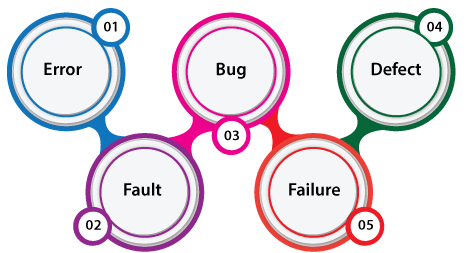
In this section, we are going to discuss the difference between the Bug, Defect, Error, Fault & Failure as we understood that all the terms are used whenever the system or an application act abnormally.

Sometimes we call it an error and sometimes a bug or a defect and so on. In software testing, many of the new test engineers have confusion in using these terminologies.

Generally, we used these terms in the Software Development Life Cycle (SDLC) based on the phases. But there is a conflict in the usage of these terms.

In other words, we can say that in the era of software testing, the terms bugs, defects, error, fault, and failure come across every second of the day.

Skip Ad

But for a beginner or the inexperienced in this field, all these terminologies may seem synonyms. It became essential to understand each of these terms independently if the software doesn’t work as expected.

What is a bug?

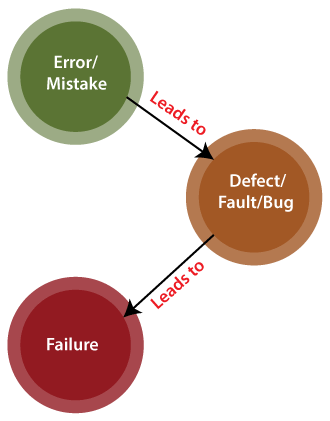
In software testing, a bug is the informal name of defects, which means that software or application is not working as per the requirement. When we have some coding error, it leads a program to its breakdown, which is known as a bug. The test engineers use the terminology Bug.

If a QA (Quality Analyst) detect a bug, they can reproduce the bug and record it with the help of the bug report template.

What is a Defect?

When the application is not working as per the requirement is knows as defects. It is specified as the aberration from the actual and expected result of the application or software.

In other words, we can say that the bug announced by the programmer and inside the code is called a Defect.

What is Error?

The Problem in code leads to errors, which means that a mistake can occur due to the developer’s coding error as the developer misunderstood the requirement or the requirement was not defined correctly. The developers use the term error.

Bug vs Defect vs Error vs Fault vs Failure

What is Fault?

The fault may occur in software because it has not added the code for fault tolerance, making an application act up.

A fault may happen in a program because of the following reasons:

  • Lack of resources
  • An invalid step
  • Inappropriate data definition

What is Failure?

Many defects lead to the software’s failure, which means that a loss specifies a fatal issue in software/ application or in its module, which makes the system unresponsive or broken.

In other words, we can say that if an end-user detects an issue in the product, then that particular issue is called a failure.

Possibilities are there one defect that might lead to one failure or several failures.

For example, in a bank application if the Amount Transfer module is not working for end-users when the end-user tries to transfer money, submit button is not working. Hence, this is a failure.

The flow of the above terminologies are shown in the following image:

Bug vs Defect vs Error vs Fault vs Failure

Bug Vs. Defect Vs. Error Vs. Fault Vs. Failure

We have listed some of the vital differences between bug, defect, error, fault, and failure in the below table.

Comparison basisBugDefectErrorFaultFailure
DefinitionIt is an informal name specified to the defect.The Defect is the difference between the actual outcomes and expected outputs.An Error is a mistake made in the code; that’s why we cannot execute or compile code.The Fault is a state that causes the software to fail to accomplish its essential function.If the software has lots of defects, it leads to failure or causes failure.
Raised byThe Test Engineers submit the bug.The Testers identify the defect. And it was also solved by the developer in the development phase or stage.The Developers and automation test engineers raise the error.Human mistakes cause fault.The failure finds by the manual test engineer through the development cycle.
Different typesDifferent type of bugs are as follows:Logic bugsAlgorithmic bugsResource bugsDifferent type of Defects are as follows:
Based on priority:HighMediumLowAnd based on the severity:CriticalMajorMinorTrivial
Different type of Error is as below:Syntactic ErrorUser interface errorFlow control errorError handling errorCalculation errorHardware errorTesting ErrorDifferent type of Fault are as follows:Business Logic FaultsFunctional and Logical FaultsFaulty GUIPerformance FaultsSecurity FaultsSoftware/ hardware fault—–
Reasons behindFollowing are reasons which may cause the bugs:
Missing coding
Wrong coding
Extra coding
The below reason leads to the defects:
Giving incorrect and wrong inputs.
Dilemmas and errors in the outside behavior and inside structure and design.
An error in coding or logic affects the software and causes it to breakdown or the failure.
The reasons for having an error are as follows:
Errors in the code.
The Mistake of some values.
If a developer is unable to compile or run a program successfully.
Confusions and issues in programming.
Invalid login, loop, and syntax.
Inconsistency between actual and expected outcomes.
Blunders in design or requirement actions.
Misperception in understanding the requirements of the application.
The reasons behind the fault are as follows:
A Fault may occur by an improper step in the initial stage, process, or data definition.
Inconsistency or issue in the program.
An irregularity or loophole in the software that leads the software to perform improperly.
Following are some of the most important reasons behind the failure:
Environmental condition
System usage
Users
Human error
Way to prevent the reasonsFollowing are the way to stop the bugs:
Test-driven development.
Offer programming language support.
Adjusting, advanced, and operative development procedures.
Evaluating the code systematically.
With the help of the following, we can prevent the Defects: Implementing several innovative programming methods.
Use of primary and correct software development techniques.
Peer review
It is executing consistent code reviews to evaluate its quality and correctness.
Below are ways to prevent the Errors:
Enhance the software quality with system review and programming.
Detect the issues and prepare a suitable mitigation plan.
Validate the fixes and verify their quality and precision.
The fault can be prevented with the help of the following:
Peer review.
Assess the functional necessities of the software.
Execute the detailed code analysis.
Verify the correctness of software design and programming.
The way to prevent failure are as follows:
Confirm re-testing.
Review the requirements and revisit the specifications.
Implement current protective techniques.
Categorize and evaluate errors and issues.

Conclusion

After seeing all the significant differences between bug, defect, error, fault, and failure, we can say that the several issues and inconsistencies found throughout software are linked and dependent on each other.

All the above terminology affects and change different parts of the software and differ from one another massively. However, all these differences between bug, defect, errors, faults, and failures slow down the software’s excellence and performance.

Uncategorized

How to Handle alerts in Selenium?

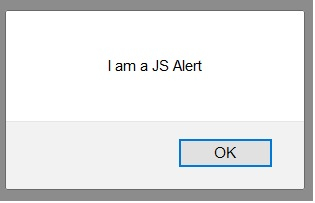
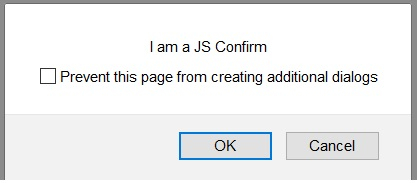
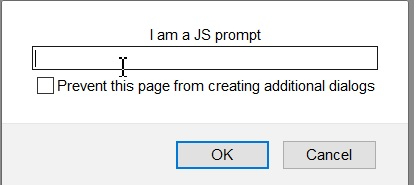
We can handle alerts in Selenium webdriver by using the Alert interface. An alert can be of three types – a prompt which allows the user to input text, a normal alert and a confirmation alert.

By default, the webdriver can only access the main page, once an alert comes up, the method switchTo().alert() is used to shift the focus webdriver control to the alert.

A normal alert is shown below −

A confirmation alert is shown below −

A prompt alert is shown below −

To accept an alert (to click on the OK button in alert), the method switchTo().alert().accept() is used. To dismiss an alert (to click on the Cancel button in alert), the method switchTo().alert().dismiss() is used.

To extract the alert text, the method switchTo().alert().getText() is used. To input text inside a confirmation alert, the method switchTo().alert().sendKeys() is used.

The text to be entered is passed as a parameter to the sendKeys method.

package RK1.Building_a_selenium_project;

import org.openqa.selenium.By;
import org.openqa.selenium.WebDriver;
import org.openqa.selenium.WebElement;
import org.openqa.selenium.chrome.ChromeDriver;
import org.openqa.selenium.firefox.FirefoxDriver;
import java.util.concurrent.TimeUnit;
import org.openqa.selenium.Alert;
public class AlertHandle{
   public static void main(String[] args) {
      System.setProperty("webdriver.chrome.driver",
         "F:\\Work Environment\\MyProject\\chromedriver.exe");
      WebDriver driver = new ChromeDriver();
      //implicit wait
      driver.manage().timeouts().implicitlyWait(5, TimeUnit.SECONDS);
      //URL launch
      driver.get("https://the-internet.herokuapp.com/javascript_alerts");
      // identify element
      WebElement c=driver.findElement(By.xpath("//button[text()='Click for JS Prompt']"));
      c.click();
      //shift to alert
      Alert a = driver.switchTo().alert();
      //get alert text
      String s = a.getText();
      System.out.println("Alert text is: " + s);
      //input text to alert
      a.sendKeys("Selenium");
      //dismiss alert
      a.dismiss();
      c.click();
      //accept alert
      a.accept();
      driver.quit();
   }
}
Automation Testing

How to Open New Browser Tab in Selenuim


Answer − We can open a new browser tab in Selenium webdriver. The methods – Keys.chord and sendKeys are required to achieve this task. The Keys.chord method is used to send multiple keys at once.

We shall pass Keys.CONTROL and Keys.ENTER as parameters to this method. The complete string is again passed as a parameter to the sendKeys. Finally, the method sendKeys shall be applied on the link which we want to open in a new tab

Syntax

String l = Keys.chord(Keys.CONTROL,Keys.ENTER);
driver.findElement(By.xpath("//*[text()='Links']")). sendKeys(l);

Code Implementation

package RK1.Building_a_selenium_project;

import java.util.concurrent.TimeUnit;

import org.openqa.selenium.WebDriver;
import org.openqa.selenium.chrome.ChromeDriver;
import org.openqa.selenium.By;
import org.openqa.selenium.Keys;

public class OpenNextTab {

	public static void main(String[] args) {
		// TODO Auto-generated method stub
		System.setProperty("webdriver.chrome.driver", "F:\\Work Environment\\MyProject\\QA_Round\\chromedriver.exe");

		WebDriver driver = new ChromeDriver();

		// wait of 5 seconds
	      driver.manage().timeouts().implicitlyWait(5, TimeUnit.SECONDS);
	      //url launch
	      driver.get("https://www.tutorialspoint.com/about/about_careers.htm");
	      // Keys.Chord string
	      String l = Keys.chord(Keys.CONTROL,Keys.ENTER);
	      // open new tab
	      driver.findElement(By.xpath("//*[text()='Terms of Use']")).sendKeys(l);
	      driver.quit();
	   }

	}

Uncategorized

Difference between HashMap and Hashtable

HashMap and Hashtable both are used to store data in key and value form. Both are using hashing technique to store unique keys.

But there are many differences between HashMap and Hashtable classes that are given below.

HashMapHashtable
1) HashMap is non synchronized. It is not-thread safe and can’t be shared between many threads without proper synchronization code.Hashtable is synchronized. It is thread-safe and can be shared with many threads.
2) HashMap allows one null key and multiple null values.Hashtable doesn’t allow any null key or value.
3) HashMap is a new class introduced in JDK 1.2.Hashtable is a legacy class.
4) HashMap is fast.Hashtable is slow.
5) We can make the HashMap as synchronized by calling this code
Map m = Collections.synchronizedMap(hashMap);
Hashtable is internally synchronized and can’t be unsynchronized.
6) HashMap is traversed by Iterator.Hashtable is traversed by Enumerator and Iterator.
7) Iterator in HashMap is fail-fast.Enumerator in Hashtable is not fail-fast.
8) HashMap inherits AbstractMap class.Hashtable inherits Dictionary class.
Uncategorized

Difference between abstract class and interface

Abstract class and interface both are used to achieve abstraction where we can declare the abstract methods. Abstract class and interface both can’t be instantiated.

But there are many differences between abstract class and interface that are given below.

Abstract classInterface
1) Abstract class can have abstract and non-abstract methods.Interface can have only abstract methods. Since Java 8, it can have default and static methods also.
2) Abstract class doesn’t support multiple inheritance.Interface supports multiple inheritance.
3) Abstract class can have final, non-final, static and non-static variables.Interface has only static and final variables.
4) Abstract class can provide the implementation of interface.Interface can’t provide the implementation of abstract class.
5) The abstract keyword is used to declare abstract class.The interface keyword is used to declare interface.
6) An abstract class can extend another Java class and implement multiple Java interfaces.An interface can extend another Java interface only.
7) An abstract class can be extended using keyword “extends”.An interface can be implemented using keyword “implements”.
8) A Java abstract class can have class members like private, protected, etc.Members of a Java interface are public by default.
9)Example:
public abstract class Shape{
public abstract void draw();
}
Example:
public interface Drawable{
void draw();
}

Simply, abstract class achieves partial abstraction (0 to 100%) whereas interface achieves fully abstraction (100%).

Example of abstract class and interface in Java

Let’s see a simple example where we are using interface and abstract class both.

  1. //Creating interface that has 4 methods  
  2. interface A{  
  3. void a();//bydefault, public and abstract  
  4. void b();  
  5. void c();  
  6. void d();  
  7. }  
  8.   
  9. //Creating abstract class that provides the implementation of one method of A interface  
  10. abstract class B implements A{  
  11. public void c(){System.out.println(“I am C”);}  
  12. }  
  13.   
  14. //Creating subclass of abstract class, now we need to provide the implementation of rest of the methods  
  15. class M extends B{  
  16. public void a(){System.out.println(“I am a”);}  
  17. public void b(){System.out.println(“I am b”);}  
  18. public void d(){System.out.println(“I am d”);}  
  19. }  
  20.   
  21. //Creating a test class that calls the methods of A interface  
  22. class Test5{  
  23. public static void main(String args[]){  
  24. A a=new M();  
  25. a.a();  
  26. a.b();  
  27. a.c();  
  28. a.d();  
  29. }} 
Uncategorized

How to Use Log4j in Selenium

What is Logging?

Logging is a process that takes applications to a newer level with information logs on how the applications may or may not have performed/executed. It gives an exact idea of software performance, including any shortcomings.

Log4j in Selenium is one such logging framework that helps in gathering information in the form of logs or log files.

What is Log4j in Selenium?

Log4j is a logging framework written in Java that provides an easy way for logging in Selenium. In a nutshell, the framework gives out information about everything that goes on during the software execution.

Log4j also provides insight into anything that may have gone wrong during software execution or automation. Overall, Log4j documents the output in the form of logs that can be examined later for purposes such as auditing small and large-scale Selenium projects.

Let’s take a look at the various components of the Log4j logging framework.

Components of Log4j

The Log4j logging framework comprises the following components:

  1. Logger
  2. Appenders
  3. Layout

Logger

The function of the logger in Log4j is basically storing and capturing all the necessary logging information that will be generated using the framework.

To truly understand its functioning, let’s dig a little deeper and discuss the logger class, and log level methods. The loggers also decide which priority is going to be captured.

  1. Logger Class – To fully use the logger, create an instance for a logger class where all the generic methods will be at the user’s disposal, required to use Log4j.
  2. Log Levels – These are the methods that will be used to print the log messages. There are primarily only a few log levels that are used in a script.
  • ALL – This level will prioritize and include everything in the logs.
  • ERROR – This level will show messages that inform users about error events that may not stop the application.
  • WARN – This level will show information regarding warnings, that may not stop the execution but may still cause problems.
  • DEBUG – This level will log debugging information.
  • INFO – This level will log the progress of the application.
  • FATAL – This will print information critical to the system that may even crash the application.

Appenders

The appender basically grabs information from the logger and writes log messages to a file or any other storage location. The following are some of the appenders one can use for Log4j:

  1. FileAppender – This will append the log messages to a file.
  2. RollingFileAppender – It will perform the same function as FileAppender, but users will be able to specify the maximum file size. Once the limit is exceeded, the appender will create another file to write the messages.
  3. DailyRollingFileAppender – It specifies the frequency by which the messages are to be written to the file.
  4. ConsoleAppender – In this, the appender will simply write the log messages in the console.

Layout

The layout is where the format in which log messages will appear is decided. There are several layouts one can use for log messages:

  1. Pattern Layout – The user must specify a conversion pattern based on which the logs will be displayed. Otherwise, it takes the default conversion pattern in case of “no pattern specified”.
  2. HTML Layout – In this layout, the format of logs will be in the form of an HTML table.
  3. XML Layout – This will show the logs in an XML format.

How to Use Log4j in Selenium

Follow the steps below to successfully run Log4j with Selenium Webdriver:

  1. Write an automation script, such as the one in the example below. It is a simple script that opens a URL, send keys to username and password, and ends the script when it clicks the login button.
  2. After creating the script, create a log4j.properties file and specify the root logger, appended, and layout information in the file.
  3. Import log4j dependencies like Logger, PropertyConfigurator, and add them to the script along with the logger class.
  4. Add the messages that will be displayed in the log file.

Now, let’s try to understand the code written below:

import org.apache.log4j.Logger;
import org.apache.log4j.PropertyConfigurator;
import org.openqa.selenium.By;
import org.openqa.selenium.JavascriptExecutor;
import org.openqa.selenium.UnexpectedAlertBehaviour;
import org.openqa.selenium.WebDriver;
import org.openqa.selenium.chrome.ChromeDriver;
import org.openqa.selenium.chrome.ChromeOptions;


public class Bstack01 implements driverHelp {
	static Logger log = Logger.getLogger(Bstack01.class);
	public static void main(String[] args) {
	PropertyConfigurator.configure("F:\\Work Environment\\MyProject\\QA_Round\\src\\log4j.properties");
	System.setProperty("webdriver.chrome.driver", "//path of chrome driver");
	ChromeOptions options = new ChromeOptions();
	options.setUnhandledPromptBehaviour(UnexpectedAlertBehaviour.IGNORE);
	WebDriver driver = new ChromeDriver(options);
	JavascriptExecutor js = (JavascriptExecutor)driver;
	driver.get("https://www.browserstack.com/users/sign_in");
	log.info("Open browserstack");
	driver.manage().window().maximize();
	log.info("Maximize window size");
	driver.findElement(By.id("user_email_login")).sendKeys("rbc@xyz.com");
	System.out.println("User name is etered");
	log.info("enter username");
	driver.findElement(By.id("user_password")).sendKeys("password");
	System.out.println("Password is entered");
	log.info("enter password");
	//driver.findElement(By.name("commit")).click();
	js.executeScript("document.getElementById('user_submit').click();");
	log.info("click on login");
	System.out.println("Sign in button is clicked");
	driver.close();

	}
	}

Log4j with Properties File Configuration

The properties configuration file will contain the information regarding the following:

  1. The first objective is to identify the log level and the destination where the log will be written. In this case, the log level is the DEBUG level and a file is the destination.
  2. The next step is to establish an appender. This example uses a RollingFIleAppender with a maximum capacity of 2MB and the file location is also specified in this section. The MaxBackupIndex is the number of files that will be created in case the file size is exceeded.
  3. The last section contains the layout in which a format is specified. This example uses PatternLayout. And, since we have not used a conversion pattern here, it will take the default conversion pattern into account.
#root logger
log4j.rootLogger = DEBUG, file
#appender
log4j.appender.file = org.apache.log4j.RollingFileAppender
log4j.appender.file.File = PATH\\TO\\firstoutput.log
log4j.appender.file.MaxFileSize = 2MB
log4j.appender.file.MaxBackupIndex = 3
#layout
log4j.appender.file.layout = org.apache.log4j.PatternLayout