Automation Testing

Clear text from text area using selenium WebDriver.


We can clear text from the text area using Selenium webdriver. We shall use the clear method to remove the content from a text area or an edit box. First, we shall identify the text area with the help of any locator.

A text area is identified with a textarea tagname in the html code. Let us input some text inside the below text area, then clear the text.
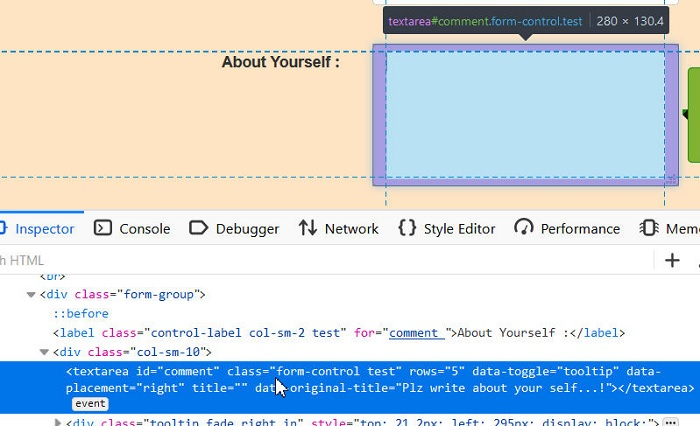
Example

Code Implementation

import org.openqa.selenium.By;
import org.openqa.selenium.WebDriver;
import org.openqa.selenium.WebElement;
import org.openqa.selenium.chrome.ChromeDriver;
public class TextAreaClear{
   public static void main(String[] args) {
      System.setProperty("webdriver.chrome.driver","C:\\Users\\ghs6ko r\\Desktop\\Java\\chromedriver.exe");
      WebDriver driver = new ChromeDriver();

      //URL launch
      driver.get("http://www.uitestpractice.com/Students/Form");

      // identify element
      WebElement m = driver.findElement(By.id("comment"));

      // enter text
      m.sendKeys("Selenium");

      // obtain value entered in text area
      System.out.println("Value entered: " + m.getAttribute("value"));

      // clear text area
      m.clear();

      // obtain value entered in text area after clear applied
      System.out.println("Value after clear(): " + m.getAttribute("value"));

      //browser close
      driver.close();
   }
}

Java

Java Program to Iterate through each characters of the…

Here we will learn to iterate through each characters of the string.

To understand this example, you should have the knowledge of the following Java programming topics:

  • Java Strings
  • Java for Loop
  • Java for-each Loop

Example 1: Loop through each character of a string using for loop

class Main {
  public static void main(String[] args) {

    // create a string
    String name = "Programiz";

    System.out.println("Characters in " + name + " are:");

    // loop through each element
    for(int i = 0; i<name.length(); i++) {

      // access each character
      char a = name.charAt(i);
      System.out.print(a + ", ");
    }
  }
}

Output

Characters in Programiz are:
P, r, o, g, r, a, m, i, z,

In the above example, we have used the for-loop to access each element of the string. Here, we have used the charAt() method to access each character of the string.


Example 2: Loop through each character of a string using for-each loop

class Main {

  public static void main(String[] args) {

    // create a string
    String name = "Programiz";

    System.out.println("Characters in string \"" + name + "\":");

    // loop through each element using for-each loop
    for(char c : name.toCharArray()) {

      // access each character
      System.out.print(c + ", ");
    }

  }
}

Output

Characters in string "Programiz":
P, r, o, g, r, a, m, i, z,

In the above example, we have converted the string into a char array using the toCharArray(). We then access each element of the char array using the for-each loop.

Java

Private Constructor in Java

In Java, the constructoris a special type of method that has the same name as the class name. Internally, a constructor is always called when we create an object of the class. It is used to initialize the state of an object.

In the same way, Java also allows us to create a private constructor. In this section, we will discuss private constructors in Java, rules for creating a private constructor, and its use cases. Also, we will see its implementation.

What is a private constructor?

Java allows us to declare a constructor as private. We can declare a constructor private by using the private access specifier. Note that if a constructor is declared private, we are not able to create an object of the class. Instead, we can use this private constructor in Singleton Design Pattern.

Rules for Private Constructor

The following rules keep in mind while dealing with private constructors.

  • It does not allow a class to be sub-classed.
  • It does not allow to create an object outside the class.
  • If a class has a private constructor and when we try to extend the class, a compile-time error occurs.
  • We cannot access a private constructor from any other class.
  • If all the constant methods are there in our class, we can use a private constructor.
  • If all the methods are static then we can use a private constructor.
  • We can use a public function to call the private constructor if an object is not initialized.
  • We can return only the instance of that object if an object is already initialized.

Use Cases of Private Constructor

The main purpose of using a private constructor is to restrict object creation. We also use private constructors to implement the singleton design pattern. The use-cases of the private constructor are as follows:

  • It can be used with static members-only classes.
  • It can be used with static utilityor constant classes.
  • It can also be used to create singleton classes.
  • It can be used to assign a name, for instance, creation by utilizing factory methods.
  • It is also used to avoid sub-classing.
  • It incorporates the factory methods.

Let’s see the implementation of the private constructor.

Implementation of a Private Constructor

A.java

  1. public class A  
  2. {  
  3. //craeting a private constructor   
  4. private A()  
  5. {  
  6. }  
  7. void display()  
  8. {  
  9. System.out.println(“Private Constructor”);  
  10. }  
  11. }  
  12. private class Test  
  13. {  
  14. public static void main(String args[])  
  15. {  
  16. //compile time error  
  17. A obj = new A();   
  18. }  
  19. }  

Output:

Private Constructor in Java

PrivateConstructorDemo.java

  1. public class PrivateConstructorDemo   
  2. {  
  3. //creating an instance variable of the class Tester  
  4. private static PrivateConstructorDemo pcd;  
  5. //creating a private constructor  
  6. private PrivateConstructorDemo()  
  7. {  
  8. }  
  9. //creating a static method named getInstance()  
  10. public static PrivateConstructorDemo getInstance()  
  11. {  
  12. if(pcd == null)  
  13. {  
  14. //creating a constructor of the class      
  15. pcd = new PrivateConstructorDemo();  
  16. }  
  17. return pcd;  
  18. }  
  19. //main() method  
  20. public static void main(String args[])   
  21. {  
  22. PrivateConstructorDemo pcd = PrivateConstructorDemo.getInstance();  
  23. PrivateConstructorDemo pcd1 = PrivateConstructorDemo.getInstance();  
  24. //invokes the getInstance() method and prints the corresponding result  
  25. System.out.println(pcd.equals(pcd1));  
  26. }    
  27. }  

Output:

true