Manual Testing

Accessibility testing

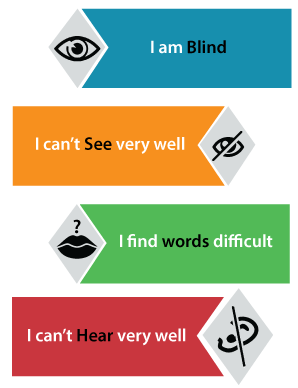
In software testing, accessibility testing is widely used to check the application for disabled persons and make sure the developer will create the application which can be accessible by all types of users, like a regular user and physically challenged (color blindness, learning disabilities, and so on).

In this section, we will discuss accessibility testing, how we perform accessibility testing, the objective of using this testing, and tools of accessibility testing.

What is accessibility testing?

Accessibility testing is another type of software testing used to test the application from the physically challenged person’s point of view. Here the physical disability could be old age, hearing, color blindness, and other underprivileged groups. It is also known as 508 compliance testing. In this, we will test a web application to ensure that every user can access the website.
Accessibility testing

For accessibility testing, we have some assured rules and regulations, which need to be followed as well.

The Law for Accessibility testing:

  • Web content accessibility guidelines: These strategies are established to serve a purpose, which helps us to increase the user-friendliness of a website.
  • Rehabilitation Act, section 504, and section 508:

Section 504: This section will help people with disabilities by providing workspace access, education, and other organizations.

Section 508: Section 508 will help those people by giving access to technology.

  • Americans with disabilities act (ADA): The ADA rule says that all the domains, such as schools and organizations, public buildings should make the tools that everyone uses.

Individuals who are physically challenged will use assistive tools that help them to work on the software product. Let see some of the tools which are available in the market:

  • Special keyboard: We have some special keyboards where the users can quickly type, and these keyboards are specially designed for them who have motor control problems.
  • Screen reader software: This type of software is used to read out the text, which is shown on the screen.
  • Speech Recognition Software: The speech recognition software will change the spoken word to text and works as an input to the computer system.
  • Screen Magnification Software: This type of software is designed to help the vision-impaired persons because it will expand the screen and make the reading easy.

Example of accessibility testing

Let us assume that if a blind person uses the internet, and clicks on anything, the response connected into the voice, and the person can hear that and then uses it. The response should be read by the browsers and commented invoice.

Whatever the response is sent to the browser, it can be easily read, and the application or the software should be designed like that. The response should be immediately connected to voice. Therefore the blind person can easily access it.

The application should be designed in such a way that even the physically impaired person could be able to access the application without facing any difficulties.

The accessibility testing has many rules which could be followed while developing the software or the application. Some of the essential strategies are as follows:

  • The red and green color objects should not be used or displayed.
  • All the comments should have Alt tags.
  • The application should be able to access all the components with the help of keywords.

Purpose of Accessibility testing

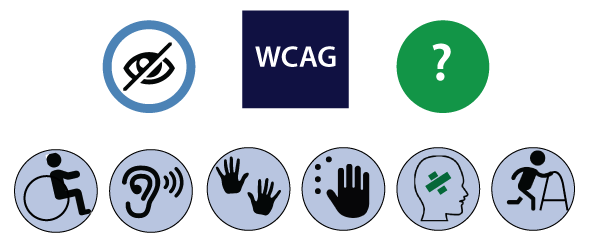
The primary purpose of Accessibility testing is to accommodate people who have disabilities like:
Accessibility testing
  • Hearing Deficiency: In this, the person is not able to hear or hear clearly and has sensory issues such as hearing disabilities and deafness.
  • Learning Impairment: The people who are facing reading difficulties.
  • Physical Disabilities: In this type of disability, the people are not capable of using the Keyboard or the Mouse with one hand and facing the problem in hand activities, muscle detention, and reduced motor abilities.
  • Visual Impairments: The visual or vision disabilities define that when a person has complete blindness, poor vision abilities, color blindness, and flashing effect problems and visual strobe.
  • Cognitive Deficiency: In this, the person will have poor memory, not able to recognize more complex scenarios, and learning difficulties.

Myths and facts about Accessibility Testing

MythsFacts
Accessibility testing is only for physically challenged people.All types of users can use the accessibility testing as they enhance the credibility of software.
We are modifying the unapproachable application to the available use, which causes us lots of time and money?We can work on the typical requirements that are essential for the challenged users because sometimes, it is not required to integrate all the modifications at one time.
Accessibility testing is costly.This testing is not costly if we recognize the accessibility issues at the design phase besides the extensive testing, which can help us to decrease the cost and save lots of rework as well.
Accessibility testing is basic and tedious process to perform.Here, we can prepare our application in such a way that all types of users can use it.

How to perform accessibility testing

We can perform accessibility testing both manually and with the help of automation as well. First, we see that how we perform accessibility testing manually:

For accessibility testing, we have many tools available in the market, but while using it, we may face some problems such as budget, less knowledge, and so on. To overcome these issues, we will perform accessibility testing manually.

Let us see some scenarios, where we test the accessibility of the application manually:

  • Modifying the font size to large: We can use the large font size and check the availability.
  • Testing for captions: Here, we will test that a caption should be visible and also ensure that it is expressive. As we know that while we are accessing the Facebook application, sometimes the images and videos take lots of time to load, where the captions will help us to understand what is in the pictures and video.
  • By deactivating the style: We can disable the method and test if the content of the table is accurately lined up or not.
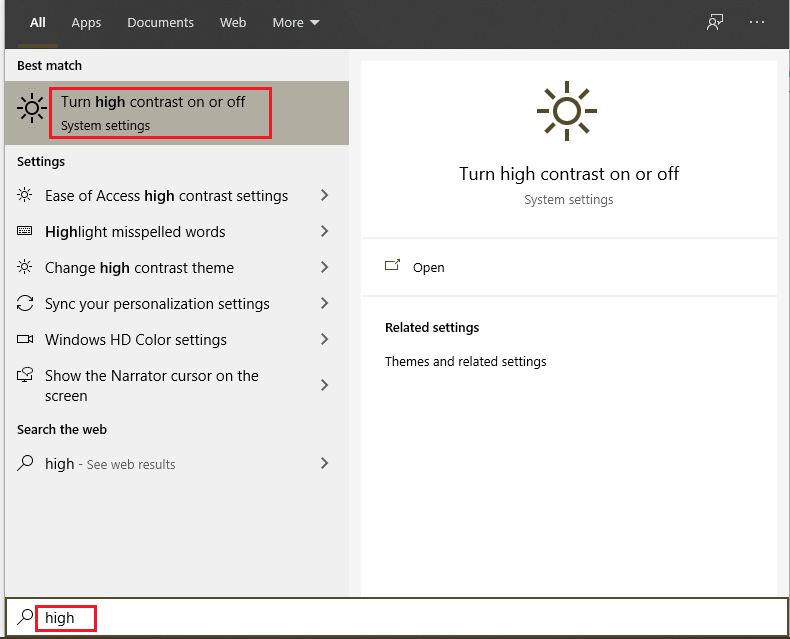
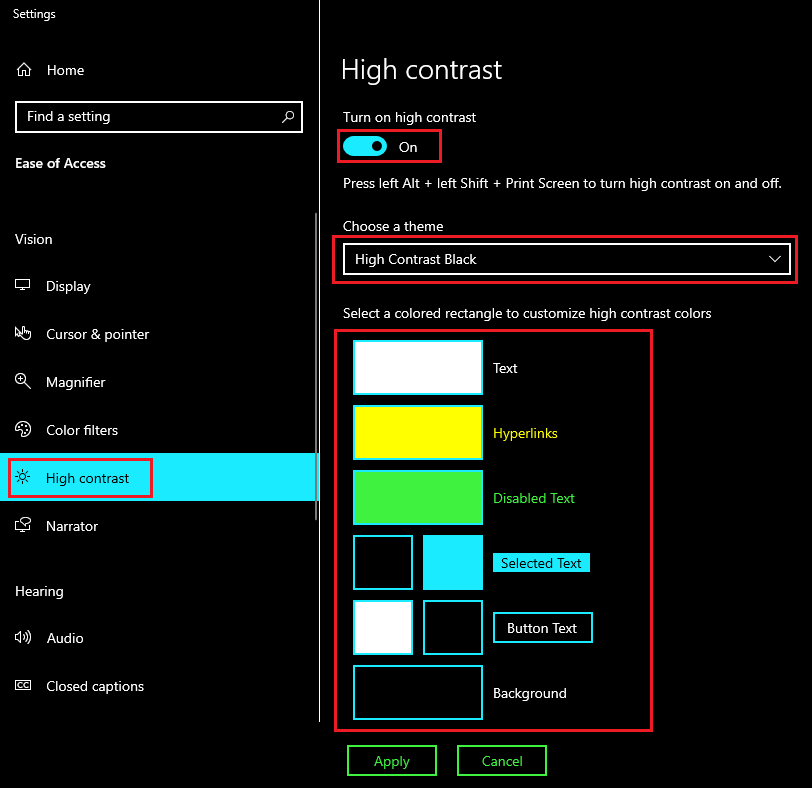
  • We can use high contrast mode: If we can use high-contrast mode, we can highlight the website’s content. When we turn the high contrast mode in our windows, the content of the site gets highlighted automatically as it turns into white or yellow, and the background turns black.

To turn on high contrast mode, search the high contrast mode in the search box of the start menu on your system as we can see in the below image:
Accessibility testing

Here, first we turn-on the high-contrast, and we can also select a theme from the given drop-down list as we choose the high contrast theme as we can see in the below image:
Accessibility testing

After modifying the settings, our browser will look like this:
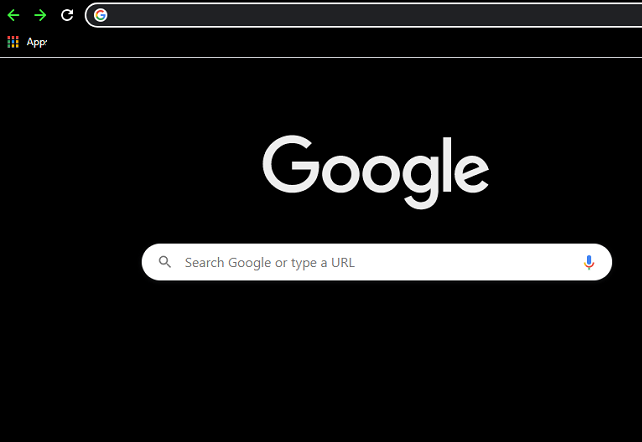
Accessibility testing
  • Skip navigation: We can also skip the navigation sometimes as it is helpful for people who have the motor incapacities. We can change our effort to the top of the page by clicking on the Ctrl + Home
  • Turn-off the CSS [cascading style sheet]: Generally, the Cascading style sheet is used to define the appearance of the document. If we turn off this, we can test the text presentation, text style, and background color of the application.
  • Use the field label: If we use the field label as it will help us in filing a form because this, we can see the template and fill out the required information while we ordering something online and login.
  • PDF document: In we can try to save the PDF file in the form of text and test whether the order for the content is kept or not.
  • Content scaling: We can check the image readability while zooming out it.

Automation method

Generally, the Automation technique is used for various testing methods. The automation testing process contains multiple tools to perform accessibility testing.

Some of the most commonly used tools are as follows:

  • Hera
  • Wave
  • Accessibility valet
  • TAW
  • aDesigner
  • WebAnywhere
  • Web accessibility toolbar

Hera

The Hera tool is to test the accessibility of Web pages based on the WCAG requirement. It is used to do an initial set of tests on the page and also finds the automatically detectable issues. It will help us in manual modification by highlighting the parts of the page, providing guidelines on how to perform the tests, and also verify the style of the application which comes with a multilingual preference.

Wave

Accessibility testing

It is a web accessibility tool that is introduced by WEBAIM. It is an open-source tool that automatically tests the web page for several phases of accessibility. It is a suite of assessment tools which ensure the writers make their content more accessible to those who are physically challenged.

It is used to identify the WCAG (web content accessibility toolbar guidelines) issues but also simplifies the human assessment of web content. The WAVE tool will make sure that our accessibility reports are protected and hundred percent isolated.

Accessibility Valet

The accessibility valet tool is used to test the web pages besides the Web Content Accessibility Guidelines [WCAG] agreement. This tool includes various features such as:

  • It is a scripting tool.
  • It will display the detailed reports to the developers.
  • It will provide the automatic cleanup.
  • It will help us to convert the Html to Xhtml.
  • This tool will also provide the meta-data for the semantic web and WWW.

TAW

It is a tool that will help to explore the website in agreement with the W3c web accessibility strategies and also display the accessibilities problems. It is an online tool that defines the accessibility of our website. The web accessibility test problem is further classified as Priority 1, priority two, and priority 3. This tool will also provide the subsets of WCAG 1.0.

aDesigner

The aDesigner tool is established by IBM that helps us to understand the visually impaired persons. Thus the designer can recognize the necessities of Impairment people and create the applications.

WebAnywhere

It is an open-source tool, which is a web-based screen reader for the web. The screen reader allows blind people to access the network from any computer system. This tool will help the readers to read the web page as it is easily accessed on any device.

Web accessibility toolbar

It is an extension of Opera or Internet Explorer, which allows as designing web pages with the help of suitable features. The most important feature of this tool is GreyScale that helps to identify the small contrast spots in the design.

Conclusion

In the end, we can say that accessibility testing is testing where each user can use software or the application. The test engineer could perform the accessibility testing from each user’s points of view because the test engineer’s purpose of testing an application is to verify that all the strategies are fulfilled or not. All the users should easily access that application.
Manual Testing

Security Testing

What is security testing?

Security testing is an integral part of software testing, which is used to discover the weaknesses, risks, or threats in the software application and also help us to stop the nasty attack from the outsiders and make sure the security of our software applications.

The primary objective of security testing is to find all the potential ambiguities and vulnerabilities of the application so that the software does not stop working. If we perform security testing, then it helps us to identify all the possible security threats and also help the programmer to fix those errors.

It is a testing procedure, which is used to define that the data will be safe and also continue the working process of the software.https://a1d0b1b08eb5d744beee9e626591c960.safeframe.googlesyndication.com/safeframe/1-0-38/html/container.html

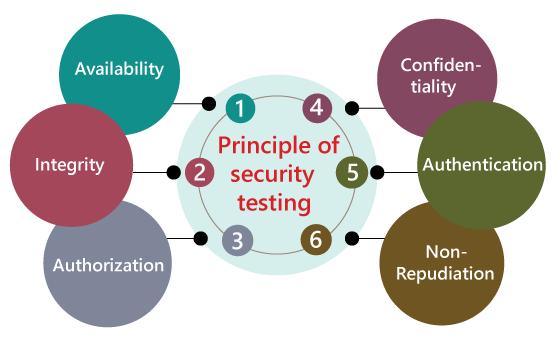
Principle of Security testing

Here, we will discuss the following aspects of security testing:

  • Availability
  • Integrity
  • Authorization
  • Confidentiality
  • Authentication
  • Non-repudiation
Security Testing

Availability

In this, the data must be retained by an official person, and they also guarantee that the data and statement services will be ready to use whenever we need it.

Integrity

In this, we will secure those data which have been changed by the unofficial person. The primary objective of integrity is to permit the receiver to control the data that is given by the system.

The integrity systems regularly use some of the similar fundamental approaches as confidentiality structures. Still, they generally include the data for the communication to create the source of an algorithmic check rather than encrypting all of the communication. And also verify that correct data is conveyed from one application to another.

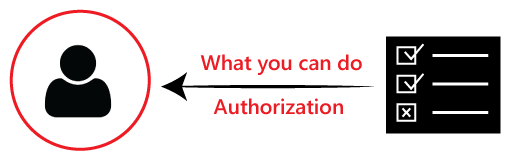
Authorization

It is the process of defining that a client is permitted to perform an action and also receive the services. The example of authorization is Access control.

Security Testing

Confidentiality

It is a security process that protracts the leak of the data from the outsider’s because it is the only way where we can make sure the security of our data.

Authentication

The authentication process comprises confirming the individuality of a person, tracing the source of a product that is necessary to allow access to the private information or the system.

Security Testing

Non- repudiation

It is used as a reference to the digital security, and it a way of assurance that the sender of a message cannot disagree with having sent the message and that the recipient cannot repudiate having received the message.

The non-repudiation is used to ensure that a conveyed message has been sent and received by the person who claims to have sent and received the message.

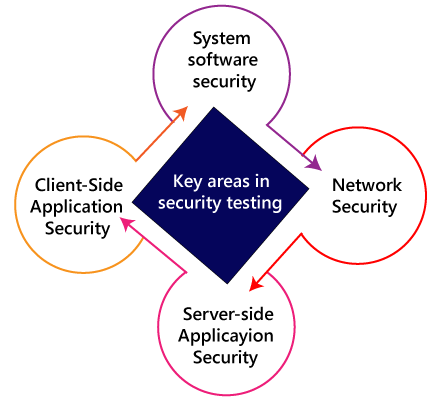
Key Areas in Security Testing

While performing the security testing on the web application, we need to concentrate on the following areas to test the application:

Security Testing

System software security

In this, we will evaluate the vulnerabilities of the application based on different software such as Operating system, Database system, etc.

Network security

In this, we will check the weakness of the network structure, such as policies and resources.

Server-side application security

We will do the server-side application security to ensure that the server encryption and its tools are sufficient to protect the software from any disturbance.

Client-side application security

In this, we will make sure that any intruders cannot operate on any browser or any tool which is used by customers.

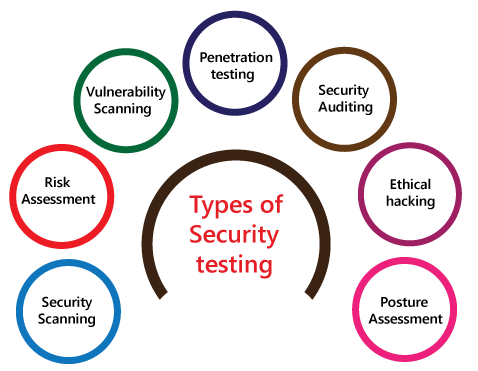
Types of Security testing

As per Open Source Security Testing techniques, we have different types of security testing which as follows:

  • Security Scanning
  • Risk Assessment
  • Vulnerability Scanning
  • Penetration testing
  • Security Auditing
  • Ethical hacking
  • Posture Assessment
Security Testing

Security Scanning

Security scanning can be done for both automation testing and manual testing. This scanning will be used to find the vulnerability or unwanted file modification in a web-based application, websites, network, or the file system. After that, it will deliver the results which help us to decrease those threats. Security scanning is needed for those systems, which depends on the structure they use.

Risk Assessment

To moderate the risk of an application, we will go for risk assessment. In this, we will explore the security risk, which can be detected in the association. The risk can be further divided into three parts, and those are high, medium, and low. The primary purpose of the risk assessment process is to assess the vulnerabilities and control the significant threat.

Vulnerability Scanning

It is an application that is used to determine and generates a list of all the systems which contain the desktops, servers, laptops, virtual machines, printers, switches, and firewalls related to a network. The vulnerability scanning can be performed over the automated application and also identifies those software and systems which have acknowledged the security vulnerabilities.

Penetration testing

Penetration testing is a security implementation where a cyber-security professional tries to identify and exploit the weakness in the computer system. The primary objective of this testing is to simulate outbreaks and also finds the loophole in the system and similarly save from the intruders who can take the benefits.

Security Auditing

Security auditing is a structured method for evaluating the security measures of the organization. In this, we will do the inside review of the application and the control system for the security faults.

Ethical hacking

Ethical hacking is used to discover the weakness in the system and also helps the organization to fix those security loopholes before the nasty hacker exposes them. The ethical hacking will help us to increase the security position of the association because sometimes the ethical hackers use the same tricks, tools, and techniques that nasty hackers will use, but with the approval of the official person.

The objective of ethical hacking is to enhance security and to protect the systems from malicious users’ attacks.

Posture Assessment

It is a combination of ethical hacking, risk assessments, and security scanning, which helps us to display the complete security posture of an organization.

How we perform security testing

The security testing is needed to be done in the initial stages of the software development life cycle because if we perform security testing after the software execution stage and the deployment stage of the SDLC, it will cost us more.

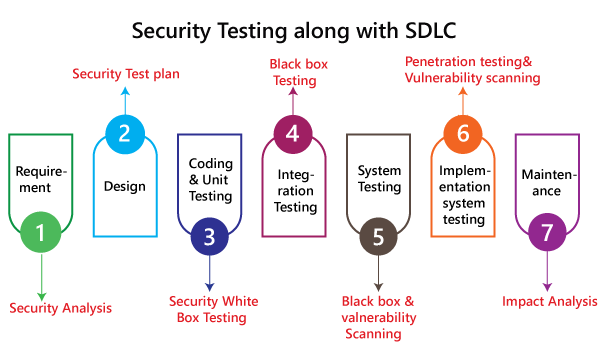
Now let us understand how we perform security testing parallel in each stage of the software development life cycle(SDLC).

Security Testing

Step1

SDLC: Requirement stage

Security Procedures: In the requirement phase of SDLC, we will do the security analysis of the business needs and also verify that which cases are manipulative and waste.

Step2

SDLC: Design stage

Security Procedures: In the design phase of SDLC, we will do the security testing for risk exploration of the design and also embraces the security tests at the development of the test plan.

Step3

SDLC: Development or coding stage

Security Procedures: In the coding phase of SDLC, we will perform the white box testing along with static and dynamic testing.

Step4

SDLC: Testing (functional testing, integration testing, system testing) stage

Security Procedures: In the testing phase of SDLC, we will do one round of vulnerability scanning along with black-box testing.

Step 5

SDLC: Implementation stage

Security Procedures: In the implementation phase of SDLC, we will perform vulnerability scanning again and also perform one round of penetration testing.

Step 6

SDLC: Maintenance stage

Security Procedures: In the Maintenance phase of SDLC, we will do the impact analysis of impact areas.

And the test plan should contain the following:

  • The test data should be linked to security testing.
  • For security testing, we need the test tools.
  • With the help of various security tools, we can analyze several test outputs.
  • Write the test scenarios or test cases that rely on security purposes.

Example of security testing

Generally, the type of security testing includes the problematic steps based on overthinking, but sometimes the simple tests will help us to uncover the most significant security threats.

Let us see a sample example to understand how we do security testing on a web application:

  • Firstly, log in to the web application.

  • And then log out of the web application.
  • Then click the BACK button of the browser to verify that it was asking us to log in again, or we are already logged-in the application.
Why security testing is essential for web applications

At present, web applications are growing day by day, and most of the web application is at risk. Here we are going to discuss some common weaknesses of the web application.
  • Client-side attacks
  • Authentication
  • Authorization
  • Command execution
  • Logical attacks
  • Information disclosure

Client-side attacks

The client-side attack means that some illegitimate implementation of the external code occurs in the web application. And the data spoofing actions have occupied the place where the user believes that the particular data acting on the web application is valid, and it does not come from an external source.
Note: Here, Spoofing is a trick to create duplicate websites or emails.

Authentication

In this, the authentication will cover the outbreaks which aim to the web application methods of authenticating the user identity where the user account individualities will be stolen. The incomplete authentication will allow the attacker to access the functionality or sensitive data without performing the correct authentication.
For example, the brute force attack, the primary purpose of brute force attack, is to gain access to a web application. Here, the invaders will attempt n-numbers of usernames and password repeatedly until it gets in because this is the most precise way to block brute-force attacks.

After all, once they try all defined number of an incorrect password, the account will be locked automatically.

Authorization

The authorization comes in the picture whenever some intruders are trying to retrieve the sensitive information from the web application illegally.

For example, a perfect example of authorization is directory scanning. Here the directory scanning is the kind of outbreaks that deeds the defects into the webserver to achieve the illegal access to the folders and files which are not mentioned in the pubic area.

And once the invaders succeed in getting access, they can download the delicate data and install the harmful software on the server.

Command execution

The command execution is used when malicious attackers will control the web application.

Logical attacks

The logical attacks are being used when the DoS (denial of service) outbreaks, avoid a web application from helping regular customer action and also restrict the application usage.

Information disclosure

The information disclosures are used to show the sensitive data to the invaders, which means that it will cover bouts that planned to obtain precise information about the web application. Here the information leakage happens when a web application discloses the delicate data, like the error message or developer comments that might help the attacker for misusing the system.

For example, the password is passing to the server, which means that the password should be encoded while being communicated over the network.

Note:

The web application needs more security regarding its access along with data security; that’s why the web developer will make the application in such a way to protect the application from Brute Force Attacks, SQL Injections, Session Management, failure to Restrict URL Access and Cross-site scripting (XSS). And also, if the web application simplifies the remote access points, then it must be protected too.

Here, Session management: It is used to check whether the cookies can be re-used in another computer system during the login stage.

SQL injection: It is a code injection approach where the destructive SQL Statements are implanted into some queries, and it is implemented by the server.

Cross-site scripting (XSS): This is the technique through which the user introduces client-side script or the HTML in the user-interface of a web application and those additions are visible to other users.

Myths and Facts of Security testing

Here, we will discuss the Myths and facts of security testing:

MythsFacts
There is no profit on an asset in security testing.Security Testing can highlight the parts of enhancement, which help us to increase productivity and decrease interruption and also allow the maximum output.
Nowadays, the Internet is not safe, and we will be buying the hardware or software to save the business and protect the system.Here, the fact is rather purchasing any software or hardware, the company first understands security and then follows the security process.
If we have a small business and we do not require a security procedure.In that case, the fact is every organization needs a security procedure.
The only technique to secure is to disconnect it.The one and the most excellent way to protect an association is to identify the Perfect Security. Here Perfect security can be accomplished by performing the implementation, compared with business, permitted, and manufacturing validations.

Security testing tools

We have various security testing tools available in the market, which are as follows:

  • SonarQube
  • ZAP
  • Netsparker
  • Arachni
  • IronWASP

Conclusion

For an application or the software, it is necessary to perform security testing to verify that the sensitive information is still private. In software testing, the security testing is essential because it helps us to save our necessary data ultimately. In this, the test engineer will act as an invader and test the system or detect the security defects.

Manual Testing

Mutation Testing

What is mutation testing?

Mutation testing is a white box method in software testing where we insert errors purposely into a program (under test) to verify whether the existing test case can detect the error or not. In this testing, the mutant of the program is created by making some modifications to the original program.

The primary objective of mutation testing is to check whether each mutant created an output, which means that it is different from the output of the original program. We will make slight modifications in the mutant program because if we change it on a massive scale than it will affect the overall plan.

When we detected the number of errors, it implies that either the program is correct or the test case is inefficient to identify the fault.

Mutation testing purposes is to evaluate the quality of the case that should be able to fail the mutant code hence this method is also known as Fault-based testing as it used to produce an error in the program and that why we can say that the mutation testing is performed to check the efficiency of the test cases.

What is mutation?

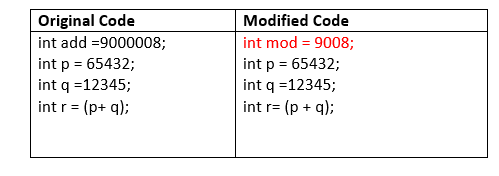
The mutation is a small modification in a program; these minor modifications are planned to typical low-level errors which are happened at the time of coding process.

Generally, we deliberate the mutation operators in the form of rules which match the data and also generate some efficient environment to produce the mutant.

Types of mutation testing

Mutation testing can be classified into three parts, which are as follows:

  • Decision mutations
  • value mutations
  • Statement mutations

Let us understand them one by one:

Mutation Testing

Decision mutations

In this type of mutation testing, we will check the design errors. And here, we will do the modification in arithmetic and logical operator to detect the errors in the program.

Like if we do the following changes in arithmetic operators:

  • plus(+)→ minus(-)
  • asterisk(*)→ double asterisk(**)
  • plus(+)→incremental operator(i++)

Like if we do the following changes in logical operators

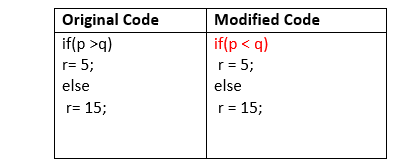
  • Exchange P > → P<, OR P>=

Now, let see one example for our better understanding:

Mutation Testing

Value mutations

In this, the values will modify to identify the errors in the program, and generally, we will change the following:

  • Small value à higher value
  • Higher value àSmall value.

For Example:

Mutation Testing

Statement Mutations

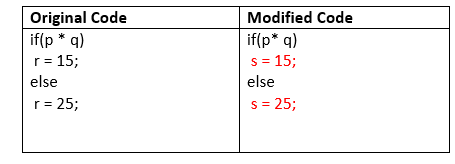
Statement mutations means that we can do the modifications into the statements by removing or replacing the line as we see in the below example:

Mutation Testing

In the above case, we have replaced the statement r=15 by s=15, and r=25 by s=25.

How to perform mutation testing

To perform mutation testing, we will follow the below process:

Mutation Testing
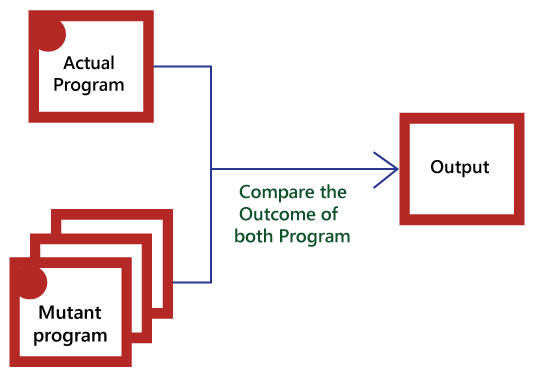
  • In this, firstly, we will add the errors into the source code of the program by producing various versions, which are known mutants. Here every mutant having the one error, which leads the mutant kinds unsuccessful and also validates the efficiency of the test cases.
  • After that, we will take the help of the test cases in the mutant program and the actual application will find the errors in the code.
  • Once we identify the faults, we will match the output of the actual code and mutant code.
  • After comparing the output of both actual and mutant programs, if the results are not matched, then the mutant is executed by the test cases. Therefore the test case has to be sufficient for identifying the modification between the actual program and the mutant program.
  • And if the actual program and the mutant program produced the exact result, then the mutant is saved. And those cases are more active test cases because it helps us to execute all the mutants.

Advantages and disadvantages of Mutation Testing

Advantages

The benefits of mutation testing are as follows:

  • It is a right approach for error detection to the application programmer
  • The mutation testing is an excellent method to achieve the extensive coverage of the source program.
  • Mutation testing helps us to give the most established and dependable structure for the clients.
  • This technique can identify all the errors in the program and also helps us to discover the doubts in the code.

Disadvantages

The drawbacks of mutant testing are as follows:

  • This testing is a bit of time taking and costlier process because we have many mutant programs that need to be created.
  • The mutation testing is not appropriate for Black-box testing as it includes the modification in the source code.
  • Every mutation will have the same number of test cases as compare to the actual program. Therefore the significant number of the mutant program may need to be tested beside the real test suite.
  • As it is a tedious process, so we can say that this testing requires the automation tools to test the application.

Manual Testing

Globalization Testing

Globalization testing is another type of software testing which is used to test the software that is developed for multiple languages, is called globalization testing, and improving the application or software for various languages is known as globalization.

This testing ensures that the application will support multiple languages and multiple features because, in current scenarios, we can see the enhancement in several technologies as the applications are planned in such a way that it is used globally.

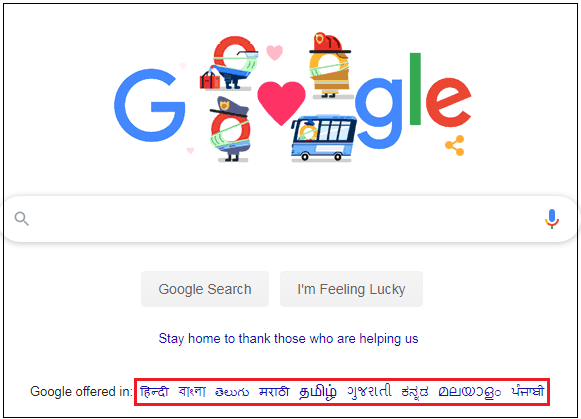
For example, In India, the Google.com supports most of the languages, and it can also be retrieved by the large numbers of people of the various countries as it is a globalized application.

Globalization Testing

Purpose of Globalization testing

The primary purpose of globalization testing is as follows:

  • It is used to make sure that the application is to support all the languages around the world.
  • It is used for the identification of the various phases of the implementation.
  • It is used to define the user interfaces of the software.
  • This testing will focus on the world-wide experiences of the application.
  • It is used to make sure that code can control all international support without breaking the functionality of the application.

Why we need to perform Globalization testing

We need to perform globalization testing to fulfill the following conditions:

Understanding the language vocabulary: The application should design in such a way that it can easily understand the multiple languages terms across the world.

For example

  • In UK→ English
  • in India→ Hindi and English

Zip Code: Suppose we lived in the UK where the Zipcode includes the alphanumeric characters as well as in India the zip code is in the 6 number digit formats. Thus if we select our country like India and entering the pin code of our state, it should accept only the 6-digit code.

So in this scenario, the software should receive the zip code based on the UK Zip code format. Therefore it is essential to make sure that the zip code functionality is working fine based on every location.

Address and telephone number format: The application should be tested in such a way that it will access the address and phone number format for multiple countries.

For example

  • United kingdom→+44
  • India→ +91

Types of Globalization Testing

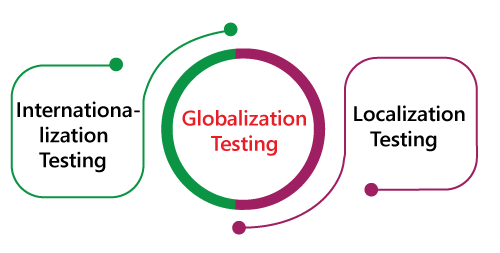
Globalization testing is classified into two different parts, which are as follows:

Globalization Testing

Internationalization Testing

The internationalization testing is the procedure of developing and planning the software or the application (product) or file content, which allows us to localize our application for any given language, culture, and region without demanding any changes in the source code. This testing is also known as I18N testing, and here 18 is the number between I and N in the Internationalization word.

The main objective is to perform the internationalization testing, and this testing concentrates on the multiple testing such as functional testing, integration testing, usability testing, user interface testing, compatibility testing, installation testing, and validation testing.

In this testing, the application code is independent of language, and it is done at the design level.

Why we do the internationalization testing

We will perform the I18N testing to check the following conditions:

  • For verifying that the right content is in the correct place.
  • To check an opposing effect on product quality.
  • For verifying that the content is in the correct language.

Example of internationalization testing

Let see an example to understand internationalization testing.

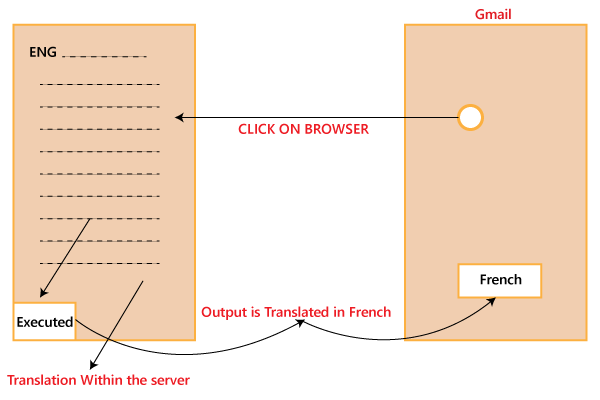
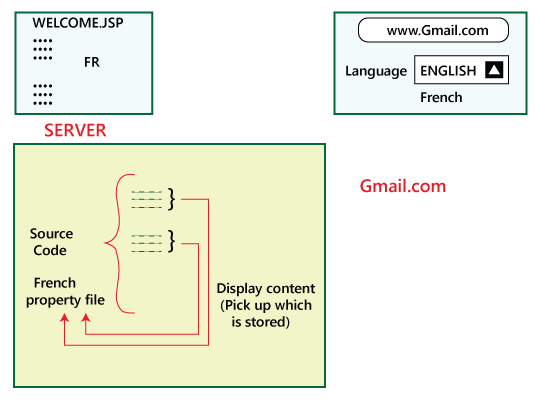
Let say if we want our software in the French language, so we have to click on the browser. The browser will take us to the server where the code is in English, and from there, it is executed, and the output is translated into French and displayed in the French language.

Globalization Testing

Now the question arises how do we translate into another language?

Can we do it with the help of the translator, NO there are some drawbacks of using the translator.

If we translate the code from English to any other language with the help of a translator, we face the below consequences:

  • We will not be summoning the feeling, that’s why the usage of the translators will fail.
  • The meaning will change.

Let see how the internationalization testing works for the English language:

Globalization Testing

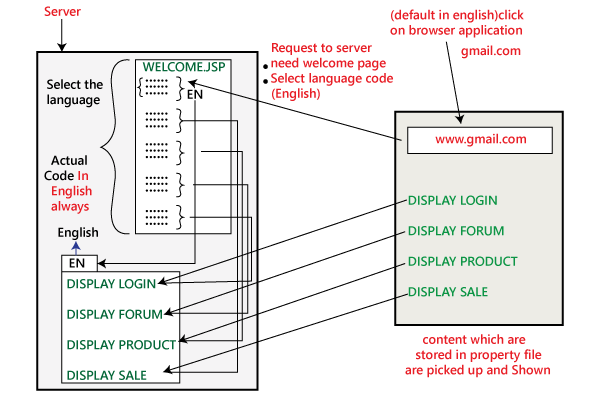
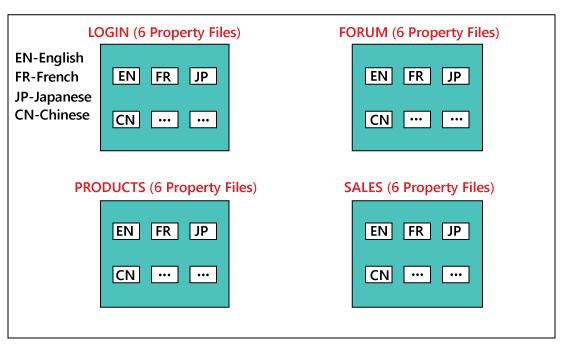
We will write one general code in English, and for all other languages, we have multiple property files. Assume that we have 6 various languages, and for that, we have 6 different property files. Let see how this will execute:

First, click on the browser, and it will take the request to the server with the following guidelines as we require a Welcome Page and start the language code EN. Then the code where the language is implemented has the property files of English. Now we select the English property file and connect to the particular link.

For example, if the next phase of coding is for the login module, then it relates to the Link1, then collects the data stored there and demonstrations it in the English language. The same process will be continuing for the other links, such as forums, sales, and products. The same process will be followed for the different languages also.

But here one has to consider that, who wrote these properties files?

Firstly, the developer writes the property files in English. Then the person of the experience takes the data and manually writes the property file and gives it back to the developers.

After that, the developer places this particular property in the server as we can see in the below image:

Globalization Testing

Now let us understand how we will translate into the French language, and we also test it.

We will follow the same process as above:

  • First, we click on the browser, select the language French before we further click.
  • After we clicked, it leads us to the Welcome page with selected language code FR.
  • Therefore, it will go to the FR property file and show the data (French), which is stored in the file based on the link it gets connected. For example, Link 1 to login shows the data of the login module. Likewise, for other modules such as a forum, sales, and product.
Globalization Testing

As if now, we have converted the language from English to French. So how do we verify that it is in French or some other language?

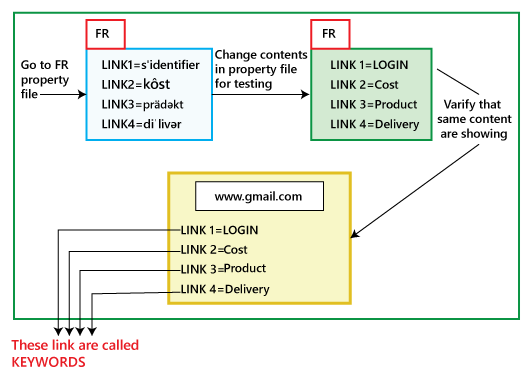
Move to the French property file and change the contents in that particular file as we can see in the below image:

Globalization Testing

Once we have done modifications in the property file, and we select the French language again and see whether the changes we have done in the content is displaying the same or not.

If it shows the same, then the test engineer can do the testing, and we must do the modification in the property file, not in the actual code. Or if it is not showing the same, then we will find the defects which need to fix only in the code.

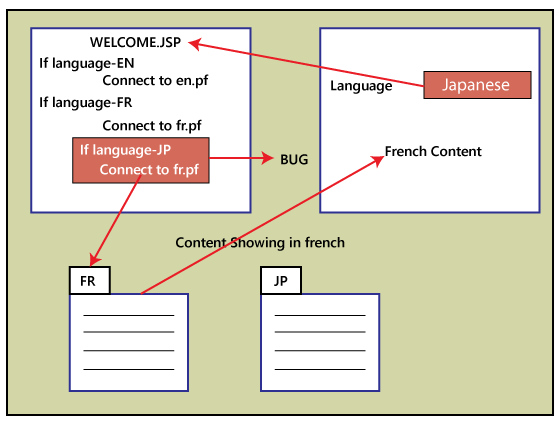
While doing I18N testing, we may find the below defects:

  • If we select English→display in English
    If we choose French→ display in French
    If we select Japanese→display in French
Globalization Testing

Note:

Now, we will understand that if we choose the Japanese language, and it will display the content in French?

The above scenarios will occur if the developers will copy and paste the code and forget to modify the specific property file such as Japanese such as jp.pf; they continue with Fr.pf file; that’s why the content is still present in the French language.

  • The defect could be in alignment, so we will verify that the alignment specification for various languages is appropriately followed, like left alignment or the right alignment.
  • We can check for opposite direction language, which means that how we can breakdown the words. There are two types of languages, such as Bi-Directional and Uni-Directional, where the Bi-direction language can start either from right to left, and the Uni-directional language will start either from left to right. Therefore, we have to check if the text is showing correctly as per the selected language or not.

Localization testing (L10N testing)

The localization testing is nothing but the format testing, where we test the format specification based on the country, region, etc. It is also known as L10N testing, and here 10 is the number between L and N in the Localization word.

The primary objective of localization is to provide a product the look and feel for a target market, no matter their culture, location, and the languages. This testing is not required to localize the product.

Let us understand the various formats testing, which we perform in the localization testing:

Date format testing

The software should be designed in such a way that it can follow the date based on its country format.

For example

  • In the USA, the date format→MM-DD-YY
  • In India, the date format→DD-MM-YYYY

Currency format testing

In this, we do not worry about the functionality of the format, such as $ is converted to Rs. or not. Here we only test whether the $ should be in the first or the last.

For example, 200$, $250, Rs.500 (the standard should be as per country standards)

Pin code format testing

In this, we have the countries that have the pin code with the characters such as PQ230. Checking the Pin code format is L10N testing, and checking whether PQ is translated to French is I18N testing.

The L10N testing contains the Date Format, currency format, and the Pin code format.

Image format testing

In this, we can only change the name of the image because the image cannot be changed. Therefore we must have multiple images depending on the country.

Advantages of Globalization Testing

Following are the benefits of globalization testing:

  • This testing will provide the free edition of software applications or other content to multiple locations.
  • This testing ensures that the application could be used in various languages without need of rewriting the entire software code.
  • It will increase the code design and quality of the product.
  • It will enhance the customer base around the world.
  • This testing will help us to decrease the cost and time for localization testing.
  • This testing will provide us more scalability and flexibility.

Disadvantages of Globalization Testing

The disadvantages of globalization testing are as follows:

  • The test engineer might face the schedule challenge.
  • We need the domain expert to perform globalization testing,
  • We need to hire a local translator, which makes this procedure costlier.
Manual Testing

Adhoc Testing

In this section, we will learn about Adhoc testing, types of Adhoc testing, the need for Adhoc testing, and advantage/ disadvantage of the adhoc testing.

What is Adhoc Testing?

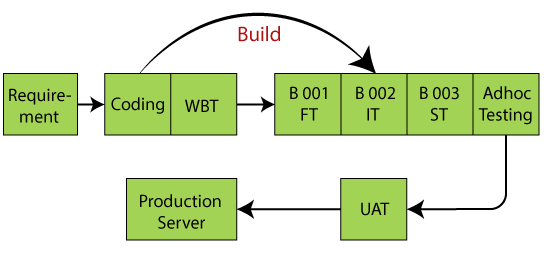
This testing we do when the build is in the checked sequence, then we go for Adhoc testing by checking the application randomly.

Adhoc testing is also known as Monkey testing and Gorilla testing.

It is negative testing because we will test the application against the client’s requirements.

When the end-user using the application randomly, and he/she may see a bug, but the professional test engineer uses the software systematically, so he/she may not find the same bug.

Adhoc Testing

Example of Adhoc Testing

Scenario 1

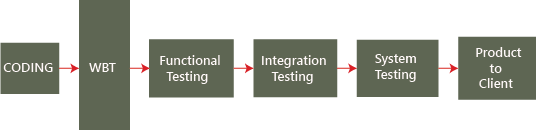
Suppose we will do one round of functional testing, integration, and system testing on the software.

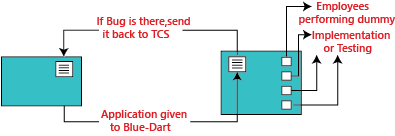
Then, we click on some feature instead of going to the login page, and it goes to the blank page, then it will be a bug.

To avoid these sort of scenarios, we do one round of adhoc testing as we can see in the below image:

Adhoc Testing

Scenario 2

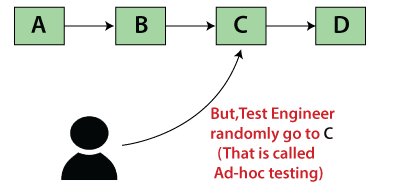
In Adhoc testing, we don’t follow the requirement because we randomly check the software. Our need is A?B?C?D, but while performing Adhoc testing, the test engineer directly goes to the C and test the application as we can see in the below image:

Adhoc Testing

Scenario 3

Suppose we are using two different browsers like Google Chrome and Mozilla Firefox and login to the Facebook application in both the browsers.

Then, we will change the password in the Google Chrome browser, and then in another browser (Firefox,) we will perform some action like sending a message.

It should navigate to the login page, and asking to fill the login credentials again because we change our credentials in another browser (Chrome), this process is called adhoc testing.

Why do we need to perform Adhoc Testing?

When the product release to the market, we go for Adhoc testing because the customer never uses the application in sequence/systematically for that sake; we check the application by going for Adhoc testing by checking randomly.

Checking the application randomly without following any sequence or procedure since the user doesn’t know how to use the application, they may use it randomly and find some issues to cover this we do one round of Adhoc testing.

When we perform adhoc testing

We go for Adhoc testing when all types of testing are performed. If the time permits then we will check all the negative scenarios during adhoc testing.

Type of Adhoc Testing

Following are the types of adhoc testing:

  • Buddy testing
  • Pair testing

Buddy testing

Buddy testing is done with at least two members. And one member is from the testing team, and another one is from the development team.

When the unit testing is performed on the application, then only we can perform buddy testing. This type of testing helps the developer team and testing team to do their jobs.

Pair testing

In this type of testing, two testers will work together to test the software, where they can share their ideas and identify the bugs or defects in the application.

One of them will test the application, and the other one can review and analyze the application.

Advantages of Adhoc Testing

Following are some of the benefits of adhoc testing:

  • Adhoc testing cannot follow any process; that why it can be performed anytime in the software development life cycle.
  • The test engineer can test the application in their new ways that helps us to find out many numbers of bugs as compared to the actual testing process.
  • The developer can also execute adhoc testing while developing the module that helps them to code in a better way.
  • When the in-depth testing is required in less time, adhoc testing can be performed and also deliver the quality product on time.
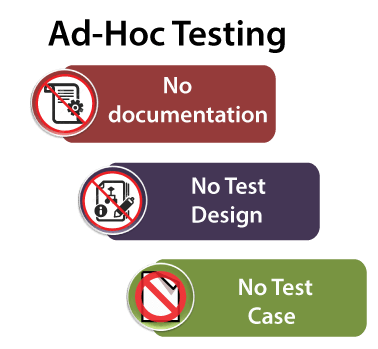
  • Adhoc testing does not require any documentation; that’s why tester can test the application with more concentration without worrying about the formal documentation.

Disadvantages of Adhoc Testing

Following are the disadvantages of adhoc testing:

  • Adhoc testing is dependent on the test engineer’s product knowledge because he/she knows the flow of the application, so he/she knows where the application can collapse, and a new test engineer may not that much familiar with the application.
  • Sometimes reproducing the bug is difficult because, in this testing, we did not follow any planning.
Manual Testing

Mainframe Testing

In this section, we are going to understand the Mainframe testing, which is used to test the software or the applications and services developed on Mainframe Systems.

And we also learn about the mainframe attributes, types of mainframe testing, how to perform it, the different challenges and Troubleshooting while performing the mainframe testing, various commands used in Mainframe Testing, some common issues faced during mainframe testing, and Mainframe Automation Testing Tools.

Before understanding the concept of Mainframe testing, we are going to learn about the Mainframe.

What is Mainframe?

The mainframe is a multi-user, high performance and high-speed computer system. The mainframe is the most reliable, scalable, and secured machine systems.

In other words, we can say that these systems are used for the intend of larger-scale computing, which involves great availability and safety. The mainframe systems are mostly used in various subdivisions such as Retail, insurance, finance, and other critical areas where massive data are processed several times.

In this, we can perform some million Instructions per second [up to 569,632 MIPS] with the help of the below aspects:

  • Maximum Input/output bandwidth: The connections between drives and processors have a few choke points if we have the extreme input and output bandwidth.
  • Reliability: Frequently, the mainframes agree to the graceful degradation and service though the system is running.
  • Reliable single-thread performance: It is important for practical operations against a database.
  • Maximum Input/output connectivity: The maximum input/output connectivity implies that the mainframes excel at providing huge disk farms.

After understanding the mainframe concept, now we have come to our main point of discussion on mainframe testing.

What is mainframe testing?

The main objective of mainframe testing is to make sure the dependability, performance, and excellence of the application or service by verification and validation approaches and check if it is ready to deploy or not.

The tester only needs to know about the CICS screens’ navigations while performing the Mainframe testing as these are custom-built for specific applications.

And the tester does not have to worry about the emulator set up on the machine if any modification happens to the code in COBOL, JCL, and so on.

Where we performed the mainframe testing?

Generally, the mainframe testing is executed on the deployed code with multiple data combinations set into the input file. In other words, we can say that the Mainframe Applications must be tested completely before the production run.

The Mainframe application, or else known as the batch job, is tested in contradiction of the test cases developed with requirements.

The software or the application which runs on the mainframe can be retrieved through the terminal emulator.

After understanding the mainframe testing, we will look into the several characteristics of mainframe testing.

Mainframe Testing Methodology

In Mainframe testing, the Software or an application are retrieved by end-users in a way, which is diverse from Web applications.

And the application tester should know these significant differences, which are shown below:

Web ApplicationsMainframe Applications
The web applications are acquired via two-tier architecture [Client/Server] or three-tier architecture [Presentation/apps/DB storage layers].In the mainframe application, the end-user must log into the system directly.
The web applications retrieve across Browser or UI.Terminal Emulator must retrieve the web applications.
In this, the testing can be performed straight on the application screen.In this, the tester should have precise knowledge of mainframe operations.
In the web application, some of the processing is done on the Client-side, and the applications should install at the right place before the testing begin.In mainframe testing, the Terminal Emulator is the only software, which has to be loaded in a client machine for testing where the applications exist in the main server.

Mainframe Attributes

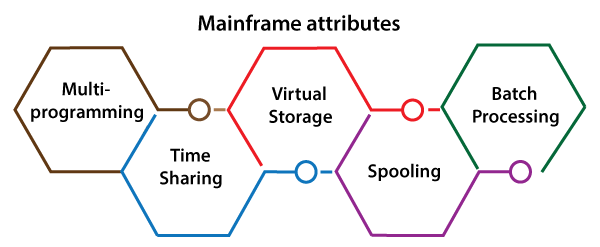
In mainframe testing, we have the following mainframe features; let us see them one by one:

  • Multiprogramming
  • Time sharing
  • Virtual storage
  • Spooling
  • Batch processing
Mainframe Testing

Multiprogramming

  • The multiprogramming attribute is a facility, which allows us to make efficient use of the CPU.
  • The computer implements various programs at the same time.

Time-Sharing

  • Time-share processing is also known as Foreground Processing, whereas batch job processing is known as Background Processing. Therefore, it is known as an Interactive Processing because it allows the user to relate with the computer directly.
  • In a time-sharing system each user can access to the system over the terminal device.

Virtual Storage

  • Virtual storage uses disk storage as an extension of real storage.
  • It is a technique to use memory efficiently to store and perform many sized tasks.

Spooling

  • The Spool means Simultaneous Peripheral Operations Online, which is used to accumulate the output of a program or an application.
  • If it is required, then the spooled output is directed to output devices like a printer.

Batch Processing

  • Batch processing is a technique where we can accomplish any task in units also known as jobs.
  • We can perform one or more programs in an order based on jobs.
  • The Job scheduler concludes about the sequence where the jobs are implemented.
  • Jobs are planned as per their importance and class to maximize the average output.
  • The batch processing gives us the necessary information with the help of JOB CONTROL LANGUAGE(JCL).

How to do Mainframe Testing

The mainframe testing can be performed in two ways, either manually or using some automation tools such as QTP, REXX, and IBM application performance analyzer etc. But generally, we will execute the Mainframe testing manually.

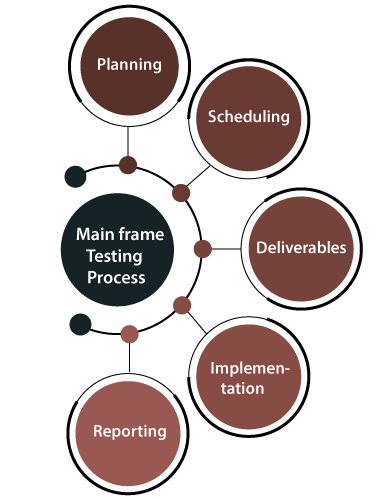
To do mainframe testing, we need to follow the below steps:

Mainframe Testing

Step1: Planning

Firstly, the business team or the development team constructs the test plans including the Business requirement document, System requirement document, other project documents and the inputs. And it controls how a specific item or process is going to be changed in the release’s cycle.

Meanwhile, to prepare the test scenarios and test cases in advance, the testing team will coordinate the development and the Project management teams.

Step2: Scheduling

Once the requirement document is prepared successfully, it will hand over to the development team and the testing team. And the testing schedule should be writing with the project delivery plan, which should be accurate.

Step3: Deliverables

After receiving the document, they will check the deliverables. And the deliverables should well describ without having any uncertainty, and it should be fulfilling the scope of test objectives.

Step4: Implementation

After that, the implementation should be done as per plan and deliverables.

Generally, the 15-25% of the application will be affected directly by the modified requirement in a release. And the other 60-75% of the release will be depend on the out-box-features such as testing the applications and processes.

Therefore, we need to test the Mainframe application in two ways:

  • Testing Requirements
  • Testing Integration

Testing Requirements: We will test the application for the features or the modification disclose in the requirement document.

Testing Integration: Regression Testing is the main attention of this testing activity. And we will test the entire process or other applications that receive or send data to the precious application.

Step5: Reporting

After that, we will share the test results with the development team on a periodical basis. To maintain continuity, the testing team should be in touch with the development team for instant modification in crucial conditions.

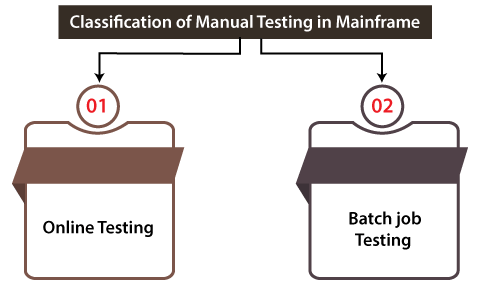
Categorization of Manual Testing in Mainframe

Mainframe Manual Testing can be categorized into the following two types:

  • Online testing
  • Batch job testing
Mainframe Testing

Online Testing

  • Online Testing refers to the testing of CICS screens that is equivalent to web page testing where the functionality of the existing screens can alter, or new screens can be added.
  • Various applications can have inquiry and modification screens where screens’ functionality needs to be tested as part of the online testing.

Batch Job Testing

  • Generally, in batch job testing, the testing process contains batch jobs for the functionality, which is executed in the existing release.
  • The test result will extract from the output files, and the database should be tested and documented.

Mainframe Testing commands

In mainframe testing, we have used various commands, which are very helpful while testing an application or software.

Some of the most commonly used commands in mainframe testing are shown in the following table:

CommandsDescription
COPYThe COPY command is used to copy a dataset.
SUBMITThe SUBMIT command is used to submit a background job.
RENAMEThe RENAME command is used to rename the dataset.
DELETEThe DELETE command is used to remove the dataset.
JOB SCANThe JOB SCAN command is used to fix the JCL with the libraries, program, file, and so on without implementing it.
CANCELThe CANCEL command is used to cancel the background job.
ALLOCATEThe ALLOCATE command is used to allocate a dataset.

Note: We have some other commands while performing mainframe testing, but they are not used regularly; therefore, we used those commands whenever it is needed.

Prerequisite statistics on Mainframe operations

A tester should have the following information on mainframe operation while performing the mainframe testing on an application:

  • ISPF [Interactive system productivity facility] has to be used for menu operations.
  • TSO [Time-sharing option] is a method that is used to access virtual storage and manage datasets with the help of commands.
  • The FTP [file transfer protocol] or another transfer protocol must be used while testing software.
  • If the mainframe is the backend, we should use the cross-platform operations.
  • SDSF [System display and search facility] has to be used for controlling operations and system resources.
  • Batch job management has to be followed.
  • CICS transaction has to use for testing the IBM mainframes.

Mainframe testing Challenges and Troubleshooting

If we are performing the mainframe testing on the application, we might have encountered some challenges, and for those challenges, we have some specified approach, as we can see in the below table:

ChallengesExplanationApproach
Unclear or Incomplete RequirementsSometimes a user may have access to the user manual or the training guide, but which are not similar to the documented requirements.The Test engineer should be actively part of the Software Development Life Cycle (SDLC) from the requirements phase to overcome the unclear requirement issue.And if the requirements are testable, then it will help them to validate easily.
Identification or Data SetupSometimes, the tester might have a condition to re-use the current data as per the requirement. But occasionally, it is hard to find the mandatory details from the current data.To overcome the data setup challenges, we can use the homegrown tools as per the requirement.And to get the existing data, queries should make in advance.In case of any trouble, a request place to the data management team to generate or replicating the vital data.
Job SetupThe job needs to be setup in the QA region when the jobs are saved into PDS.
Therefore, the jobs are not submitted with a production qualifier.
For this, the Job set-up tools can be used to overcome human errors during setup.
Ad-hoc RequestSometimes, we may encounter some situations where the end to end testing needs to be maintained due to a problem in upstream or downstream application. And the Ad-hoc requests enhance the time and effort in the execution cycle.To overcome the particular challenges, we can take help with some regression scripts, automation scripts, and skeleton scripts, which decrease the time and effort overhead.
On-Time Releases for scope alterationSometimes, we have the condition where the code effect may entirely modify the look and feel of the system. And the modification could be in the test cases, scripts, and data.For this, the impact analysis and the scope change management process should be in placed properly.

Steps to follow in Mainframe Testing

The below steps need to be followed while performing the mainframe testing:

Step1: Smoke Testing

In the first step, we will be performed smoke testing, where we check whether the code installed is in the correct test environment. And it also makes sure that there is no critical issues with the code, which saves the effort of testers’ time in testing a faulty build.

Step2: Functionality Testing/ System testing

After performing the smoke testing, we will do one round of functionality or system testing to test various models’ functionalities independently and concerning each other.

Following are the types of testing which has to done while implementing the System Testing.

  • Batch testing
  • online testing
  • Online-batch integration testing
  • Database testing
  • Batch Testing

We will perform the batch testing to authenticate the test result on the output files and data modification completed by the batch job with the testing specification.

Note: Batch jobs are a set of events that got implemented without any user interaction with accessible computing resources.

  • Online Testing

In online testing, we will test the front-end features of the mainframe applications. The online testing covers various aspects such as user-friendliness, data input validations, look & feel, navigations within the screen etc.

The application should be tested for exact entry fields such as interest on the plan, an insurance plan, etc.

  • Online-Batch Integration Testing

The online-batch integration testing can be performed on the systems with the batch processes and online application. And here, we also tested the Integration features of the online process with the backend process.

Basically, in this testing, we validate the data flow’s accuracy and the interactions between the screens and the backend system. And the batch job is used to check the data flow and communication between the online screens.

  • Database Testing

The database testing is used to test the data stored by the transactions for conformance with the system specification. And the databases validated their layout and the data storage, which contains the data from the mainframe application such as IMS, IDMS, DB2, VSAM/ISAM, Sequential datasets, GDGs are

And in database testing, we can also authenticate the data integrity and other database parameters for their ideal performance.

Step3: System Integration Testing

The system integration testing is used to check the systems’ functionality relating to the system under test. It is executed after unit-level tests because it is important to test the interface and serval types of messages such as Job Successful, Job Failed, Database updated, etc.

And for correctness, we will test the data flow across the modules and applications. The system integration testing is performed to make sure the readiness of the build for deployment.

In system integration testing, we can perform the below testing:

  • Batch Testing
  • Online Testing
  • Online -Batch Integration Testing

Step4: Regression Testing

The most important phase of any testing is regression testing. The regression testing is making sure that the batch jobs and the online screens cannot directly relate to the system under test, which are not affected by the current project release.

The regression testing guarantees the modification done in a module and does not affect the parent application’s and the overall function along with the integrated application.

A specific set of test cases should be accepted based on their complexity, and a Test cases repository should be created to get a successful regression testing. And the particular test should be modified whenever there is a new functionality moved into the release.

Step5: Performance Testing

In mainframe testing, the next step is performance testing. In performance testing, we will try to find the bottlenecks in important areas such as front-end data, upgrading online databases, and project the application’s scalability.

In the Mainframe applications, we may encounter the below performance bugs:

  • The online response time could be slow, which leads to user disappointment.
  • Sometimes the Batch jobs and backend process takes extra time, which cuts into system accessibility to the online users.
  • Scalability issues.

To overcome the above bugs, we should test the application appropriately with the help of the following:

  • System integration parameters
  • Application and Database design
  • Coding
  • System and database parameters
  • Timing of back end jobs

Step6: Security Testing

The security testing includes evaluating the threats, risks, vulnerabilities and recommend remedial actions for applications and networks.

The security testing should cover use cases in identity and access management, Risk & Compliance Management, Data protection & privacy policy adherence.

In other words, we can say that security testing is performed to check how well the application is designed and developed to conflicting anti-security attacks.

Security testing should be completed on the two types of security systems: Mainframe security and Network security.

In security testing, we need to test the following aspects:

  • Authorization
  • Integrity
  • Authentication
  • Confidentiality
  • Availability

Step7: Agile Methodologies

The Agile methodology is used to simplifies the gradual development of application and responds to modification quickly.

Note: In an agile development scenario, we can use the Incremental Testing approach.

Mainframe Automation Testing Tools

We have various types of mainframe automation testing tools available in the market. Some of the most commonly used mainframe automation testing tools are as follows:

  • QTP
  • REXX

QTP [Quick Test Professional]

QTP tool is used to test functional regression test cases of the web-based application. QTP stands for Quick Test Professional, and now it is known as Micro Focus UFT [Unified Functional Testing].

It is very helpful for the new test engineer because they can understand this tool quickly. QTP is designed on the scripting language like VB script to automate the application.

Mainframe Testing

Features of QTP

Following are the most common features of QTP:

  • In this tool, we can perform BPT [Business process testing].
  • QTP uses the scripting language to deploy the objects, and for analysis purposes, it provides test reporting.
  • Both technical and non-technical tester can use QTP.
  • QTP supports multiple software development environments like Oracle, SAP, JAVA,
  • We can test both desktop and web-based applications with the help of QTP.

REXX [Restructured Extended Executor]

It is an interpreted programming language, which is established at IBM. REXX is a high-level, structured programming language designed for reading and learning. REXX stands for Restructured Extended Executor.

It is used as a scripting and macro language. In other words, we can say that REXX is frequently used for processing text, data, and generating reports.

It supports various operating systems such as MVS, OS/2, AmigaOS, VM. And REXX can also be used as an internal macro language in some other software, for example, KEDIT, ZOC terminal emulator, SPFPC, etc.

Mainframe Testing

Features of REXX

Following are the most common features of REXX:

  • It supports case-insensitive tokens, which contain the variable names.
  • By using REXX, we can access system services and commands easily.
  • The REXX can support various procedures, functions, and commands which are related to a particular situation.
  • It supports basic input/output advantages.
  • It supports dynamic data typing with no declarations.

Advantage of performing the Mainframe testing

The advantages of performing the mainframe testing process will help us in the following aspects:

  • It utilizes the resources optimally.
  • It helps to evade the redundant rework.
  • It enhances the user experience.
  • It decreases the production downtime.
  • It helps us to expands customer retention.
  • And it also helps us to reduces the overall cost of IT operation.

Overview

In the mainframe testing section, we have learned the following topics:

  • To test the application efficiently, the test engineer should participate in design meetings scheduled by the business and development teams.
  • Mainframe testing is like any other testing process starting from Requirement gathering, test design, test execution and result reporting.
  • We have understood the mainframe attributes such as Multiprogramming, Time sharing, Virtual storage, Spooling, and Batch processing.
  • We have understood that mainframe testing classification is divided into two parts as Online testing and batch testing. The online and batch testing can implement effectively without missing any functionality mention in the Requirement specification document.
  • We have understood the various mainframe testing Challenges and approaches.
  • We have learned the most commonly used command of mainframe testing.
  • We have understood the several mainframe automation testing tools, which help us enhance the process of mainframe testing.
Manual Testing

Database Testing

In this section, we are going to understand Database testing, which checks the schema, tables, triggers, etc. of the database under test.

And we also learn about following concept of database Testing:

  • Why we need to use database Testing
  • Database testing process
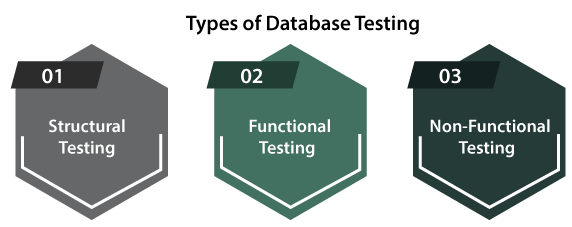
  • Types of database testing
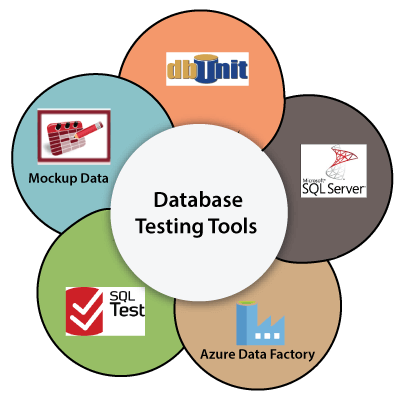
  • How to perform database testing manually and with the help of automation tool
  • What are the different challenges we may face during the database testing?
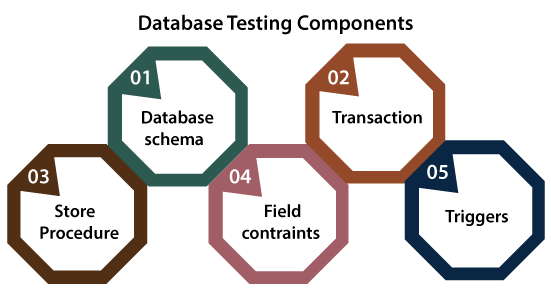
  • Components of database testing.

Before we discuss database testing, firstly, we will understand the definition database.

What is a Database?

database is a prearranged collection of data containing the information and helps in data manipulation. A database can easily manage and retrieved by the user. We can establish data into tables, rows, columns, and indexes, making it easier to identify the appropriate data.

In a Database, data management becomes a very easy task because we can use the databases as databases to retrieve the information like tables for storing data, function, triggers for data manipulation and view for data representations.

Note: The Database is become more difficult over time due to the massive amount of data stored in a software system.

After understanding the database concept, we have now come to our main discussion on database testing.

Introduction of Database Testing

In software testing, Database Testing is testing, which is used to analyze the schema, tables, triggers, etc., of the database under test. It also assesses data integrity and consistency, which might include creating difficult queries to load and stress test the Database and review its responsiveness.

Generally, it contains the layered process, which involves the data access, User Interface [UI], the business layer, along with the database layer.

During the database testing, we can cover the following database activities, such as:

  • Testing data integrity
  • Checking data validity
  • Performance check relate
  • Triggers and Functions in the database
  • Testing various procedures

Why do we need to perform database testing?

If we performed the database testing, it would ensure the database’s efficiency, maximum stability, performance, and security.

And these features can be set aside on a check occasionally to confirm that the software application is stable as soon as deployed in a competitive environment. To perform database testing, we must have a basic knowledge of SQL.

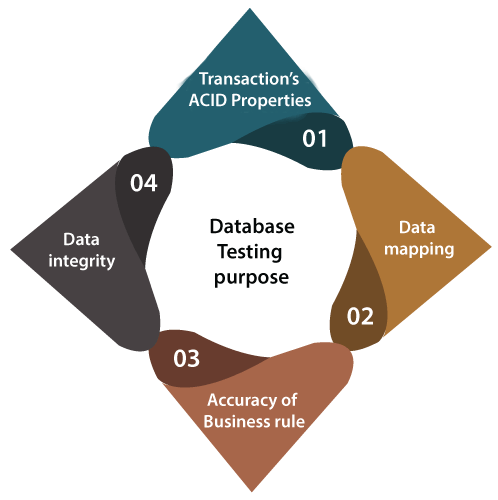
What is the purpose of the Database Testing?

The main objective of performing database testing is to make sure they follow the various aspects:

  • Transaction’s ACID Properties
  • Data mapping
  • Accuracy of Business Rule
  • Data integrity
Database Testing

1. Transaction’s ACID Properties

The database testing will ensure the ACID properties of the transaction.

A Database performs these four ACID properties. The ACID properties are as follows:

  • Atomicity
  • Consistency
  • Isolation
  • Durability

Atomicity

  • The term atomicity in transaction specifics that the data remains atomic, which implies that if any operation is performed on the data, it should be performed or implemented entirely or should not be implemented at all.
  • It is also known as All-or-Nothing.

Consistency

  • The term consistency specifies that the value should remain always preserved after the transaction is completed in the transaction.
  • And the integrity of the data is very important therefore, the database remains consistent before and after the transaction. The data should always be correct.

Isolation

  • In the transaction, the term isolation means separation, which specified that the multiple transactions could implement all at once without impacting one another and changing the database state.
  • Or if two or more transactions occur concurrently, the consistency should remain preserved.

Durability

  • The word durability makes sure the permanency of something, which further implies if a transaction is committed, it will keep the modifications without any fail irrespective of the effect of external factors.
  • And the durability of the data should be so faultless even though the system fails, the database still survives.

2. Data Mapping

Data mapping is an essential feature in database testing, which is mainly focused on verifying the data that pass through back and out between the application and the backend database.

Below are some of the important features tested in the data mapping:

  • We analyze whether the user interface or front-end methods are mapped constantly with the equivalent fields in the database table.
  • Characteristically, this mapping information is specified in the requirements documents.
  • When a specific action is done at the front-end of an application, an equivalent Create, Retrieve, Update and Delete [CRUD] activity gets used at the back-end.
  • And then, the test engineer will have to assess if the correct activity is used and whether the user action in itself is effective or not.

3. The Accuracy of the Business Rules

  • Database testing ensures the accuracy of the business rules as we know that complex databases lead to complex components such as stored procedure triggers and relational constraints.
  • Therefore, the test engineer will come up with appropriate SQL commands to verify the complex objects.

4. Data Integrity

  • The database testing also makes sure the data integrity, where we can update, and the most recent shared data values should appear on all the forms and screens.
  • And if the value should not be modified on one screen and show an older value on another, then the status can be updated concurrently.

How to perform Database Testing

We can perform the database testing either manually or with the help of some automation tools.

How to perform database testing manually

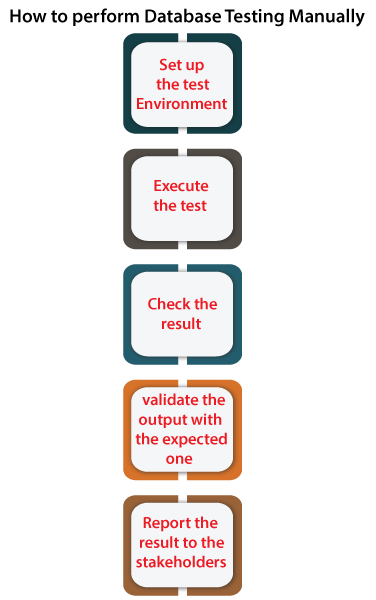
To perform database testing manually, which need to follow the below process:

  • Firstly, we will Open the SQL server in our local system.
  • After that, we will open the query analyzer to write the command and retrieve the data.
  • Once we can retrieve the specified data, we will compare the detailed data with the expected result.
  • Then we can update or delete the data to check how the software application performs.
  • The general test process of the testing database is not dissimilar from any other application. Therefore, to run the test, we can follow the below steps:
Database Testing

Step1: Set up the test environment

Firstly, we need to prepare the test environment to test the software application.

Step2: Execute the test

Once we set up the test environment, we will run particular test case.

Step3: Check the results

When the test case is executed successfully without having any issues, we will check the specified test case results.

Step4: Validate the output with the expected one

After checking the test case result, we will validate the same output with the excepted one. If the results meet the excepted output, the test case will consider as a pass; otherwise, it will be marked as a fail.

Step5: Report the results to the stakeholders

And at last, we will report the results to the stakeholder of the particular software application.

Note: If we set-up the environment, the test engineer and developers will develop all possible scenarios, which can execute through the application.

Then, the test will involve running through these queries and checking the data integrity, which means that the resulting data will need to be truthful, accurate, complete, retrievable, and verifiable.

And the test could also include monitoring data mapping, the different ACID properties, and ensuring the implemented business rules’ accuracy.

How automation can help in Database Testing

In software testing, Automation testing is used to decrease the repetitive manual work, which helps the test engineer focus more on critical features, which work the same for the database testing.

Let’s see a few scenarios where automation can be very useful for the test engineer:

  • Modification in the database schema

When every schema is modified, the database needs in-depth testing to ensure that the things are in place. And the number of scenarios to be covered based on the size of the database. And this process is time-consuming if we have done it manually.

  • Monitoring for data integrity issues

There can be a condition where a set of data gets corrupted in recovery or other actions because of human error or other issues.

But if we consider the automated monitoring processes, it became easier to find those variations, and we can fix them as soon as possible.

  • New or frequently altering applications

As we know that Agile methodology is the new era of testing, where we will have a new release to production at the end of every sprint, which implies it will take every 2-3 weeks to complete one round of testing.

But with the help of automation features, which is completely constant and unchanged in the recent sprint, we can focus on new modified requirements.

Database testing components

Following are the components of the database testing:

  • Database schema
  • Transactions
  • Store procedure
  • Field constraints
  • Triggers
Database Testing

1. Database Schema

A database schema is used to describe the working of data in a Database and its organization. In other words, we can say that it is nothing but a proper classification of how the data will be planned inside the database.

For testing those conditions, we have two ways, which are explained below:

One of the Below approaches can be used as per the tool’s significance:

  • We can use the SchemaCrawler tool, which is a free database schema discovery and comprehension tool.
  • Regular expressions are a good approach to verify the names of the specific fields and their values.
  • To verify the schema, we can use the following SQL command:
  1. DESC<table name>  

Find the needs according to the Database operates

  • The Field names begin or end with explicit characters.
  • The Primary keys need to be generated before any other fields are designed.
  • The specific values can or cannot be inserted in the fields that have a constraint.
  • For easy recovery and search, the Foreign keys must be indexed completely.

2. Transactions

One of the most important database testing components is transactions because while we are performing the database testing, the ACID properties need to satisfy.

  • The most commonly used statements are as below:
  1. BEGIN TRANSACTIONTRANSACTION#  
  2. END TRANSACTIONTRANSACTION#  
  • To make sure the database remains in a consistent state, we can use the below ROLLBACK commands:
  1. ROLLBACK TRANSACTION#  
  • To ensure the modification have been reproduced, we can use a SELECT command after the implementation of the above command:
  1. SELECT * FROM TABLENAME < Transactions Tables >  

Note: In the above statement, the Transaction table is the table that includes the transaction.

3. Stored Procedure

The Stored Procedures are relatively parallel to user-defined functions. And the entire system works in looming with the most consistent and correct result.

It can be used by Execute or Call Procedure commands, and generally, the output is in the format of result sets. The stored procedure system is used for multiple applications where data is kept in RDBMS.

We can test the stored procedure throughout the white-box and black-box testing.

  • White box testing: In white box testing, the Stubs are used to invoke the stored procedures and then the output is verified in contradiction of the expected values.
  • Black box testing: In this, we can operate the application’s front-end (UI). And also assess the implementation of the stored procedure and its outputs.

4. Field Constraints

The next database testing components are Field Constraints, where the entire system works on the default value, exclusive value, and foreign key.

In this, we can easily verify the outcomes retrieved from the SQL commands, and

to ensure that the object condition in the database is implemented, we can perform the Front-end (user interface) operations.

5. Triggers

The trigger components are used to implement an entire table independently to record the output. In other words, we can say that a trigger (a piece of code) can be auto-instructed to be performed if a particular event takes place on a precise table.

Let us see one sample example, where we can understand the working of trigger components in the database testing:

  • Suppose a new employee joined a company. And the employee is doing two tasks, which are development and testing. Then the employee is added to the Employee table.
  • Once he/she is added to the Employee table, a Trigger could add the employee to the equivalent task’s
  • After that, we can follow the common process to test it, firstly the SQL command implanted in the Trigger independently and then it records the result.
  • In the end, we can follow this process to perform the trigger as an entire system and then compare the outcomes.

These types of tests are completed in two ways, which are as follows

  • White-Box Testing
  • Black-Box Testing

Both the white-box and black-box testing have their procedure and sets of rules, which help us get the precise result.

Types of Database Testing

The database testing classified into three different types of testing, which are as follows:

  • Structural testing
  • Functional testing
  • Non-functional testing
Database Testing

Let understand each type one by one:

Structural Database Testing

  • It is a most important database testing technique used to verify all the elements inside the data repository, which are primarily used for data storage and not allowed to be directly operated by end-users.
  • If we want a successful conclusion of this testing, we must have a complete understanding of SQL commands.
  • In structural database testing, we can test the database components that are not visible to users.
  • The structural database testing is mostly vitally used to validate the database.

Functional Database Testing

  • The most important database testing approach is functional database testing, which is used to authorize a database’s functional requirements from the end user’s interpretation.
  • The functional database testing’s primary purpose is to test whether the end-user’s transactions and operations are connected to the database work as expected or not.

Non-functional Testing

In the topic of database testing, Non-functional testing can be divided into several types as vital by the business requirements.

Some of the important parts of non-functional testing are listed below:

  • Load testing
  • Stress Testing
  • Security Testing
  • Usability Testing
  • Compatibility Testing

Note: The load testing and the stress testing come under Performance Testing, which helps two specific non-functional testing objectives.

What are the different challenges of Database Testing?

While performing database testing, we may encounter the following challenges.

In the below table, we listed some common challenges and their solutions:

Different challengesSolutions
Testing huge data and production simulated the databaseA scaled-down or enhanced database would be the best solution because it is as close as possible to the production data set.Although it is a good approach to test in a production-like environment, it could sometimes become a very challenging and time-consuming process to test on enormous data.
Re-usability of data again for testing and Test data creationTo resolve this specific issue, we need a better strategy to generate all the essential data for all the stretch repetitions. And then, we can use detailed data carefully.All the commands need to be separate from each other; for example, the input data and output of one command do not modify another command’s output.
Separation of data and queriesThe software product quality depends on the cost.
Cost and time were taken to get the data from a massive databaseTherefore, it is significant to maintain a balance between the project timelines, expected quality and data load, and additional factors.
Frequently altering the database structureWhile performing DB testing, the Database test engineers most frequently faced this challenge.The best solution for the particular challenges is that the DB tester needs to create the test cases and the SQL command derived from the specific structure, which gets modified at the time of implementation or through any other retesting.To avoid the final delays, we need to intercept the modification and the impact as early as possible.
Unwanted data modificationThe best solution for unwanted data modification in DB testing is access control.We can provide access only to a limited number of people for the modification.And the access should be restricted for the EDIT and DELETE options.

Misconception or Myths related to Database Testing

When we are performing the database testing, we may undergo some misconceptions about database testing.

Let us see them one by one and also understand the reality of the related myths:

Misconception or MythsReality
The overall development process will slow down because of the database testing.For this particular myth, the reality is that database testing helps us enhance the database application’s overall quality.
Database Testing is a monotonous job, and it involves plenty of expertise.In software testing, database testing is an efficient process, which gives long-term functional stability to the entire application.
Database testing is an expensive process.Expenses on Database Testing is needed because any expenses on database testing is a long-term investment that leads to long-term robustness and constancy of the application.
Database testing increases additional work for bottlenecks.In reverse, identifying the hidden defects with the help of database testing enhances more value to the overall work.

Automation tools used in database testing

We have several Database testing tools available in the market, but here we are discussing some of the most commonly used automation tools for database testing, which are as follows:

  • Data factory
  • SQL test
  • Mockup data
  • MS SQL Server
  • DbUnit
Database Testing

Data Factory

Database Testing
  • The data factory is one of the most popular tools used for database testing.
  • Mostly it is used for commercial database testing tools, which means that the huge project can be tested by a data factory tool.
  • It works as a data generator and data manager in the context of database testing.
  • For handling the complex command with a large amount of data, it is the most efficient tool.
  • This tool gives us a platform to easily perform the stress or load testing on the database.

SQL Test

Database Testing
  • The SQL test is the most frequently used Database testing tool available in the market.
  • It is an open-source tool tSQLt framework, which means that it can be used by all the Database test engineer at least once.
  • It allows us to execute the unit tests for SQL Server databases.
  • With the help of this tool, we can easily execute extensive SQL tests.
  • The major drawback of this tool is that it is slow compared to the other Database testing tools in the market.

Mockup data

Database Testing
  • The Mockup Data testing tool also comes under the Test Data Generator category, and it is commercial testing tool.
  • In this tool, we need to add columns in our table to validate the outputs.
  • It helps us to create a huge Amount of Data, CSV files and databases with accurate data.
  • It rapidly creates a large amount of data and tests several tables for a relationship with foreign keys.

MS SQL Server

Database Testing
  • The Microsoft SQL server tool is extensively used to execute the unit testing.
  • It is a commercial tool where we can generate in VB or C# projects, and the test engineer is expected to understand the project schema before starting the test.
  • Even though we are creating the tests from a database project, we can use SQL Server Object Explorer.
  • The main disadvantage of this tool is that it does not have any good user interface.

DbUnit

Database Testing
  • It is an open-source tool, which is also known as the JUnit extension.
  • It helps us export and import data into a database to and from XML datasets and work on large databases.
  • It performs the CLEAN-INSERT operation initially; that’s why it does not perform any further clean-up.
  • With the DBUnit tool’s help, we can explore the data and connect relational and multidimensional databases.

Conclusion

In the Database testing section, we have learned the following topics:

  • Database Testing is testing, which is used to analyze the schema, tables, triggers, etc., of the database under test.
  • To understand the database testing process’s key concepts, the database test engineer must be aware of database testing’s various features, types, manual and automation processes, and database testing tools.
  • With this tutorial’s help, we get to know about the misconception or their solution of database testing.
Manual Testing

Beta Testing

Beta Testing

If we compare the various activity performed to develop ideal software, we will find the importance of software testing similar to that of the software development process. Testing is one of those activities which ensure the accuracy of the development process while validating its functionality and performance.

What is Beta Testing?

Beta testing is a type of User Acceptance Testing among the most crucial testing, which performed before the release of the software. Beta Testing is a type of Field Test. This testing performs at the end of the software testing life cycle. This type of testing can be considered as external user acceptance testing. It is a type of salient testing. Real users perform this testing. This testing executed after the alpha testing. In this the new version, beta testing is released to a limited audience to check the accessibility, usability, and functionality, and more.

  • Beta testing is the last phase of the testing, which is carried out at the client’s or customer’s site.
Beta Testing

What are the features of beta testing?

Testing of the product performs by the real users of the software application in the real environment. Beta version of the software is released to a restricted number of end-users to obtain the feedback of the product quality. Beta testing reduces the risk of failure and provides the quality of the product through customer validation. It is the final testing before shipping the product to the customers. Beta testing obtains direct feedback from the customers. It helps in testing to test the product in the customer’s environment.

Features of beta testing are:

  • Beta testing used in a real environment at the user’s site. Beta testing helps in providing the actual position of the quality.
  • Testing performed by the client, stakeholder, and end-user.
  • Beta testing always is done after the alpha testing, and before releasing it into the market.
  • Beta testing is black-box testing.
  • Beta testing performs in the absence of tester and the presence of real users
  • Beta testing is performed after alpha testing and before the release of the final product.
  • Beta testing generally is done for testing software products like utilities, operating systems, and applications, etc.

What is a beta version of the software?

The beta version of the software is delivered to a restricted number of users to accept their feedback and suggestions on quality improvement. Hence, there are two types of beta version:

1) Closed beta version: Closed beta version, also known as a private beta, it is released to a group of selected and invited people. Those people will test the software and evaluate their features and specifications. This beta version represents the software which is capable of delivering value, but it is not ready to be used by everyone. Because it shows the issues like lack of documentation or missing vital features.

Beta Testing 2

2) Open beta version: Open beta is also known as a public beta. The open beta opened to the public. Any user as a tester can assess the beta version to provide the relevant feedback and reviews. Open beta version improves the quality of the final release. This version helps to find the various undetected errors and issues.

Beta Testing 3

The beta testing process orients this beta version.


What is the lifecycle of Beta Testing?

A group of end-users performs beta testing. This process can’t execute without any strategy or test plan. Before the testers, the end-user executes this type of testing.

The process of beta testing follows the following steps:

  1. Planning: Like another testing process, beta testing also supports proper planning. In this stage, the team prepares a testing strategy and defines the goal of testing. In this case, the team establishes the need of users for testing, duration, and necessary details related to the process.
  2. Participant Recruitment: This is the second stage of the beta process in which the team recruits a group of selected end-users for testing. This group can change as per the requirement of the organization and the product.
  3. Product Launch: When a team of users (testers) recruited. The beta version of the product is launched or installed at the client or user side, and users will test the product for quality assurance.
  4. Collect and Evaluate Feedback: When the testing finished, developers will collect the feedback provided by the testers and evaluate it. In the end, based on the feedback, issues, and bugs are fixed and resolved by the responsible individual team.
  5. Closure: When all the problems fixed and the organization meets the exit criteria, beta testing achieved, and the rewards offered to the testing team.

What are the types of beta testing?

Beta testing has six types. Each type has different aspects of the software. All these help developers to improve the quality of the software and allow them to deliver a product that offers excellent user experience. Here are the different types of beta testing:

  1. Open Beta Testing: Open beta testing involves testing the software product by a large number of people before the final release. The organization decides to make a software product open to the public before releasing the product. Open Beta includes the extensive participation of the public to use and evaluate software product accordingly.
    Users report the bug to the organization, along with a suggestion to improve the quality of the software.
  2. Closed Beta Testing: Opposite to the open beta testing. Closed beta testing performed by the selective and limited number of persons. The organization recruits these. In this testing software product is not open to the public.
  3. Traditional Beta Testing: In this testing, a software product delivered to the target market, and the feedback from the users collected. This type of testing assistance the beta testing, the quality of the software is improved, and developers can make the changes.
  4. Public Beta Testing: This type of testing is similar to open testing. Public beta testing also allows the product is delivering to the end-users worldwide, with the aid of various online channels available in the world. From this, the feedback and evaluated data also collected and based on the requirement changes, and the development team implements modifications.
  5. Technical Beta Testing: Technical beta testing is also an essential type of beta testing. This testing involves delivering the software product to the internal groups of the organization. However, the data and feedback provided by the employees of the organization.
  6. Focused Beta Testing: This type of testing focused on monitoring and evaluating a specific feature or component of the software. In focused beta testing, the software released to the market and user’s experience assessed and collected to make the required changes.
  7. Post-Release Beta Testing: In this testing, the product delivered to the market for the use of the end-users. Their feedback, reactions, and experience are collect for the future release of the software.

When to perform Beta Testing?

Acceptance testing is the final phase of the testing, which combines both alpha and beta testing to ensure that the product released flawlessly. Beta testing performed at the user’s end. This testing always performed after the alpha testing, but before the product released to the market. In this stage, the product is expected to be 90% to 95% completed.

Any product undergoing to beta test should be reviewed for the entire checklist before launching it.

Some of them are:

  • All the component of the product is ready to start this testing.
  • Documentation which is going to end-user should be kept ready – Setup, installation, usage, Uninstallation should be in detail.
  • The product management team should review that all the functionality is in good condition.
  • Procedure to collect bugs, feedback, etc. should be identified before publishing it.

What are the stakeholders and participants in the Beta Testing?

The product management, quality management, and user experience teams are the stakeholder in beta testing, and they closely monitor every move of the phase.

The real users who use the product are the participants.

Beta test strategy

  • Business objective for the product.
  • Beta test plan
  • The testing approach followed by participants.
  • Tools used to detect bugs, measure productivity, collect feedback.
  • When and how to end this testing phase?

What is a Beta Test plan?

A beta test plan can be written in many ways,

Objective: We should have to mention the aim of the project why there is a need for beta testing even after performing the internal testing.

Scope: In this plan, we should mention the areas to be tested or not.

Test Approach: We should have to mention clearly that the testing is in the deep, what to focus on – functionality, UI, response, etc.

Schedule: We have to specify, clearly the start and ending date with time, number of cycles, and duration per cycle.

Tools: Bug logging tools and the usage of the machines should identify.

Budget: Incentive of the bugs based on the severity.

Feedback: Collecting feedback and evaluating methods.

  • Identify and review the entry and exit criteria.

What are the entry criteria for Beta Testing?

  • Sign off the document from alpha testing.
  • Beta version of the software should ready.
  • The environment should be ready to release the software application to the public.
  • To capture the real-time faults environment should be ready.

What are the exit criteria for Beta Testing?

  • All the major and minor issues resolved.
  • The feedback report should prepare.
  • The delivery of beta test summary report.

What are the advantages of Beta Testing?

Beta testing performed at the end of the software testing lifecycle. Beta testing offers numerous benefits to testers, software developer, as well as the users. In the assistance of this type of testing, it enables developers, testers to test the product before its release in the market. The

  1. Beta testing focuses on the customer’s satisfaction.
  2. It helps to reduce the risk of product failure via user validations.
  3. Beta testing helps to get direct feedback from users.
  4. It helps to detect the defect and issues in the system, which is overlooked and undetected by the team of software testers.
  5. Beta testing helps the user to install, test, and send feedback regarding the developed software.

What are the disadvantages of Beta Testing?

Disadvantages of beta testing is:

  1. In this type of testing, a software engineer has no control over the process of the testing, as the users in the real-world environment perform it.
  2. This testing can be a time-consuming process and can delay the final release of the product.
  3. Beta testing does not test the functionality of the software in depth as software still in development.
  4. It is a waste of time and money to work on the feedback of the users who do not use the software themselves properly.

Wrap Up

Keeping in mind the characteristics of beta testing can be concluded that beta testing may be considered desirable for the organization. Beta testing provides the feedback of the real-users, which helps improve the software quality before the product released in the market.

Manual Testing

Alpha Testing

Alpha Testing

Alpha testing is conducted in the organization and tested by a representative group of end-users at the developer’s side and sometimes by an independent team of testers.

Alpha testing is simulated or real operational testing at an in-house site. It comes after the unit testing, integration testing, etc. Alpha testing used after all the testing are executed.

It can be a white box, or Black-box testing depends on the requirements – particular lab environment and simulation of the actual environment required for this testing.

Alpha Testing

What is the alpha testing process?

Alpha testing follows the following process:

  1. Requirement Review: Review the design of the specification and functional requirement
  2. Test Development: Test development is base on the outcome of the requirement review. Develop the test cases and test plan.
  3. Test case design: Execute the test plan and test cases.
  4. Logging Defects: Logging the identified and detected bug found in the application.
  5. Bug Fixation: When all the bugs are identified and logged, then there is a need to fix the bug.
  6. Retesting: When all the issues are solved, and fixed retesting is done.
Alpha Testing

What are the phases of alpha testing?

Alpha testing ensures that the software performs flawlessly and does not impact the reputation of the organization; the company implements final testing in the form of alpha testing. This testing executed into two phases.

Alpha Testing

There are two phases of alpha testing.

First Phase: In-house developers of software engineers do the first phase of testing. In this phase, the tester used hardware debugger or hardware aided debugger to catches the bugs quickly. During the alpha testing, a tester finds a lot of bugs, crashes, missing features, and docs.

Second Phase: The second phase involves the quality assurance staff performs the alpha testing by involving black box and white box techniques.

When to perform alpha testing?

Alpha Testing

Alpha testing is user acceptance testing. Alpha testing performed once the product has gone through stages of testing and prepared for release. It is executing before beta testing, which is also a part of acceptance testing and can define as field testing. During this testing, we can make changes in the software to improve its quality and functionality. Alpha testing done from the developer’s site where independent developers can monitor and record user experience and make necessary changes to enhance the performance.

What are the reasons to perform Alpha Testing?

Alpha testing is the final stage of the testing. Alpha testing is an essential and popular testing technique that helps the team to deliver quality and useful software. This testing performed before the release of the product. Alpha testing can define as the first round of independent testing that ensures that the software run as per the requirement plan.

Reasons for alpha testing are:

  • Refines the software product by finding and rectifying bugs that weren’t discovered through previous tests.
  • Alpha testing allows the team to test the software in a real-world environment.
  • One of the reasons to do alpha testing is to ensure the success of the software product.
  • Alpha testing validates the quality, functionality of the software, and effectiveness of the software before it released in the real world.

What are the features of Alpha Testing?

  • Alpha testing is a type of acceptance testing.
  • Alpha testing is happening at the stage of the completion of the software product.
  • Alpha testing is in the labs where we provide a specific and controlled environment.
  • Alpha testing is in-house testing, which is performed by the internal developers and testers within the organization.
  • There is not any involvement of the public.
  • Alpha testing helps to gain confidence in the user acceptance of the software product.
  • With the help of black box and white box technique, we can achieve the alpha testing.
  • Alpha testing ensures the maximum possible quality of the software before releasing it to market or client for beta testing.
  • Developers perform alpha testing at developer’s site; it enables the developer to record the error with the ease to resolve found bugs quickly.
  • Alpha testing is doing after the unit testing, integration testing, system testing but before the beta testing.
  • Alpha testing is for testing the software application, products, and projects.

What are the advantages of Alpha Testing?

Advantages of alpha testing are:

  • One of the benefits of alpha testing is it reduces the delivery time of the project.
  • It provides a complete test plan and test cases.
  • Free the team member for another project.
  • Every feedback helps to improve software quality.
  • It provides a better observation of the software’s reliability and accountability.

What are the disadvantages of Alpha Testing?

Disadvantages of alpha testing are:

  • Alpha testing does not involve in-depth testing of the software.
  • The difference between the tester’s tests the data for testing the software and the customer’s data from their perspective may result in the discrepancy in the software functioning.
  • The lab environment is used to simulate the real environment. But still, the lab cannot furnish all the requirement of the real environment such as multiple conditions, factors, and circumstances.

Wrap Up:

Every software product needs to undergo a vital methodology before going into a highly competitive market. Alpha testing is one of the vital testing. It needs to be considered by going through the functionality of the software and achieve the confidence in its user acceptance for the real environment, before releasing it into the market.

Manual Testing

Acceptance testing

Acceptance testing is formal testing based on user requirements and function processing. It determines whether the software is conforming specified requirements and user requirements or not. It is conducted as a kind of Black Box testing where the number of required users involved testing the acceptance level of the system. It is the fourth and last level of software testing.

Acceptance Testing

User acceptance testing (UAT) is a type of testing, which is done by the customer before accepting the final product. Generally, UAT is done by the customer (domain expert) for their satisfaction, and check whether the application is working according to given business scenarios, real-time scenarios.

In this, we concentrate only on those features and scenarios which are regularly used by the customer or mostly user scenarios for the business or those scenarios which are used daily by the end-user or the customer.

However, the software has passed through three testing levels (Unit Testing, Integration Testing, System Testing) But still there are some minor errors which can be identified when the system is used by the end user in the actual scenario.

Acceptance testing is the squeezing of all the testing processes that have done previously.

Note:

It is done in the separate environment at the customer place, which is known as the UAT environment. The user acceptance testing is done by a different team called as domain expert who is known to the application.

Generally, small companies do not have a domain expert because there is no frequent changes happen in the application.

Reason behind Acceptance Testing

Once the software has undergone through Unit Testing, Integration Testing and System Testing so, Acceptance Testing may seem redundant, but it is required due to the following reasons.

  • During the development of a project if there are changes in requirements and it may not be communicated effectively to the development team.
  • Developers develop functions by examining the requirement document on their own understanding and may not understand the actual requirements of the client.
  • There’s maybe some minor errors which can be identified only when the system is used by the end user in the actual scenario so, to find out these minor errors, acceptance testing is essential.

Note:
Once we collect the requirement from the customer and done the coding process completely then the test engineer starts all different types of testing until the application becomes stable.

Acceptance Testing

Once the application is bug-free, we handover it to the customer, no customer accept the application blindly before using it. Hence, they do one round of testing for their satisfaction, which is known as user acceptance testing.

Who performs user acceptance testing?

The acceptance testing can be performed by different persons in different cases.

For example, the blue-dart company gives the requirement to TCS for developing the application, and the TCS will accept the needs and agree to deliver the application in the two releases as we can see in the below image:

Acceptance Testing

On August 10, the test manager tells the project manager that there is a critical bug in the application, and that will take another four days to fix it.

Acceptance Testing

But the project manager said we have to deliver the software within a given time. It takes another 30 days to fix the defect, or otherwise, we will have to pay the penalty (fine) for each day after the given release date. Is this the real situation? NO, let us see three different cases and understand who perform the acceptance testing.

Case1

In this, we will discuss how the acceptance testing is performed, and here the test engineer will do the acceptance testing.

Acceptance Testing

Mostly, the actual flow for testing the application will be seen in the above image, but here it is little difference, as we know where the end-to-end testing or system testing ends and the acceptance testing will proceed. To understand this scenario, follow the below process:

The blue-dart provides the requirements, and TCS develops the application and performs all the testing and handover to the blue-dart company.

Now the question arises the blue-dart will use the application as soon they get it from TCS? NO, the blue dart company has a group of test engineers after they get the software, and this team will start testing the application, and this end-to-end testing is done at the customer environment, which is called the User Acceptance Testing.

Let us see the difference between TCS test engineers and Blue-dart Engineers:

In TCS, the tester will perform the functional testing, integration testing, and system testing and whereas in Blue-dart, the tester will do only the end-to-end or system testing, which is known as acceptance testing.

The difference between end-to-end testing at TCS and blue-dart is as follows:

  • The blue-dart test engineer is the one who gave the requirements
  • The blue-dart engineer understands the product well
  • The blue-dart engineer is a domain expert.
  • They test the real-time data on the application.

To understand this, we can see the below example, or if we have the application format is like this:

When the application is given to blue-dart test engineers, and they will perform testing and the application should generate a text message “Parcel 1 invoice Id created.” It was not mentioned in the requirement, or it is there, and TCS does not fix it. Then fine(penalty) counts for TCS from that only, and whereas the test engineers at TCS will not knowing this, due to that, we can see the difference between the testing done at TCS and Blue-dart.

Acceptance Testing

Case2

In this case, we will see how the Employee is becoming end-users and performing acceptance testing.

Acceptance Testing

The application is developed and tested at the TCS environment and then sent to blue-dart. And in the Blue-dart, they have fewer test engineers, so they can’t do acceptance testing. So for this, out of 300 employees of blue-dart, they will provide the application to the 30 employees and install the application to their systems and ask them to start using the application and find any defect or issues.

Now 30 employees will do the dummy implementation, which means they provide the data into the application and also written that data manually. And here, the employee becomes the end-user and also identify the bugs and issues while using the application.

These issues are verified against the requirements, and now the fine is charged for TCS (sometimes the penalty is charged on an hourly basis). If the identified bug is not as per requirement, then blue-dart can go for the Request For Enhancement [REF] and Change Request [CR].

Where Request for enhancement means that if the blue-dart feels that a particular module can be improved and developed in a better way, and then they can send the Customer Requirement Specification [CRS] as REF and TCS will follow the CRS and also make sure to do the necessary changes.

And the Change Request means, if the requirement has not been specified accurately, then blue-dart provides the exact needs and Request for changes.

Therefore, the acceptance testing can also be defined as end-to-end testing, which can be done by the engineers who are working in the client environment. Here, they take real-time scenarios and check whether the application is working fine or not, and also we can make real-time business scenarios because the end-user knows how the business flow works.

Note:

If we are getting more builds for acceptance testing, this means that:

  • After receiving the application, the customer is getting more and more ideas, so they are asking for more and more changes.
  • The quality of the software, which we delivered to customers, is not appropriate, and the development and testing both are not correctly done.
  • The requirement which was given in the starting is not clear.

Case3

In this case, if the blue-dart customers become the end-users.

Here, the application is developed and tested and implemented at a blue-dart production server, and n-numbers of users start using the application, which is in the first release. While using the application, the blue-dart comes up with more number of features and enhancements, which is sent with the CRS to the TCS after that TCS will do the further changes in modules and sent it back to the blue-dart.

Hence, what is happing here, the application was developed when the requirement is collected by blue-dart from their end-users and customers.

The numbers of releases depend on the following facts:

  • Difficulty of modules
  • The number of modules.
  • How the new module affects the old module.

Note:

Hotfix: In the production environment, whenever the customer identify the critical bug, we will do the following

  • The developers fix the bugs.
  • Small teams of test engineers will test the software.
  • Re-install the application on the client environment.
  • The client starts using the new software.

This entire process is known as a hotfix, and it can be done in a few hours or one day.

For example: If the significant module, suppose the Login module itself is not working at the production server, then the client will send it immediately for fixing it, and that has to be done as soon as possible.

Short release

Between two major releases, this is a short release of improvements, and it happens when the client needs some small features to change on an urgent basis.

For example, if we have 60 developers, where the ten developers will come out, and out of 40 test engineers, the 3 test engineers will come out, and they develop and test the application. And before adding it to the production server, the customer does one short round of acceptance testing.

Steps to Perform Acceptance Testing

Acceptance Testing

Requirement Analysis:

In this step, the testing team analyzes requirement document to find out the objective of the developed software. Test planning accomplished by using requirement document, Process Flow Diagrams, System Requirements Specification, Business Use Cases, Business Requirements Document and Project Charter.

Test Plan Creation:

Test Plan Creation outlines the whole strategy of the testing process. This strategy is used to ensure and verify whether the software is conforming specified requirements or not.

Test Case Designing:

This step includes the creation of test cases based on test plan documents. Test cases should be designed in a way that can cover most of the acceptance testing scenario.

Test Case Execution:

Test Case Execution includes execution of test cases by using appropriate input values. The testing team collects input values from the end user then all test cases are executed by both tester and end user to make sure software is working correctly in the actual scenario.

Confirmation of objectives:

After successful completion of all testing processes, testing team confirms that the software application is bug-free and it can be delivered to the client.

Tools used in Acceptance Testing

Acceptance Testing can be done by using several tools; some are given below:

done by using several tools; some are given below:

Watir:

Acceptance testing uses this tool for the execution of automated browser-based test cases. It uses Ruby language for the inter-process communication.

Fitness tool:

This tool is used to enter input values and generate test cases automatically. The user needs to input values, these values used by the tool to execute test cases and to produce output. It uses Java language for the inter-process communication. This tool makes it easy to create test cases as well as record them in the form of a table.

Advantages of Acceptance Testing

  • It increases the satisfaction of clients as they test application itself.
  • The quality criteria of the software is defined in an early phase so that the tester has already decided the testing points. It gives a clear view to testing strategy.
  • The information gathered through acceptance testing used by stakeholders to better understand the requirements of the targeted audience.
  • It improves requirement definition as client tests requirement definition according to his needs.

Disadvantages of Acceptance Testing

According to the testing plan, the customer has to write requirements in their own words and by themselves but

  1. Customers are not willing to do that; it defeats the whole point of acceptance testing.
  2. If test cases are written by someone else, the customer does not understand them, so tester has to perform the inspections by themselves only.

If the process is done in this manner, it destroys the existence of the Acceptance Testing.