Manual Testing

Bug/Defect Life cycle

In this section, we will learn about the bug life cycle and the different status of bugs and bug report template.

Here, we will talk about the complete life cycle of a bug from the stage it was found, fixed, re-test, and close.

We have some different status of bugs like new/open, assigned, fix, re-open, and closed.
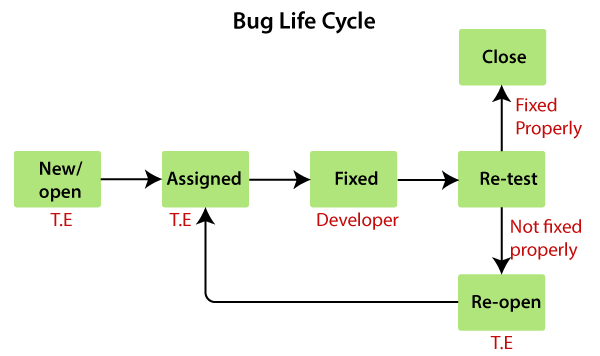
Bug Life cycle

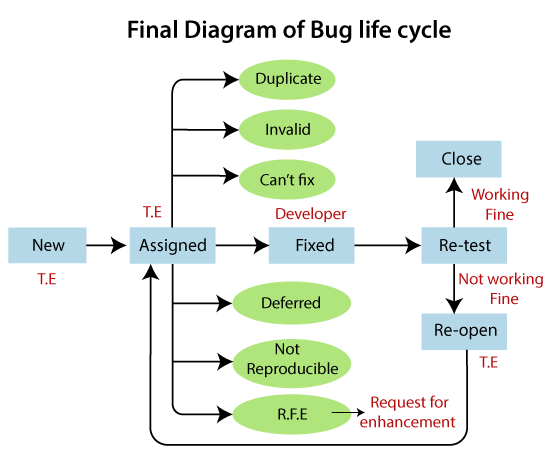
As soon as the test engineer finds the bug, status is given as New, which indicates that a bug is just found.

This new bug needs to be reported to the concerned Developer by changing the status as Assigned so that the responsible person should take care of the bug.

Then the Developer first go through the bug, which means that the Developers read all the navigation steps to decide whether it is a valid bug or not.

Based on this, if the bug is valid, the Developer starts reproducing the bug on the application, once the bug is successfully reproduced, the Developer will analyze the code and does the necessary changes, and change the status as Fixed.

Once the code changes are done, and the bug is fixed, the test engineer re-test the bug, which means that the test engineer performs the same action once again, which is mentioned in the bug report, and changes the status accordingly:

Close, if the bug fixes properly, and functionally working according to the requirement.

OR

Re-open, if the bug still exists or not working properly as per the requirement, then the bug sends it back to the Developer once again.

This process is going on continuously until all the bugs are fixed and closed.

Note1:
The test engineer cannot tell the bug orally to the Developer because of the following reasons:Developers might ignore the bugDeveloper misunderstood the bugForget the bugThe bug may not be found in the exact location

Whom to assign the bug

The bug can be assigned to the following:

  • Developers
  • Developers lead
  • Test lead

Developers: If we know who has developed that particular module.

Developer lead: If we don’t know the Developer who has developed the particular module.

Test lead: When we don’t have any interaction with the development team.

When the bug is fixed and closed or if it is having any impact on the other module, then we go for a new bug report.

OR

When the status of the bug is Re-open (not fixed) and affecting another module, then we have to prepare the new bug report.

Note2:Whenever we find a bug and Developers fix it, we have to check one round of impact area.If the old bug is fixed correctly, change the status to Close.And if we find a bug in the impact area, then reported as a new bug.If the old bug is not fixed properly, then change the status to Re-open.Or, if we find a bug impact area, then change the status to New or reported as a new bug.

Another status of the bug

Once we prepared a bug report and send it to the Developers, the Developer will accept the bug and starts doing the necessary code changes that become the positive flow of the bug life cycle.

There may be a serval conditions where Developers may not do the necessary code changes and depend on the situation, which becomes a negative flow or status of the bug life cycle.

Following are the different status of the bug life cycle:

  • Invalid/rejected
  • Duplicate
  • Postpone/deferred
  • Can’t fix
  • Not reproducible
  • RFE (Request for Enhancement)
Bug Life cycle

Invalid / rejected

When the Test Engineer wrote an incorrect Bug Report because of misunderstanding the requirements, then the Developer will not accept the bug, and gave the status as Invalid and sent it back. (Sometime Developer can also misunderstand the requirements).

Any bug which is not accepted by the developer is known as an invalid bug.
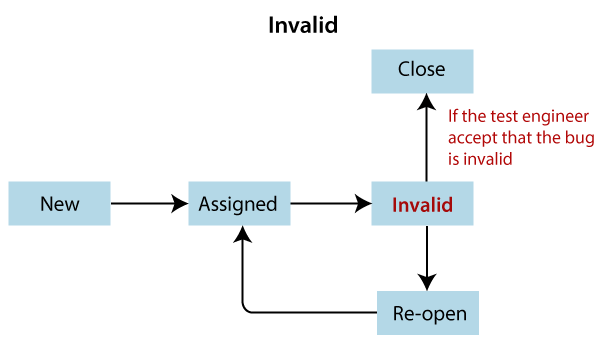
Bug Life cycle

Reasons for an invalid status of the bug

The invalid status of the bug is happened because of the following reasons:

  • Test Engineer misunderstood the requirements
  • Developer misunderstood the requirements

Let’s see one example where the test engineer and developer misunderstood the requirements as we can see in the below image:
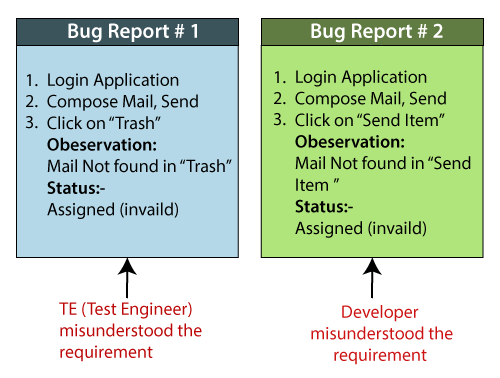
Bug Life cycle

Duplicate

When the same bug has been reported multiple times by the different test engineers are known as a duplicate bug.
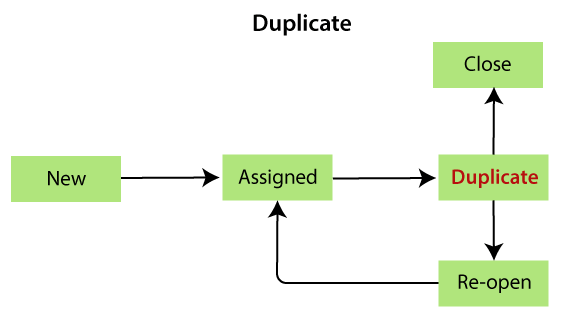
Bug Life cycle

Reasons for the duplicate status of the bug

Following are the reasons for the duplicate status:

  • Common features:
    For example: Suppose we have test engineer P and Q which are testing the software, the test engineer P and Q will test their features like login the application.
    Here, the test engineer P enters the valid username and password, and click on the login button.
    Once P click on the login button, it opens a blank page, which means that it is a bug.
    After that, P prepares a bug report for the particular bug and sends it to the developer.
    Then the test engineer Q also login the application and got the same bugs. Q also prepare a bug report and send it to the developer.
    Once the developer got both test engineers bug report, he/she sends back the bug report to the Q and say it is duplicate.
  • Dependent Modules
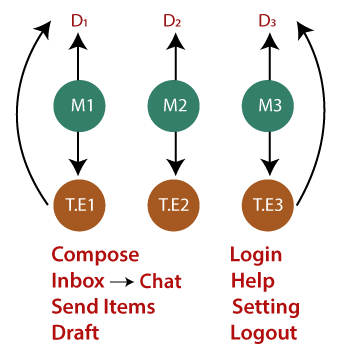
    As we can see in the below image, that the test engineer wants to compose a mail, so first, the test engineer needs to login, then only he/she can able to compose a mail.
    If the bug is found in the login module, the test engineer cannot do further process because the composing module is dependent on the login module.
Bug Life cycle
  • To avoid the duplicate bug
    If the Developer got the duplicate bug, then he/she will go to the bug repository and search for the bug and also check whether the bug exist or not.
    If the same bug exist, then no need to log the same bug in the report again.
    Or
    If the bug does not exist, then log a bug and store in the bug repository, and send to Developers and Test Engineers adding them in [CC].

Note1:Generally, we don’t search for each bug in the repository to check the duplicity.To save time, we only search that bug that has the common feature and dependent features.

Note2:
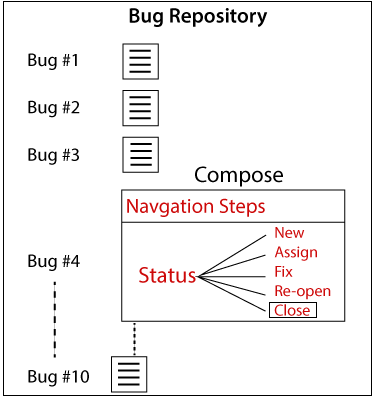
Whenever we are comparing two bug reports to find out if it is duplicate or not, we should always look at two things, which are as follows:The navigation steps should be the same.Apart from the close status, any other status should exist, we should not log a bug, and else it will become a duplicate bug as we can see in the below image:Bug Life cycle
Not Reproducible

The Developer accepts the bug, but not able to Reproduce due to some reasons.

These are the bug where the developer is not able to find it, after going through the navigation step given by the test engineer in the bug report.

Reasons for the not reproducible status of the bug

Reasons for the not reproducible status of the bug are as follows:

  • Incomplete bug report
    The Test engineer did not mention the complete navigation steps in the report.
  • Environment mismatch
    Environment mismatch can be described in two ways:
    • Server mismatch
    • Platform mismatch

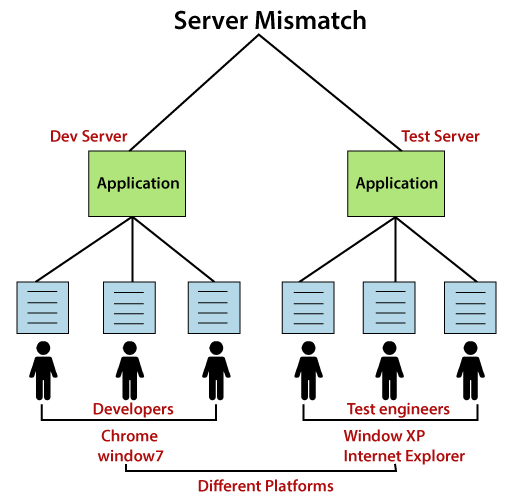
Server mismatch: Test Engineer is using a different server (Test Server), and the Developer is using the different server (Development Server) for reproducing the bug as we can see in the below image:
Bug Life cycle

Platform mismatch: Test engineer using the different Platform (window 7 and Google Chrome browser), and the Developer using the different Platform (window XP and internet explorer) as well.

  • Data mismatch
    Different Values used by test engineer while testing & Developer uses different values.
    For example:
    The requirement is given for admin and user.
Test engineer(user) using the below requirements:the Developer (admin) using the below requirements:
User name → abc
Password → 123
User name → aaa
Password → 111

I.e., both are using a different value for the same login module.

  • Build mismatch
    The test engineer will find the bug in one Build, and the Developer is reproducing the same bug in another build. The bug may be automatically fixed while fixing another bug.
  • Inconsistent bug
    The Bug is found at some time, and sometime it won’t happen.
    Solution for inconsistent bug:
    As soon as we find the bug, first, take the screenshot, then developer will re-confirm the bug and fix it if exists.

Can’t fix

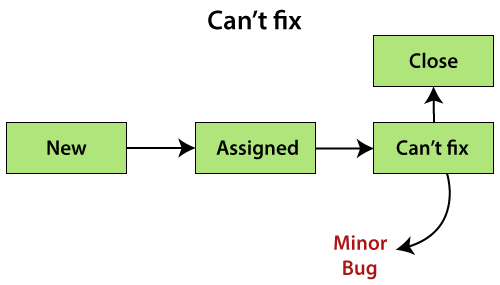
When Developer accepting the bug and also able to reproduce, but can’t do the necessary code changes due to some constraints.
Bug Life cycle

Reasons for the can’t fix status of the bug

Following are the constraints or reasons for the can’t fix bug:

  • No technology support: The programming language we used itself not having the capability to solve the problem.
  • The Bug is in the core of code (framework): If the bug is minor (not important and does not affect the application), the development lead says it can be fixed in the next release.
    Or if the bug is critical (regularly used and important for the business) and development lead cannot reject the bug.
  • The cost of fixing a bug is more than keeping it.

Note:If any bug is minor, but the Developer can’t fix it, which means that the Developer can fix, but the bug is affecting the existing technology because it was present in the core of the code.Each can’t fix bugs are the minor bug.

Deferred / postponed

The deferred/postpone is a status in which the bugs are postponed to the future release due to time constraints.
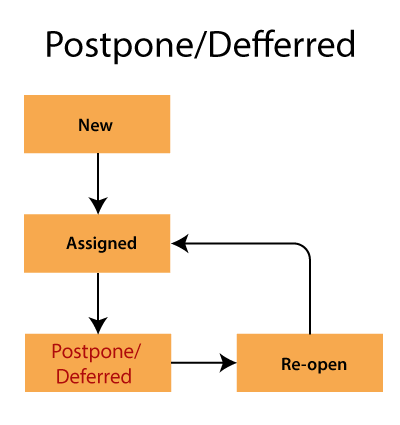
Bug Life cycle

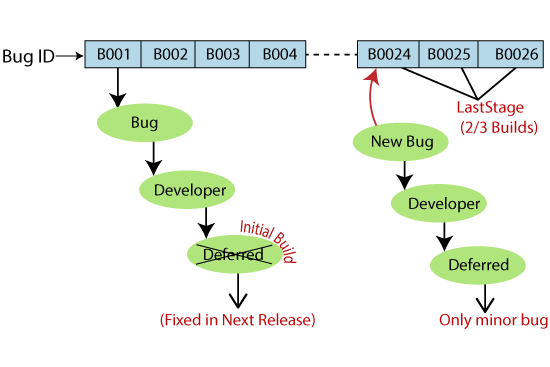
The deferred status of the bug was not fixed in the initial build because of the time constraints.

As we can see in the below image:

The Bug ID-B001 bug is found at the initial build, but it will not be fixed in the same build, it will postpone, and fixed in the next release.

And Bug ID- B0024, B0025, and B0026 are those bugs, which are found in the last stage of the build, and they will be fixed because these bugs are the minor bugs.
Bug Life cycle

Note:All minor bugs can’t be deferred, but all deferred bugs are minor bugs.Whenever there is no future release, then the postpone bug will be fixed at the maintenance stage only.

RFE (Request for Enhancement)

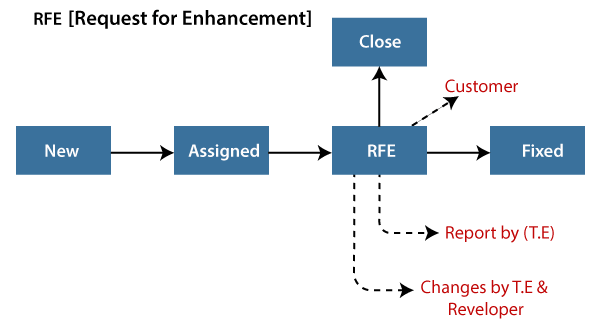
These are the suggestions given by the test engineer towards the enhancement of the application in the form of a bug report. The RFE stands for Request for Enhancement.
Bug Life cycle

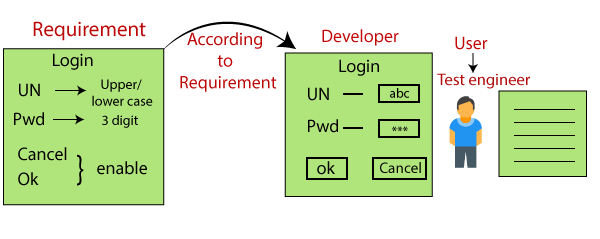
As we can see in the below example image that the test engineer thinks that the look and feel of the application or software are not good because the test engineer is testing the application as an end-user, and he/she will change the status as RFE.

And if the customer says Yes, then the status should be Fix.

Or

If the customer says no, then the status should be Close.
Bug Life cycle

Bug Report Template (excel)

The bug report template is as follows:
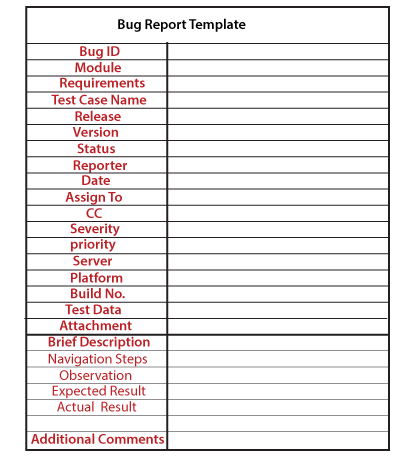
Bug Life cycle

Let see one example of the bug report:

Bug IDBoo12
ModuleLogin
Requirement1
Test case nameGmail_login_compose _mail
ReporterTest engineer name
Releasedelta
Version3.0
Statusassigned
Date23-02-2020
Assign toYY developer
CCTest lead, developer
Severitycritical
PriorityP2
PlatformWindow XP, internet explorer7.0
Build no.B02
Test dataUsername=xyz, password= 123
Brief description
Navigation stepsLogin Gmail applicationCompose mail and confirmation message should be displayed
observation Mailnot found in inbox
Expected result Mailshould also be in the inbox.
Actual resultMail not found in inbox
Additionalcomments——

Here, we are describing some important attributes of the bug report.

Bug ID: it is a unique number given to the bug.

Test case name: When we find a bug, we send a bug report, not the test case to the concerned developer. It is used as a reference for the test engineer.

Severity: It is the impact of a bug on the application. It can be a blocker, critical, major, and minor.

Priority: In this, we have to decide which bug has to be fixed first. It could be P1/P2/P3/P4, urgent, high, medium, and low.

Status: The different status of the bug which could be assigned, invalid, duplicate, deferred, and so on.

Reporter: In this, we will mention the name of the person who found the bug. It could be the test engineer, and sometime it may be a developer, business analyst, customer, etc.

Date: It provides the date when the bug is found.

Release/Build Version: It provides the release number in which the bug occurs, and also the build version of the application.

Platform: Mention the platform details, where we exactly find the bug.

Description: In this, we will explain the navigation steps, expected and actual results of the particular bug.

Attachments: Attach the screenshots of the bug, which we captured because it helps the developers to see the bug.

The Drawback of a manual bug report

Following are the disadvantages of manual bug report:

  • Time consuming
    While searching every bug in the bug report, it will be time taken process.
  • Possibility of human error
    A bug may be repeated, wrong data mentioned in the bug report, and miss something to add on the bug report.
  • No security
    Anyone can change it or delete it.
  • Tedious process
  • No centralized repository
Manual Testing

Prototype Model

The most significant disadvantage of previous models (waterfall and spiral) is that there were lots of customer rejection that happens after the application was developed, and there was no involvement of the customers in between the project.

Hence, they started the new approach, which is known as the prototype model. In this, we will collect the requirements from the customer and prepare a prototype (sample), and get it reviewed and approved by the customer. And only when they satisfied, we will start working on the original projects so that there won’t be any customer rejection.

The prototype is just the sample or a dummy of the required software product. If all the mentioned modules are present, then only the developer and tester will perform prototype testing.

When we use the Prototype model

Generally, we go for this model because of the following reasons:

  • Whenever the customer is new to the software industry or when he doesn’t know how to give the requirements to the company.
  • When the developers are new to the domain.

Note:
he difference between the testing and prototype testing is that- in the testing, we will work on the functionality, which gives some input and output.
And in the prototype testing, we will test only the look and feel, which means that the UI and frontend.

Prototype model process

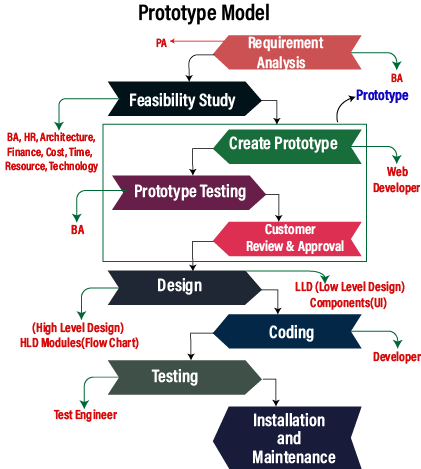
Prototyping Model has different phases, which are as follows:

  • Requirement analysis
  • feasibility study
  • Create a prototype
  • Prototype testing
  • Customer review and approval
  • Design
  • Coding
  • Testing
  • Installation and maintenance
Prototype Model

Requirement analysis

This model starts with collecting the requirements from the customers. And these requirements of the project should be in-details. These details are received by the Business Analyst and Product Analyst. Where Business analyst is assigned for service-based software companies, and the Product analyst is assigned for product-based software companies.

Feasibility study

In the next stage, the BA, HR, Architecture, and Finance teams head will sit together and talk about the cost of the product, which resource is going to be needed, which technology is used to develop the product and how much time is required to complete the product and deliver.

Create a prototype

After we completed the feasibility study, we will move to our next stage, where we will be creating the prototype (sample or dummy) based on the data collects from the client, and the web developer will design the prototype.

Here, we have the following types of prototype:

  • Static prototype
  • Dynamic prototype

Static prototype

In the static prototype, we kept the entire prototype of the requirements in a word document with having all the guidelines, screenshot, and the description of how to build the software, how the completed product will look like and how it will work and so on.

Dynamic prototype

The dynamic prototype is parallel to the browser, but here we can’t provide any details, only the functionality is there without entering the data. It is like a dummy page made out of the html with having tags and links to the various pages to the expressive features of the product.

Prototype testing

Once we build the prototype, the BA will test the prototype and perform one round of prototype testing.

Note:
The prototype testing is testing, where we will test only the look and feel, which means that the UI and frontend.

Customer review and approval

Once the prototype testing is done, it will be handed over to the customer for their review and approval. If the customer is not happy with the given sample, we will change the prototype based on the customer’s guidelines and feedback. This process will go on until the customer approved and satisfied with the prototype. It is a bit time-consuming because we have to perform the changes again and again in the prototype.

Design

After getting the approved prototype, we will start the high level and low-level design for the final product and consider all the suggestions given by the customer at the time of the final prototype.

Coding

Once the design phase has been completed successfully, we move to our coding phase, where the concerned developer starts developing the product based on their programming knowledge.

Testing

After the compilation of the development phase, it is handed over to the test engineer. And the test engineer test the application functionality, and all inputs and outputs.

Installation and maintenance

Once our final product is developed and tested according to the final prototype, it will be deployed to the production. And the product will go through the time to time maintenance to reduce any interruption, which helps to avoid significant failures.

Note:

  • Starting from the Requirement collection to Customer review, the documented format is converted to a prototype format because it is an extended requirement collection phase, and the actual design begins from the design phase.
  • Previously, prototype development is done by developers. Still, now it is done by content developers or web designers where they develop the prototype of the product with the help of some tools.
  • In this, the client gets a chance in the starting itself to ask for changes in the requirement as it is easy to do requirements changes in the prototype rather than the actual application. Therefore the cost will reduce, and expectations are met.

Advantage and disadvantage of the prototype model

There are the following advantages and disadvantages of the prototype model:

AdvantageDisadvantage
We can easily detect the missing functionality.It is a time-consuming process because if customer changes in the prototype.
And it will also waste our time by changing again and again in the dummy (prototype), which will delay the working of the real project.
In this, the development team and customer have clear communication regarding the requirements and the outcome of the product.There is no requirement review, but the prototype review is there.
In this, customer satisfaction exists.There are no parallel deliverables, which means that the two teams cannot be work together.
We can re-use the prototype in the design phase and for similar applications.Sometime the partial application may cause the software not to be used as the complete system was designed.
In this model, customer rejection is less as compared to the other models.Insufficient or partial problem analysis.
Issues can be identified in the early phase.We may also lose customer attention if they are not happy with the final product or original prototype.
Manual Testing

V-model/ V and V model /Verification and Validation model

This model came up to overcome the drawback of the waterfall model. And in this model, testing starts from the requirement stage itself.

In this model, first, all the activities go on the downward direction, and at one point in time, it starts moving in the upward direction to re-use the test document for the testing process and forms a V shape. Hence it is known as the V model.

When we go for this model

We go for V and V model for the following reasons:

  • For the large and complex application, here, large means that the n numbers of modules and complex specify lots of dependencies between modules.
  • And It is also used for the long term projects.

Before going further in this model, first, we will understand the requirements:

Requirements

It is a document which is collected from the customer; here, we have two different types of requirements documents, which are as follows:

  • CRS/BRS
  • SRS/FS

CRS/BRS

The CRS or BRS stands for Customer Requirement Specification or Business Requirement Specification. For the CRS, the details will be written in the simple business (English) language by the BA (business analyst), which cannot be understood by the developers and the test engineers.

Let us see one sample example for Customer Requirement Specification to the Gmail application:

1.Customer secured entry
2.Optional creates mails
3.Able to see mails
4.Unwanted content delete
—-
15.Successfully close the application.

SRS/ FS

It stands for Software Requirement Specifications or the Functional Specification; in this, all the details are converted to the detail document, which can be understood by the developers and the test engineers.

Let us see one sample example for Software Requirement Specifications to the Gmail application:

1.Login ( module)
1.1User name→ Text box (functional specification )
1.1.1User name→ Accept only 5 alphabets
1.2Password→ text box
1.2.1Password→Accept only 8 characters, in which one should be capital and one special character(@,$,%,&)
1.3OK→ Button
1.3.1OK→ enabled
2.Compose
2.1To→Text Box
—–
—–
3.Inbox
3.1—-
—-
4.Logout

Characteristics of a functional requirement

  • The requirements should be In-Details, which means it has all the details about modules, components, and the functional specification and in the Proper flow, which means that it should be in the sequence order.
  • The requirements should be written in a simple language which is easy to understand by everyone.
  • The requirement should be measurable or Countable.

V and V Model Process

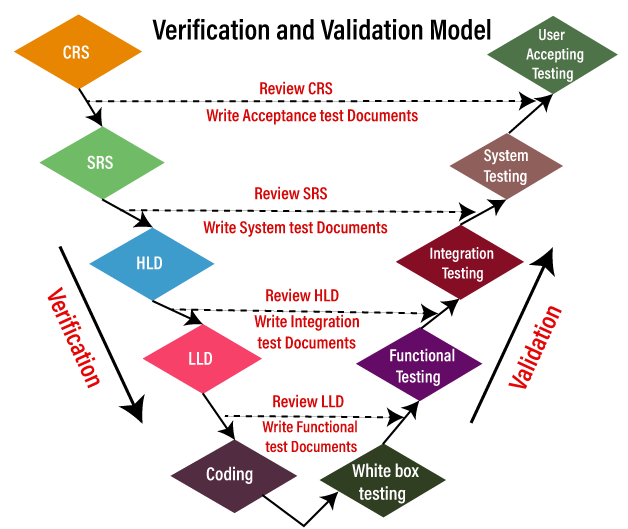
The entire V model executes in two-phase, the complete review process is done in the verification phase, and the whole testing process is done under the validation phase; that’s why it is also known as verification and validation model.

Where the verification and validation process includes different stages:

V-model

Stage 1

It will start from collecting the CRS (customer requirement specification) document, from the client by the Business Analyst where the test engineer will check the following scenarios:

  • Review the CRS based on
    • Incorrect requirements
    • Missing requirements
    • Conflicts in the requirements
  • Write Acceptance Test documents

Note: In all the stages, the Test Documents includes the test plans and test cases.

Once the test engineer team reviews the CRS and found any bugs or defects, they will send it to the development team for fixing the bugs. After fixing the bugs, the development team updates the CRS and concurrently developing the SRS document.

Stage 2

After completing the CRS, the SRS is sent to the testing team for the review process, and the developers start creating the HLD (high-level design) for the application. And the testing team will test the SRS on the following scenarios:

  • Review the SRS against CRS
    • Each CRS is transferred to SRS
    • CRS is not transformed properly to SRS
  • Write the system Test documents

Once the testing team reviews every detail of the SRS and CRS has been converted correctly to SRS, we will move to our next stage.

Stage 3

After the completion of HLD, the developers start creating the LLD (Low-level design) for the application, and in the meantime, the tester will check the following tests on the HLD:

  • Review HLD
  • Write integration test documents

Stage 4

Once the testing team has done reviewing the HLD, the developers write the coding and develops the application, and the testing team will do the following tasks:

  • Review the LLD
  • Write functional test documents

Stage 5

After the completion of the coding part, the developers will perform one round of unit testing, which is also called white box testing, and check every line of the code and make sure that the code is correct.

After performing the unit testing, the application is sent to the testing team, where they perform multiple testing such as functional testing, integration testing, and system testing, and acceptance testing.

And once the testing part is done, the application will finally deliver to the customer.

Note:
How to handle requirement changes in V and V?
Whenever there is a change happen in the requirement, the same procedure continues, and the documents will be updated.

Advantage and Disadvantage of V and V Model

Let us see the pros and cons of the V and V model:

Advantagedisadvantage
In this, review exists in every phase, that’s why we may get less number of bugs in the application.It is a bit expensive process because Initial investment is high as the testing team is needed from the starting stage itself.
The V model provides the Parallel deliverable, which implies that the two teams can work together like here; the development and testing team are working parallelly.It is a time-consuming process because if requirement changes happen, we need to change every text documents.
This model helps to deliver Robust or stable products.In this, we need to do more documentation work because of the test cases and all other documents.
In this model, the test Engineers have more knowledge about the product because testing is involved in every stage of product development.The V model is not suitable for object-oriented projects.
The text document can be re-used.We cannot go back and replace the functionality once the application is in the testing phase.
Manual Testing

Spiral Model

The biggest problem we face in the waterfall model is that taking a long duration to complete the product, and the software became outdated. To solve this problem, we have a new approach, which is known as the Spiral model. The spiral model is also known as the cyclic model.

In this model, we create the application module by module and handed over to the customer so that they can start using the application at a very early stage. And we prepare this model only when the module is dependent on each other. In this model, we develop the application in the stages because sometimes the client gives the requirements in between the process.

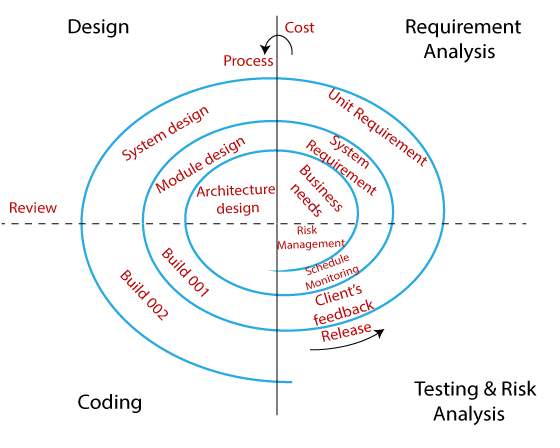
The different phases of the spiral model are as follows:https://6f82016f74e0451439a947405835e6d5.safeframe.googlesyndication.com/safeframe/1-0-37/html/container.html

  • Requirement analysis
  • Design
  • Coding
  • Testing and risk analysis
Spiral Model

Requirement Analysis

The spiral model process starts with collecting business needs. In this, the following spirals will include the documentation of system requirements, unit requirements, and the subsystem needs. In this stage, we can easily understand the system requirements because the business analyst and the client have constant communication. And once the cycle is completed, the application will be deployed in the market.

Design

The second stage of the spiral model is designed, where we will plan the logical design, architectural design, flow charts, decision tree, and so on.

Coding

After the compilation of the design stage, we will move to our next step, which is the coding stage. In this, we will develop the product based on the client’s requirement and getting the client’s feedback as well. This stage refers to the construction of the real application in every cycle.

And those spirals had an excellent clarity of the requirements, and the design details of an application are known as the build with having version numbers. After that, these builds are transferred to the client for their responses.

Testing and Risk Analysis

Once the development is completed successfully, we will test the build at the end of the first cycle and also analyze the risk of the software on the different aspects such as managing risks, detecting, and observing the technical feasibility. And after that, the client will test the application and give feedback.

Example of the Spiral model

Let us see one example for a better understanding of the spiral model:

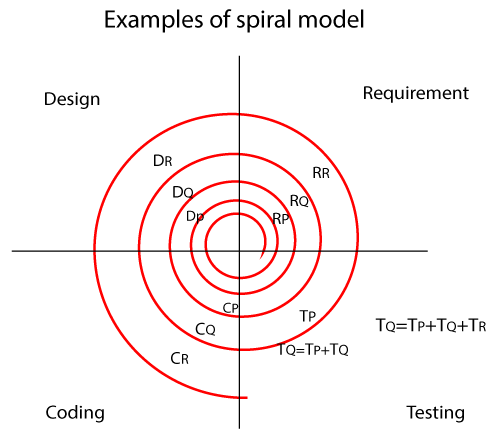
In the spiral model, the software is developed in the small modules. Suppose we have the application A and this A application is created with the help of different models as P, Q, R.

Spiral Model

In the above image,

RP: the requirement analysis of module P, similarly with RQ, RR.

DP: Design of module P, and similarly with DQ, DR.

CP: Coding of module P, and similarly CQ, CR.

TP: Testing of module P, and similarly TQ, TR.

  • In the P module, we get the requirement first, and then only we design the module. And the coding part of module A is done when it is tested for bugs.
  • The next module is Q, and it has been created when the module P has been built. We follow the same process as we did in module P, but when we start testing the module Q, and we check the following condition such as:
    • Test the Q module
    • The test integration of module Q with P
    • Test module P
  • After creating the module P, Q, we will proceed to the module R, where we will then follow the same process as module P and Q, and then test the following conditions:
    • First, check the module as R, Q, and P
    • Then, check the integration of module in the below order:
      R → Q, R and P → P and Q

Note:
Once the cycle continues for multiple modules, the module Q can be built only after the module P has been built correctly and similar for module R.

The best-suited example for the spiral model is MS-Excel because MS-Excel sheet having several cells, which are the components of an excel sheet. Since we have to create the cells first (module P), then we can perform operation on the cells like split cells into half (module Q), merge cells into two, and then we can draw graphs on the excel-sheet (module R).

In the spiral model, we can perform two types of changes, which are as follows:

  • Major changes
  • Minor changes

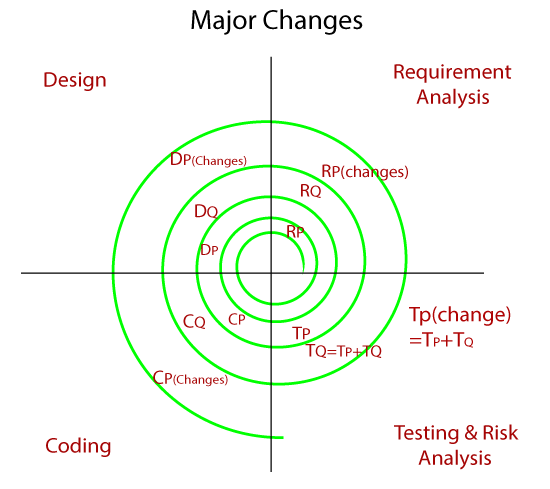
Major Changes

When the customer request for the major changes in the requirements for the particular module, then we change only that module and perform testing for both integration and unit. And for this, we always prefer one new cycle because it may affect the existing modules. Major changes could be the functionality of the software.

Spiral Model

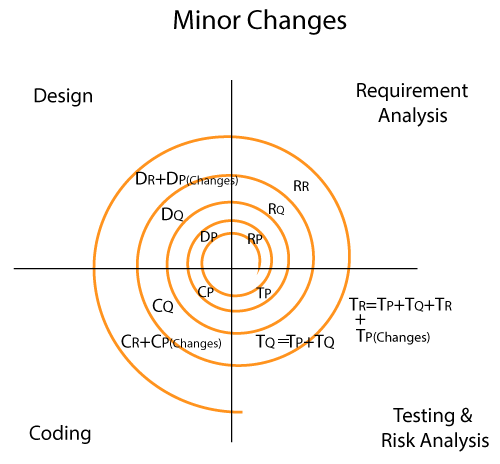
Minor changes

Whenever the client request for the minor changes in the particular application, then the software team makes the smaller changes along with the new module has to be developed simultaneously in a single cycle. And we never go for any new cycle or iteration because a minor variation does not affect the existing functionality, and it also takes the extra resource and time. The minor changes could be UI (frontend changes).

Spiral Model

Advantage and disadvantage of the spiral model

AdvantageDisadvantage
Flexible changes are allowed in spiral model.It is not suitable for the small and low-risk product because it could be costly for a smaller project.
The development can be distributed into smaller parts.It is a traditional model, and thus developers only did the testing job as well.
The customer can use the application at an early stage also.There is no requirement of review process and no parallel deliverables allowed in the spiral model.
More clarity for Developers and Test engineersIn the spiral model, management is a bit difficult; that’s why it is a complex process.
It will provide the wide use of prototypes.The maximum number of intermediate phases needs unnecessary paperwork.
Manual Testing

Waterfall model

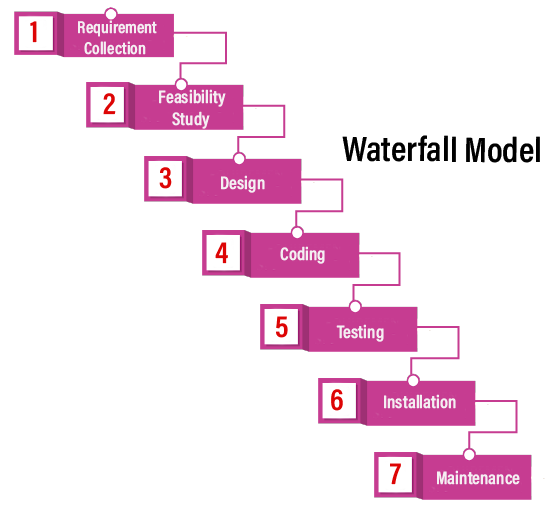
It is the first approach and the basic model used in software development. It is a simple model that is easy to use as well as understand. The execution happens in the sequence order, which means that the outcome of the one-stage is equal to the input of another stage. That’s why it is also known as the Linear-sequential life cycle model.

To avoid the overlapping issues of the multiple phases, every stage should be completed before moving to the next stage. Each stage of the waterfall model involves the deliverable of the previous stage, like requirements, are transferred to the design phase, design moved to development, and so on. When we have the Life critical (hospital application) and Machine critical (Military project), we will widely use the waterfall model.

The waterfall model is divided into various stages, which are as follows:

  • Requirement collection
  • Feasibility study
  • Design
  • Coding
  • Testing
  • Installation
  • Maintenance

Let us understand them one by one:

Requirement Collection

Requirement collection is the first phase of the waterfall model, where a business analyst will assemble all the information or business needs of the client in the form of a requirement document. And this document should be clear and easy to understand, and all requirements are correctly listed.

By taking help of Software Requirement Specification [SRS], Customer Requirement Specification [CRS], and Business Requirement Specification [BRS], the SRS document is generated. And this SRS document covers the whole thing that should be developed and designed.

Features of a functional requirement

  • It should be written in a simple language so it can be easily understandable.
  • The specification should be in the proper flow.
  • The requirement should be countable.
Waterfall model

Feasibility Study

The feasibility study is based on the needs of the project, where many people (human resource, business analyst, architecture) evaluate whether the project can be done or not. To develop a good project, we should follow the various characteristics, which are based on the customer requirements:

AspectsDescription
LegalCan the company handle the project as cyber law and other monitoring agreements?
TechnicalCheck whether the available machine supports the software or not?
Operation feasibilityThe company should able to generate operation that is given by the clients?
EconomicShould the company able to complete the product within given  budget or not?
ScheduleThe project should be done within the given schedule or not.

Design

Once we are done with the feasibility study, we will move to our next stage, which is designing. In this, we will create the architecture of the product, with the help of some essential tools like a combination of different software and hardware, various programming languages (PHP, Java, .Net, etc.), database (MySQL, Oracle). And then the designer gets ready with a plan for the application that could be classified into two different parts:

  • High-Level Design
  • Low-Level Design

High-Level Design [HLD]:

In this, the designer will concentrate only on the models such as decision trees, flow diagrams, decision tables, flow charts, data dictionary, and the architect does it.

Low-Level Design [LLD]:

In this, the designer will concentrate on the components like a User interface (UI), and the developer manager does it.

Coding

Once we are done with the design stage, we are ready to develop the application. For this, the developer will start writing the code based on their programming language knowledge, and it could be any language such as Python, C, Java, C#, C++, and so on. Whereas the back-end developers will do the back-end coding based on the needed operations, and the front-end developers will develop the attractive GUI.

Testing

After the compilation of coding, it will hand over to the concern test engineer. And after that, the test engineer will start testing the functionality of the application based on the client’s requirement.

While testing the application, they may encounter some defects or bugs (not working as per the client’s needs) in the application and send those bugs to the developer with the proper justification. And the developer will verify that the given bug is valid or not. If it is correct, it will be fixed by the developer and change with the new one. After that tester will re-test it and verify that the bug is fixed or not.

Installation

Once the application is tested, we will move to the next stage (installation). In this, the process will remain until the software is stable or bug-free and fulfilling all the customer requirements. When the application is stable, it will install into the client’s environment for their use.

After getting the software, the client will perform one round of testing to their satisfaction. If they face any error, they will inform the development team to resolve those issues for the particular application. When all the issue gets resolved, the application will be deployed for the end-users use.

Maintenance

After completing the six stages successfully, we will move to the last stage (maintenance) of the waterfall model. In this, the process will remain until the software comes to an end, where the end-user starts using the application, and they may have some issues that need to be tested and fixed. Taking care of the product, time to time is called the maintenance, which includes the variations that happen in the hardware and software to maintain the operational effectiveness and also increase the performance.

Example of the waterfall model

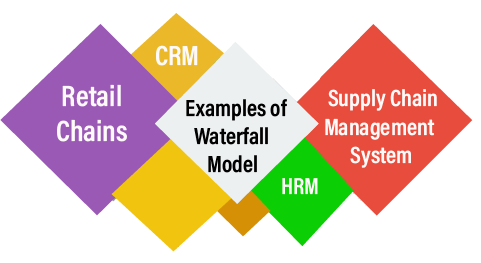
Earlier it was used for the applications such as Human Resource Management [HRM], Supply Chain Management System, Customer Relationship Management [CRM], and Retail Chains, etc. but now in present time, the waterfall models are replaced by other models such as Iterative models and Agile Methodology, etc.

Waterfall model

Pros and Cons of the Waterfall Model

ProsCons
In the Waterfall model, the requirement should be clear.This model has no parallel deliverable, which means that two teams can work together.
It is suitable for a smaller project where needs are well understood.The waterfall model doesn’t provide the requirement changes and requirement review.
This model is easy to understand, as well as easy to use.Previously, when the waterfall is invented, there is no concept of testing, that’s why the developer is used to test the application.
It will allow us to arrange the tasks efficiently.In between, changes are not allowed because one phase is dependent on another stage.
In this model, release level changes are allowed.Backward tracking is not possible.
In this model, the procedure and the results are well documented.It is a time-consuming process.
Manual Testing

Software Testing Life Cycle (STLC)


The procedure of software testing is also known as STLC (Software Testing Life Cycle) which includes phases of the testing process.The testing process is executed in a well-planned and systematic manner. All activities are done to improve the quality of the software product.

Let’s see, the different steps of STLC.

Software testing life cycle contains the following steps:

  1. Requirement Analysis
  2. Test Plan Creation
  3. Environment setup
  4. Test case Execution
  5. Defect Logging
  6. Test Cycle Closure
Software Testing Life Cycle

Requirement Analysis:

The first step of the manual testing procedure is requirement analysis. In this phase, tester analyses requirement document of SDLC (Software Development Life Cycle) to examine requirements stated by the client. After examining the requirements, the tester makes a test plan to check whether the software is meeting the requirements or not.

Entry CriteriaActivitiesDeliverable
For the planning of test plan requirement specification, application architecture document and well-defined acceptance criteria should be available.Prepare the list of all requirements and queries, and get resolved from Technical Manager/Lead, System Architecture, Business Analyst and Client.
Make a list of all types of tests (Performance, Functional and security) to be performed.
Make a list of test environment details, which should contain all the necessary tools to execute test cases.
List of all the necessary tests for the testable requirements andTest environment details

Test Plan

Test plan creation is the crucial phase of STLC where all the testing strategies are defined. Tester determines the estimated effort and cost of the entire project. This phase takes place after the successful completion of the Requirement Analysis Phase. Testing strategy and effort estimation documents provided by this phase. Test case execution can be started after the successful completion of Test Plan Creation.

Entry CriteriaActivitiesDeliverable
Requirement DocumentDefine Objective as well as the scope of the software.
List down methods involved in testing.
Overview of the testing process.
Settlement of testing environment.
Preparation of the test schedules and control procedures.
Determination of roles and responsibilities.
List down testing deliverables, define risk if any.
Test strategy document.
Testing Effort estimation documents are the deliverables of this phase.

Environment setup:

Setup of the test environment is an independent activity and can be started along with Test Case Development. This is an essential part of the manual testing procedure as without environment testing is not possible. Environment setup requires a group of essential software and hardware to create a test environment. The testing team is not involved in setting up the testing environment, its senior developers who create it.

Entry CriteriaActivitiesDeliverable
Test strategy and test plan document.
Test case document.
Testing data.
Prepare the list of software and hardware by analyzing requirement specification.
After the setup of the test environment, execute the smoke test cases to check the readiness of the test environment.
Execution report.
Defect report.

Test case Execution:

Test case Execution takes place after the successful completion of test planning. In this phase, the testing team starts case development and execution activity. The testing team writes down the detailed test cases, also prepares the test data if required. The prepared test cases are reviewed by peer members of the team or Quality Assurance leader.

RTM (Requirement Traceability Matrix) is also prepared in this phase. Requirement Traceability Matrix is industry level format, used for tracking requirements. Each test case is mapped with the requirement specification. Backward & forward traceability can be done via RTM.

Entry CriteriaActivitiesDeliverable
Requirement DocumentCreation of test cases.
Execution of test cases.
Mapping of test cases according to requirements.
Test execution result.
List of functions with the detailed explanation of defects.

Defect Logging:

Testers and developers evaluate the completion criteria of the software based on test coverage, quality, time consumption, cost, and critical business objectives. This phase determines the characteristics and drawbacks of the software. Test cases and bug reports are analyzed in depth to detect the type of defect and its severity.

Defect logging analysis mainly works to find out defect distribution depending upon severity and types.If any defect is detected, then the software is returned to the development team to fix the defect, then the software is re-tested on all aspects of the testing.

Once the test cycle is fully completed then test closure report, and test metrics are prepared.

Entry CriteriaActivitiesDeliverable
Test case execution report.
Defect report
It evaluates the completion criteria of the software based on test coverage, quality, time consumption, cost, and critical business objectives.
Defect logging analysis finds out defect distribution by categorizing in types and severity.
Closure report
Test metrics

Test Cycle Closure:

The test cycle closure report includes all the documentation related to software design, development, testing results, and defect reports.

This phase evaluates the strategy of development, testing procedure, possible defects in order to use these practices in the future if there is a software with the same specification.

Entry CriteriaActivitiesDeliverable
All document and reports related to software.Evaluates the strategy of development, testing procedure, possible defects to use these practices in the future if there is a software with the same specificationTest closure report
Manual Testing

Software Development Life Cycle (SDLC)

SDLC is a process that creates a structure of development of software. There are different phases within SDLC, and each phase has its various activities. It makes the development team able to design, create, and deliver a high-quality product.

SDLC describes various phases of software development and the order of execution of phases. Each phase requires deliverable from the previous phase in a life cycle of software development. Requirements are translated into design, design into development and development into testing; after testing, it is given to the client.

Let’s see all the phases in detail:https://105ed388330ace4c59931caf56628ce3.safeframe.googlesyndication.com/safeframe/1-0-37/html/container.html

Different phases of the software development cycle

Software Development Life Cycle
  • Requirement Phase
  • Design Phase
  • Build /Development Phase
  • Testing Phase
  • Deployment/ Deliver Phase
  • Maintenance

1. Requirement Phase

This is the most crucial phase of the software development life cycle for the developing team as well as for the project manager. During this phase, the client states requirements, specifications, expectations, and any other special requirement related to the product or software. All these are gathered by the business manager or project manager or analyst of the service providing company.

The requirement includes how the product will be used and who will use the product to determine the load of operations. All information gathered from this phase is critical to developing the product as per the customer requirements.

2. Design Phase

The design phase includes a detailed analysis of new software according to the requirement phase. This is the high priority phase in the development life cycle of a system because the logical designing of the system is converted into physical designing. The output of the requirement phase is a collection of things that are required, and the design phase gives the way to accomplish these requirements. The decision of all required essential tools such as programming language like Java, .NET, PHP, a database like Oracle, MySQL, a combination of hardware and software to provide a platform on which software can run without any problem is taken in this phase.

There are several techniques and tools, such as data flow diagrams, flowcharts, decision tables, and decision trees, Data dictionary, and the structured dictionary are used for describing the system design.

3. Build /Development Phase

After the successful completion of the requirement and design phase, the next step is to implement the design into the development of a software system. In this phase, work is divided into small units, and coding starts by the team of developers according to the design discussed in the previous phase and according to the requirements of the client discussed in requirement phase to produce the desired result.

Front-end developers develop easy and attractive GUI and necessary interfaces to interact with back-end operations and back-end developers do back-end coding according to the required operations. All is done according to the procedure and guidelines demonstrated by the project manager.

Since this is the coding phase, it takes the longest time and more focused approach for the developer in the software development life cycle.

4. Testing Phase

Testing is the last step of completing a software system. In this phase, after getting the developed GUI and back-end combination, it is tested against the requirements stated in the requirement phase. Testing determines whether the software is actually giving the result as per the requirements addressed in the requirement phase or not. The Development team makes a test plan to start the test. This test plan includes all types of essential testing such as integration testing, unit testing, acceptance testing, and system testing. Non-functional testing is also done in this phase.

If there are any defects in the software or it is not working as per expectations, then the testing team gives information to the development team in detail about the issue. If it is a valid defect or worth to sort out, it will be fixed, and the development team replaces it with the new one, and it also needs to be verified.

5. Deployment/ Deliver Phase

When software testing is completed with a satisfying result, and there are no remaining issues in the working of the software, it is delivered to the customer for their use.

As soon as customers receive the product, they are recommended first to do the beta testing. In beta testing, customer can require any changes which are not present in the software but mentioned in the requirement document or any other GUI changes to make it more user-friendly. Besides this, if any type of defect is encountered while a customer using the software; it will be informed to the development team of that particular software to sort out the problem. If it is a severe issue, then the development team solves it in a short time; otherwise, if it is less severe, then it will wait for the next version.

After the solution of all types of bugs and changes, the software finally deployed to the end-user.

6. Maintenance

The maintenance phase is the last and long-lasting phase of SDLC because it is the process which continues until the software’s life cycle comes to an end. When a customer starts using software, then actual problems start to occur, and at that time there’s a need to solve these problems. This phase also includes making changes in hardware and software to maintain its operational effectiveness like to improve its performance, enhance security features and according to customer’s requirements with upcoming time. This process to take care of product time to time is called maintenance.

“So, all these are six phases of software development life cycle (SDLC) under which the process of development of software takes place. All are compulsory phases without any one of the development cannot be possible because development continues for the lifetime of software with maintenance phase”.


Software Development Life Cycle (SDLC) Models

The software development models are those several process or approaches which are being selected for the development of project based on the project’s objectives. To accomplish various purposes, we have many development life cycle models. And these models identify the multiple phases of the process. Picking up the correct model for developing the software application is very important because it will explain the what, where, and when of our planned testing.

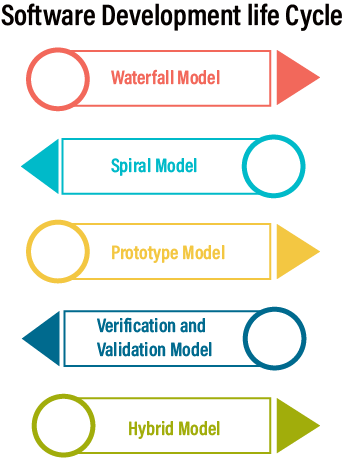
Here, are various software development models or methodologies:

  • Waterfall model
  • Spiral model
  • Verification and validation model
  • Prototype model
  • Hybrid model
Software Development Life Cycle

Waterfall Model

It is the first sequential-linear model because the output of the one stage is the input of the next stage. It is simple and easy to understand, which is used for a small project. The various phases of the waterfall model are as follows:

  • Requirement analysis
  • Feasibility study
  • Design
  • Coding
  • Testing
  • Installation
  • Maintenance

For information about the waterfall model, refers to the below link:

Spiral Model

It is the best suites model for a medium level project. It is also called the Cyclic and Iteration model. Whenever the modules are dependent on each other, we go for this model. And here, we develop application model wise and then handed over to the customer. The different stages of the spiral model are as follows:

  • Requirement collection
  • Design
  • Coding
  • Testing

For information about the spiral model, refers to the below link:

Prototype Model

From the time when customer rejection was more in the earlier model, we go for this model as customer rejection is less. And also, it allows us to prepare a sample (prototype) in the early stage of the process, which we can show to the client and get their approval and start working on the original project. This model refers to the action of creating the prototype of the application.

For information about the prototype model, refers to the below link:

Verification & Validation Model

It is an extended version of the waterfall model. It will implement in two phases wherein the first phase, we will perform the verification process, and when the application is ready, we will perform the validation process. In this model, the implementation happens in the V shape, which means that the verification process done under downward flow and the validation process complete in the upward flow.

For information about the Verification and validation model, refers to the below link:

Hybrid Model

The hybrid model is used when we need to acquire the properties of two models in the single model. This model is suitable for small, medium, and large projects because it is easy to apply, understand.

The combination of the two models could be as follows:

  • V and prototype
  • Spiral and Prototype
Manual Testing

Software Testing Principles

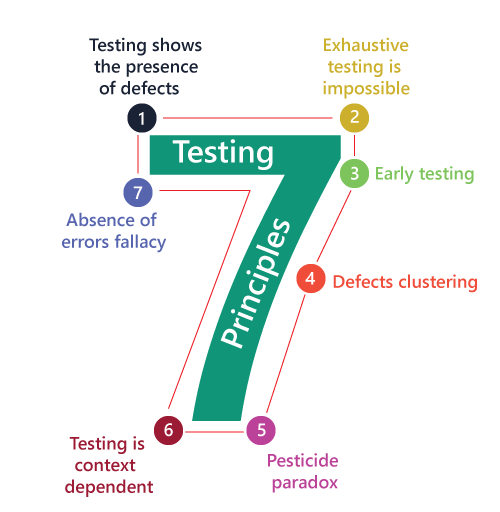
Software testing is a procedure of implementing software or the application to identify the defects or bugs. For testing an application or software, we need to follow some principles to make our product defects free, and that also helps the test engineers to test the software with their effort and time. Here, in this section, we are going to learn about the seven essential principles of software testing.

Let us see the seven different testing principles, one by one:

  • Testing shows the presence of defects
  • Exhaustive Testing is not possible
  • Early Testing
  • Defect Clustering
  • Pesticide Paradox
  • Testing is context-dependent
  • Absence of errors fallacy
Software Testing Principles

Testing shows the presence of defects

The test engineer will test the application to make sure that the application is bug or defects free. While doing testing, we can only identify that the application or software has any errors. The primary purpose of doing testing is to identify the numbers of unknown bugs with the help of various methods and testing techniques because the entire test should be traceable to the customer requirement, which means that to find any defects that might cause the product failure to meet the client’s needs.https://76ad47b25f8f3bfc47c6059c52ecb954.safeframe.googlesyndication.com/safeframe/1-0-37/html/container.html

By doing testing on any application, we can decrease the number of bugs, which does not mean that the application is defect-free because sometimes the software seems to be bug-free while performing multiple types of testing on it. But at the time of deployment in the production server, if the end-user encounters those bugs which are not found in the testing process.

Exhaustive Testing is not possible

Sometimes it seems to be very hard to test all the modules and their features with effective and non- effective combinations of the inputs data throughout the actual testing process.

Hence, instead of performing the exhaustive testing as it takes boundless determinations and most of the hard work is unsuccessful. So we can complete this type of variations according to the importance of the modules because the product timelines will not permit us to perform such type of testing scenarios.

Early Testing

Here early testing means that all the testing activities should start in the early stages of the software development life cycle’s requirement analysis stage to identify the defects because if we find the bugs at an early stage, it will be fixed in the initial stage itself, which may cost us very less as compared to those which are identified in the future phase of the testing process.

To perform testing, we will require the requirement specification documents; therefore, if the requirements are defined incorrectly, then it can be fixed directly rather than fixing them in another stage, which could be the development phase.

Defect clustering

The defect clustering defined that throughout the testing process, we can detect the numbers of bugs which are correlated to a small number of modules. We have various reasons for this, such as the modules could be complicated; the coding part may be complex, and so on.

These types of software or the application will follow the Pareto Principle, which states that we can identify that approx. Eighty percent of the complication is present in 20 percent of the modules. With the help of this, we can find the uncertain modules, but this method has its difficulties if the same tests are performing regularly, hence the same test will not able to identify the new defects.

Pesticide paradox

This principle defined that if we are executing the same set of test cases again and again over a particular time, then these kinds of the test will not be able to find the new bugs in the software or the application. To get over these pesticide paradoxes, it is very significant to review all the test cases frequently. And the new and different tests are necessary to be written for the implementation of multiple parts of the application or the software, which helps us to find more bugs.

Testing is context-dependent

Testing is a context-dependent principle states that we have multiple fields such as e-commerce websites, commercial websites, and so on are available in the market. There is a definite way to test the commercial site as well as the e-commerce websites because every application has its own needs, features, and functionality. To check this type of application, we will take the help of various kinds of testing, different technique, approaches, and multiple methods. Therefore, the testing depends on the context of the application.

Absence of errors fallacy

Once the application is completely tested and there are no bugs identified before the release, so we can say that the application is 99 percent bug-free. But there is the chance when the application is tested beside the incorrect requirements, identified the flaws, and fixed them on a given period would not help as testing is done on the wrong specification, which does not apply to the client’s requirements. The absence of error fallacy means identifying and fixing the bugs would not help if the application is impractical and not able to accomplish the client’s requirements and needs.

Manual Testing

What is Software Testing

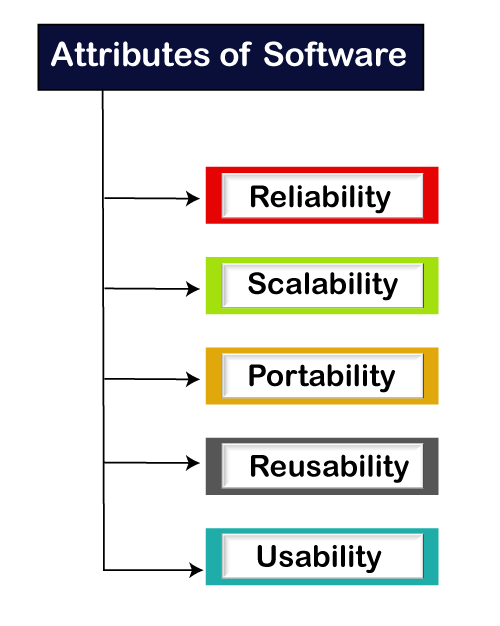
Software testing is a process of identifying the correctness of software by considering its all attributes (Reliability, Scalability, Portability, Re-usability, Usability) and evaluating the execution of software components to find the software bugs or errors or defects.

Software Testing

Software testing provides an independent view and objective of the software and gives surety of fitness of the software. It involves testing of all components under the required services to confirm that whether it is satisfying the specified requirements or not. The process is also providing the client with information about the quality of the software.

Testing is mandatory because it will be a dangerous situation if the software fails any of time due to lack of testing. So, without testing software cannot be deployed to the end user.

What is Testing

Testing is a group of techniques to determine the correctness of the application under the predefined script but, testing cannot find all the defect of application. The main intent of testing is to detect failures of the application so that failures can be discovered and corrected. It does not demonstrate that a product functions properly under all conditions but only that it is not working in some specific conditions.

Testing furnishes comparison that compares the behavior and state of software against mechanisms because the problem can be recognized by the mechanism. The mechanism may include past versions of the same specified product, comparable products, and interfaces of expected purpose, relevant standards, or other criteria but not limited up to these.

Testing includes an examination of code and also the execution of code in various environments, conditions as well as all the examining aspects of the code. In the current scenario of software development, a testing team may be separate from the development team so that Information derived from testing can be used to correct the process of software development.

The success of software depends upon acceptance of its targeted audience, easy graphical user interface, strong functionality load test, etc. For example, the audience of banking is totally different from the audience of a video game. Therefore, when an organization develops a software product, it can assess whether the software product will be beneficial to its purchasers and other audience.

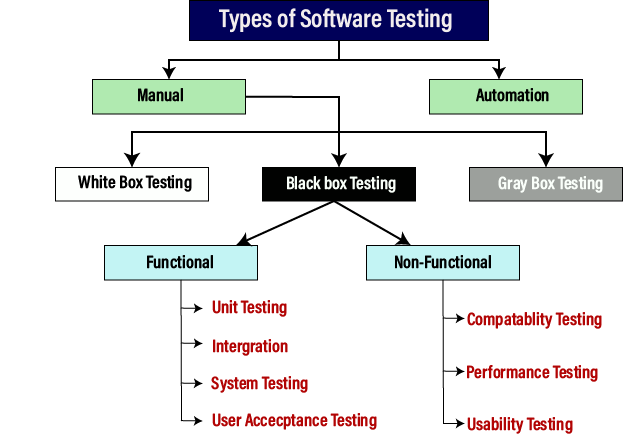
Type of Software testing

We have various types of testing available in the market, which are used to test the application or the software.

With the help of below image, we can easily understand the type of software testing:

Software Testing

Manual testing

The process of checking the functionality of an application as per the customer needs without taking any help of automation tools is known as manual testing. While performing the manual testing on any application, we do not need any specific knowledge of any testing tool, rather than have a proper understanding of the product so we can easily prepare the test document.

Manual testing can be further divided into three types of testing, which are as follows:

  • White box testing
  • Black box testing
  • Gray box testing

Automation testing

Automation testing is a process of converting any manual test cases into the test scripts with the help of automation tools, or any programming language is known as automation testing. With the help of automation testing, we can enhance the speed of our test execution because here, we do not require any human efforts. We need to write a test script and execute those scripts.

Prerequisite

Before learning software testing, you should have basic knowledge of basic computer functionality, basic mathematics, computer language, and logical operators.